
Fall Alarm Device
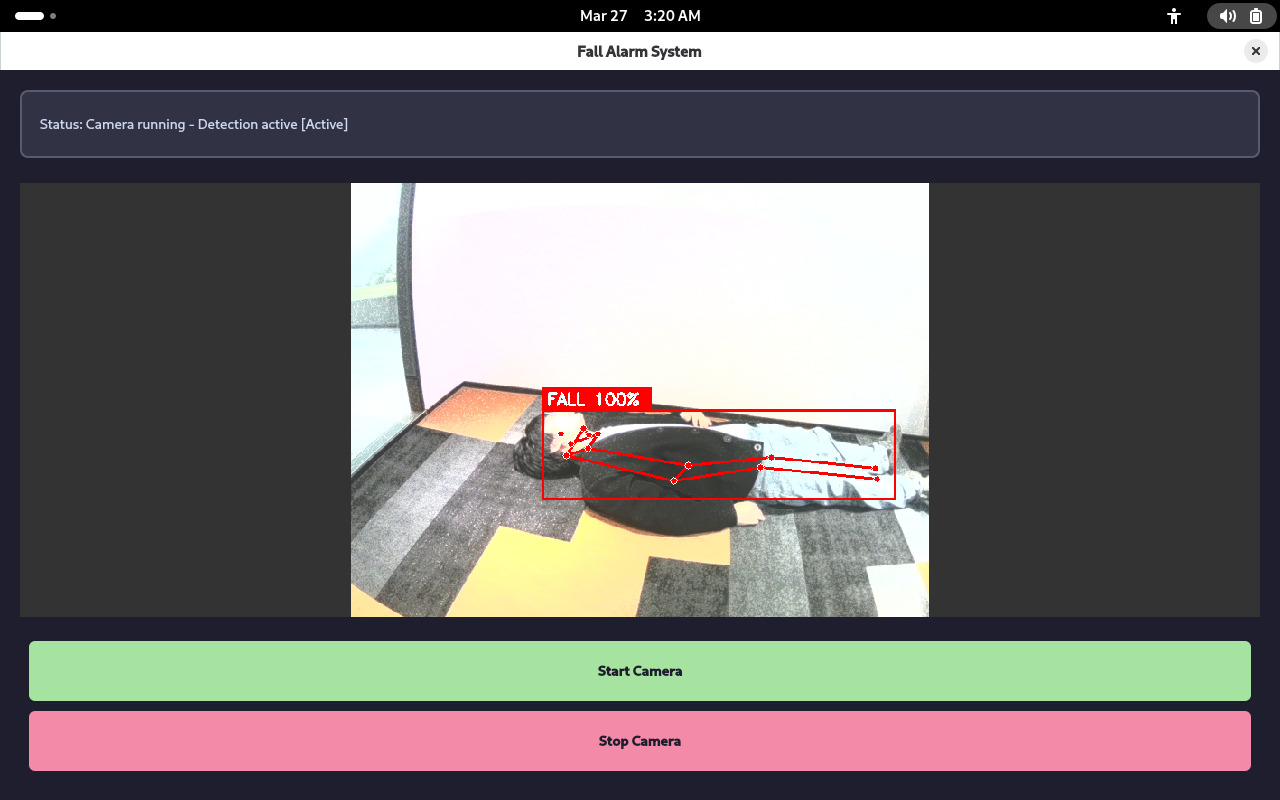
This application is a smart solution based on Quectel Pi H1 intelligent main board, using USB camera for real-time human pose recognition, employing YOLOv8-Pose and multi-person fall classifier to automatically detect whether a user has fallen.
This project collects real-time footage via a camera. When a fall event is detected, it triggers a local alarm and sends a notification to a mobile phone. Users can view fall-related images through an APK on their mobile devices. It can serve as a reference example for safety monitoring and fall warning systems for the elderly or patients.
Development Resources Summary
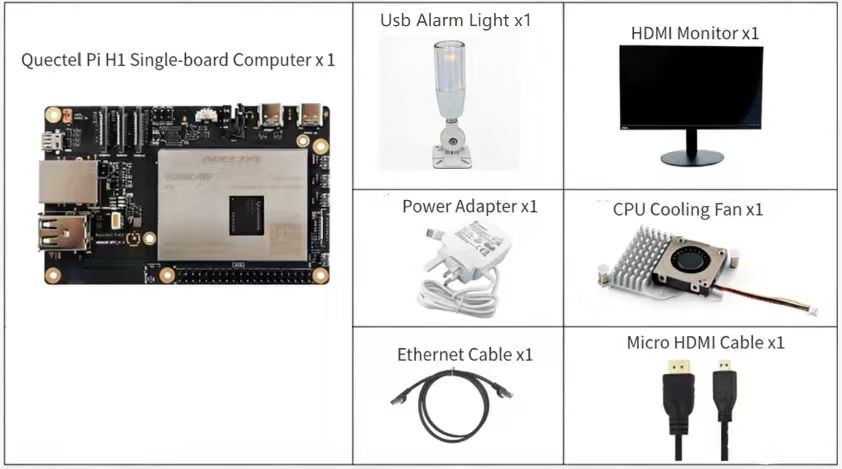
Development Accessories List
| Accessory Name | Quantity | Specifications |
|---|---|---|
| Quectel Pi H1 smart single-board computer | 1 board | Quectel Pi H1 Smart Ecosystem Development Board |
| USB Camera | 1 unit | Recommended resolution: 1280×720 or higher; Output format: MJPG/YUYV |
| USB-C Power Cable Charger | 1 unit | 27W USB Type-C Interface Charger 1.2m Cable Length Standard Power PD Power Supply Suitable for Raspberry Pi 5 |
| USB-C DP Display Cable / Micro HDMI Cable | 1 unit | Specifications: DP 1.4; Cable length: 1m; Interface: USB-C (male) - USB-C (male) Specifications: Micro HDMI 2.0; Cable length: 1m; Interface: HDMI-A (male) -HDMI-D (male) |
| CPU Cooling Fan (Optional) | 1 unit | Raspberry Pi 5 Official Active Cooler with Heatsink and Thermal Pad |
| Display | 1 unit | 24-inch HDMI monitor |
| USB Programmable Alarm Light (Optional) | 1 unit | LED alarm light controlled via serial port (/dev/ttyUSB0) |
Accessories Reference
Quectel Kit
Quick Start
Development Preparation
Quectel Pi H1 intelligent main board comes with Debian 13 system image by default, so there's no need to flash the image again. Just follow the steps below.
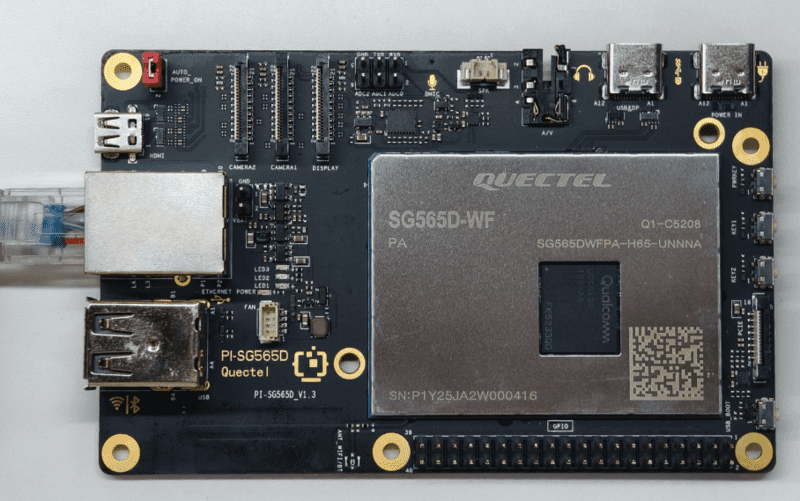
Hardware Connection
Display Connection
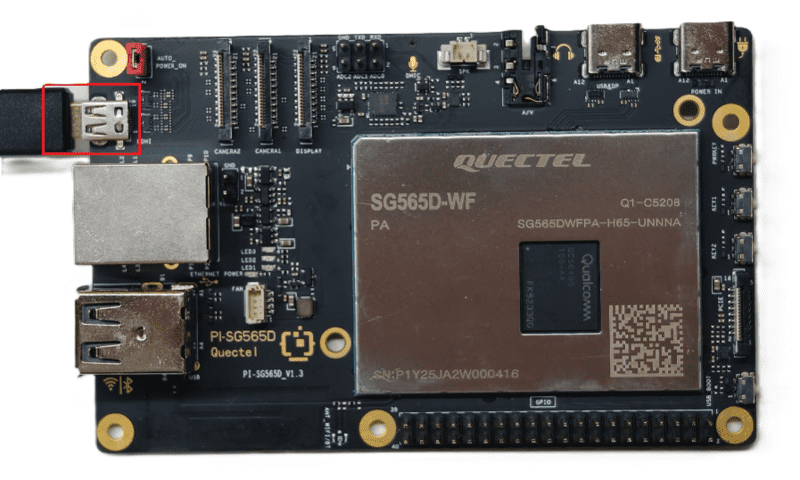
Connect one end of the Micro HDMI cable to the Micro HDMI port on the intelligent main board, and the other end to the HDMI port on the monitor.
Input Device Connection
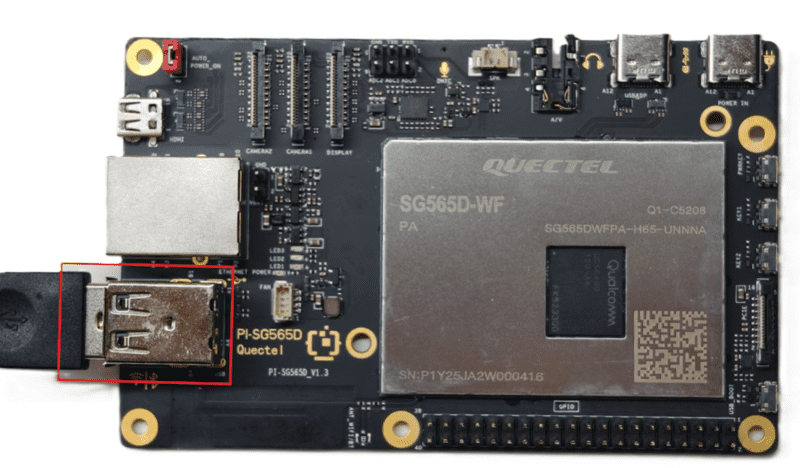
Connect USB keyboard and mouse to the two USB-A ports on the intelligent main board. For wireless input devices, simply plug the receiver into the USB port.
Network Cable Connection
Connect one end of the network cable to the Gigabit Ethernet port on the intelligent main board, and the other end to a router port (ensure the router has internet access).
USB Alarm Light Connection (Optional)
Connect the alarm light to an available USB port on the intelligent main board using a USB cable (refer to your alarm device documentation)
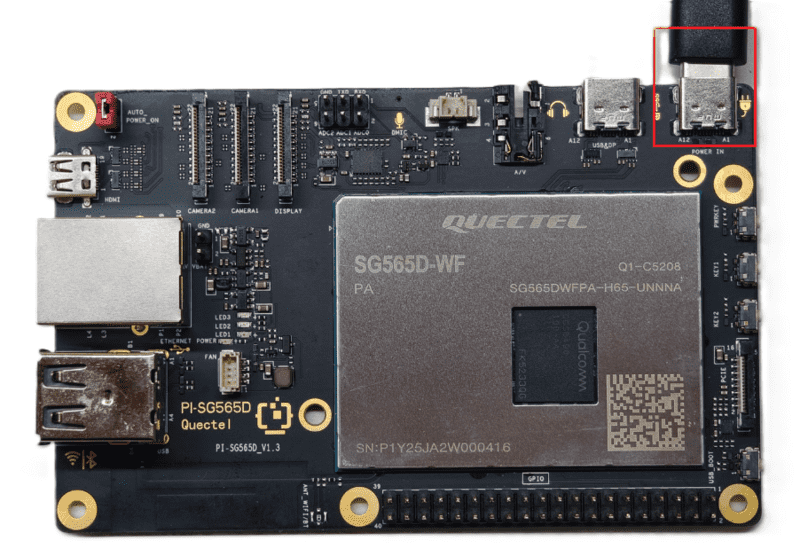
Power Connection
Connect the USB-A end of the power cable to the power adapter, and the USB-C end to the power port on the intelligent main board (usually labeled POWER IN).
Project Implementation
Prerequisites Installation
After confirming network connection, open the terminal and enter the command:
sudo apt update && sudo apt install -y python3-pip libatlas-base-dev libjasper-dev
The above command will update the software sources and install some libraries required for the project, including:
- libatlas-base-dev and libjasper-dev: Dependencies for scientific computing libraries;
- python3-pip: Python package manager for installing project dependencies.
Get the Code
Extract the code to the device
Install Python Dependencies
pip install -r requirements.txt
Dependency package descriptions:
- PySide6: Python bindings for Qt6, used for building graphical user interfaces;
- opencv-python: OpenCV image processing library, used for camera capture and image processing;
- ultralytics: YOLOv8 object detection framework, used for human keypoint detection;
- numpy: Numerical computing library, used for matrix operations and feature extraction;
- scikit-learn: Machine learning library, used for providing random forest classifier;
- joblib: Serialization library, used for loading pre-trained models.
Prepare Model Files
The fall detection application requires the following model files to be pre-loaded, please place them in the model/ directory:
- yolov8n-pose.pt - YOLOv8-Nano Pose model, used for detecting 17 human keypoints
- fall_multi_person_model.pkl - Random forest classifier, used for determining falls
- feature_scaler_multi.pkl - Feature scaler, used for standardizing input features
These model files can be obtained from:
- yolov8n-pose.pt: Download from Ultralytics official GitHub or auto-download via code
- fall_multi_person_model.pkl and feature_scaler_multi.pkl are placed in the model directory
Run the Application
After preparing the models, run the main program:
cd src
python3 main.py
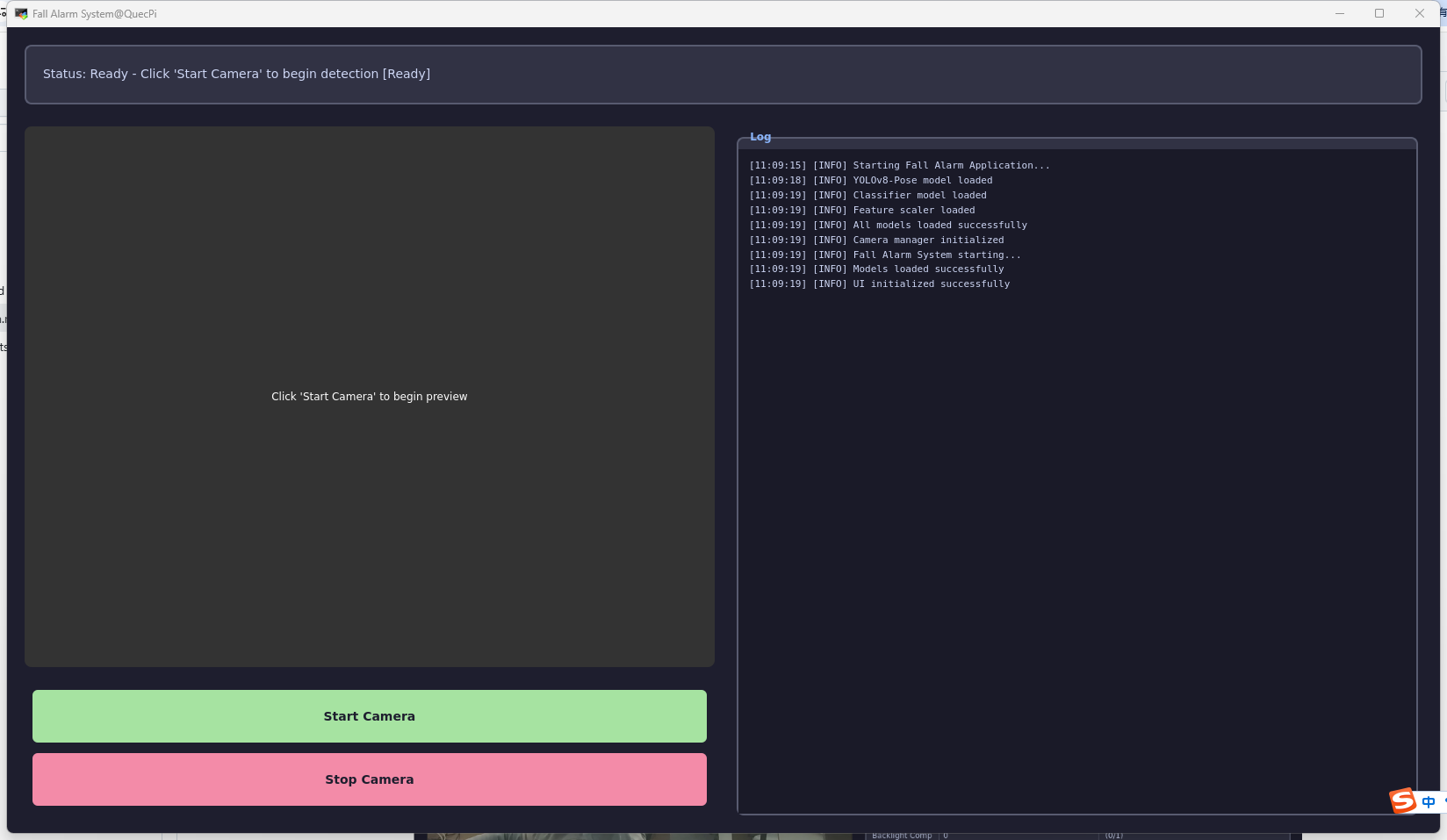
After the program starts, it will display a graphical interface with the following features:
Interface Description
| Interface Area | Function Description |
|---|---|
| Camera Preview Area | Real-time display of camera captured footage, with detected humans and fall status annotated |
| Log Output Area | Display real-time logs and detection information during application runtime |
| Fall Alarm Alert | Display fall detection results at the top, automatically trigger alarm light and save alarm images |
| Camera Selection | Supports multiple USB cameras, can automatically detect and select available cameras |
Log Display Area
The right side area can output log information during application runtime, including:
- Model Loading Logs: Shows whether YOLOv8 model and classifier loaded successfully
- Detection Logs: Shows number of detected humans and fall status
- Alarm Logs: Shows fall alarms and image upload status
Real-time Detection Parameters
The program uses the following parameters for fall detection (can be adjusted according to actual needs):
| Parameter | Description | Default Value |
|---|---|---|
| MIN_CONFIDENCE | Keypoint confidence threshold | 0.4 |
| MIN_KEYPOINTS | Minimum number of valid keypoints | 10 |
| FALL_BODY_ANGLE_THRESHOLD | Body tilt angle threshold | 55° |
| FALL_HEIGHT_RATIO_THRESHOLD | Body height-to-width ratio threshold | 1.2 |
| FALL_MIN_CONFIDENCE | Classifier confidence threshold | 0.75 |
| FALL_CONFIRM_FRAMES | Fall confirmation frame count | 3 |
| DETECT_INTERVAL | Detection interval (seconds) | 0.15 |
Fall Detection Principle
Keypoint Detection
The application uses YOLOv8-Pose model to detect 17 human keypoints:
0: Nose       1: Left Eye       2: Right Eye       3: Left Ear       4: Right Ear
5: Left Shoulder       6: Right Shoulder       7: Left Elbow       8: Right Elbow       9: Left Wrist
10: Right Wrist    11: Left Hip       12: Right Hip      13: Left Knee      14: Right Knee
15: Left Ankle    16: Right Ankle
Feature Extraction
The following features are extracted from keypoints for classification:
- Keypoint Coordinates: (x, y) coordinates and confidence of 17 keypoints, 51 dimensions total
- Body Angles: Calculate angle features between 8 keypoints, 8 dimensions total
- Relative Coordinates: Relative coordinates to the hip center point, 26 dimensions total
- Body Morphology: Body height, width and height-to-width ratio, 3 dimensions total
Fall Judgment Logic
The application uses multiple methods to determine if a fall has occurred:
# Feature extraction and classification
features = detector.extract_features(keypoints, confidences)
if scaler is available:
    features_scaled = scaler.transform(features)
else:
    features_scaled = features

# Get classifier prediction
probabilities = classifier.predict_proba(features_scaled)
is_falling = probabilities[0, 1] > FALL_MIN_CONFIDENCE  # Class 1 indicates fall

# Confirmation frame count (reduce false alarms)
if is_falling:
    fall_count += 1
    if fall_count >= FALL_CONFIRM_FRAMES:
        trigger_alarm()
Judgment Criteria:
- Random forest classifier probability > 0.75 and fall detected for 3 consecutive frames
- Or both body angle > 55° and body height-to-width ratio > 1.2 are satisfied
Alarm and Viewing
When a fall is detected, the application will:
- Activate Alarm Light: Send flash and alarm commands to the alarm light device via serial port
- Save Alarm Image: Save JPEG image with timestamp in the
picture/directory - Upload to Server: Upload alarm image to specified server address
- Upload address:
http://SERVER_IP:8000/upload_fall(replace with your server address and upload interface) - Supports background asynchronous upload, does not block main program execution
- Upload address:
- APK Viewing: Users can receive fall notifications in real-time via APK and view alarm images
Application Demo
Common Issues and Solutions
Model Loading Related Issues
Model File Not Found
Symptom:
ERROR - Pose model not found: /path/to/model/yolov8n-pose.pt
ERROR - Classifier model not found: /path/to/model/fall_multi_person_model.pkl
Solution:
- Ensure
yolov8n-pose.pt,fall_multi_person_model.pkl,feature_scaler_multi.pklare all in themodel/directory - Check if file paths are correct, test with absolute paths
- First run can let the program auto-download YOLOv8 model (requires network connection)
Camera Related Issues
Camera Not Recognized
Symptom:
Warning: No available cameras detected
Solution:
Check if camera is properly connected to USB port
Use command to check if camera is recognized:
# Linux
ls -la /dev/video*

# Use v4l2-ctl to list cameras
v4l2-ctl --list-devices
Try other USB ports
If still not working, use a USB hub with power
Check if camera driver installation is needed
Camera Footage Stuttering or High Latency
Symptom:
Detected frame delay exceeds 1 second, or camera preview footage is not smooth
Cause Analysis:
- Camera resolution too high causing processing delay
- High CPU usage
- Network upload blocking main thread
Solution:
- Reduce camera resolution (change to 1280×720 instead of higher)
- Adjust
DETECT_INTERVALparameter to increase detection interval:DETECT_INTERVAL = 0.25 # Increase from 0.15 to 0.25 seconds - Reduce
YOLO_IMG_SIZEto speed up inference:YOLO_IMG_SIZE = 320 # Can reduce to 256 - Disable server upload function for local testing
Fall Detection Related Issues
High False Alarm Rate (Normal Actions Detected as Falls)
Symptom:
Users bending over, sitting down or resting are incorrectly detected as falling
Solution:
Adjust Classifier Confidence Threshold: Increasing threshold can reduce false alarms
FALL_MIN_CONFIDENCE = 0.80 # Increase from 0.75 to 0.80Increase Confirmation Frame Count: Only judge as fall when detected in multiple consecutive frames
FALL_CONFIRM_FRAMES = 5 # Increase from 3 to 5Optimize Angle and Ratio Thresholds:
FALL_BODY_ANGLE_THRESHOLD = 65  # Increase angle threshold
FALL_HEIGHT_RATIO_THRESHOLD = 1.4  # Increase height-to-width ratio threshold
Retrain Classifier: Use more diverse training data
- Add negative samples of sitting, bending over, etc.
- Ensure diversity of fall samples (different angles, speeds, people)
- Increase training dataset size
High Miss Rate (Actual Falls Not Detected)
Symptom:
No alarm triggered when actual fall occurs
Solution:
Lower Classifier Confidence Threshold:
FALL_MIN_CONFIDENCE = 0.65 # Lower from 0.75 to 0.65Decrease Confirmation Frame Count:
FALL_CONFIRM_FRAMES = 2 # Lower from 3 to 2Check Keypoint Detection Quality:
# Increase keypoint requirements or lower confidence threshold
MIN_CONFIDENCE = 0.3  # Lower from 0.4
MIN_KEYPOINTS = 8     # Lower from 10
Optimize View Angle: Ensure camera can see the entire body
- Camera should be 1-3 meters from user
- Camera installation height should be 1.5-2 meters
- Avoid side or near-vertical viewing angles
Improve Lighting Conditions:
- Ensure adequate lighting, avoid shadows and backlighting
- Use uniform ambient light instead of localized strong light
Alarm and Upload Related Issues
Alarm Light Not Activating
Symptom:
Fall detected but alarm light doesn't turn on
Solution:
- Check if serial port connection is correct
- Verify if alarm light device is working properly
- Check serial port configuration in
light_control.py:port = '/dev/ttyUSB0' # Modify according to actual device baudrate = 9600 # Modify according to device specifications - Check serial port permissions:
sudo chmod 666 /dev/ttyUSB0 - Debug according to purchased alarm light documentation, ensure sent command format is correct
Image Upload Failed
Symptom:
ERROR - Upload failed: fall_20240326_143022.jpg
Cause Analysis:
- Unstable network connection
- Wrong server address or server unavailable
- Request timeout
Solution:
- Check network connection:
ping SERVER_IP - Verify if server is running:
curl http://SERVER_IP:8000/upload_fall - Check firewall settings to allow outbound connections
- Modify server address:
SERVER_IP = "your.server.ip"
Performance Optimization Issues
High CPU Usage
Symptom:
Application CPU usage > 80% during runtime, system response slow
Solution:
- Lower detection frequency (increase
DETECT_INTERVAL) - Reduce video resolution (change to 640×480 or lower)
- Disable real-time log display or reduce log update frequency
- Use GPU acceleration (if hardware supports)
Memory Leak Causing Continuous Memory Increase
Symptom:
Application memory usage grows from 200MB to 1GB after running for several hours
Solution:
- Check if unreleased objects are created in loops
- Periodically clear log buffer:
if len(LogManager._logs) > 100: LogManager.clear_logs() - Ensure threads are properly closed
- Use memory analysis tool to detect leaks:
python3 -m memory_profiler
Technical Support and Contributions
If you encounter any issues during use, please submit technical inquiries on the Quectel Official Forum. Our technical support team will respond promptly.
Project open-source repository: https://github.com/Quectel-Pi/demo-fall-alarm-device
We welcome you to submit Issues to report problems or Pull Requests to contribute code improvements!