
5G PCIe network card
This section uses the RM520N-GL PCIe network card as an example to introduce how to connect a 5G modem to the Quectel Pi H1 single-board computer via the PCIe interface, and complete network configuration and dial-up access.
Hardware interface and preparation
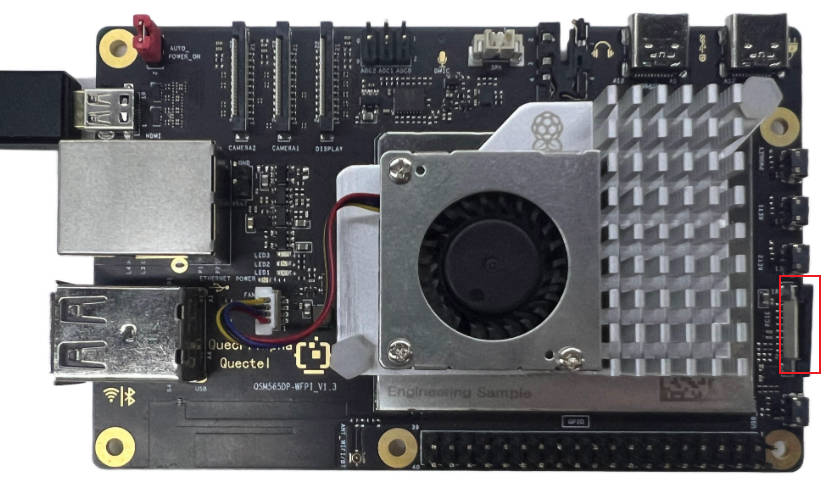
Before you begin, please prepare the following hardware:
- Quectel Pi H1 single-board computer
- RM520N-GL PCIe network card
- PCIe adapter cable
- Type-C-to-Type-A USB cable
- 5G antenna
- A valid SIM card
Quick start
Connect the hardware
- Fully and evenly insert the RM520N-GL PCIe network card adapter cable into the PCIe port of the single-board computer.
- Push down the PCIe interface brackets from both sides to ensure the PCIe adapter cable is firmly secured.
- Use a Type‑C-to-Type-A USB cable to connect to a Windows PC. On first use, you may need to install the USB driver (the driver is provided by the module technical support team; select the correct package according to the module model).
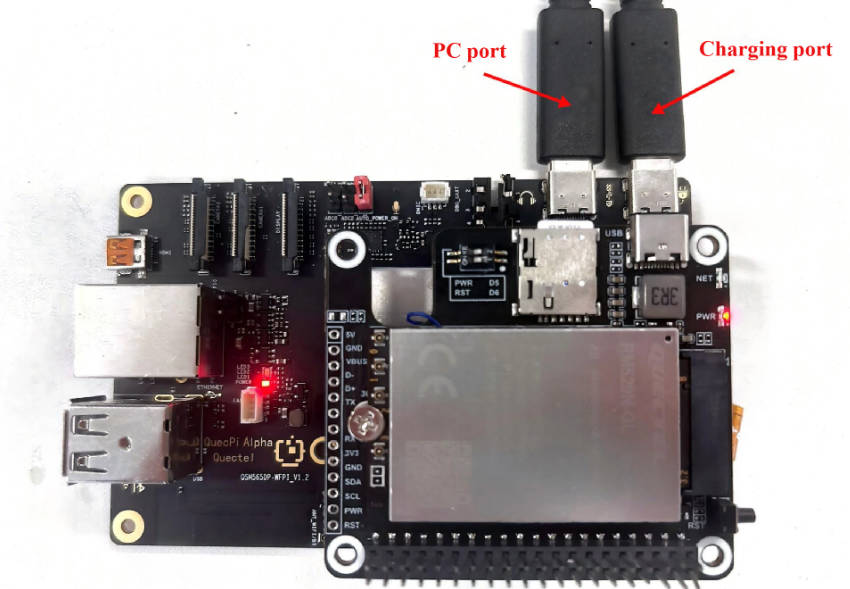
Function usage
PCIe module configuration
When using a PCIe passthrough adapter card, the module must be set to PCIe‑EP mode; otherwise, it cannot communicate with the Quectel Pi H1 PCIe interface.
After installing the module driver, connect the 5G module through the adapter board’s USB port and switch it to PCIe‑EP mode using AT commands as follows.
Connect to the AT port
In Windows Device Manager, locate the port shown as “Quectel USB AT Port (COMxxx)”.
Then, open this AT port using a serial terminal tool.
Execute configuration commands
- Execute the following command:
AT+QCFG="data_interface",1,0
AT+QCFG="pcie/mode",0
AT+QCFG="usbnet",2
AT+CFUN=1,1
- After executing the command, disconnect the USB cable from the PC side and power-cycle the main board.
Verify PCIe device recognition
From the shell, execute the following commands and check the output.
Check PCIe bus device recognition.
lspciExpected example output:
root@QuectelPi:~# lspci
0000:00:00.0 PCI bridge: Qualcomm Device 010b
0000:01:00.0 Ethernet controller: Device 1f0a:6801 (rev 01)
0001:00:00.0 PCI bridge: Qualcomm Device 010b
0001:01:00.0 Unassigned class [ff00]: Qualcomm Device 0308
Check recognition of MHI modem interfaces.
ls /dev/mhi*Expected example output:
root@QuectelPi:~# ls /dev/mhi*
/dev/mhi_BHI  /dev/mhi_DIAG  /dev/mhi_DUN  /dev/mhi_LOOPBACK  /dev/mhi_QMI0
If the devices above are all recognized, you can proceed with the dial-up operation.
Dial-up Internet access
Pre-checks
- 5G module antennas are connected.
- SIM card is inserted.
- Signal quality is normal (to avoid registration failures due to poor signal).
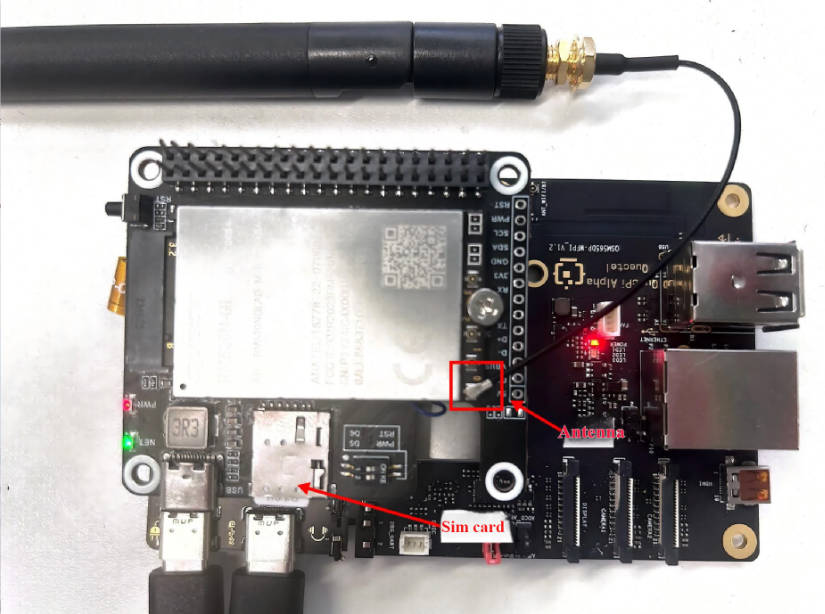
Dial up with quectel-CM
Run quectel-CM in the background to initiate the dial-up.
root@QuectelPi:~# quectel-CM &
[2] 1303
root@QuectelPi:~# [01-01_00:07:55:168] QConnectManager_Linux_V1.6.7
[01-01_00:07:55:179] network interface '' or qmidev '' is not exist
[01-01_00:07:55:179] netcard driver = pcie_mhi, driver version = V1.3.7
[01-01_00:07:55:179] qmap_mode = 1, qmap_version = 9, qmap_size = 15360, muxid = 0x81, qmap_netcard = rmnet_mhi0.1
[01-01_00:07:55:179] Modem works in QMI mode
[01-01_00:07:55:193] /proc/1273/fd/7 -> /dev/mhi_QMI0
[01-01_00:07:55:193] /proc/1273/exe -> /usr/bin/quectel-CM
[01-01_00:07:55:193] requestDeactivateDefaultPDP WdsConnectionIPv4Handle
[01-01_00:07:55:424] ip link set dev rmnet_mhi0 down
[01-01_00:07:55:431] ip addr flush dev rmnet_mhi0.1
[01-01_00:07:55:436] ip link set dev rmnet_mhi0.1 down
[01-01_00:07:55:457] QmiWwanThread exit
[01-01_00:07:55:459] qmi_main exit
[01-01_00:07:57:196] cdc_wdm_fd = 7
[01-01_00:07:57:208] Get clientWDS = 15
[01-01_00:07:57:212] Get clientDMS = 1
[01-01_00:07:57:215] Get clientNAS = 4
[01-01_00:07:57:219] Get clientUIM = 3
[01-01_00:07:57:224] Get clientWDA = 1
[01-01_00:07:57:229] requestBaseBandVersion RM520NGLABR03A02M8G
[01-01_00:07:57:232] qmap_settings.rx_urb_size = 15360
[01-01_00:07:57:233] qmap_settings.ul_data_aggregation_max_datagrams  = 11
[01-01_00:07:57:233] qmap_settings.ul_data_aggregation_max_size       = 8192
[01-01_00:07:57:233] qmap_settings.dl_minimum_padding                 = 0
[01-01_00:07:57:248] requestGetSIMStatus SIMStatus: SIM_READY
[01-01_00:07:57:257] requestGetProfile[pdp:1 index:1] ctnet///0/IPV4V6
[01-01_00:07:57:261] requestRegistrationState2 MCC: 460, MNC: 11, PS: Attached, DataCap: 5G_SA
[01-01_00:07:57:265] requestQueryDataCall IPv4ConnectionStatus: DISCONNECTED
[01-01_00:07:57:265] ip link set dev rmnet_mhi0 down
[01-01_00:07:57:272] ip addr flush dev rmnet_mhi0.1
[01-01_00:07:57:277] ip link set dev rmnet_mhi0.1 down
[01-01_00:07:57:768] requestSetupDataCall WdsConnectionIPv4Handle: 0xe27891d0
[01-01_00:07:57:783] ip link set dev rmnet_mhi0 up
[  473.062494][ T1311] [I][mhi_netdev_open] Opened net dev interface
[01-01_00:07:57:797] ip link set dev rmnet_mhi0.1 up
[01-01_00:07:57:803] busybox udhcpc -f -n -q -t 5 -i rmnet_mhi0.1
udhcpc: started, v1.35.0
udhcpc: broadcasting discover
udhcpc: broadcasting select for 100.98.134.67, server 100.98.134.68
udhcpc: lease of 100.98.134.67 obtained from 100.98.134.68, lease time 7200
[01-01_00:07:57:883] /etc/udhcpc.d/50default: Adding DNS 202.102.213.68
[01-01_00:07:57:883] /etc/udhcpc.d/50default: Adding DNS 61.132.163.68
When udhcpc obtains an IP address (as shown at the bottom of the log), the device has successfully received an IP assigned by the base station and the data connection is established.
Next, use ifconfig and ping commands to verify network connectivity:
root@QuectelPi:~# ifconfig
eth0      Link encap:Ethernet  HWaddr 00:55:7B:B5:7D:F7
          UP BROADCAST MULTICAST  MTU:1500  Metric:1
          RX packets:0 errors:0 dropped:0 overruns:0 frame:0
          TX packets:0 errors:0 dropped:0 overruns:0 carrier:0
          collisions:0 txqueuelen:1000
          RX bytes:0 (0.0 B)  TX bytes:0 (0.0 B)
          Interrupt:166

lo        Link encap:Local Loopback
          inet addr:127.0.0.1  Mask:255.0.0.0
          inet6 addr: ::1/128 Scope:Host
          UP LOOPBACK RUNNING  MTU:65536  Metric:1
          RX packets:50 errors:0 dropped:0 overruns:0 frame:0
          TX packets:50 errors:0 dropped:0 overruns:0 carrier:0
          collisions:0 txqueuelen:1000
          RX bytes:4632 (4.5 KiB)  TX bytes:4632 (4.5 KiB)

p2p0      Link encap:Ethernet  HWaddr 02:03:7F:D6:00:01
          UP BROADCAST MULTICAST  MTU:1500  Metric:1
          RX packets:0 errors:0 dropped:0 overruns:0 frame:0
          TX packets:0 errors:0 dropped:0 overruns:0 carrier:0
          collisions:0 txqueuelen:3000
          RX bytes:0 (0.0 B)  TX bytes:0 (0.0 B)

rmnet_mhi0 Link encap:UNSPEC  HWaddr 00-00-00-00-00-00-00-00-00-00-00-00-00-00-00-00
          inet6 addr: fe80::6921:e40e:336d:a80e/64 Scope:Link
          UP RUNNING NOARP  MTU:1500  Metric:1
          RX packets:14 errors:0 dropped:0 overruns:0 frame:0
          TX packets:23 errors:0 dropped:0 overruns:0 carrier:0
          collisions:0 txqueuelen:1000
          RX bytes:4464 (4.3 KiB)  TX bytes:5204 (5.0 KiB)

rmnet_mhi0.1 Link encap:Ethernet  HWaddr 02:50:F4:00:00:01
          inet addr:100.98.134.67  Mask:255.255.255.248
          inet6 addr: fe80::50:f4ff:fe00:1/64 Scope:Link
          UP RUNNING NOARP  MTU:1500  Metric:1
          RX packets:14 errors:0 dropped:0 overruns:0 frame:0
          TX packets:23 errors:0 dropped:0 overruns:0 carrier:0
          collisions:0 txqueuelen:1000
          RX bytes:4330 (4.2 KiB)  TX bytes:5334 (5.2 KiB)

wlan0     Link encap:Ethernet  HWaddr 00:03:7F:50:00:01
          UP BROADCAST MULTICAST  MTU:1500  Metric:1
          RX packets:0 errors:0 dropped:0 overruns:0 frame:0
          TX packets:0 errors:0 dropped:0 overruns:0 carrier:0
          collisions:0 txqueuelen:3000
          RX bytes:0 (0.0 B)  TX bytes:0 (0.0 B)

root@QuectelPi:~# ping 8.8.8.8
PING 8.8.8.8 (8.8.8.8): 56 data bytes
64 bytes from 8.8.8.8: seq=0 ttl=113 time=5006.075 ms
64 bytes from 8.8.8.8: seq=5 ttl=113 time=485.806 ms
64 bytes from 8.8.8.8: seq=6 ttl=113 time=190.026 ms
64 bytes from 8.8.8.8: seq=13 ttl=113 time=628.962 ms
64 bytes from 8.8.8.8: seq=14 ttl=113 time=542.605 ms
64 bytes from 8.8.8.8: seq=15 ttl=113 time=585.632 ms
64 bytes from 8.8.8.8: seq=16 ttl=113 time=796.018 ms
64 bytes from 8.8.8.8: seq=17 ttl=113 time=95.139 ms
64 bytes from 8.8.8.8: seq=18 ttl=113 time=837.369 ms
64 bytes from 8.8.8.8: seq=19 ttl=113 time=41.186 ms