
Application development
This document describes how to develop applications on the Debian system of Quectel Pi H1. Application development refers to the process of writing, compiling, and running applications on the development board. Quectel Pi H1 supports two development approaches:
- Local Development: Develop, compile, and run directly on the development board, suitable for rapid development and debugging
- Cross-Compilation: Compile code on a PC host to generate executable files that can run on the development board, suitable for resource-constrained scenarios or when higher compilation efficiency is needed
This document uses the classic HelloWorld program as an example to detail the complete workflow of both development approaches, helping developers quickly get started with application development on Quectel Pi H1.
HelloWorld Example
HelloWorld is a simple C program primarily used to verify that the development environment is set up correctly. By writing, compiling, and running this basic program, you can test the basic functionality of the system, including whether the compiler, runtime environment, etc., are working properly. It is a fundamental practice for getting started with embedded development.
Local Development
Local development refers to developing, compiling, and running directly on the Quectel Pi H1 development board. This approach is simple to operate and suitable for quick verification and debugging.
Setting Up the Development Environment
After logging into the Debian system of Quectel Pi H1, open a terminal window, enter the following command and press Enter to install the necessary development environment:
sudo apt update && sudo apt install vim gawk gcc g++ build-essential chrpath socat wget diffstat file unzip tar locales zstd debianutils iputils-ping cpio python3 python3-pip net-tools git make cmake
Writing Code
Create a helloworld.c file in the /Desktop directory.
Copy the following code snippet and paste it into the helloworld.c file:
#include <stdio.h>
int main(void)
{
    printf("hello world\r\n");
    return 0;
}
Compiling and Running
- Execute the following command to compile the code:
$ cd Desktop/
$ gcc helloworld.c -o helloworld
- Execute the following command to run the helloworld program:
$ ./helloworld
- Program execution result output:
$ ./helloworld
$ hello world
Cross-Compilation
Cross-compilation is the process of generating executable programs on one platform (such as an x86 PC) that can run on another platform with a different architecture (such as an ARM embedded device). This approach allows compilation on more powerful PCs, improving development efficiency.
Prerequisites
- A 32/64-bit host computer for compiling code.
- A Quectel Pi H1 development board for running the executable program.
Using a 64-bit computer as an example, execute the following steps on the host:
Installing ARM64 Toolchain
sudo apt update
sudo apt install gcc-aarch64-linux-gnu g++-aarch64-linux-gnu
Verifying Installation
$ aarch64-linux-gnu-gcc --version

Creating Code File
$ touch  hello.c
$ sudo vim hello.c
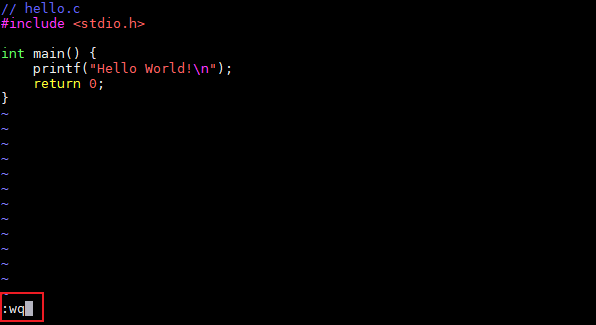
Press ESC + i, enter the following code, then press ESC + "shift + : ", and type "wq+Enter" in the command console to save and exit.
#include <stdio.h>
int main() {
    printf("Hello World!\n");
    return 0;
}
Compiling Code File
$ aarch64-linux-gnu-gcc -o output_filename source_filename
Example: aarch64-linux-gnu-gcc -o hello_arm64 hello.c
Checking File Architecture
$ file filename
Successful compilation is shown as follows:

Uploading Compiled File
Download the compiled file from the host to your local machine, then upload the compiled file to the Quectel Pi H1 development board using the SCP command in the Windows console.
#Note: Do not use Chinese characters in the file path where the compiled file is stored on the host
scp -O /local/file.txt username@remote_IP:/target_path/
Example: scp -O D:\hello_arm64 pi@192.168.x.x:/home/pi

Running Compiled File
Set permissions for the compiled file and execute it on the Quectel Pi H1 development board terminal.
sudo chmod 777 filename
