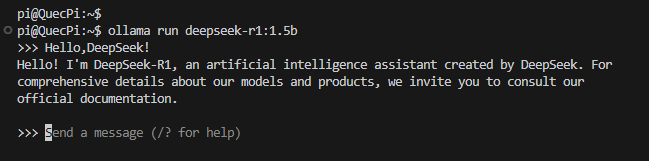
DeepSeek Deployment
This document demonstrates how to deploy DeepSeek locally on the Quectel Pi H1 single-board computer.
DeepSeek is a high-performance open-source large language model developed by a Chinese team. It features powerful natural language understanding, code generation, and logical reasoning capabilities. It can efficiently run in a local environment and is suitable for a variety of scenarios such as intelligent Q&A, text generation, and code assistance.
Prerequisites
1.The Quectel Pi H1 Debian system has been successfully flashed and booted.
2.The system can access the Internet normally.
Update Software Sources
Run the following commands in the terminal:
sudo apt update
sudo apt upgrade
Before installing any software, it is recommended to update the system packages to ensure that all dependencies are up to date.

Install Basic Tools
sudo apt install curl
curlis a commonly used command-line download tool, which will be used later during the Ollama installation.If the system indicates that
curlis already installed, you can skip this step.

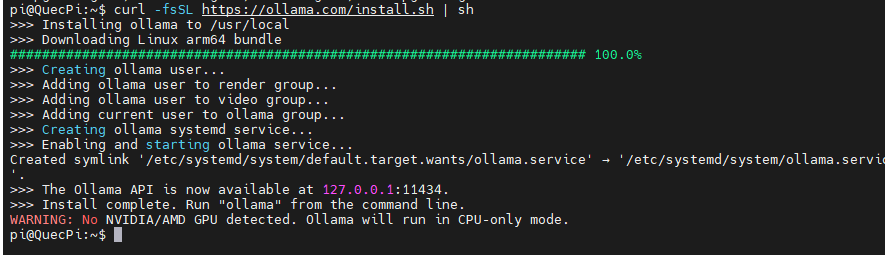
Install Ollama
Ollama is a lightweight model runtime environment that allows you to deploy and run various open-source AI models locally.
Run the following command in the terminal:
curl -fsSL https://ollama.com/install.sh | sh
Start Ollama Service
Ollama needs to run a background server process to manage models.
Open a terminal and execute the command:
ollama serve
Please keep this terminal window open.
Run DeepSeek Model
Open another terminal window and run the following command to pull and start the DeepSeek-R1 1.5B model:
ollama run deepseek-r1:1.5b
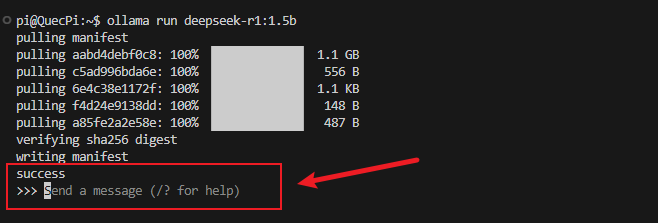
You can enter a text for a conversation in the highlighted area, for example: