Qt图形界面开发
2026-02-28
下面是使用Qt Quick技术创建一个日历程序的过程。
环境准备
sudo apt update -y
sudo apt install -y qt6-base-dev qt6-declarative-dev qt6-multimedia-dev \
     qmake6 libgstreamer1.0-dev libjpeg62-turbo-dev libjpeg62-turbo-dev \
     libswscale-dev gcc g++ cmake make
创建项目文件
新建calendar.pro文件
QT += quick
SOURCES += main.cpp
RESOURCES += qml.qrc
创建资源文件
新建qml.qrc文件
<RCC>
    <qresource prefix="/">
        <file>main.qml</file>
    </qresource>
</RCC>
创建qml文件
新建main.qml文件
import QtQuick 2.15
import QtQuick.Layouts 1.15
import QtQuick.Window 2.15
import QtQuick.Controls 2.15

Window {
    id: mainWindow
    visible: true
    title: "日历"

    Rectangle {
        id: calendarRoot
        anchors.fill: parent
        color: "#eeeeee"
        property real sideMargin: width * 0.04  // 左右边距为宽度的2%
        property date currentDate: new Date()
        property int currentMonth: currentDate.getMonth()
        property int currentYear: currentDate.getFullYear()
        property date selectedDate: currentDate

        ColumnLayout {
            anchors.fill: parent
            anchors.margins: calendarRoot.sideMargin  // 应用整体边距
            anchors.horizontalCenter: parent.horizontalCenter
            anchors.verticalCenter: parent.verticalCenter

            // 标题栏
            RowLayout {
                Layout.preferredHeight: 40
                Layout.fillWidth: true

                Button {
                    text: "<"
                    onClicked: {
                        calendarRoot.currentMonth--
                        if (calendarRoot.currentMonth < 0) {
                            calendarRoot.currentMonth = 11
                            calendarRoot.currentYear--
                        }
                        calendarGrid.updateCalendar()
                    }
                }

                Label {
                    text: calendarRoot.currentYear + "年 " + (calendarRoot.currentMonth + 1) + "月"
                    font.pointSize: 16
                    horizontalAlignment: Text.AlignHCenter
                    verticalAlignment: Text.AlignVCenter
                    Layout.fillWidth: true
                }

                Button {
                    text: ">"
                    onClicked: {
                        calendarRoot.currentMonth++
                        if (calendarRoot.currentMonth > 11) {
                            calendarRoot.currentMonth = 0
                            calendarRoot.currentYear++
                        }
                        calendarGrid.updateCalendar()
                    }
                }
            }

            Item {
                Layout.preferredHeight: 20  // 高度越大,日历网格下移越多
                Layout.fillWidth: true
            }
            // 星期标题
            GridView {
                id: weekHeader
                model: 7
                // 计算单元格宽度(扣除左右边距后平均分配)
                cellWidth: (parent.width - 2 * calendarRoot.sideMargin) / 7
                cellHeight: 30
                Layout.preferredHeight: 30
                Layout.fillWidth: true

                delegate: Rectangle {
                    color: "#e0e0e0"
                    border.color: "#cccccc"
                    border.width: 1

                    Text {
                        anchors.centerIn: parent
                        text: ["Sun", "Mon", "Tue", "Wed", "Thu", "Fri", "Sat"][index]
                        font.bold: true
                        font.pointSize: 18
                        color: index === 0 || index === 6 ? "#ff6666" : "#333333"
                    }
                }
            }

            Item {
                Layout.preferredHeight: 20  // 高度越大,日历网格下移越多
                Layout.fillWidth: true
            }
            // 日历网格
            GridView {
                id: calendarGrid
                model: 42
                cellWidth: (parent.width - 2 * calendarRoot.sideMargin) / 7
                cellHeight: 55
                Layout.fillWidth: true
                Layout.fillHeight: true

                property var calendarData: createCalendarModel()
                property int firstDayOfMonth: new Date(calendarRoot.currentYear, calendarRoot.currentMonth, 1).getDay()

                function createCalendarModel() {
                    var daysInMonth = new Date(calendarRoot.currentYear, calendarRoot.currentMonth + 1, 0).getDate()
                    var firstDay = new Date(calendarRoot.currentYear, calendarRoot.currentMonth, 1).getDay()

                    var days = []
                    // 填充上个月的末尾几天
                    for (var i = 0; i < firstDay; i++) {
                        var prevMonthDays = new Date(calendarRoot.currentYear, calendarRoot.currentMonth, 0).getDate()
                        days.push({
                            day: prevMonthDays - firstDay + i + 1,
                            isCurrentMonth: false,
                            isSelected: false,
                            isToday: false
                        })
                    }

                    // 填充当前月的天数
                    for (var i = 1; i <= daysInMonth; i++) {
                        var isToday = (i === calendarRoot.currentDate.getDate() &&
                        calendarRoot.currentMonth === calendarRoot.currentDate.getMonth() &&
                        calendarRoot.currentYear === calendarRoot.currentDate.getFullYear())
                        var isSelected = (i === calendarRoot.selectedDate.getDate() &&
                        calendarRoot.currentMonth === calendarRoot.selectedDate.getMonth() &&
                        calendarRoot.currentYear === calendarRoot.selectedDate.getFullYear())
                        days.push({
                            day: i,
                            isCurrentMonth: true,
                            isSelected: isSelected,
                            isToday: isToday
                        })
                    }

                    // 填充下个月的开头几天
                    var remainingCells = 42 - days.length
                    for (var i = 1; i <= remainingCells; i++) {
                        days.push({
                            day: i,
                            isCurrentMonth: false,
                            isSelected: false,
                            isToday: false
                        })
                    }

                    return days
                }

                function updateCalendar() {
                    calendarData = createCalendarModel()
                    firstDayOfMonth = new Date(calendarRoot.currentYear, calendarRoot.currentMonth, 1).getDay()
                    calendarGrid.update()
                }

                delegate: Rectangle {
                    border.color: "#cccccc"
                    border.width: 1
                    color: {
                        if (calendarGrid.calendarData[index].isSelected) return "#4a86e8"
                        if (!calendarGrid.calendarData[index].isCurrentMonth) return "#f8f8f8"
                        if (calendarGrid.calendarData[index].isToday) return "#d9ead3"
                        return "#ffffff"
                    }

                    Text {
                        anchors.centerIn: parent
                        horizontalAlignment: Text.AlignHCenter
                        verticalAlignment: Text.AlignVCenter
                        text: calendarGrid.calendarData[index].day
                        color: {
                            if (!calendarGrid.calendarData[index].isCurrentMonth) return "#dddddd"
                            if ((index % 7 === 0 || index % 7 === 6) && calendarGrid.calendarData[index].isCurrentMonth) return "#ff6666"
                            if (calendarGrid.calendarData[index].isSelected) return "red"
                            return "#000000"
                        }
                        font.pointSize: 14
                        font.bold: {
                            if (calendarGrid.calendarData[index].isSelected) return true
                            return false
                        }
                    }

                    MouseArea {
                        anchors.fill: parent
                        onClicked: {
                            if (calendarGrid.calendarData[index].isCurrentMonth) {
                                calendarRoot.selectedDate = new Date(calendarRoot.currentYear, calendarRoot.currentMonth, calendarGrid.calendarData[index].day)
                                calendarGrid.updateCalendar()
                            } else if (index < calendarGrid.firstDayOfMonth) {
                                calendarRoot.currentMonth--
                                if (calendarRoot.currentMonth < 0) {
                                    calendarRoot.currentMonth = 11
                                    calendarRoot.currentYear--
                                }
                                calendarRoot.selectedDate = new Date(calendarRoot.currentYear, calendarRoot.currentMonth, calendarGrid.calendarData[index].day)
                                calendarGrid.updateCalendar()
                            } else {
                                calendarRoot.currentMonth++
                                if (calendarRoot.currentMonth > 11) {
                                    calendarRoot.currentMonth = 0
                                    calendarRoot.currentYear++
                                }
                                calendarRoot.selectedDate = new Date(calendarRoot.currentYear, calendarRoot.currentMonth, calendarGrid.calendarData[index].day)
                                calendarGrid.updateCalendar()
                            }
                        }
                    }
                }
            }
        }

        Component.onCompleted: {
            calendarGrid.updateCalendar()
        }
    }

    Component.onCompleted: {
        //mainWindow.visibility = Window.FullScreen;
        width = 900
        height = 600
        flags = Qt.FramelessWindowHint | Qt.WindowStaysOnTopHint;
    }
}
编写程序代码
新建main.cpp文件
#include <QGuiApplication>
#include <QQmlApplicationEngine>
#include <QQmlContext>
#include <QString>

int main(int argc, char *argv[])
{
#if QT_VERSION < QT_VERSION_CHECK(6, 0, 0)
    QCoreApplication::setAttribute(Qt::AA_EnableHighDpiScaling);
#endif
    QGuiApplication app(argc, argv);

    QQmlApplicationEngine engine;
    engine.rootContext()->setContextProperty("appCurrtentDir", QCoreApplication::applicationDirPath());
    const QUrl url(QStringLiteral("qrc:/main.qml"));
    QObject::connect(&engine, &QQmlApplicationEngine::objectCreated,
                     &app, [url](QObject *obj, const QUrl &objUrl) {
        if (!obj && url == objUrl)
            QCoreApplication::exit(-1);
    }, Qt::QueuedConnection);
    engine.load(url);

    return app.exec();
}
编译
运行以下命令:
qmake6 calendar.pro
make
生成可执行文件:calendar
运行
XDG_SESSION_TYPE=wayland ./calendar
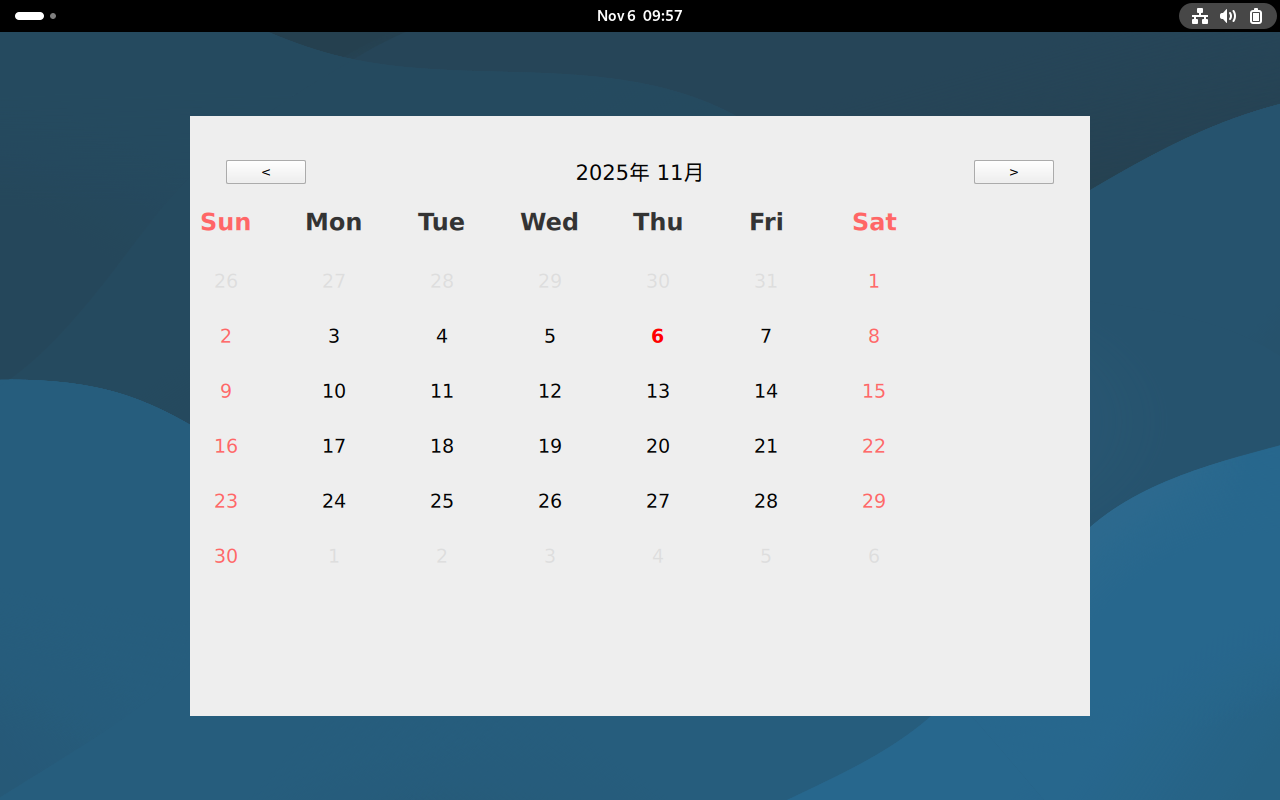
运行效果