
Ethernet
2026-03-26
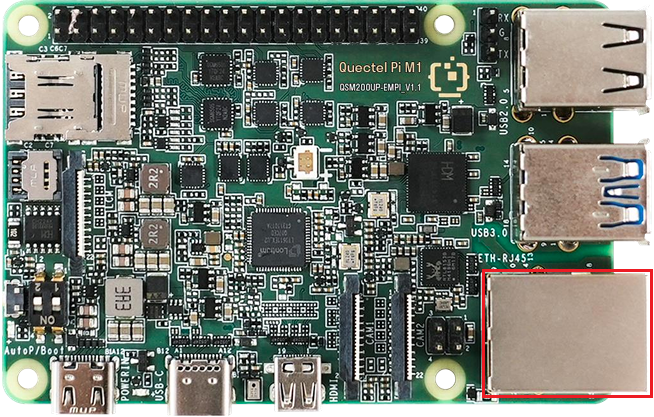
The Quectel Pi M1 smart single-board computer comes with one standard RJ45 interface, supporting Ethernet communication rates of 10/100/1000 Mbps.
Ethernet cable requirements: Only straight-through cables are supported; crossover cables are not supported.
Hardware interface:
Function usage
View network configuration
By default, DHCP is enabled on the system to automatically obtain network configurations.
Use the
ifconfigcommand in the terminal to view the network interface addresses:ifconfigOutput example: The
192.168.90.116afterinet addr:is the the local IP address.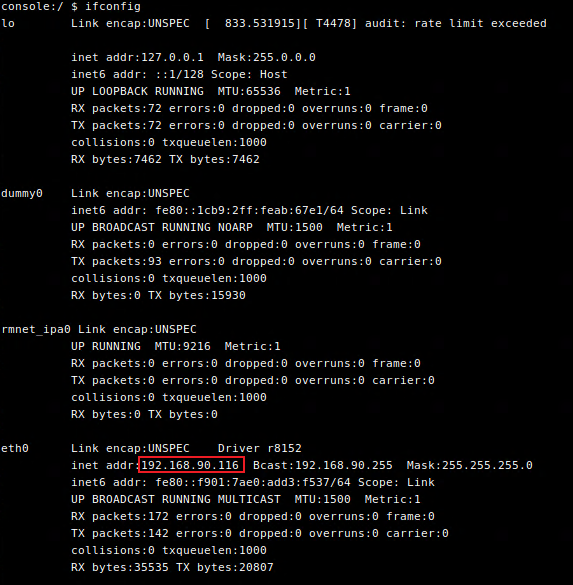
Use the command
ip routein the terminal to view network routing information:ip routeOutput example:

View the DNS server address:
dumpsys connectivity | grep -o ' DnsAddresses: \[[^]]*\]'Output example:

Test the network
Run the ping command to test network connectivity
- Execute the
ping 8.8.8.8command. If the ping is successful (responses are received), it indicates that the external network connection is functioning normally. - Execute the
ping www.example.comcommand. If the ping is successful, it indicates that both the external network connection and DNS resolution are functioning correctly.