
Audio function
This document provides a concise operational guide for the Linux audio system. The system adopts a dual audio backend architecture based on ALSA and PulseAudio, delivering a complete audio solution from the driver layer up to the application layer.
At the hardware level, the system supports:
- External microphone input (via external SH1.0-4P audio-to-headset interface)
- External speaker/headset output, enabling full-duplex communication for headset playback and microphone input.
At the software level, a set of standard audio configuration and control commands is provided to support common operations such as device inspection, audio recording, playback, and volume control.
By following this guide, you can complete most audio-related tasks using basic command-line tools, without the need for complex audio configuration.
Hardware interface
- External SH1.0-4P audio to headset interface
- Onboard MEMS microphone
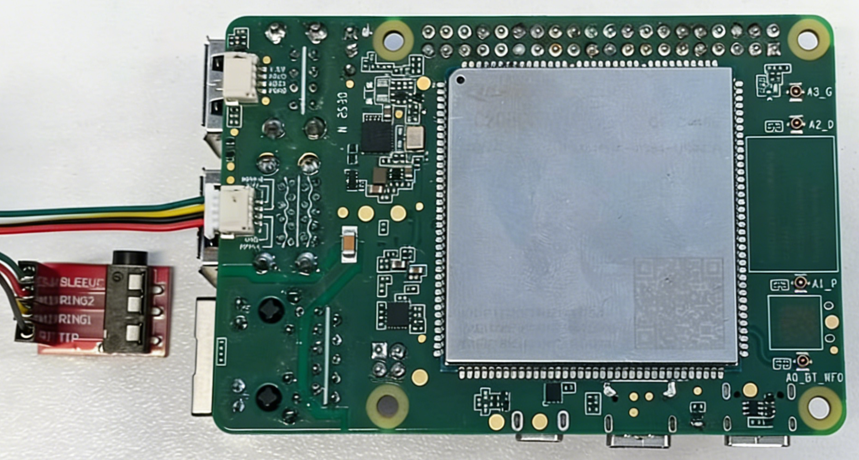
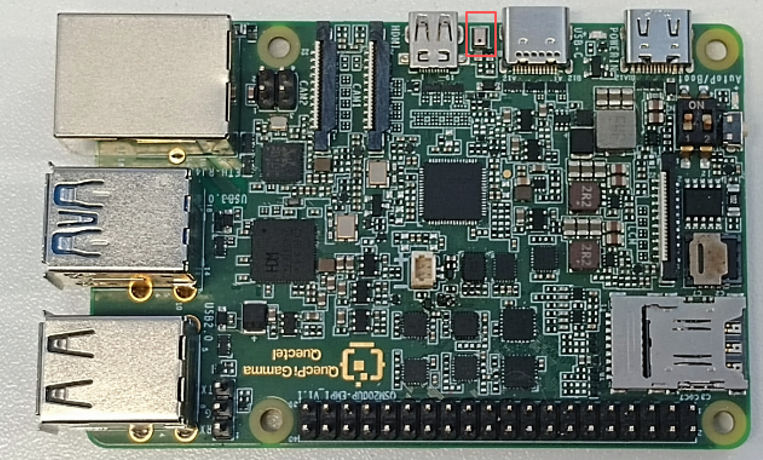
View sound card information
Use the following commands to verify that the audio devices and PCM streams are correctly registered in the system.
Check the list of detected sound cards:
cat /proc/asound/cards
Check the list of assigned pcm streams:
cat /proc/asound/pcm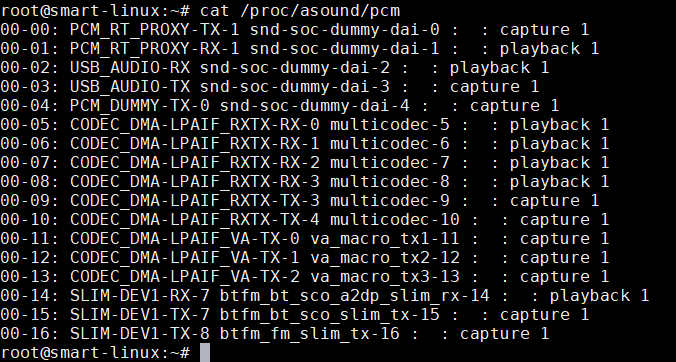
Note: If no sound card information or PCM streams are present, both ALSA and PulseAudio will be unavailable.
Function usage
Audio recording
On Linux, ensure that the audio backend configuration file /etc/backend_conf.xml on the smart single-board computer is correctly configured (this is done by default):
<device name="CODEC_DMA-LPAIF_RXTX-TX-3" rate="48000" ch="2" bits="16" />
In the Android environment, the audio backend is preconfigured by default and does not require modification.
Onboard microphone recording
Record on Linux
Before starting audio recording on Linux, stop the PulseAudio service:
systemctl stop pulseaudio
tinymix "TX DEC0 MUX" "SWR_MIC"
tinymix "ADC2 ChMap" "SWRM_TX2_CH1"
tinymix "TX SMIC MUX0" "SWR_MIC4"
tinymix "TX_AIF1_CAP Mixer DEC0"  "1"
tinymix "ADC2_MIXER Switch"  "1"
tinymix "ADC2 MUX"  "INP3"
tinymix 'TX_AIF1_CAP Mixer DEC2' '1'
agmcap /data/testMic3.wav -D 100 -d 101 -c 1 -r 48000 -i "CODEC_DMA-LPAIF_RXTX-TX-3"
Record on Android
tinymix "TX DEC0 MUX" "SWR_MIC"
tinymix "ADC2 ChMap" "SWRM_TX2_CH1"
tinymix "TX SMIC MUX0" "SWR_MIC4"
tinymix "TX_AIF1_CAP Mixer DEC0"  "1"
tinymix "ADC2_MIXER Switch"  "1"
tinymix "ADC2 MUX"  "INP3"
tinymix 'TX_AIF1_CAP Mixer DEC2' '1'
agmcap ./testMic3.wav -D 100 -d 101 -c 1 -r 48000 -i "CODEC_DMA-LPAIF_RXTX-TX-3"
Stop recording
Press “Ctrl” + “Z” to stop recording:
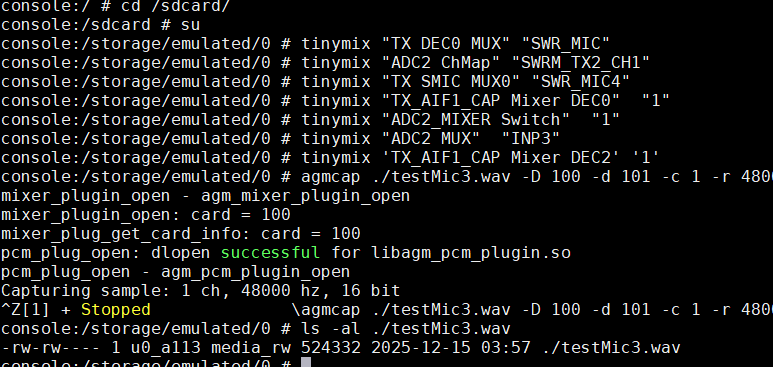
Headset microphone recording
Record on Linux
systemctl stop pulseaudio
tinymix  "TX DEC0 MUX" "SWR_MIC"
tinymix  "TX SMIC MUX0" "SWR_MIC5"
tinymix  "DEC0_BCS Switch" "1"
tinymix  "TX_AIF1_CAP Mixer DEC0" "1"
tinymix  "ADC2 ChMap" "SWRM_TX2_CH2"
tinymix  "MBHC ChMap" "SWRM_TX3_CH3"
tinymix  "ADC2_MIXER Switch" "1"
tinymix  "ADC2 MUX" "INP2"
tinymix  "BCS Channel" "CH10"
agmcap /data/rec2.wav -D 100 -d 101 -c 1 -r 48000 -i "CODEC_DMA-LPAIF_RXTX-TX-3"
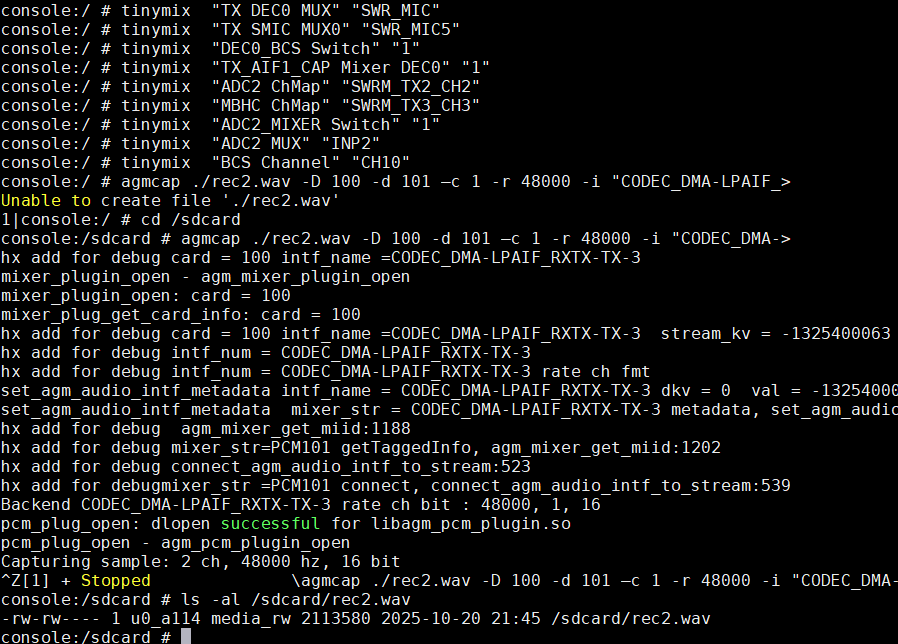
Record on Android
tinymix  "TX DEC0 MUX" "SWR_MIC"
tinymix  "TX SMIC MUX0" "SWR_MIC5"
tinymix  "DEC0_BCS Switch" "1"
tinymix  "TX_AIF1_CAP Mixer DEC0" "1"
tinymix  "ADC2 ChMap" "SWRM_TX2_CH2"
tinymix  "MBHC ChMap" "SWRM_TX3_CH3"
tinymix  "ADC2_MIXER Switch" "1"
tinymix  "ADC2 MUX" "INP2"
tinymix  "BCS Channel" "CH10"
agmcap ./rec2.wav -D 100 -d 101 –c 1 -r 48000 -i "CODEC_DMA-LPAIF_RXTX-TX-3"
Note: Make sure you have write permissions for the current directory during operation.
Audio playback
Since the onboard speaker is not populated, audio playback must be performed through the external headset output.
Headset playback
To play audio using a 3.5mm headset, execute the following commands:
Playback on Linux (3.5 mm headset)
systemctl stop pulseaudio
tinymix "RX_MACRO RX0 MUX" "AIF1_PB"
tinymix "RX_MACRO RX1 MUX" "AIF1_PB"
tinymix "RX INT0_1 MIX1 INP0" "RX0"
tinymix "RX INT1_1 MIX1 INP0" "RX1"
tinymix "RX INT0 DEM MUX" "CLSH_DSM_OUT"
tinymix "RX INT1 DEM MUX" "CLSH_DSM_OUT"
tinymix "RX_COMP1 Switch" "1"
tinymix "RX_COMP2 Switch" "1"
tinymix "HPHL Switch" "1"
tinymix "HPHR Switch" "1"
tinymix "HPHL_RDAC Switch" "1"
tinymix "HPHR_RDAC Switch" "1"
agmplay /data/vvdn_ring.wav -D 100 -d 100 -i CODEC_DMA-LPAIF_RXTX-RX-0 -dkv 0xA2000002
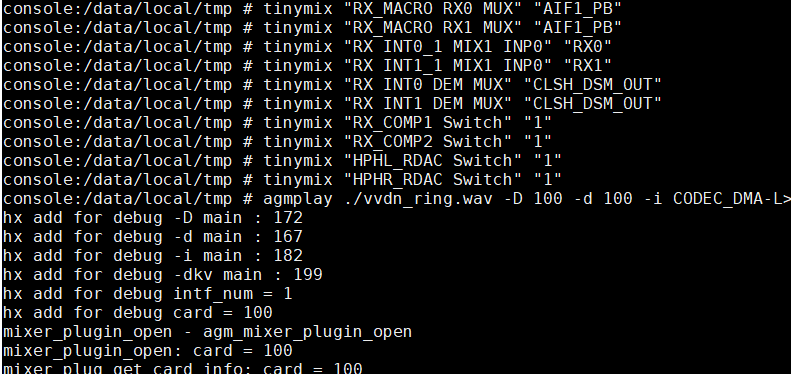
Playback on Android (3.5 mm headset)
adb root
adb shell
cd /data/local/tmp
tinymix "RX_MACRO RX0 MUX" "AIF1_PB"
tinymix "RX_MACRO RX1 MUX" "AIF1_PB"
tinymix "RX INT0_1 MIX1 INP0" "RX0"
tinymix "RX INT1_1 MIX1 INP0" "RX1"
tinymix "RX INT0 DEM MUX" "CLSH_DSM_OUT"
tinymix "RX INT1 DEM MUX" "CLSH_DSM_OUT"
tinymix "RX_COMP1 Switch" "1"
tinymix "RX_COMP2 Switch" "1"
tinymix "HPHL_RDAC Switch" "1"
tinymix "HPHR_RDAC Switch" "1"
agmplay ./vvdn_ring.wav -D 100 -d 100 -i CODEC_DMA-LPAIF_RXTX-RX-0 -dkv 0xA2000002
Troubleshooting
| Issue | Possible causes |
|---|---|
| Recording file not generated | 1. Check if setting commands are correct. 2. Check if the operating directory has read/write permissions. |
| Audio playback failed | 1. Check if the playback file exists. 2. Check if the playback command is correct, pay attention to the difference between Chinese and English symbols for "-". |