
SD card
The SD card (Secure Digital Card) is a widely used portable storage medium known for its compact size, large capacity, low power consumption, and ease of use. It is commonly found in mobile phones, cameras, embedded devices, and single-board computers for storing system files, applications, and data, making it one of the most prevalent storage solutions in modern mobile and embedded devices.
Hardware interface
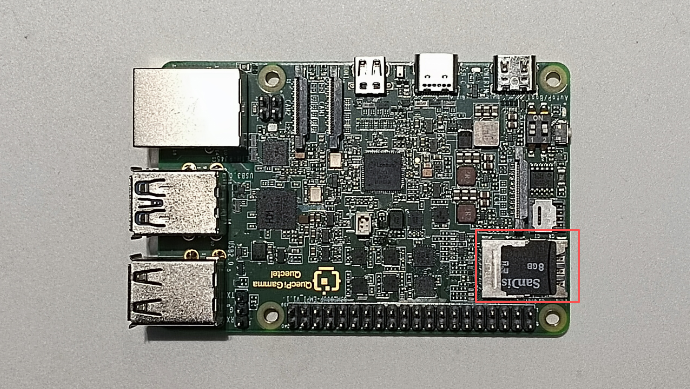
The Quectel Pi M1 features a 2-in-1 micro SD + Nano SIM card slot that supports the SD 3.0 protocol.
Note: The upper slot is for the micro SD card, and the lower slot is for the Nano SIM card.
Function usage
System recognition
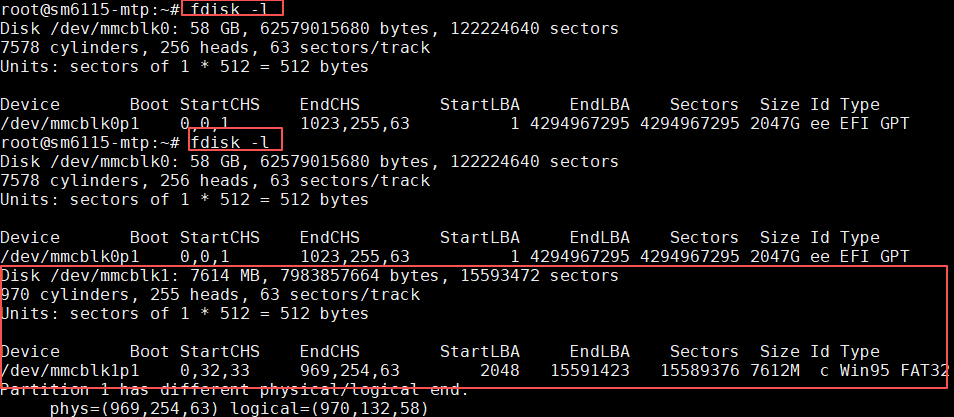
After inserting the SD card, you can use the following command to confirm whether the system recognizes the device:
fdisk -l
By comparing the output before and after insertion, you can confirm that the system has successfully recognized the SD card:
Mounting and unmounting
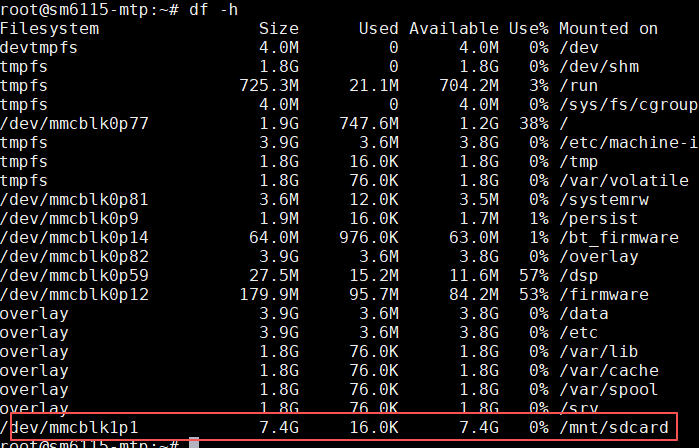
View the mount path:
df -h
As shown below, the device is automatically mounted to /mnt/sdcard:
View files in the mounted directory:
ls /mnt/sdcard
Mount to another directory:
sudo mkdir -p /media/sdcard
sudo mount /dev/mmcblk1p1 /media/sdcard
Check the mounting result:
ls /media/sdcard
Unmount after use:
sudo umount /media/sdcard
Note: Unmount the SD card before removing it to prevent data corruption.
File operations and permissions
Standard users may encounter permission issues when accessing the SD card. You can change the ownership of the mount point using the following commands:
sudo chown <username> /mnt/sdcard
sudo chmod 755 /mnt/sdcard
Replace <username> with the currently logged-in username. After modification, you can read and write files normally in the /mnt/sdcard directory.