


 English
Test Report for FGM842D Module
Test Purpose
In order to ensure the reliability of the module performance and the integrity of the functions, the performance test, function test and stress test at room temperature were carried out on the FGM842D model module. The main test contents of the test report include the basic function test of the module, Close-range throughput test for WiFi, Longest distance test for WiFi&BLE, Wall penetration test for WiFi&BLE, Current consumption test, WiFi ping test, Stress test, Compatibility test, etc.
Tested Module: FGM842D WiFi Module
Test Content
Test Content Overview
Introduction to the test scenario:
| Test Item | Test Description |
|---|---|
| Function test | Test whether the basic function of the module is normal |
| Close-range throughput test for WiFi | Test the throughput of the module WiFi as AP and STA mode respectively |
| Longest distance test for WiFi | Test the longest communication distance for WiFi |
| Longest distance test for BLE | Test the longest communication distance for BLE |
| Wall penetration test for WiFi | Test whether the module WiFi can connect and receive data after penetrating through the solid wall of the corresponding test point in AP and STA mode |
| Wall penetration test for BLE | Test whether the BLE module can connect to each other and receive data after penetrating the solid wall of the corresponding test point |
| Current consumption test | Test the current consumption value of the module in different sleep modes, the current consumption value of the module under different DTIM values, the average current consumption and peak current consumption of the module in different working scenarios |
| WiFi ping test | In AP and STA mode, the delay and packet loss statistics of PING from the module to the peer |
| Stress test | Test whether the basic functions of the module are stable during long-term operation |
| Compatibility test for WiFi | Test the compatibility of the module WiFi with different terminal devices and routers |
| Compatibility test for BLE | Test the compatibility of BLE and different terminal devices |
Function test
Function items and results
Basic function test:
| Function Item | Test Content | Test Results |
|---|---|---|
| WiFi | AP mode | PASS |
| STA mode | PASS | |
| Connect to WPA3 hotspot in STA mode | PASS | |
| AP+STA mode | PASS | |
| BLE | Server starts advertising and sends and receives data | PASS |
| Client scans, connects, sends and receives data | PASS | |
| TCP | TCP Client connects and sends and receives data | PASS |
| TCP Listener connects and sends and receives data | PASS | |
| Run multiple TCP Clients to establish multiple socket connections and each socket sends and receives data | PASS | |
| As a TCP Listener, it is connected by multiple Clients and each socket sends and receives data | PASS | |
| UDP | UDP Client connects and sends and receives data | PASS |
| UDP Service connects and sends and receives data | PASS | |
| Run multiple UDP Clients to establish multiple socket connections and each socket sends and receives data | PASS | |
| MQTT(S) | As an MQTT client, it can establish a session connection with the server, subscribe to topics, and send and receive data normally | PASS |
| MQTTS no authentication/one-way authentication/two-way authentication to connect to the server, publish and receive messages through the MQTT server | PASS | |
| SSL | SSL configuration without authentication/one-way authentication/two-way authentication to connect to the server and send and receive data | PASS |
| HTTP(S) | HTTP(s) GET/PUT/POST request sending, reading response data | PASS |
| HTTPS no authentication/one-way authentication/two-way authentication, send GET request, get data | PASS | |
| Upgrade | The burning tool upgrades normally, the power is cut off during the upgrade process, the upgrade continues normally. the WiFi and BLE functions are normal after the upgrade. | PASS |
| OTA upgrade is normal. Cut off the power or disconnect from the network during the upgrade process, and continue to upgrade normally. After the upgrade is successful, the function is normal. | PASS | |
| DTIM | The WiFi DTIM Function | PASS |
Close-range throughput test for WiFi
Close-range throughput test for single AP
Test the scenario
Test environment: shielded room
Temperature: room temperature
Test tool: iperf, Honor 70 Test Mobile
Test distance: within 1m between the module and auxiliary test equipment
Test scenario:
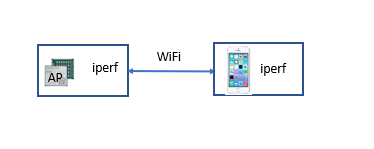
To test the throughput in AP mode, the module works in AP mode, use the test mobile phone to connect the AP, the module and the mobile phone run iperf to test upstream and downstream throughput, and the throughput data is the average value of iperf streaming for 1 minute
TCP_UL is the uplink rate, at this time the module run iperf -c, the mobile phone run iperf -s;
TCP_DL is the downstream rate, the module run iperf -s and the mobile phone run iperf -c
Test data
Single AP throughput data:
| Mode | Band | Protocol bandwidth | UL&DL | Thread | Iperf rate (Mbps) | Packet loss rate (%) | Latency (ms) |
|---|---|---|---|---|---|---|---|
| AP | 2.4G | n-20 | TCP_UL | 1 | 10.70 | / | / |
| TCP_DL | 1 | 9.87 | / | / |
Note: The test data in the above table is applicable to OC: FGM842DAAMD
Close-range throughput test for single STA
Test the scenario
Test environment: shielded room
Temperature: room temperature
Test tool: iperf, HUAWEI AX3 Pro router, PC
Test distance: within 1m between the module and auxiliary test equipment
Test scenario:
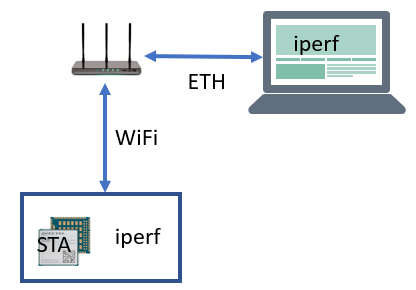
To test the throughput in STA mode, The module works in STA mode, the router turns on the hotspot, the PC is connected to the router through the network cable, and the module is connected to the router WiFi hotspots, PC and the module run iperf to test upstream and downstream throughput. and the throughput data is the average value of iperf streaming for 1 minute.
TCP_UL is the uplink rate, at this time the module run iperf -c, PC run iperf -s;
TCP_DL is the downstream rate, the module run iperf -s and PC run iperf -c
Test data
Single STA throughput data:
| Mode | Band | Protocol bandwidth | UL&DL | Thread | Iperf rate (Mbps) | Packet loss rate (%) | Latency (ms) |
|---|---|---|---|---|---|---|---|
| STA | 2.4G | n-20 | TCP_UL | 1 | 11.50 | / | / |
| TCP_DL | 1 | 10.50 | / | / |
Note: The test data in the above table is applicable to OC: FGM842DAAMD
Longest distance test for WiFi
Test the scenario
Test environment: Outdoor open road
Temperature: room temperature
Test Tool: iperf, Honor 70 Test Mobile, HUAWEI AX3 Pro Router, PC
Test scenario:
AP mode:
Tracking distance: The module is placed in a fixed place at a height of 1m from the ground, the module works in AP mode, the mobile phone is connected to the AP, run iperf to stream between the module and the mobile phone, and keep the mobile phone away from the module slowly until the data rate of multiple groups is less than 100Kbps or the connection is disconnected. The distance at this time is the farthest tracking distance.
Capture distance: Slowly move the mobile phone closer to the module from a long distance until it can be scanned and connected to the AP of the module. When the iperf flow rate between the module and the mobile phone is stable and greater than 100Kbps, the distance at this time is the longest capture distance.
STA mode:
Tracking distance: The router is placed in a fixed place at a height of 1m from the ground, the router turns on the hotspot, the module works in STA mode to connect to the router hotspot, the PC connects to the router through a network cable, and the PC and the module run iperf to stream, and the module slowly moves away from the router until multiple groups appear. If the rate data is less than 100Kbp or the connection is disconnected, the distance at this time is the longest tracking distance.
Capture distance: Slowly move the module closer to the router from a long distance until it can scan and connect to the hotspot of the router. When the iperf flow rate between the module and the PC is stable and greater than 100Kbps, the distance at this time is the longest capture distance.
Test data
Longest distance data for WiFi in External Antenna:
| Mode | Band | Protocol bandwidth | The longest Tracking distance (M) | The longest Tracking RSSI (dBm) | The longest Capture distance (M) | The longest Capture RSSI (dBm) |
|---|---|---|---|---|---|---|
| AP | n-20 | 2.4G | 265 | -71 | 265 | -71 |
| STA | n-40 | 2.4G | 270 | -67 | 270 | -48 |
Note: The test data in the above table is applicable to OC: FGM842DAA0X
Longest distance test for BLE
Test the scenario
Test environment: Outdoor open road
Temperature: room temperature
Test Tool: Nrf Connect APP, Honor 70 Test Mobile, PC
Test scenario:
BLE longest distance:
Server mode:
Tracking distance: The module is placed at a fixed location at a height of 1m from the ground. The module starts advertising, and the test mobile phone acts as a client to scan and connect to the server. The module continues to send data to the mobile phone. The mobile phone gradually moves away from the module and the farthest distance without disconnection is the farthest tracking distance.
Capture distance: The test mobile phone gradually approaches the module from a long distance until the test mobile phone can scan and connect to the server. The test mobile phone continues to send data to the module, and the module can receive normally. At this time, it is the longest capture distance.
Two modules:
Tracking distance: A module is placed at a fixed place at a height of 1m from the ground, A module starts advertising, and B module acts as a client to scan and connect to the server. A module continues to send data to B module, and B module gradually moves away from A module and the farthest distance without disconnection is the farthest tracking distance.
Capture distance: A module is placed at a fixed location at a height of 1m from the ground, A module turns on the Sever, and B module gradually approaches A module from a long distance until B module can scan and connect to the server, and A module continues to send data To the B module, the B module end can receive normally, at this time, it is the farthest capture distance.
Test data
Longest distance data for BLE in External Antenna:
| Bluetooth | Mode | The longest Tracking distance (M) | The longest Tracking RSSI (dBm) | The longest Capture distance (M) | The longest Capture RSSI (dBm) |
|---|---|---|---|---|---|
| BLE | Server | 192 | / | 145 | -80 |
| two modules | 271 | / | 254 | -73 |
Note: The test data in the above table is applicable to OC: FGM842DAA0X
Wall Penetration test for WiFi
Test the scenario
Temperature: room temperature
Test tool: iperf, Honor 70 Test Mobile, HUAWEI AX3 Pro Router, PC
Test scenario:
AP through the wall: The module works in AP mode, and uses the test mobile phone to try to connect on the other side of the wall. If the connection is successful, the module and the test phone run iperf to test the uplink and downlink throughput.
STA through the wall: use the router to turn on the hotspot on different test points as the picture below, the module tries to connect, if the connection is successful, the PC is connected to the router through a network cable, and the PC and the module run iperf to test the uplink and downlink throughput.
TCP_UL is the uplink rate, at this time PC run iperf -c, mobile phone run iperf -s;
TCP_DL is the downlink rate, test the mobile phone run iperf -c, PC run iperf -s.
Test environment: office
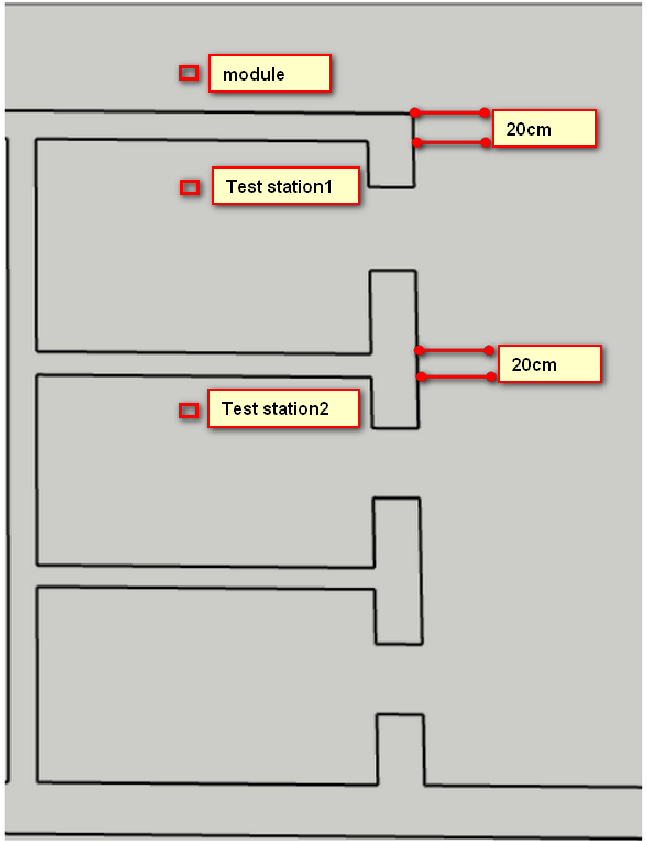
The top view of the test environment is shown in the figure below:
- Wall: concrete load-bearing wall, thickness 0.2m
- Height: Height of auxiliary measurement equipment and modules from the ground: 1m
- Test station 1: The linear distance between the test point and the module: 0.5m
- Test station 2: The linear distance between the test point and the module: 2.9m
Test data
AP mode wall penetration data:
| Mode | Band | Protocol bandwidth | Test station | UL&DL | Iperf rate (Kbit/sec) | RSSI (dBm) |
|---|---|---|---|---|---|---|
| AP | 2.4G | n-20 | Test station 1 | TCP_UL | 8.51 | -42 |
| TCP_DL | 6.13 | -42 | ||||
| Test station 2 | TCP_UL | 7.79 | -48 | |||
| TCP_DL | 2.53 | -48 |
Note: The test data in the above table is applicable to OC: FGM842DAA0X
STA mode wall penetration data:
| Mode | Band | Protocol bandwidth | Test station | UL&DL | Iperf rate (Kbit/sec) | RSSI (dBm) |
|---|---|---|---|---|---|---|
| STA | 2.4G | n-20 | Test station 1 | TCP_UL | 9.50 | -30 |
| TCP_DL | 10.2 | -30 | ||||
| Test station 2 | TCP_UL | 8.77 | -39 | |||
| TCP_DL | 5.75 | -39 |
Note: The test data in the above table is applicable to OC: FGM842DAA0X
Wall Penetration test for BLE
Test the scenario
Temperature: room temperature
Test tool: PC, nRF Connect APP
Test scenario:
One tester holds the BLE SERVER terminal device at the fixed point on the 5th floor, and the other tester holds the BLE CLIENT terminal at the test point on the 5th floor. Start the SERVER terminal first, connect the module to the test computer, and BLE SERVER starts advertising, then start the CLIENT, connect the module to the test computer, start scanning and initiate a connection.
After the connection is established, the tester holding the SERVER device performs a packet sending test, sending 100 data packets at a time, each data packet is 20 bytes, and the tester holding the CLIENT end observes the packet receiving situation and records the test data; then the tester with the CLIENT-side device conducts a packet sending test, sending 100 data packets at a time, and each data packet is 20 bytes. The tester with the SERVER-side device observes the packet reception and records the test data.
For the next test, you need to restart the client module first, then restart the server module, and repeat the test at least 5 times.
BLE SERVER and CLIENT are both test modules
Test environment: office
The top view of the test environment is shown in the figure below:
- Wall: concrete load-bearing wall, thickness 0.2m
- Height: Height of auxiliary measurement equipment and modules from the ground: 1m
- Test station 1: The linear distance between the test point and the module: 0.5m
- Test station 2: The linear distance between the test point and the module: 2.9m
Test data
BLE wall penetration data:
| Test module | Send data (packet) | Receive data (packet) | Receiving rate (%) | RSSI value (dBm) | Test point |
|---|---|---|---|---|---|
| FGM842D | 100 | 100 | 100 | -55 | Test station1 |
| 100 | 100 | 100 | -66 | Test station 2 |
Note: The test data in the above table is applicable to OC: FGM842DAA0X
Current consumption test
Low Power Mode test
Test the scenario
Test environment: Office
Temperature: normal temperature
Test tool: Power Monitor, Serial Port Tools, FGM842D
Test scenario:
Use Power Monitor to connect to VBAT and GND pins respectively, and enable power supply. Shutdown power consumption refers to the power consumption when the module is shutdown. the module sends instructions through the serial port tools to enter Deep sleep and Light sleep modes respectively, and counts the average current consumption value.
Test data
Low Power Mode Data:
| Mode | Voltage (V) | Current consumption (uA) |
|---|---|---|
| Deep sleep | 3.3 | 16.27 |
| Light sleep | 3.3 | 77.7 |
DTIM test
Test the scenario
Test environment: Office
Temperature: normal temperature
Test tool: Power Monitor, HUAWEI AX3 Pro router, FGM842D
Test scenario:
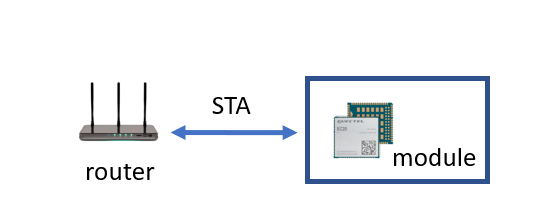
Use Power Monitor to connect to VBAT and GND pins respectively, and enable power supply. The module turns on the STA to connect to the hotspot opened by the router, sends commands through the serial port tool to set different DTIM values, enters the Light sleep mode, and counts the average current consumption value.
Test data
DTIM current consumption test data:
| DTIM value | Voltage (V) | Light sleep (mA) |
|---|---|---|
| DTIM1 | 3.3 | 6.02 |
| DTIM3 | 3.3 | 2.99 |
| DTIM6 | 3.3 | 2.72 |
| DTIM10 | 3.3 | 2.45 |
| DTIM30 | 3.3 | 1.88 |
Current Consumption Test in Working Mode
Test the scenario
Test environment: Office
Temperature: normal temperature
Test tool: Power Monitor, HUAWEI AX3 Pro router, FGM842D, HONOR 70 mobile phone
Test scenario:
Test the power consumption of the module in different working scenarios,
and count the average current consumption and the maximum instantaneous
current consumption
Test data
Current consumption data of different scenes:
| Scenarios | 3.3V Current consumption (mA) | 3.3V Peak current consumption (mA) |
|---|---|---|
| Module Idle state, Neither Wi-Fi nor BLE does any operation | 6.061 | 23.430 |
| The module works in AP mode and no device is connected to the AP | 43.635 | 258.203 |
| The module works in STA scan mode and continuously scans surrounding WiFi hotspots | 37.862 | 263.639 |
| The module works in AP mode, no device is connected to the AP, and the STA scan mode is scanning WiFi hotspots | 45.449 | 266.421 |
| The module works in STA mode and stays connected to the router hotspot (hotspot signal value > -50dB) | 36.272 | 253.587 |
| The module works in AP mode and a terminal device (STA) is connected to the AP | 43.818 | 259.392 |
| The module works in AP mode, and a terminal device (STA) is connected to the AP. An iperf flow test (TCP_UL) is performed between the module and the terminal device | 109.527 | 266.920 |
| The module works in STA mode, connected to a 2.4G router hotspot, and an iperf flow test (TCP_UL) is performed between the module and the PC (connected to the router via an Ethernet cable) | 102.006 | 266.048 |
| The module works in BLE Server mode and starts advertising (the advertising data length is 25Bytes), and the advertising interval is set to 50ms | 8.950 | 121.570 |
| The module works in BLE Server mode and starts advertising (the advertising data length is 25Bytes), and the advertising interval is set to 100ms | 7.579 | 121.570 |
| The module works in BLE Server mode and starts advertising (the advertising data length is 25Bytes), and the advertising interval is set to 200ms | 6.842 | 120.817 |
| The module works in BLE Server mode and starts advertising (the advertising data length is 25Bytes), and the advertising interval is set to 500ms | 6.379 | 120.819 |
| The module works in BLE Server mode and starts advertising (the advertising data length is 25Bytes), and the advertising interval is set to 1000ms | 6.221 | 120.191 |
| The module works in BLE Server mode and starts advertising (the advertising data length is 25Bytes), and the advertising interval is set to 2000ms | 6.137 | 121.192 |
| The module works in BLE Server mode and starts advertising, and after the peer device establishes a connection with the module, the server initiates a connection parameter update, the connection interval is set to 10ms, latency=0, timeout=5000ms | 10.276 | 88.691 |
| The module works in BLE Server mode and starts advertising, and after the peer device establishes a connection with the module, the server initiates a connection parameter update, the connection interval is set to 50ms, latency=0, timeout=5000ms | 8.164 | 88.437 |
| The module works in BLE Server mode and starts advertising, and after the peer device establishes a connection with the module, the server initiates a connection parameter update, the connection interval is set to 100ms, latency=0, timeout=5000ms | 6.239 | 88.310 |
| The module works in AP mode, no terminal device is connected to the AP, and the module starts BLE advertising with the default advertising interval | 44.462 | 259.140 |
| The module works in STA mode, connected to the router hotspot, and the module starts BLE advertising with the default advertising interval | 36.913 | 254.343 |
WiFi Ping test
Test the scenario
Test environment: workstation
Temperature: room temperature
Test tool: FGM842D*2
Test scenario:
AP mode: the module A works in AP mode, the module B connects to the AP, and PING the module B from the module A to collect data.
STA mode: the module A works in AP mode, the module B connects to the AP, and PING the module A from the module B to collect data.
Test data
AP mode PING delay data:
| Mode | Band | Ping count | Protocol bandwidth | Average delay (ms) | Maximum delay (ms) | Minimum delay (ms) | Packet loss rate (%) |
|---|---|---|---|---|---|---|---|
| AP | 2.4G | 56101 | n-20 | 25.57 | 256 | 0 | 0.06% |
STA mode PING delay data:
| Mode | Band | Ping count | Protocol bandwidth | Average delay (ms) | Maximum delay (ms) | Minimum delay (ms) | Packet loss rate (%) |
|---|---|---|---|---|---|---|---|
| STA | 2.4G | 56101 | n-20 | 25.02 | 248 | 0 | 0.06% |
Stress Test
Stress test items and results
Stress Test and Results:
| Stress test items | Test Results |
|---|---|
| WiFi and Bluetooth function test after hardware power on/off (room temperature/low temperature/high temperature) | PASS |
| WiFi and Bluetooth function test after software power on and off (room temperature) | PASS |
| WiFi on/off stability (room temperature) | PASS |
| Iperf continuous flow stability (room temperature/low temperature/high temperature) | PASS |
| BLE continuous data transmission and reception stability (room temperature) | PASS |
| WiFi continuous scanning (room temperature) | PASS |
| BLE continuous scanning (room temperature) | PASS |
| STA/BLE Client mode maintains connection stability (room temperature) | PASS |
| MQTT continuous sending and receiving data stability (room temperature) | PASS |
| Repeated sleep and wake-up (room temperature) | PASS |
| 10W Flash read and write times (room temperature/low temperature/high temperature) | PASS |
| OTA upgrade (room temperature/low temperature/high temperature) | PASS |
Compatibility test for WiFi
Test the scenario
Test environment: office
Temperature: room temperature
Test tools: iperf, several mainstream phones, several mainstream brand routers, PC
Test scenario:
WiFi compatibility test:
AP mode: The module works in AP mode with different encryption methods, and uses different models of mobile phones to connect to the module AP. If the connection is successful, perform a ping operation from the module side.
STA mode: Use different models of routers to open different encryption methods of hotspots. After the module to connect to hotspots successfully, perform a ping operation from the module side.
Test data
AP mode compatible data:
| Test phone model | Connection test | Ping test |
|---|---|---|
| Honor 70 | PASS | PASS |
| HUAWEI nova 11 Pro | PASS | PASS |
| HUAWEI P40 | PASS | PASS |
| SAMSUNG Galaxy S22+ | PASS | PASS |
| SAMSUNG F52 | PASS | PASS |
| SAMSUNG Galaxy Z Flip3 5G | PASS | PASS |
| iPhone SE | PASS | PASS |
| iPhone 11ProMax | PASS | PASS |
| iPhone12 | PASS | PASS |
| One Plus8 | PASS | PASS |
| Oneplus Ace Pro | PASS | PASS |
| Sony XQ-BE72 | PASS | PASS |
| Xiaomi 12 Pro | PASS | PASS |
| Redmi K50 Pro | PASS | PASS |
| OPPO PHF110 | PASS | PASS |
| Huawei P60 | PASS | PASS |
STA mode compatible data:
| Router Brand | Model | Protocol | Encryption Method | Connect/Ping Network |
|---|---|---|---|---|
| HUAWEI | HUAWEI WS318N | 802.11b/g/n | WPA2-PSK | PASS |
| HUAWEI | HUAWEI WS318N | 802.11b/g/n/ax | Open | PASS |
| HUAWEI | HUAWEI WS318N | 802.11b/g/n/ax | WPA/WPA2-PSK | PASS |
| ZTE | ZTE AX5400Pro | 802.11b/g/n | WPA2-PSK | PASS |
| ZTE | ZTE AX5400Pro | 802.11b/g/n/ax | Open | PASS |
| ZTE | ZTE AX5400Pro | 802.11b/g/n/ax | WPA2-PSK | PASS |
| ZTE | ZTE AX5400Pro | 802.11b/g/n/ax | WPA/WPA2-PSK | PASS |
| ZTE | ZTE AX5400Pro | 802.11b/g/n/ax | WPA2/WPA3-PSK | PASS |
| Nighthawk | Nighthawk RAX50 | 802.11b/g/n | WPA2-PSK | PASS |
| Nighthawk | Nighthawk RAX50 | 802.11b/g/n/ax | Open | PASS |
| Nighthawk | Nighthawk RAX50 | 802.11b/g/n/ax | WPA2-PSK | PASS |
| Nighthawk | Nighthawk RAX50 | 802.11b/g/n/ax | WPA/WPA2-PSK | PASS |
| Nighthawk | Nighthawk RAX50 | 802.11b/g/n/ax | WPA2/WPA3-PSK | PASS |
| H3C | H3C Magic NX15 | 802.11b/g/n | WPA2-PSK | PASS |
| H3C | H3C Magic NX15 | 802.11b/g/n/ax | Open | PASS |
| H3C | H3C Magic NX15 | 802.11b/g/n/ax | WPA2-PSK | PASS |
| H3C | H3C Magic NX15 | 802.11b/g/n/ax | WPA/WPA2-PSK | PASS |
| H3C | H3C Magic NX15 | 802.11b/g/n/ax | WPA2/WPA3-PSK | PASS |
| Tenda | Tenda AX2 PRO | 802.11b/g/n | WPA2-PSK | PASS |
| Tenda | Tenda AX2 PRO | 802.11b/g/n/ax | Open | PASS |
| Tenda | Tenda AX2 PRO | 802.11b/g/n/ax | WPA2-PSK | PASS |
| Tenda | Tenda AX2 PRO | 802.11b/g/n/ax | WPA/WPA2-PSK | PASS |
| Tenda | Tenda AX2 PRO | 802.11b/g/n/ax | WPA2/WPA3-PSK | PASS |
| ASUS | RT-AXE7800 | 802.11b/g/n | WPA2-PSK | PASS |
| ASUS | RT-AXE7800 | 802.11b/g/n/ax | Open | PASS |
| HUAWEI | HUAWEI TC7001 | 802.11b/g/n | WPA2-PSK | PASS |
| HUAWEI | HUAWEI TC7001 | 802.11b/g/n/ax | Open | PASS |
| HUAWEI | HUAWEI TC7001 | 802.11b/g/n/ax | WPA2-PSK | PASS |
| HUAWEI | HUAWEI TC7001 | 802.11b/g/n/ax | WPA/WPA2-PSK | PASS |
| HUAWEI | HUAWEI TC7001 | 802.11b/g/n/ax | WPA2/WPA3-PSK | PASS |
| Tenda | Tenda-ac10 | 802.11b/g/n | WPA2-PSK | PASS |
| Tenda | Tenda-ac10 | 802.11b/g/n/ax | Open | PASS |
| Tenda | Tenda-ac10 | 802.11b/g/n/ax | WPA2-PSK | PASS |
| Tenda | Tenda-ac10 | 802.11b/g/n/ax | WPA/WPA2-PSK | PASS |
| Zyxel | Zyxel NBG7510 | 802.11b/g/n | WPA2-PSK | PASS |
| Zyxel | Zyxel NBG7510 | 802.11b/g/n/ax | Open | PASS |
| Zyxel | Zyxel NBG7510 | 802.11b/g/n/ax | WPA2-PSK | PASS |
| Zyxel | Zyxel NBG7510 | 802.11b/g/n/ax | WPA/WPA2-PSK | PASS |
| Zyxel | Zyxel NBG7510 | 802.11b/g/n/ax | WPA2/WPA3-PSK | PASS |
| TP-Link | TP-Link ArcherC50 | 80211b/g/n | WPA2-PSK | PASS |
| Xiaomi | Xiaomi 12 Pro mobile hotspot | None | Open | PASS |
| Xiaomi | Xiaomi 12 Pro mobile hotspot | None | WPA2-PSK | PASS |
| Xiaomi | Xiaomi 12 Pro mobile hotspot | None | WPA3-PSK | PASS |
| vivo | vivo IQOO Z5 mobile hotspot | None | Open | PASS |
| vivo | vivo IQOO Z5 mobile hotspot | None | WPA2-PSK | PASS |
| Honor | Honor 70 mobile hotspot | None | Open | PASS |
| Honor | Honor 70 mobile hotspot | None | WPA2-PSK | PASS |
| Honor | Honor 70 mobile hotspot | None | WPA3-PSK | PASS |
| Honor | Honor 70 mobile hotspot | None | WPA2/WPA3-PSK | PASS |
| HUAWEI | HUAWEI P40 mobile hotspot | None | WPA2-PSK | PASS |
| HUAWEI | HUAWEI P60 mobile hotspot | None | WPA2-PSK | PASS |
| HUAWEI | HUAWEI NOVA11 PRO mobile hotspot | None | WPA2-PSK | PASS |
| OnePlus | OnePlus ACE mobile hotspot | None | Open | PASS |
| OnePlus | OnePlus ACE mobile hotspot | None | WPA2-PSK | PASS |
| OnePlus | OnePlus ACE mobile hotspot | None | WPA3-PSK | PASS |
| OnePlus | OnePlus ACE mobile hotspot | None | WPA2/WPA3-PSK | PASS |
| OPPO | OPPO PH110 mobile hotspot | None | Open | PASS |
| OPPO | OPPO PH110 mobile hotspot | None | WPA2-PSK | PASS |
| OPPO | OPPO PH110 mobile hotspot | None | WPA3-PSK | PASS |
| OPPO | OPPO PH110 mobile hotspot | None | WPA2/WPA3-PSK | PASS |
| VIVO | VIVO X90 mobile hotspot | None | Open | PASS |
| VIVO | VIVO X90 mobile hotspot | None | WPA2-PSK | PASS |
| Sony | Sony XQBE72 mobile hotspot | None | Open | PASS |
| Sony | Sony XQBE72 mobile hotspot | None | WPA2-PSK | PASS |
| Sony | Sony XQBE72 mobile hotspot | None | WPA3-PSK | PASS |
Compatibility test for BLE
Test the scenario
Test environment: office
Temperature: room temperature
Test tools: several mainstream phones, PC, nRF Connect app
Test scenario:
BLE compatibility test:
FGM842D acts as a server, the module starts advertising, use different
models of mobile phones as clients to initiate the connection;
Different models of mobile phones use nRF Connect app to start the
server, and the module initiates the connection as a client.
BLE Character Description:
| Symbol | Meaning |
|---|---|
| Y | Pass |
| X | Phone does not support |
| N | Not tested |
| ? | Needs further testing |
| F | Fail |
| L | Fail (phone issue) |
| Dev | Device (Module) |
| Mob | Mobile (Smartphone) |
| PB | Phonebook |
| CL | Call Log (Call History) |
Test data
FGM842D BLE Compatibility Test Report:
| Brand | Device Name | Server Advertising Test | Server Connection Test | Server Communication Test | Server Disconnection Test |
|---|---|---|---|---|---|
| Honor | Honor 70 | Y | Y | Y | Y |
| Xiaomi | Xiaomi_Redmi K30SULTRA | Y | Y | Y | Y |
| HUAWEI | HUAWEI nova 11 Pro | Y | Y | Y | Y |
| Xiaomi | Xiaomi_Redmi K40 | Y | Y | Y | Y |
| HUAWEI | HUAWEI P40 | Y | Y | Y | Y |
| Xiaomi | Xiaomi_Redmi 9A | Y | Y | Y | Y |
| Samsung | Samsung Galaxy S22+ | Y | Y | Y | Y |
| Samsung | Samsung F52 | Y | Y | Y | Y |
| iPhone | iPhone SE | Y | Y | Y | Y |
| iPhone | iPhone 11ProMax | Y | Y | Y | Y |
| iPhone | iPhone12 | Y | Y | Y | Y |
| One Plus | One Plus8 | Y | Y | Y | Y |
| Oneplus | Oneplus Ace Pro | Y | Y | Y | Y |
| Sony | Sony XQ-BE72 | Y | Y | Y | Y |
| Xiaomi | Xiaomi 12 Pro | Y | Y | Y | Y |
| Redmi | Redmi K50 Pro | Y | Y | Y | Y |
| OPPO | OPPO PHF110 | Y | Y | Y | Y |
| HUAWEI | HUAWEI P60 | Y | Y | Y | Y |
| Samsung | Galaxy Z Flip3 5G | Y | Y | Y | Y |