


 English
General API Development Guide
Introduction
Quectel FCM242D and FGM842D series modules support QuecOpen® solution. QuecOpen® is an embedded development platform based on RTOS system. It is intended to simplify the design and development of IoT applications. For more information on QuecOpen®, see Quick_Start_Guide.
This document is applicable to QuecOpen® solution based on SDK build environment. This document provides an overview of the flash API, SPI flash API, timer API, watchdog API and low power mode API provided in the SDK of Quectel FCM242D and FGM842D series modules, and the development procedures in QuecOpen® solution.
Flash
Flash API
Header File
ql_flash.h, the header file of flash API, is in the ql_components/api directory. Unless otherwise specified, all header files mentioned in this document are in this directory.
API Overview
| Function | Description |
|---|---|
ql_flash_security() |
Sets flash protection type. |
ql_flash_write_bytes() |
Writes data to flash. |
ql_flash_read_bytes() |
Reads data from flash. |
ql_flash_erase() |
Erases data from flash. |
ql_flash_partition_erase() |
Erases data from the specified partition in flash. |
ql_flash_partition_write() |
Writes data to the specified partition in flash. |
ql_flash_partition_read() |
Reads data from the specified partition in flash. |
ql_flash_partition_get_info() |
Gets the information of the current flash partition. |
API Description
ql_flash_security
This function sets flash protection type. Flash protection needs to be enabled before writing or deleting data.
Prototype::
ql_flash_errcode_e ql_flash_security(ql_flash_protect_type_e type)
Parameter::
type: [In] Flash protection type. See ql_flash_protect_type_e for details.
Return Value::
See ql_flash_errcode_e for result codes.
ql_flash_protect_type_e
The enumeration of flash protection types:
typedef enum {
  QL_FLASH_PROTECT_NONE = 0,
  QL_FLASH_PROTECT_ALL,
  QL_FLASH_PROTECT_HALF,
  QL_FLASH_UNPROTECT_LAST_BLOCK,
} ql_flash_protect_type_e;
| Member | Description |
|---|---|
| QL_FLASH_PROTECT_NONE | No protection |
| QL_FLASH_PROTECT_ALL | Protect the entire flash |
| QL_FLASH_PROTECT_HALF | Protect half of the flash |
| QL_FLASH_UNPROTECT_LAST_BLOCK | Protect flash other than the last block |
ql_flash_errcode_e
The enumeration of result codes:
typedef enum {
  QL_FLASH_SUCCESS = 0,
  QL_FLASH_EXECUTE_ERR,
  QL_FLASH_PARAM_ERROR,
} ql_flash_errcode_e;
| Member | Description |
|---|---|
| QL_FLASH_SUCCESS | Successful execution |
| QL_FLASH_EXECUTE_ERR | Failed execution |
| QL_FLASH_PARAM_ERROR | Invalid parameter |
ql_flash_write_bytes
This function writes data to flash.
Prototype::
ql_flash_errcode_e ql_flash_write_bytes(const uint8 *data, uint32 addr, uint32 size)
Parameter::
data: [In] Data to be written.addr: [In] Address where data is to be written.size: [In] Length of data to be written. Unit: byte.
Return Value::
See ql_flash_errcode_e for result codes.
ql_flash_read_bytes
This function reads data from flash.
Prototype::
ql_flash_errcode_e ql_flash_read_bytes(uint8 *data, uint32 addr, uint32 size)
Parameter::
data: [Out] Buffer for storing read data.addr: [In] Address from which data is to be read.size: [In] Length of data to be read. Unit: byte.
Return Value::
See ql_flash_errcode_e for result codes.
ql_flash_erase
This function erases data from flash. At least one sector (4 KB) of data is erased each time, and the size of data erased each time is an integer multiple of the sector size.
Prototype::
ql_flash_errcode_e ql_flash_erase(uint32 addr, uint32 size)
Parameter::
addr: [In] Address of data to be erased. The address length must be an integer multiple of the sector size.size: [In] Length of data to be erased. It is an integer multiple of 4096. Unit: byte.
Return Value::
See ql_flash_errcode_e for result codes.
ql_flash_partition_erase
This function erases data from the specified partition in flash.
Prototype::
ql_flash_errcode_e ql_flash_partition_erase(ql_partition_e inPartition, uint32 off_set, uint32 size)
Parameter::
inPartition: [In] Partition where the data is to be erased. See *Chapter 2.1.3.5.1* for details.off_set: [In] The starting offset address of the data to be erased in the partition.size: [In] Length of data to be erased. Unit: byte.
Return Value::
See ql_flash_errcode_e for result codes.
ql_partition_e
The enumeration of flash partitions:
typedef enum {
  QL_PARTITION_BOOTLOADER = 0,
  QL_PARTITION_APPLICATION,
  QL_PARTITION_OTA,
  QL_PARTITION_RF_FIRMWARE,
  QL_PARTITION_NET_PARAM,
  QL_PARTITION_FAST_CONNECT,
  QL_PARTITION_SN_CONFIG,
  #ifdef QL_CSDK_SUPPORT
    #if (QL_CSDK_MODE == 2)
        QL_PARTITION_CUSTOM_APP,
        QL_PARTITION_FS,
    #else
      QL_PARTITION_FS,
      QL_PARTITION_EASY_FLASH,
      QL_PARTITION_BLE_BONDING_FLASH,
    #endif
  #endif
  QL_PARTITION_USR_RESERVE,
  QL_PARTITION_MAX,
} ql_partition_e;
| Member | Description |
|---|---|
| QL_PARTITION_BOOTLOADER | Bootloader partition |
| QL_PARTITION_APPLICATION | App partition |
| QL_PARTITION_OTA | OTA partition |
| QL_PARTITION_RF_FIRMWARE | RF partition |
| QL_PARTITION_NET_PARAM | Network partition |
| QL_PARTITION_FAST_CONNECT | Wi-Fi quick connect information partition |
| QL_PARTITION_SN_CONFIG | SN storage partition |
| QL_PARTITION_CUSTOM_APP | User App partition |
| QL_PARTITION_FS | File system partition |
| QL_PARTITION_EASY_FLASH | Easy Flash partition |
| QL_PARTITION_BLE_BONDING_FLASH | BLE partition |
| QL_PARTITION_USR_RESERVE | User configuration reserved partition |
| QL_PARTITION_MAX | Flash partition number |
ql_flash_partition_write
This function writes data to the specified partition in flash.
Prototype:
ql_flash_errcode_e ql_flash_partition_write(ql_partition_e inPartition, volatile uint32 off_set, uint8 *inBuffer, uint32 inBufferLength)
Parameter:
inPartition: [In] Partition where the data is to be written. See operation process for details.off_set: [In] Offset within the partition to which data is to be written.inBuffer: [In] Buffer to store the data to be written.inBufferLength: [In] Length of data to be written. Unit: byte.
Return Value:
See ql_flash_errcode_e for result codes.
ql_flash_partition_read
This function reads data from the specified partition in flash.
Prototype:
ql_flash_errcode_e ql_flash_partition_read(ql_partition_e inPartition, volatile uint32 off_set, uint8 *outBuffer, uint32 inBufferLength)
Parameter:
inPartition: [In] Partition where the data is to be read. See ql_partition_e for details.off_set: [In] Offset within the partition from which data is to be read.outBuffer: [Out] Buffer to store the read data.inBufferLength: [In] Length of data to be read. Unit: byte.
Return Value:
See ql_flash_errcode_e for result codes.
ql_flash_partition_get_info
This function gets the information of the current flash partition.
Prototype:
ql_logic_partition_info_t *ql_flash_partition_get_info(ql_partition_e partition)
Parameter:
partition: [In] Partition for which detailed information is to be obtained. See ql_partition_e for details.
Return Value:
See ql_logic_partition_info_t for partition information.
ql_logic_partition_info_t
The structure of flash partition information:
typedef struct {
  ql_flash_type_e partition_owner;
  const char *partition_description;
  uint32_t partition_start_addr;
  uint32_t partition_length;
  uint32_t partition_options;
} ql_logic_partition_info_t;
| Type | Parameter | Description |
|---|---|---|
ql_flash_type_e |
partition_owner | Flash type. See ql_flash_type_e for details. |
| const char | partition_description | Flash description |
| uint32_t | partition_start_addr | Partition start address |
| uint32_t | partition_length | Partition length. Unit: byte |
| uint32_t | partition_options | Partition option |
ql_flash_type_e
The enumeration of flash types:
typedef enum {
  QL_FLASH_EMBEDDED = 0,
  QL_FLASH_SPI,
  QL_FLASH_MAX,
  QL_FLASH_NONE
} ql_flash_type_e;
| Member | Description |
|---|---|
| QL_FLASH_EMBEDDED | Embedded flash |
| QL_FLASH_SPI | SPI-connected flash |
| QL_FLASH_NONE | No flash |
| QL_FLASH_MAX | Number of flash |
Development Procedure
This chapter describes how to use the flash API in an application and how to debug basic features.
Operation Process
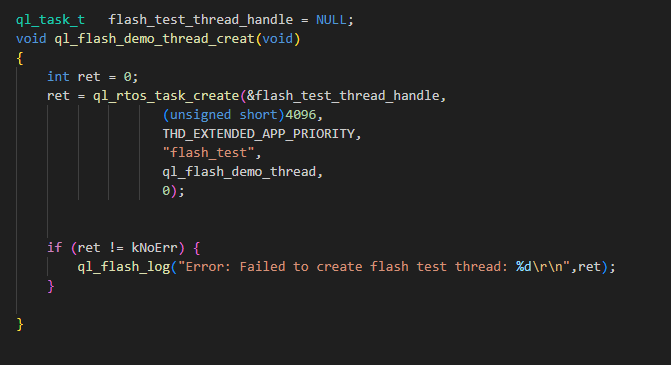
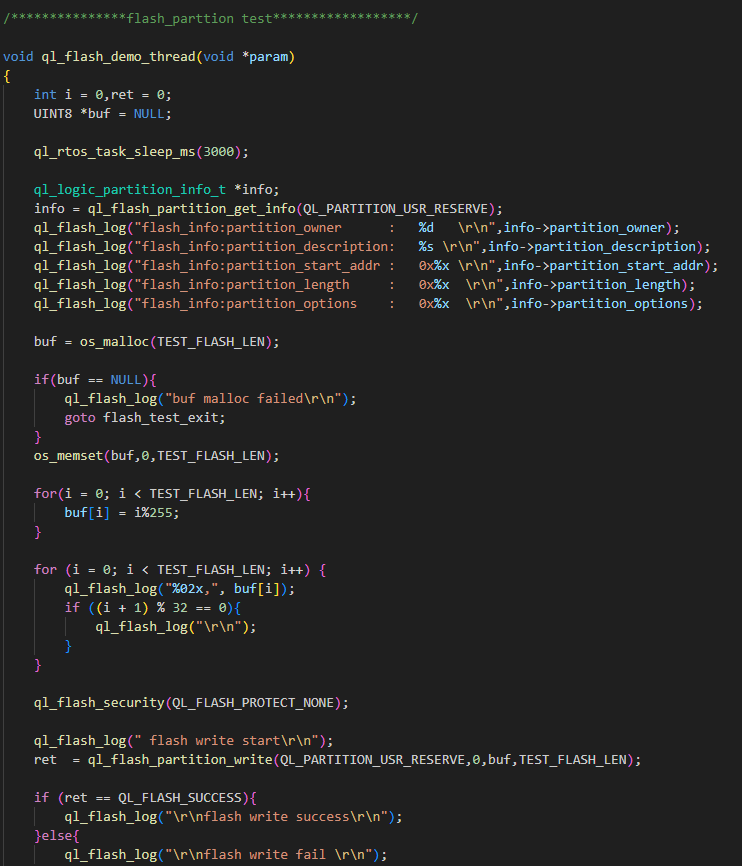
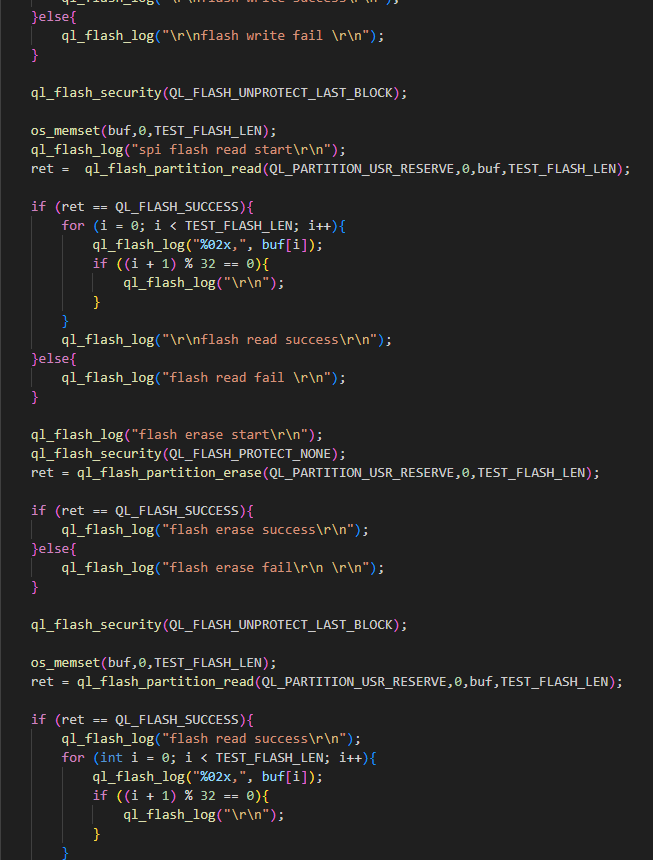
The example of how to operate flash is provided in the SDK of the module. The demo is in ql_flash_demo.c under the ql_application/example/flash_demo/ directory. The description of related functions is as follows:
Enable the CFG_ENABLE_QUECTEL_FLASH macro to run the demo, and ql_flash_demo_thread_creat() will be automatically called to create a test task.
ql_flash_demo_thread_creat(): This function creates a flash task, and needs to be called to run the demo.ql_flash_demo_thread(): Task execution function, which writes data to flash, reads and erases data from flash.
Function Debugging
To debug the flash function, use an evaluation board (e.g., FCM242D-TE-B) with the installed module and follow the following steps:
- Run the flash demo described in Operation Process.
- Recompile the firmware version, and flash it to the module.
- Reboot the module.
- Set the baud rate to 921600 bps and open UART 2 port to get the log information.
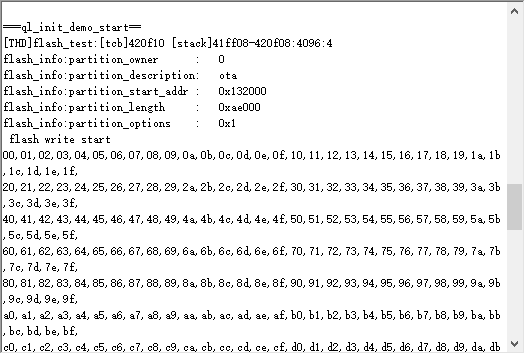
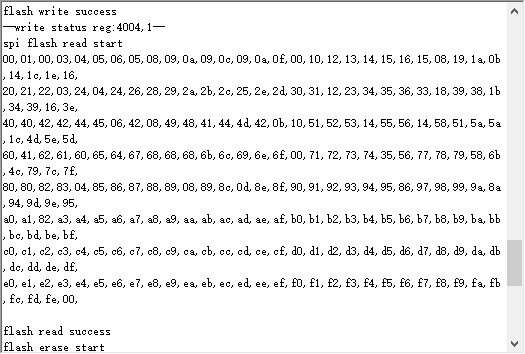
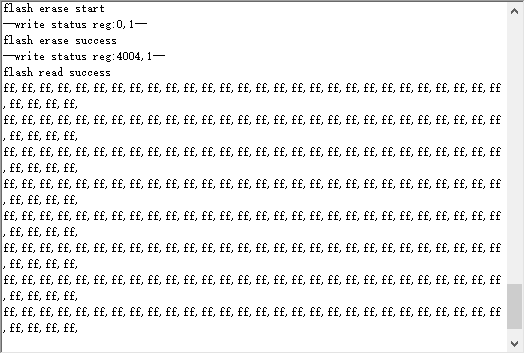
The log data in figures above show that writing data to flash, reading data from flash, and erasing data from flash were successful.
SPI Flash
SPI Flash API
Header File
ql_spi_flash.h, the header file of SPI flash API, is in the ql_components/api/ directory. Unless otherwise specified, all header files mentioned in this document are in this directory.
API Overview
| Function | Description |
|---|---|
ql_spi_flash_get_info() |
Gets flash information. |
ql_spi_flash_enable() |
Enables or disables flash. |
ql_spi_flash_read() |
Reads data in flash directly without initializing SPI. |
ql_spi_flash_write() |
Writes data to flash directly without initializing SPI. |
ql_spi_flash_erase_chip() |
Erases data from flash. |
API Description
ql_spi_flash_get_info
This function gets flash information.
Prototype:
ql_spi_flash_errcode_e ql_spi_flash_get_info(ql_spi_flash_info_t *flash_info)
Parameter:
flash_info: [Out] Flash information. See ql_spi_flash_info_t for details.
Return Value:
See ql_spi_flash_errcode_e for result codes.
ql_spi_flash_info_t
The structure of SPI flash information:
typedef struct _ql_spi_flash_info_t {
  char *type_name;
  enum_flash_driver_e driver_type;
  uint32_t id;
  uint32_t page_size;
  uint32_t sector_size;
  uint32_t block_size;
  uint32_t capacity;
} ql_spi_flash_info_t;
| Type | Parameter | Description |
|---|---|---|
| char | type_name | Flash type |
enum_flash_driver_e |
driver_type | Flash communication method. See enum_flash_driver_e |
| uint32_t | id | Flash ID |
| uint32_t | page_size | Page size |
| uint32_t | sector_size | Sector size |
| uint32_t | block_size | Block size |
| uint32_t | capacity | Capacity |
ql_spi_flash_errcode_e
The enumeration of result codes:
typedef enum {
  QL_SPI_FLASH_SUCCESS = 0,
  QL_SPI_FLASH_EXECUTE_ERR,
  QL_SPI_FLASH_PARAM_ERROR,
} ql_spi_flash_errcode_e;
| Member | Description |
|---|---|
| QL_SPI_FLASH_SUCCESS | Successful execution |
| QL_SPI_FLASH_EXECUTE_ERR | Failed execution |
| QL_SPI_FLASH_PARAM_ERROR | Invalid parameter |
enum_flash_driver_e
The enumeration of flash communication methods:
typedef enum_flash_driver_e {
  DRIVER_SPI = 0,
  DRIVER_QSPI,
} ql_spi_flash_driver_e;
| Member | Description |
|---|---|
| DRIVER_SPI | SPI communication |
| DRIVER_QSPI | QSPI communication |
ql_spi_flash_enable
This function enables or disables flash. To avoid misoperation, enable Flash with this function before operating Flash, and disable it after using.
Prototype:
ql_spi_flash_errcode_e ql_spi_flash_enable(bool status)
Parameter:
status: [In] Enable or disable flash.
1Disable
2Enable
Return Value:
See ql_spi_flash_errcode_e for result codes.
ql_spi_flash_read
This function reads data in flash directly without initializing SPI.
Prototype:
ql_spi_flash_errcode_e ql_spi_flash_read(uint32_t addr, uint8_t *buf, uint32_t len)
Parameter:
addr: [In] Address from which data is to be read.buf: [Out] Buffer to store the data read from flash.len: [In] Length of data to be read. Unit: byte.
Return Value:
See ql_spi_flash_errcode_e for result codes.
ql_spi_flash_write
This function writes data to flash directly without initializing SPI.
Prototype:
ql_spi_flash_errcode_e ql_spi_flash_write(uint32_t addr, const uint8_t *buf, uint32_t len)
Parameter:
addr: [In] Address where data is to be written.buf: [In] Buffer to store the data to be written.len: [In] Length of data to be written. Unit: byte.
Return Value:
See ql_spi_flash_errcode_e for result codes.
ql_spi_flash_erase_chip
This function erases data from flash.
Prototype:
ql_spi_flash_errcode_e ql_spi_flash_erase(uint32_t addr, ql_spi_flash_erase_e type)
Parameter:
addr: [In] Address of data to be erased.type: [In] Erasing type of flash. See ql_spi_flash_erase_e for details.
Return Value:
See ql_spi_flash_errcode_e for result codes.
ql_spi_flash_erase_e
The enumeration of flash erasing types:
typedef enum {
  ERASE_ALL = 0,
  ERASE_SECTOR,
  ERASE_BLOCK,
} ql_spi_flash_erase_e;
| Member | Description |
|---|---|
| ERASE_ALL | Erase the entire flash |
| ERASE_SECTOR | Erase the specified sector |
| ERASE_BLOCK | Erase the specified block |
Development Procedure
This chapter describes how to use the SPI flash API in an application and how to debug basic features.
Operation Process
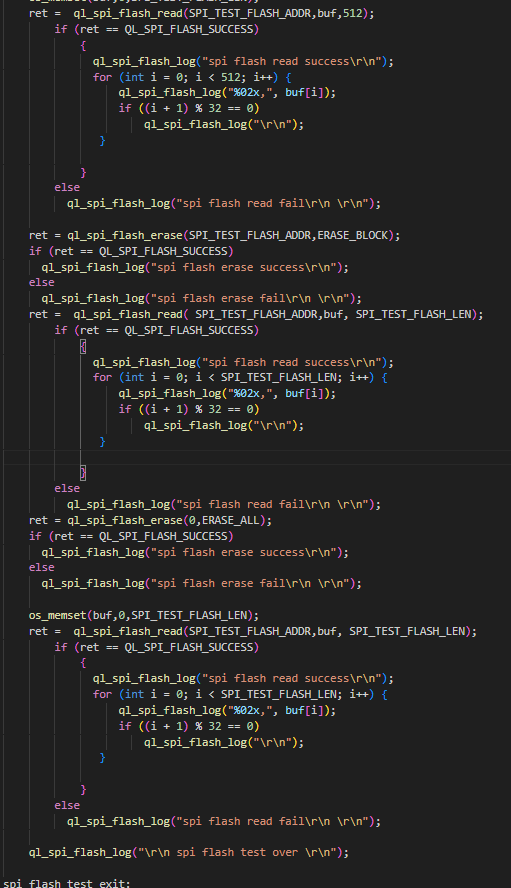
The example of how to operate SPI Flash is provided in the SDK of the module. The demo is in ql_spi_flash_demo.c under the ql_application/example/spi_flash_demo/ directory. The description of related functions is as follows:
Enable the CFG_ENABLE_QUECTEL_SPI_FLASH macro to run the demo, and ql_spi_flash_demo_thread_creat() will be automatically called to create a test task.
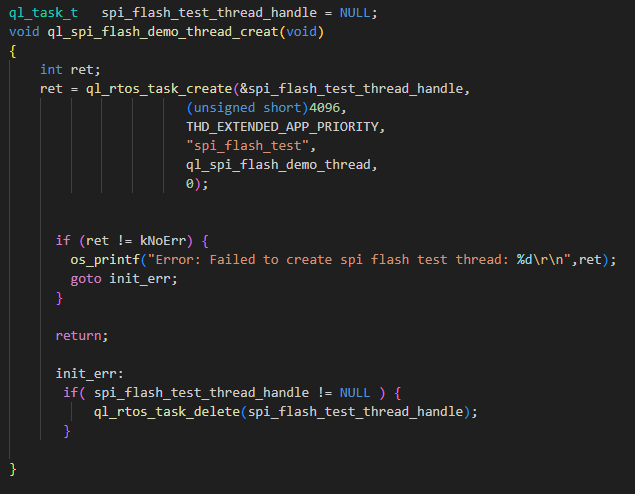
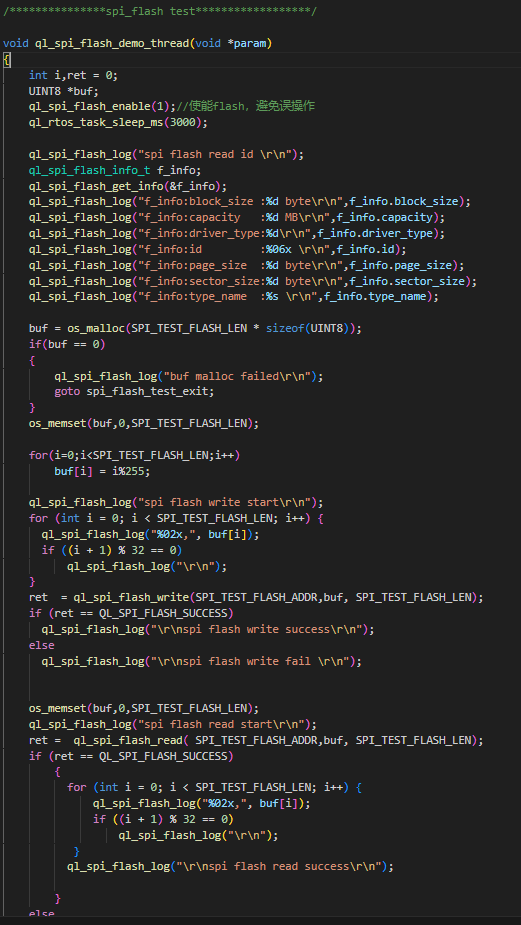
ql_spi_flash_demo_thread_creat(): This function creates a SPI Flash task, and needs to be called to run the demo.ql_spi_flash_demo_thread(): Task execution function, which gets the information of SPI flash, writes data to flash, reads and erases data from flash through SPI. The flash model used in the example program is GD25LQ64C.
Function Debugging
To debug the SPI flash function, use a development board (e.g., FCM242D-TE-B) with the installed module and follow these steps:
- Run the SPI flash demo as described in Operation Process.
- Recompile the firmware version, and flash the new one to the module. See Quick_Start_Guide for details.
- Reboot the module.
- Set the baud rate to 921600 bps and open UART 2 port to get the log information.
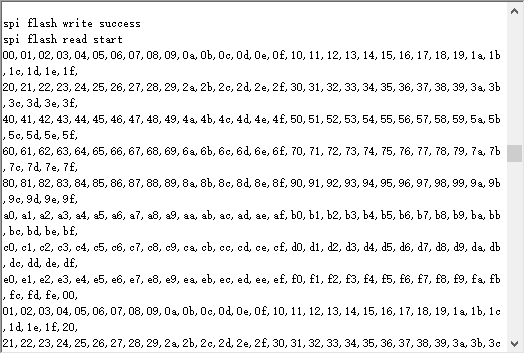
The log data in the figure above show that writing and reading data from SPI flash are successful.
Timer
Timer API
Header File
ql_timer.h, the header file of timer API, is in the ql_components/api directory. Unless otherwise specified, all header files mentioned in this document are in this directory.
API Overview
| Function | Description |
|---|---|
ql_TimerInit() |
Initializes the timer with a duration in milliseconds. |
ql_TimerInit_us() |
Initializes the timer with a duration in microseconds. |
ql_TimerStart() |
Starts the timer. |
ql_TimerStop() |
Stops the timer. |
ql_timer_delete() |
Deletes the timer. |
ql_get_timer_cnt() |
Gets the timer count value. |
API Description
ql_TimerInit
This function initializes the timer with a duration in milliseconds.
Prototype:
ql_timer_errcode_e ql_TimerInit(ql_timer_number_e timer_id, uint32 time_ms, ql_timer_callback timer_cb)
Parameter:
timer_id: [In] Timer ID. See ql_timer_number_e for details.time_ms: [In] Timer duration. Unit: millisecond.timer_cb: [In] Callback function for timer interruption. See ql_timer_callback for details.
Return Value:
See ql_timer_errcode_e for result codes.
ql_timer_number_e
The enumeration of timer IDs:
typedef enum {
  QL_TIMER_0 = 0,
  QL_TIMER_1,
  QL_TIMER_2,
  QL_TIMER_3,
  QL_TIMER_4,
  QL_TIMER_5,
} ql_timer_number_e;
| Member | Description |
|---|---|
| QL_TIMER_0 | Timer 0 |
| QL_TIMER_1 | Timer 1 |
| QL_TIMER_2 | Timer 2 |
| QL_TIMER_3 | Timer 3 (used by system, cannot be used again) |
| QL_TIMER_4 | Timer 4 |
| QL_TIMER_5 | Timer 5 |
ql_timer_callback
This is the callback function for timer interruption.
typedef void (*ql_timer_callback)(uint8 arg)
arg: [In] Inputted parameter.
ql_timer_errcode_e
The enumeration of result codes:
typedef enum {
  QL_TIMER_SUCCESS = 0,
  QL_TIMER_EXECUTE_ERR,
  QL_TIMER_INVALID_PARAM_ERR,
  QL_TIMER_NOT_OPEN_ERR,
  QL_TIMER_NOT_SUPPORT_ERR
} ql_timer_errcode_e;
| Member | Description |
|---|---|
| QL_TIMER_SUCCESS | Successful execution |
| QL_TIMER_EXECUTE_ERR | Failed execution |
| QL_TIMER_INVALID_PARAM_ERR | Invalid parameter |
| QL_TIMER_NOT_OPEN_ERR | Timer is not enabled |
| QL_TIMER_NOT_SUPPORT_ERR | Timer is not supported |
ql_TimerInit_us
This function initializes the timer with a duration in microseconds.
Prototype:
ql_timer_errcode_e ql_TimerInit_us(ql_timer_number_e timer_id, uint32 time_us, ql_timer_callback timer_cb)
Parameter:
timer_id: [In] Timer ID. See ql_timer_number_e for details.time_us: [In] Timer duration. Unit: microsecond.timer_cb: [In] Callback function for timer interruption. See ql_timer_callback for details.
Return Value:
See ql_timer_errcode_e for result codes.
ql_TimerStart
This function starts the timer.
Prototype:
ql_timer_errcode_e ql_TimerStart(ql_timer_number_e timer_id)
Parameter:
timer_id: [In] Timer ID. See ql_timer_number_e for details.
Return Value:
See ql_timer_errcode_e for result codes.
ql_TimerStop
This function stops the timer.
Prototype:
ql_timer_errcode_e ql_TimerStop(ql_timer_number_e timer_id)
Parameter:
timer_id: [In] Timer ID. See ql_timer_number_e for details.
Return Value:
See ql_timer_errcode_e for result codes.
ql_timer_delete
This function deletes the timer.
Prototype:
ql_timer_errcode_e ql_timer_delete(ql_timer_number_e timer_id)
Parameter:
timer_id: [In] Timer ID. See ql_timer_number_e for details.
Return Value:
See ql_timer_errcode_e for result codes.
ql_get_timer_cnt
This function gets the timer count value.
Prototype:
ql_timer_errcode_e ql_get_timer_cnt(ql_timer_number_e timer_id, uint32 *cont)
Parameter:
timer_id: [In] Timer ID. See ql_timer_number_e for details.cont: [Out] Pointer to the count value.
Return Value:
See ql_timer_errcode_e for result codes.
Development Procedure
This chapter describes how to use the timer API in an application and how to debug basic features. Timer 0 is tested by default in this example.
Operation Process
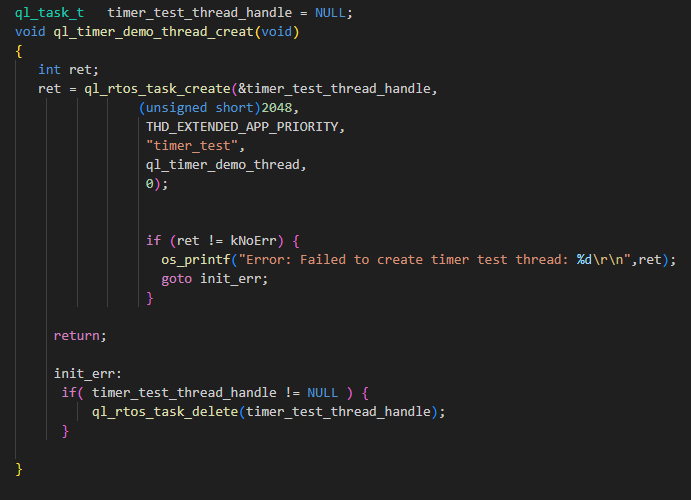
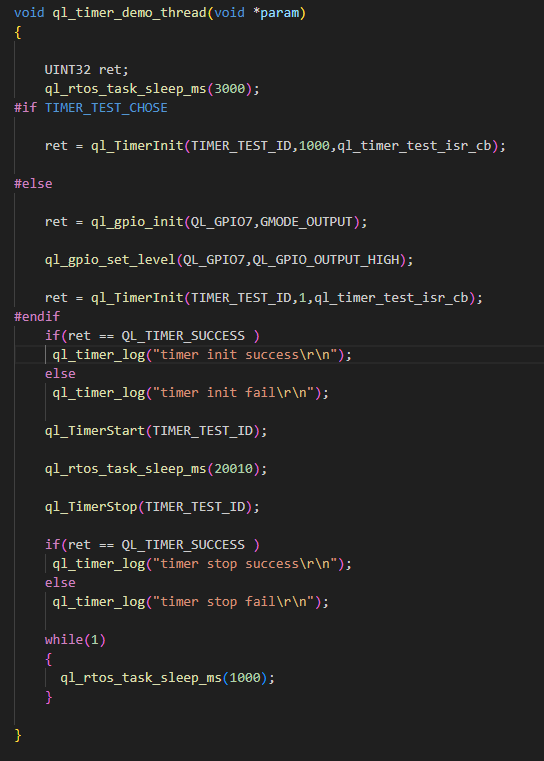
The example of how to operate the timer is provided in the SDK of the module. The demo is in ql_timer_demo.c under the ql_application/example/timer_demo/ directory. The description of related functions is as follows:
Enable the CFG_ENABLE_QUECTEL_TIMER macro to run the demo, and ql_timer_demo_thread_creat() will be automatically called to create a test task.
ql_timer_demo_thread_creat(): This function creates a timer task, and needs to be called to run the demo.ql_timer_demo_thread(): Task execution function, which initializes the timer, executes the interrupt function and stops the timer.
Function Debugging
To debug the timer function, use a development board (e.g. FCM242D-TE-B) with the installed module and follow these steps:
- Run the timer demo as described in *operation process.
- Recompile the firmware version, and flash the new one to the module.
- Reboot the module.
- Set the baud rate to 921600 bps and open UART 2 port to get the log information.
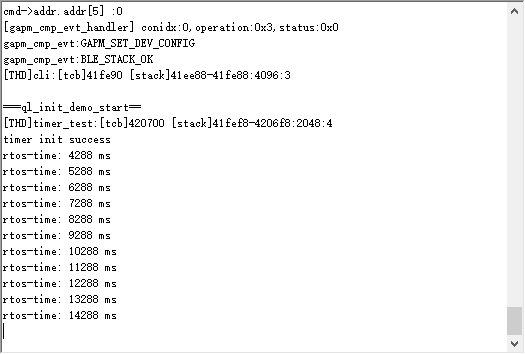
The log data in the figure above show that timer has been started and the timer interrupt callback function has been called successfully.
Watchdog
Watchdog API
Header File
ql_watchdog.h, the header file of watchdog API, is in the ql_components/api directory. Unless otherwise specified, all header files mentioned in this document are in this directory.
API Overview
| Function | Description |
|---|---|
ql_wdg_init() |
Initializes the watchdog. |
ql_wdg_reload() |
Feeds the watchdog. |
ql_wdg_finalize() |
Closes the watchdog. |
API Description
ql_wdg_init
This function initializes the watchdog.
Prototype:
ql_wdg_errcode_e ql_wdg_init(uint32 timeout)
Parameter:
timeout: [In] Watchdog reset cycle. Unit: millisecond. Maximum value: 0xFFF (About 65 s).
Return Value:
See ql_wdg_errcode_e for result codes.
ql_wdg_errcode_e
The enumeration of result codes:
typedef enum {
  QL_WDG_SUCCESS = 0,
  QL_WDG_EXECUTE_ERR,
  QL_WDG_INVALID_PARAM_ERR,
} ql_wdg_errcode_e;
| Member | Description |
|---|---|
| QL_WDG_SUCCESS | Successful execution |
| QL_WDG_EXECUTE_ERR | Failed execution |
| QL_WDG_INVALID_PARAM_ERR | Invalid parameter |
ql_wdg_reload
This function feeds the watchdog.
Prototype:
ql_wdg_errcode_e ql_wdg_reload(void)
Parameter:
None
Return Value:
See ql_wdg_errcode_e for result codes.
ql_wdg_finalize
This function closes the watchdog.
Prototype:
ql_wdg_errcode_e ql_wdg_finalize(void)
Parameter:
None
Return Value:
See ql_wdg_errcode_e for result codes.
Development Procedure
This chapter describes how to use the watchdog API in an application and how to debug basic features.
Operation Process
The example of how to operate the watchdog API is provided in the SDK of the module. The demo is in ql_watchdog_demo.c file under the ql_application/example/watchdog_demo/ directory. The description of related functions is as follows:
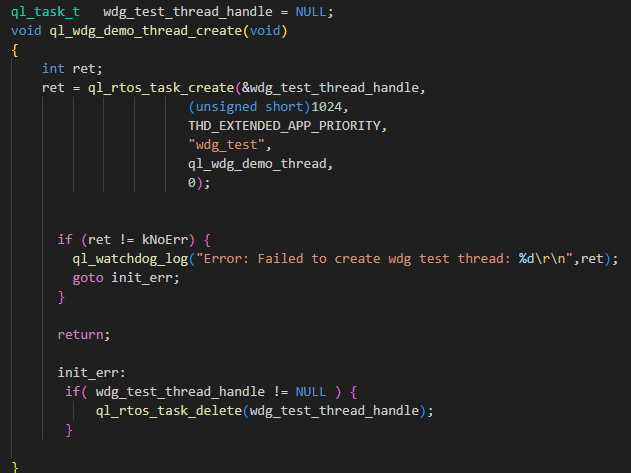
Enable the CFG_NABLE_QUECTEL_WATCHDOG macro to run the demo, and ql_wdg_demo_thread_creat() will be automatically called to create a test task.
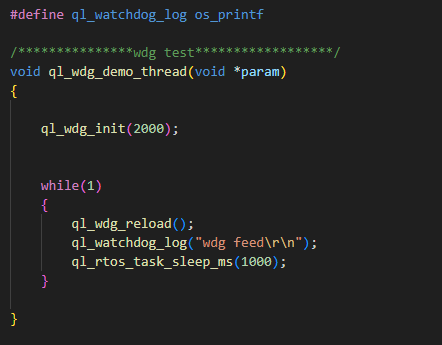
ql_wdg_demo_thread_creat(): This function creates watchdog tasks, and needs to be called to run the demo.ql_wdg_demo_thread(): This is the execution function of the task, which initializes and feeds the watchdog.
Function Debugging
To debug the watchdog function, use a development board (e.g., FCM242D-TE-B) with the installed module and follow these steps:
- Run the watchdog demo as described in operation process.
- Recompile the firmware version, and flash the new one to the module.
- Reboot the module.
- Set the baud rate to 921600 bps and open UART 2 port to get the log information.
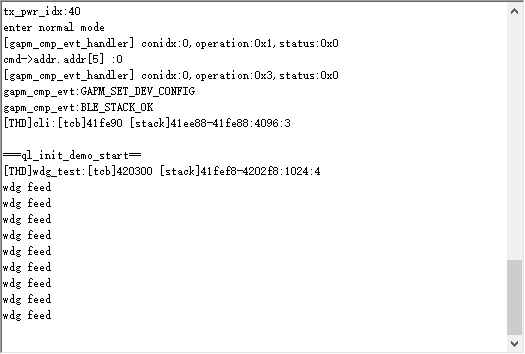
The log indicates that the demo program successfully reset the watchdog.
Low Power Mode
Low Power Mode API
Header File
ql_lowpower.h, the header file of low power mode API, is in the ql_components/api directory. Unless otherwise specified, all header files mentioned in this document are in this directory.
API Overview
| Function | Description |
|---|---|
ql_deep_sleep_enter() |
Sets MCU into deep sleep mode. |
ql_lowvol_sleep_enter() |
Sets MCU into the low voltage standby mode. |
ql_deep_mcudtim_enter() |
Enables or disables MCU normal standby mode. |
ql_deep_rfdtim_enter() |
Enables or disables RF sleep mode. |
ql_lv_ps_mode_set_en() |
Enables or disables the low voltage Wi-Fi keep-alive mode. |
ql_set_gpio_wakeup_index() |
Sets GPIO pins for waking up MCU in Wi-Fi keep-alive mode. |
API Description
ql_deep_sleep_enter
This function sets MCU into deep sleep mode.
Prototype:
ql_lowpower_errcode_e ql_deep_sleep_enter(ql_sleep_ctrl_parm_s deep_sleep_param)
Parameter:
deep_sleep_param: [In] Configuration of deep sleep mode. See ql_sleep_ctrl_parm_s for details.
Return Value:
See ql_lowpower_errcode_e for result codes.
ql_sleep_ctrl_parm_s
The structure of configuration of deep sleep mode or low voltage standby mode:
typedef struct ql_ps_sleep_ctrl {
  ql_deep_wakeup_way wake_up_way;
  UINT32 gpio_index_map;
  UINT32 gpio_edge_map;
  UINT32 gpio_stay_lo_map;
  UINT32 gpio_last_index_map;
  UINT32 gpio_last_edge_map;
  UINT32 gpio_stay_hi_map;
  UINT32 sleep_time;
  UINT32 lpo_32k_src;
  UINT32 sleep_mode;
} ql_sleep_ctrl_parm_s;
| Type | Parameter | Description |
|---|---|---|
ql_deep_wakeup_way |
wake_up_way | Method for waking up MCU. See ql_deep_wakeup_way for details. |
| UINT32 | gpio_index_map | Pins for waking up MCU. GPIO 0--GPIO 31. |
| UINT32 | gpio_edge_map | Edges for waking up MCU. 0: Rising, 1: Falling |
| UINT32 | gpio_stay_lo_map | GPIO pins maintain low status in deep sleep |
| UINT32 | gpio_last_index_map | No configuration required |
| UINT32 | gpio_last_edge_map | No configuration required |
| UINT32 | gpio_stay_hi_map | GPIO pins maintain high status in deep sleep |
| UINT32 | sleep_time | Sleep time (RTC timing wake-up). Unit: second |
| UINT32 | lpo_32k_src | RTC clock source |
| UINT32 | sleep_mode | Sleep mode: 0 Common, 1 Low voltage |
ql_lowpower_errcode_e
The enumeration of result codes:
typedef enum {
  QL_LOWPOWER_SUCCESS = 0,
  QL_LOWPOWER_EXECUTE_ERR,
  QL_LOWPOWER_INVALID_PARAM_ERR,
} ql_lowpower_errcode_e;
| Member | Description |
|---|---|
| QL_LOWPOWER_SUCCESS | Successful execution |
| QL_LOWPOWER_EXECUTE_ERR | Failed execution |
| QL_LOWPOWER_INVALID_PARAM_ERR | Invalid parameter |
ql_deep_wakeup_way
The enumeration of methods for waking up MCU from the deep sleep mode or low voltage standby mode:
typedef enum {
  QL_DEEP_WAKEUP_GPIO = 1,
  QL_DEEP_WAKEUP_RTC = 2,
} ql_deep_wakeup_way;
| Member | Description |
|---|---|
| QL_DEEP_WAKEUP_GPIO | GPIO interrupt wake-up |
| QL_DEEP_WAKEUP_RTC | RTC timing wake-up |
ql_lowvol_sleep_enter
This function sets MCU into the low voltage standby mode.
Prototype:
ql_lowpower_errcode_e ql_lowvol_sleep_enter(ql_sleep_ctrl_parm_s lowvol_sleep_param)
Parameter:
lowvol_sleep_param: [In] Configuration of the low voltage standby mode. See ql_sleep_ctrl_parm_s for details.
Return Value:
See ql_lowpower_errcode_e for result codes.
ql_deep_mcudtim_enter
This function enables or disables MCU normal standby mode.
Prototype:
ql_lowpower_errcode_e ql_deep_mcudtim_enter(UINT32 enable)
Parameter:
enable: [In] Enable or disable MCU normal standby mode.
0: Disable
1: Enable
Return Value:
See ql_lowpower_errcode_e for result codes.
ql_deep_rfdtim_enter
This function enables or disables RF sleep mode.
Prototype:
ql_lowpower_errcode_e ql_deep_rfdtim_enter(UINT32 enable, UINT32 dtimnum)
Parameter:
enable: [In] Enable or disable RF sleep mode.
0: Disable
1: Enabledtimnum: [In] Whether MCU enters the Wi-Fi keep-alive mode during normal standby.
0: No
Other values: Time interval for waking up MCU in the Wi-Fi keep-alive mode. Unit: 100 ms (Recommended: 30, i.e. 3000 ms)
Return Value:
See ql_lowpower_errcode_e for result codes.
ql_lv_ps_mode_set_en
This function enables or disables the low voltage Wi-Fi keep-alive mode.
Prototype:
ql_lowpower_errcode_e ql_lv_ps_mode_set_en(bool enable)
Parameter:
enable: [In] Enable or disable the low voltage keep-alive mode.0: Disable1: Enable
Return Value:
See ql_lowpower_errcode_e for result codes.
ql_set_gpio_wakeup_index
This function sets GPIO pins for waking up MCU in the Wi-Fi keep-alive mode.
Prototype:
ql_lowpower_errcode_e ql_set_gpio_wakeup_index(UINT8 gpio, int wakeup_level)
Parameter:
gpio: [In] GPIO pins for waking up MCU.wakeup_level: [In] Wake-up Level.0: Low level1: High level
Return Value:
See ql_lowpower_errcode_e for result codes.
Development Procedure
This chapter describes how to use the low power mode API in an application and how to debug basic features.
Operation Process
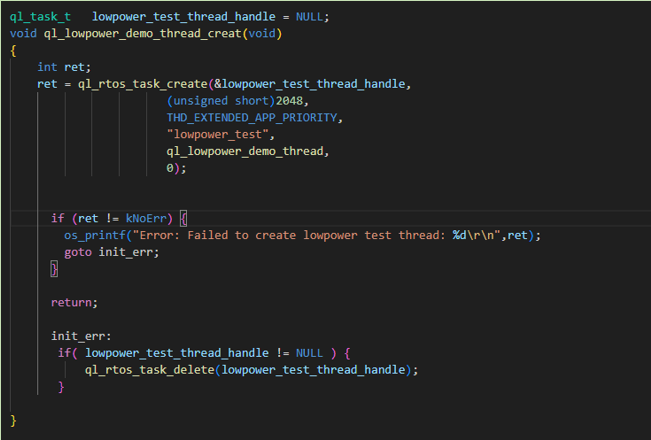
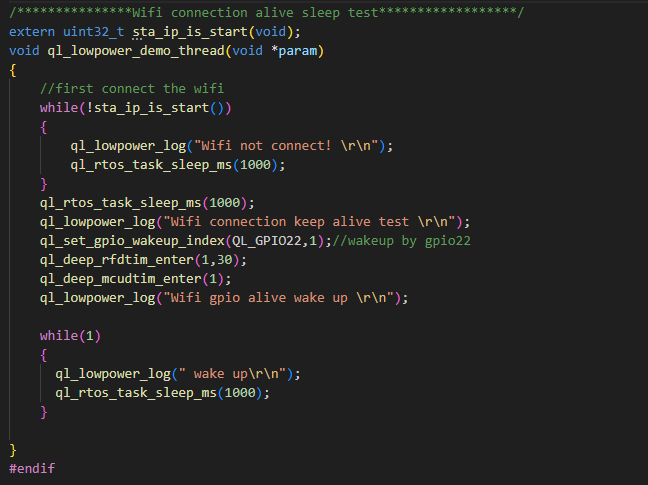
The example of how to operate the low power mode API is provided in the SDK of the module. The demo is in the ql_lowpower_demo.c file under the ql_application/example/lowpower_demo/ directory. The description of related functions is as follows:
To run the demo, enable the CFG_ENABLE_QUECTEL_LOWPOWER macro. This automatically calls ql_lowpower_demo_thread_creat() to create a test task.
ql_lowpower_demo_thread_creat(): This function creates a low power task, and needs to be called to run the demo.ql_lowpower_demo_thread(): Task execution function, which initializes low power mode.
Function Debugging
To debug the low power mode, use a development board (e.g., FCM242D-TE-B) with the module and follow these steps:
- Run the low power demo as described in operation process.
- Recompile the firmware version, and flash the new one to the module.
- Set the baud rate to 921600 bps and open UART 2 port to get the log information.
- Send STA command (STA SSID Key) to connect to the Wi-Fi, otherwise MCU cannot enter the low power keep-alive mode.
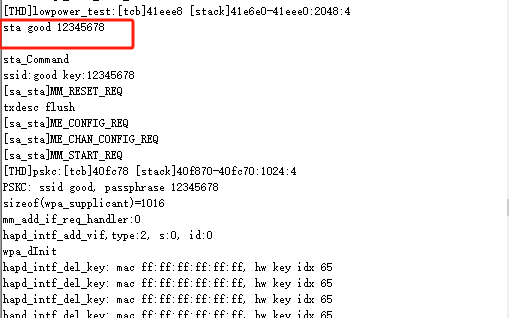
After Wi-Fi is connected, you need to wait before MCU enters the low power mode.
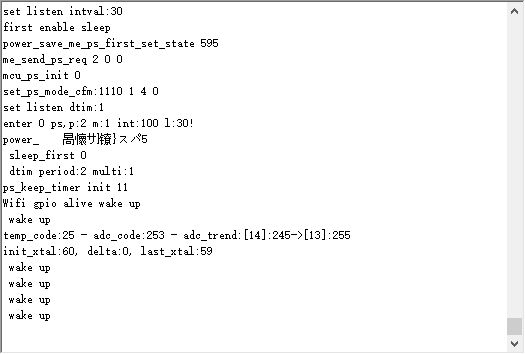
After MCU enters the low power keep-alive mode, Wi-Fi is still connected. Pull up GPIO22 to wake up the module and the module exits the low-power keep-alive mode. The serial port tool will print "wake up" every 1 second.
Appendix References
| Abbreviation | Description |
|---|---|
| API | Application Programming Interface |
| App | Application |
| BLE | Bluetooth Low Energy |
| GPIO | General-Purpose Input/Output |
| ID | Identifier |
| IoT | Internet of Things |
| MCU | Microprogrammed Control Unit |
| NET | Network |
| OTA | Over-the-Air Technology |
| QSPI | Queued Serial Peripheral Interface |
| RF | Radio Frequency |
| RTC | Real-Time Clock |
| RTOS | Real-Time Operating System |
| SDK | Software Development Kit |
| SN | Serial Number |
| SPI | Serial Peripheral Interface |
| SSID | Service Set Identifier |
| STA | Station |
| UART | Universal Asynchronous Receiver/Transmitter |
| Wi-Fi | Wireless Fidelity |