


 English
BLE Development Guide
Introduction
Quectel FCM242D and FGM842D series modules support QuecOpen® solution. QuecOpen® is an embedded development platform based on RTOS system. It is intended to simplify the design and development of IoT applications. For more information on QuecOpen®, see Quick_Start_Guide.
This document is applicable to QuecOpen® solution based on SDK build environment. It introduces the BLE API and the development examples of FCM242D and FGM842D series modules.
BLE API
Header File
ql_ble.h, the header file of BLE API, is in the ql_components/api directory of SDK. Unless otherwise specified, all header files mentioned in this document are in this directory.
API Overview
API Overview:
| Function | Description |
|---|---|
ql_ble_address_get() |
Gets the BLE MAC address of the module. |
ql_ble_set_notice_cb() |
Registers the BLE event callback function. |
ql_ble_set_adv_param() |
Sets advertising parameters. |
ql_ble_set_adv_data() |
Sets advertising data. |
ql_ble_set_scan_rsp_data() |
Sets scan response data. |
ql_ble_create_db() |
Initializes BLE and customizes the BLE service. |
ql_ble_start_advertising() |
Starts BLE advertising. |
ql_ble_stop_advertising() |
Stops BLE advertising. |
ql_ble_update_param() |
Updates connection parameters. |
ql_ble_set_dev_name() |
Sets the BLE device name. |
ql_ble_start_scaning() |
Starts BLE scanning. |
ql_ble_stop_scaning() |
Stops BLE scanning. |
ql_ble_set_connect_dev_addr() |
Sets the MAC address of the BLE peripheral device to be connected. |
ql_ble_start_conn() |
Initiates a BLE connection. |
ql_ble_stop_conn() |
Stops a BLE connection. |
ql_ble_disconnect() |
Central device or peripheral device actively disconnects from the peer device. |
ql_ble_gatt_init() |
Initializes GATT services and registers the GATT event callback function. |
ql_ble_gatts_send_ntf_value() |
Peripheral device sends data to the central device by notification. |
ql_ble_gatts_send_ind_value() |
Peripheral device sends data to the central device by indication. |
ql_ble_gattc_all_service_discovery() |
Central device discovers all services of the peripheral device. |
ql_ble_gattc_ntf_ind_enable() |
Central device enables notification or indication function of the peripheral device. |
ql_ble_gattc_write_data_req_with_handle() |
Central device writes data to the specified characteristic value handle of the peripheral device, and a response from the peripheral is required. |
ql_ble_gattc_write_data_cmd_with_handle() |
Central device writes data to the specified characteristic value handle of the peripheral device via a command. |
ql_ble_gattc_read_data() |
Central device reads data from the specified characteristic value handle of the peripheral device. |
ql_ble_gatt_mtu_changes() |
Changes the MTU size. |
API Description
ql_ble_address_get
This function gets the BLE MAC address of the module.
Prototype:
ql_ble_errcode_e ql_ble_address_get(uint8_t *mac_addr)
Parameter:
mac_addr: [Out] BLE MAC address of the module.
Return Value:
Function execution result code. See ql_ble_errcode_e for details.
ql_ble_errcode_e
The enumeration of function execution result codes:
typedef enum
{
    QL_BLE_SUCCESS = 0,
    QL_BLE_ERR_PROFILE,
    QL_BLE_ERR_CREATE_DB,
    QL_BLE_ERR_CMD_NOT_SUPPORT,
    QL_BLE_ERR_UNKNOW_IDX,
    QL_BLE_ERR_BLE_STATUS,
    QL_BLE_ERR_BLE_PARAM,
    QL_BLE_ERR_ADV_DATA,
    QL_BLE_ERR_CMD_RUN,
    QL_BLE_ERR_NO_MEM,
    QL_BLE_ERR_INIT_CREATE,
    QL_BLE_ERR_INIT_STATE,
    QL_BLE_ERR_ATTC_WRITE,
    QL_BLE_ERR_ATTC_WRITE_UNREGISTER,
} ql_ble_errcode_e
Members:
| Member | Description |
|---|---|
QL_BLE_SUCCESS |
Successful execution. |
QL_BLE_ERR_PROFILE |
Profile error. |
QL_BLE_ERR_CREATE_DB |
Failed to add the BLE service. |
QL_BLE_ERR_CMD_NOT_SUPPORT |
Command is not supported. |
QL_BLE_ERR_UNKNOW_IDX |
Unknown BLE activity index. |
QL_BLE_ERR_BLE_STATUS |
BLE status error. |
QL_BLE_ERR_BLE_PARAM |
Invalid parameter. |
QL_BLE_ERR_ADV_DATA |
Invalid advertising data format. |
QL_BLE_ERR_CMD_RUN |
Failed to execute the command. |
QL_BLE_ERR_NO_MEM |
Insufficient memory. |
QL_BLE_ERR_INIT_CREATE |
Failed to create a connection task. |
QL_BLE_ERR_INIT_STATE |
Connection status error. |
QL_BLE_ERR_ATTC_WRITE |
Failed to write data. |
QL_BLE_ERR_ATTC_WRITE_UNREGISTER |
The BLE service to which the data is written is not registered. |
ql_ble_set_notice_cb
This function registers the BLE event callback function.
Prototype:
ql_ble_errcode_e ql_ble_set_notice_cb(ql_ble_notice_cb callback)
Parameter:
callback: [In] BLE event callback function. See ql_ble_notice_cb for details.
Return Value:
Function execution result code. See ql_ble_errcode_e for details.
ql_ble_notice_cb
This function is the BLE event callback function.
Prototype:
typedef void (*ql_ble_notice_cb)(ql_ble_notify_e notice, void *param)
Parameters:
notice: [In] BLE event type. See ql_ble_notify_e for details.
param: [In] BLE event parameter.
Return Value:
None
ql_ble_notify_e
The enumeration of BLE event types:
typedef enum
{
    QL_BLE_STACK_OK = 0,
    QL_BLE_REPORT_ADV_EVENT,
    QL_BLE_MTU_CHANGE_EVENT,
    QL_BLE_CONNECT_EVENT,
    QL_BLE_DISCONNECT_EVENT,
    QL_BLE_INIT_CONNECT_EVENT,
    QL_BLE_ADV_STOP_EVENT,
    QL_BLE_SCAN_STOP_EVENT,
    QL_BLE_CONN_PARAM_UPDATE_EVENT,
    QL_BLE_LINK_RSSI_EVENT,
    QL_BLE_SEC_MASTER_AUTH_REQ,
    QL_BLE_SEC_MASTER_ENCRYPT,
    QL_BLE_SEC_SLAVE_ENCRYPT,
    QL_BLE_BOND_START_EVENT,
    QL_BLE_SEC_PEER_IDENTITY_ADDR,
    QL_BLE_BOND_FAIL_EVENT,
} ql_ble_notify_e;
Members:
| Member | Description |
|---|---|
QL_BLE_STACK_OK |
BLE protocol stack was ready. |
QL_BLE_REPORT_ADV_EVENT |
Scan result was returned. |
QL_BLE_MTU_CHANGE_EVENT |
MTU was changed. |
QL_BLE_CONNECT_EVENT |
Module, as a peripheral device, established a connection with a central device. |
QL_BLE_DISCONNECT_EVENT |
Disconnection event. |
QL_BLE_INIT_CONNECT_EVENT |
Module, as a central device, established a connection with a peripheral device. |
QL_BLE_ADV_STOP_EVENT |
Advertising stopped. |
QL_BLE_SCAN_STOP_EVENT |
Scanning stopped. |
QL_BLE_CONN_PARAM_UPDATE_EVENT |
Connection parameters were updated. |
QL_BLE_LINK_RSSI_EVENT |
RSSI value of the connection link was obtained. |
QL_BLE_SEC_MASTER_AUTH_REQ |
Central device received an authentication request from the peripheral device. |
QL_BLE_SEC_MASTER_ENCRYPT |
Link encryption on the central device. |
QL_BLE_SEC_SLAVE_ENCRYPT |
Link encryption on the peripheral device. |
QL_BLE_BOND_START_EVENT |
Bonding started. |
QL_BLE_SEC_PEER_IDENTITY_ADDR |
Peer device information is obtained. |
QL_BLE_BOND_FAIL_EVENT |
Bonding failed. |
ql_ble_set_adv_param
This function sets advertising parameters.
Prototype:
ql_ble_errcode_e ql_ble_set_adv_param(ql_ble_adv_param_t adv_param)
Parameter:
adv_param:
[In] Advertising parameter. See ql_ble_adv_param_t for details.
Return Value:
Function execution result code. See ql_ble_errcode_e for details.
ql_ble_adv_param_t
The structure of the advertising parameters:
typedef struct
{
    ql_ble_adv_mode_e mode;
    ql_ble_addr_type_e addr_type;
    ql_ble_adv_mac_addr_t peer_addr;
    ql_ble_phy_e phy;
    uint16_t adv_intv_min;
    uint16_t adv_intv_max;
    ql_ble_adv_channel_e channel;
    ql_ble_adv_filter_e filter;
    uint8_t adv_sid;
    uint16_t per_adv_intv_min;
    uint16_t per_adv_intv_max;
    ql_ble_adv_disc_mode_e disc_mode;
} ql_ble_adv_param_t;
Parameter:
| Type | Parameter | Description |
|---|---|---|
ql_ble_adv_mode_e |
mode |
Advertising mode. See ql_ble_adv_mode_e for details. (Currently not supported) |
ql_ble_addr_type_e |
addr_type |
Advertising address type. See ql_ble_addr_type_e for details. (Currently not supported) |
ql_ble_adv_mac_addr_t |
peer_addr |
Peripheral device MAC address. See ql_ble_adv_mac_addr_t for details. (Currently not supported) |
ql_ble_phy_e |
phy |
Physical layer type of advertising. See ql_ble_phy_e for details. (Currently not supported) |
| uint16_t | adv_intv_min |
Minimum advertising interval. Range: 32–16384. Unit: 0.625 ms. Time range: 20 ms–10.24 s. |
| uint16_t | adv_intv_max |
Maximum advertising interval. Range: 32–16384. Unit: 0.625 ms. Time range: 20 ms–10.24 s. |
ql_ble_adv_channel_e |
channel |
Advertising channels. See ql_ble_adv_channel_e for details. |
ql_ble_adv_filter_e |
filter |
Advertising filter policies. See ql_ble_adv_filter_e for details. (Currently not supported) |
| uint8_t | adv_sid |
Advertising index. It is only applicable to extended advertising and periodic advertising. Range: 0–0xF. (Currently not supported) |
| uint16_t | per_adv_intv_min |
Minimum interval of periodic advertising for peripheral device. Range: 32–16384. Unit: 0.625 ms. Time range: 20 ms–10.24 s. (Currently not supported) |
| uint16_t | per_adv_intv_max |
Maximum interval of periodic advertising for peripheral device. Range: 32–16384. Unit: 0.625 ms. Time range: 20 ms–10.24 s. (Currently not supported) |
ql_ble_adv_disc_mode_e |
disc_mode |
Advertising discovery modes. See ql_ble_adv_disc_mode_e for details. (Currently not supported) |
ql_ble_adv_mode_e
The enumeration of advertising modes:
typedef enum
{
    QL_BLE_ADV_MODE_UNDIRECT = 0x01,
    QL_BLE_ADV_MODE_DIRECT = 0x02,
    QL_BLE_ADV_MODE_NON_CONN_NON_SCAN = 0x03,
    QL_BLE_ADV_MODE_NON_CONN_SCAN = 0x04,
    QL_BLE_ADV_MODE_HDC_DIRECT = 0x05,
    QL_BLE_ADV_MODE_BEACON = 0x06,
    QL_BLE_ADV_MODE_CUSTOM = 0x07,
    QL_BLE_ADV_MODE_EXTEND_CONN_UNDIRECT = 0x11,
    QL_BLE_ADV_MODE_EXTEND_CONN_DIRECT = 0x12,
    QL_BLE_ADV_MODE_EXTEND_NON_CONN_SCAN = 0x13,
    QL_BLE_ADV_MODE_EXTEND_NON_CONN_SCAN_DIRECT = 0x14,
    QL_BLE_ADV_MODE_EXTEND_NON_CONN_NON_SCAN = 0x15,
    QL_BLE_ADV_MODE_EXTEND_NON_CONN_NON_SCAN_DIRECT = 0x16,
    QL_BLE_ADV_MODE_PER_ADV_UNDIRECT = 0x21,
    QL_BLE_ADV_MODE_PER_ADV_DIRECT = 0x22,
} ql_ble_adv_mode_e;
Members:
| Member | Description |
|---|---|
QL_BLE_ADV_MODE_UNDIRECT |
Connectable and scannable undirected advertising. |
QL_BLE_ADV_MODE_DIRECT |
Directed advertising. |
QL_BLE_ADV_MODE_NON_CONN_NON_SCAN |
Non-connectable and non-scannable advertising. |
QL_BLE_ADV_MODE_NON_CONN_SCAN |
Non-connectable and scannable advertising. |
QL_BLE_ADV_MODE_HDC_DIRECT |
High-duty-cycle connectable directed advertising. |
QL_BLE_ADV_MODE_BEACON |
Beacon advertising. |
QL_BLE_ADV_MODE_CUSTOM |
Custom type. |
QL_BLE_ADV_MODE_EXTEND_CONN_UNDIRECT |
Extended advertising mode: connectable and scannable undirected advertising. |
QL_BLE_ADV_MODE_EXTEND_CONN_DIRECT |
Extended advertising mode: connectable directed advertising. |
QL_BLE_ADV_MODE_EXTEND_NON_CONN_SCAN |
Extended advertising mode: non-connectable, and scannable advertising. |
QL_BLE_ADV_MODE_EXTEND_NON_CONN_SCAN_DIRECT |
Extended mode: non-connectable and scannable directed advertising. |
QL_BLE_ADV_MODE_EXTEND_NON_CONN_NON_SCAN |
Extended advertising mode: non-connectable and non-scannable advertising. |
QL_BLE_ADV_MODE_EXTEND_NON_CONN_NON_SCAN_DIRECT |
Extended advertising mode: non-connectable and non-scannable directed advertising. |
QL_BLE_ADV_MODE_PER_ADV_UNDIRECT |
Periodic advertising mode: undirected advertising. |
QL_BLE_ADV_MODE_PER_ADV_DIRECT |
Periodic advertising mode: directed advertising. |
ql_ble_addr_type_e
The enumeration of advertising address types:
typedef enum
{
    QL_BLE_ADDR_TYPE_PUBLIC = 0,
    QL_BLE_ADDR_TYPE_PRIVATE,
    QL_BLE_ADDR_TYPE_RANDOM_RESOVABLE,
    QL_BLE_ADDR_TYPE_RANDOM_NONE_RESOVABLE,
} ql_ble_addr_type_e;
Members:
| Member | Description |
|---|---|
QL_BLE_ADDR_TYPE_PUBLIC |
Public address. |
QL_BLE_ADDR_TYPE_PRIVATE |
Private address. |
QL_BLE_ADDR_TYPE_RANDOM_RESOVABLE |
Resolvable random address. |
QL_BLE_ADDR_TYPE_RANDOM_NONE_RESOVABLE |
Non-resolvable random address. |
ql_ble_adv_mac_addr_t
The structure of peripheral device MAC address:
typedef struct
{
    uint8_t addr[6];
    uint8_t addr_type;
} ql_ble_adv_mac_addr_t;
Parameter:
| Type | Parameter | Description |
|---|---|---|
| uint8_t | addr |
Address. A 6-byte array. |
| uint8_t | addr_type |
Address type. 0 Public address 1 Private random address |
ql_ble_phy_e
The enumeration of advertising physical layer types :
typedef enum
{
    QL_BLE_PHY_ANY = 0,
    QL_BLE_PHY_1MBPS = 1,
    QL_BLE_PHY_2MBPS = 2,
    QL_BLE_PHY_CODED = 3,
} ql_ble_phy_e;
Members:
| Member | Description |
|---|---|
QL_BLE_PHY_ANY |
Any type. |
QL_BLE_PHY_1MBPS |
1 Mbps transmission rate. |
QL_BLE_PHY_2MBPS |
2 Mbps transmission rate. |
QL_BLE_PHY_CODED |
Coded type. |
ql_ble_adv_channel_e
The enumeration of advertising channels:
typedef enum
{
    QL_BLE_ADV_CHAN_37 = 0x01,
    QL_BLE_ADV_CHAN_38 = 0x02,
    QL_BLE_ADV_CHAN_39 = 0x04,
    QL_BLE_ADV_CHAN_ALL = 0X07,
} ql_ble_adv_channel_e;
Members:
| Member | Description |
|---|---|
QL_BLE_ADV_CHAN_37 |
Channel 37. |
QL_BLE_ADV_CHAN_38 |
Channel 38. |
QL_BLE_ADV_CHAN_39 |
Channel 39. |
QL_BLE_ADV_CHAN_ALL |
All channels. |
ql_ble_adv_filter_e
The enumeration of advertising filter polices:
typedef enum
{
    QL_BLE_ADV_ALLOW_SCAN_ANY_CON_ANY = 0x00,
    QL_BLE_ADV_ALLOW_SCAN_WLST_CON_ANY = 0x01,
    QL_BLE_ADV_ALLOW_SCAN_ANY_CON_WLST = 0x02,
    QL_BLE_ADV_ALLOW_SCAN_WLST_CON_WLST = 0x03,
} ql_ble_adv_filter_e;
Members:
| Member | Description |
|---|---|
QL_BLE_ADV_ALLOW_SCAN_ANY_CON_ANY |
Any device can scan and connect to the local device. |
QL_BLE_ADV_ALLOW_SCAN_WLST_CON_ANY |
Any device can connect to the local device, but only devices in the whitelist can scan the local device. |
QL_BLE_ADV_ALLOW_SCAN_ANY_CON_WLST |
Any device can scan the local device, but only devices in the whitelist can connect to the local device. |
QL_BLE_ADV_ALLOW_SCAN_WLST_CON_WLST |
Only devices in the whitelist can scan and connect to the local device. |
ql_ble_adv_disc_mode_e
The enumeration of advertising discovery modes:
typedef enum
{
    QL_BLE_ADV_DISC_MODE_GEN_DISC = 0,
    QL_BLE_ADV_DISC_MODE_LIM_DISC = 1,
    QL_BLE_ADV_DISC_MODE_NON_DISC = 2,
    QL_BLE_ADV_DISC_MODE_MAX = 3,
} ql_ble_adv_disc_mode_e;
Members:
| Member | Description |
|---|---|
QL_BLE_ADV_DISC_MODE_GEN_DISC |
General discoverable mode. |
QL_BLE_ADV_DISC_MODE_LIM_DISC |
Limited discoverable mode. |
QL_BLE_ADV_DISC_MODE_NON_DISC |
Non-discoverable mode. |
ql_ble_set_adv_data
This function sets advertising data.
Prototype:
ql_ble_errcode_e ql_ble_set_adv_data(uint8_t *adv_buff, uint16_t adv_len)
Parameter:
adv_buff:
[In] Advertising data, which should be written according to the BLE advertising data rules.
adv_len:
[In] Length of advertising data. Unit: byte.
Return Value:
Function execution result code. See ql_ble_errcode_e for details.
ql_ble_set_scan_rsp_data
This function sets scan response data.
Prototype:
ql_ble_errcode_e ql_ble_set_scan_rsp_data(uint8_t *scan_rsp, uint16_t scan_rsp_len)
Parameter:
scan_rsp:
[In] Scan response data, which should be written according to the BLE advertising data rules.
scan_rsp_len:
[In] Length of scan response data. Unit: byte.
Return Value:
Function execution result code. See ql_ble_errcode_e for details.
ql_ble_create_db
This function initializes BLE and customizes the BLE service.
Prototype:
ql_ble_errcode_e ql_ble_create_db(ql_ble_gatt_service_t *service, uint8_t *svc_id)
Parameter:
service:
[In] BLE service list. See ql_ble_gatt_service_t for details.
svc_id:
[In] BLE service ID. (Currently not supported)
Return Value:
Function execution result code. See ql_ble_errcode_e for details.
ql_ble_gatt_service_t
The structure of BLE service list:
typedef struct
{
    uint16_t prf_task_id;
    uint8_t uuid[16];
    uint8_t att_db_nb;
    uint16_t start_hdl;
    ql_ble_attm_desc_t* att_db;
    uint8_t svc_perm;
}ql_ble_gatt_service_t;
Parameter:
| Type | Parameter | Description |
|---|---|---|
| uint16_t | prf_task_id |
BLE service ID. |
| uint8_t | uuid |
BLE service UUID. |
| uint8_t | att_db_nb |
Number of attribute databases. |
| uint16_t | start_hdl |
Start handle of service. |
ql_ble_attm_desc_t |
att_db |
BLE service attribute database. See ql_ble_attm_desc_t for details. |
| uint8_t | svc_perm |
BLE service configuration. |
ql_ble_attm_desc_t
The structure of the BLE service attribute database:
typedef struct
{
    uint8_t uuid[16];
    uint16_t info;
    uint16_t ext_info;
}ql_ble_attm_desc_t
Parameter:
| Type | Parameter | Description |
|---|---|---|
| uint8_t | uuid |
Attribute UUID. |
| uint16_t | info |
Attribute information. |
| uint16_t | ext_info |
Extended attribute information. |
ql_ble_start_advertising
This function starts BLE advertising.
Prototype:
ql_ble_errcode_e ql_ble_start_advertising(uint16_t duration)
Parameter:
duration:
[In] Advertising duration. Unit: 10 ms. 0 indicates not to actively stop advertising.
Return Value:
Function execution result code. See ql_ble_errcode_e for details.
ql_ble_stop_advertising
This function stops BLE advertising.
Prototype:
ql_ble_errcode_e ql_ble_stop_advertising(void)
Parameter:
None
Return Value:
Function execution result code. See ql_ble_errcode_e for details.
ql_ble_update_param
This function updates connection parameters.
Prototype:
ql_ble_errcode_e ql_ble_update_param(uint8_t conn_idx, uint16_t intv_min, uint16_t intv_max, uint16_t latency, uint16_t sup_to)
Parameter:
conn_idx:
[In] Connection index.
intv_min:
[In] Minimum connection interval. Range: 6–3200. Unit: 1.25 ms. Time range: 7.5 ms–4 s.
intv_max:
[In] Maximum connection interval. Range: 6–3200. Unit: 1.25 ms. Time range: 7.5 ms–4 s.
latency:
[In] Number of ignorable connection intervals on the peripheral device. It must comply with (1 + latency) × intv_max × 2 × 1.25 < sup_to × 10.
sup_to:
[In] Connection timeout period. Range: 10–3200. Unit: 10 ms. Time range: 100 ms–32 s.
Return Value:
Function execution result code. See ql_ble_errcode_e for details.
ql_ble_set_dev_name
This function sets BLE device name.
Prototype:
ql_ble_errcode_e ql_ble_set_dev_name(uint8_t *name , uint8_t name_len)
Parameter:
name:
[In] Name of BLE device.
name_len:
[In] Length of BLE device name. Maximum value: 18 bytes.
Return Value:
Function execution result code. See ql_ble_errcode_e for details.
ql_ble_start_scaning
This function starts BLE scanning.
Prototype:
ql_ble_errcode_e ql_ble_start_scaning(ql_ble_scan_param_t scan_param)
Parameter:
scan_param:
[In] Scan parameter. See ql_ble_scan_param_t for details.
Return Value:
Function execution result code. See ql_ble_errcode_e for details.
ql_ble_scan_param_t
The structure of scan parameter:
typedef struct
{
    ql_ble_scan_mode_e scan_mode;
    ql_ble_phy_e phy;
    uint8_t dup_filt;
    uint16_t scan_intv;
    uint16_t scan_wd;
}ql_ble_scan_param_t
Parameter:
| Type | Parameter | Description |
|---|---|---|
ql_ble_scan_mode_e |
scan_mode |
Scan modes. See ql_ble_scan_mode_e for details. |
ql_ble_phy_e |
phy |
Physical layer type of advertising. See ql_ble_phy_e for details. |
| uint8_t | dup_filt |
Duplicate packet filtering policy. |
| uint16_t | scan_intv |
Scan interval. Unit: 0.626 ms. |
| uint16_t | scan_wd |
Scan window. Unit: 0.626 ms. |
ql_ble_scan_mode_e
The enumeration of scan modes:
typedef enum
{
    QL_BLE_SCAN_MODE_GEN_DISC = 0,
    QL_BLE_SCAN_MODE_OBSERVER = 1,
    QL_BLE_SCAN_MODE_MAX = 3,
} ql_ble_scan_mode_e;
Members:
| Member | Description |
|---|---|
QL_BLE_SCAN_MODE_GEN_DISC |
General discovery mode. |
QL_BLE_SCAN_MODE_OBSERVER |
Observer mode. |
ql_ble_stop_scaning
This function stops BLE scanning.
Prototype:
ql_ble_errcode_e ql_ble_stop_scaning(void)
Parameter:
None
Return Value:
Function execution result code. See ql_ble_errcode_e for details.
ql_ble_set_connect_dev_addr
This function sets the MAC address of the BLE peripheral device to be connected.
Prototype:
ql_ble_errcode_e ql_ble_set_connect_dev_addr(ql_ble_adv_mac_addr_t *addr)
Parameter:
addr:
[In] MAC address of the peripheral device to be connected. See ql_ble_adv_mac_addr_t for details.
Return Value:
Function execution result code. See ql_ble_errcode_e for details.
ql_ble_start_conn
This function initiates a BLE connection.
Prototype:
ql_ble_errcode_e ql_ble_start_conn(uint16_t intv_min,uint16_t intv_max,uint16_t latency, uint16_t sup_to)
Parameter:
intv_min:
[In] Minimum connection interval. Range: 6–3200. Unit: 1.25 ms. Time range: 7.5 ms–4 s.
intv_max:
[In] Maximum connection interval. Range: 6–3200. Unit: 1.25 ms. Time range: 7.5 ms–4 s.
latency:
[In] Number of ignorable connection intervals on the peripheral device. It must comply with (1 + latency) × intv_max × 2 × 1.25 < sup_to × 10.
sup_to:
[In] Connection timeout period. Range: 10–3200. Unit: 10 ms. Time range: 100 ms–32 s.
Return Value:
Function execution result code. See ql_ble_errcode_e for details.
ql_ble_stop_conn
This function stops a BLE connection.
Prototype:
ql_ble_errcode_e ql_ble_stop_conn(void)
Parameter:
None
Return Value:
Function execution result code. See ql_ble_errcode_e for details.
ql_ble_disconnect
This function is used by the central device or peripheral device to actively disconnect from the peer device.
Prototype:
ql_ble_errcode_e ql_ble_disconnect(uint8_t conn_idx)
Parameter:
conn_idx:
[In] Connection index.
Return Value:
Function execution result code. See ql_ble_errcode_e for details.
ql_ble_gatt_init
This function initializes GATT services and registers the GATT event callback function.
Prototype:
ql_ble_errcode_e ql_ble_gatt_init(ql_ble_gatt_msg_handler_t gatt_evt)
Parameter:
gatt_evt:
[In] GATT event callback function. See ql_ble_gatt_msg_handler_t for details.
Return Value:
Function execution result code. See ql_ble_errcode_e for details.
ql_ble_gatt_msg_handler_t
This function is the GATT event callback function.
Prototype:
typedef uint16_t (*ql_ble_gatt_msg_handler_t)(ql_ble_gatt_msg_t *p_msg)
Parameter:
p_msg:
[In] GATT event. See ql_ble_gatt_msg_t for details.
Return Value:
Returns a value of type uint16, which currently has no specific meaning.
ql_ble_gatt_msg_t
The structure of the GATT event:
typedef struct
{
    ql_ble_gatt_msg_evt_t msg_evt;
    uint8_t conn_idx;
    union
    {
        ql_ble_gatt_data_report report;
        ql_ble_gatt_op_cmp_t op;
        ql_ble_gatt_svc_disc_s svc_disc;
        ql_ble_gatt_svc_inc_s svc_inc;
        ql_ble_gatt_char_disc_s char_disc;
        ql_ble_gatt_desc_disc_s desc_disc;
    } param;
}ql_ble_gatt_msg_t
Parameter:
| Type | Parameter | Description |
|---|---|---|
ql_ble_gatt_msg_evt_t |
msg_evt |
GATT event type. See ql_ble_gatt_msg_evt_t for details. |
| uint8_t | conn_idx |
Connection index. |
ql_ble_gatt_data_report |
report |
GATT data report. See ql_ble_gatt_data_report for details. |
ql_ble_gatt_op_cmp_t |
op |
GATT operation types, including read, write, notify, and indicate. See ql_ble_gatt_op_cmp_t for details. |
ql_ble_gatt_svc_disc_s |
svc_disc |
Discovery of all service. See ql_ble_gatt_svc_disc_s for details. |
ql_ble_gatt_svc_inc_s |
svc_inc |
Discovery of an included service according to UUID. See ql_ble_gatt_svc_inc_s for details. |
ql_ble_gatt_char_disc_s |
char_disc |
Characteristic discovery. See ql_ble_gatt_char_disc_s for details. |
ql_ble_gatt_desc_disc_s |
desc_disc |
Characteristic descriptor discovery. See ql_ble_gatt_desc_disc_s for details. |
ql_ble_gatt_msg_evt_t
The enumeration of GATT event types:
typedef enum
{
    QL_BLE_GATT_MSG_READ_REQ,
    QL_BLE_GATT_MSG_WRITE_REQ,
    QL_BLE_GATT_MSG_ATT_INFO_REQ,
    QL_BLE_GATT_MSG_NTF_REQ,

    QL_BLE_GATT_MSG_IND_REQ,
    QL_BLE_GATT_MSG_READ_IND,
    QL_BLE_GATT_MSG_CMP_EVT,
    QL_BLE_GATT_MSG_LINK_CREATE,
    QL_BLE_GATT_MSG_LINK_LOST,
    QL_BLE_GATT_MSG_DISC_SVC,
    QL_BLE_GATT_MSG_DISC_SVC_INC,
    QL_BLE_GATT_MSG_DISC_CHAR,
    QL_BLE_GATT_MSG_DISC_CHAR_DESC,
    QL_BLE_GATT_MSG_HANDLE_ERROR = 0x80,
} ql_ble_gatt_msg_evt_t;
Members:
| Member | Description |
|---|---|
QL_BLE_GATT_MSG_READ_REQ |
Read data request. |
QL_BLE_GATT_MSG_WRITE_REQ |
Write data request. |
QL_BLE_GATT_MSG_ATT_INFO_REQ |
Attribute information request. |
QL_BLE_GATT_MSG_NTF_REQ |
Notification data received from GATT peripheral device. |
QL_BLE_GATT_MSG_IND_REQ |
Indication data received from GATT peripheral device. |
QL_BLE_GATT_MSG_READ_IND |
Read request response. |
QL_BLE_GATT_MSG_CMP_EVT |
Operation completion event. |
QL_BLE_GATT_MSG_LINK_CREATE |
Link created. |
QL_BLE_GATT_MSG_LINK_LOST |
Link lost. |
QL_BLE_GATT_MSG_DISC_SVC |
All services are discovered. |
QL_BLE_GATT_MSG_DISC_SVC_INC |
An included service is discovered. |
QL_BLE_GATT_MSG_DISC_CHAR |
A characteristic is discovered. |
QL_BLE_GATT_MSG_DISC_CHAR_DESC |
A characteristic descriptor is discovered. |
QL_BLE_GATT_MSG_HANDLE_ERROR |
GATT message handling error. |
ql_ble_gatt_data_report
The structure of the GATT data report:
typedef struct
{
    uint8_t svc_id;
    uint16_t att_idx;
    uint16_t char_handle;
    ql_ble_data_t data;
} ql_ble_gatt_data_report
Parameter:
| Type | Parameter | Description |
|---|---|---|
| uint8_t | svc_id |
BLE service ID. |
| uint16_t | att_idx |
Attribute index in the service table. |
| uint16_t | char_handle |
Attribute handle number in the peripheral device service. |
ql_ble_data_t |
data |
Data. See ql_ble_data_t for details. |
ql_ble_data_t
The data structure is defined below:
typedef struct
{
    uint16_t len;
    uint8_t *data;
} ql_ble_data_t
Parameter:
| Type | Parameter | Description |
|---|---|---|
| uint16_t | len |
Length of data. Unit: byte. |
| uint8_t | data |
Data content. |
ql_ble_gatt_op_cmp_t
The structure of GATT operation types:
typedef struct
{
    ql_ble_gatt_operation operation;
    uint8_t status;
    void *arg;
}ql_ble_gatt_op_cmp_t
Parameter:
| Type | Parameter | Description |
|---|---|---|
ql_ble_gatt_operation |
operation |
GATT operation types. See ql_ble_gatt_operation for details. |
| uint8_t | status |
Operation status. |
| void | *arg | Parameter pointer. |
ql_ble_gatt_operation
The enumeration of GATT operation types:
typedef enum
{
    QL_BLE_GATT_OP_NONE,
    QL_BLE_GATT_OP_NOTIFY,
    QL_BLE_GATT_OP_INDICATION,
    QL_BLE_GATT_OP_WRITE_REQ,
    QL_BLE_GATT_OP_WRITE_CMD,
    QL_BLE_GATT_OP_READ,
    QL_BLE_GATT_OP_PEER_SVC_DISC_END,
} ql_ble_gatt_operation;
Members:
| Member | Description |
|---|---|
QL_BLE_GATT_OP_NONE |
No operation |
QL_BLE_GATT_OP_NOTIFY |
Notify |
QL_BLE_GATT_OP_INDICATION |
Indicate |
QL_BLE_GATT_OP_WRITE_REQ |
Write request |
QL_BLE_GATT_OP_WRITE_CMD |
Write command |
QL_BLE_GATT_OP_READ |
Read |
QL_BLE_GATT_OP_PEER_SVC_DISC_END |
Complete the discovery of peer device service |
ql_ble_gatt_svc_disc_s
The structure of all service discovery:
typedef struct
{
    uint8_t uuid_len;
    uint8_t uuid[16];
    uint16_t start_hdl;
    uint16_t end_hdl;
}ql_ble_gatt_svc_disc_s
Parameter:
| Type | Parameter | Description |
|---|---|---|
| uint8_t | uuid_len |
Length of service UUID. Unit: byte. |
| uint8_t | uuid |
Service UUID. |
| uint16_t | start_hdl |
Start handle of service. |
| uint16_t | end_hdl |
End handle of service. |
ql_ble_gatt_svc_inc_s
The structure of included service discovery according to UUID:
typedef struct
{
    uint8_t uuid_len;
    uint8_t uuid[16];
    uint16_t start_hdl;
    uint16_t end_hdl;
}ql_ble_gatt_svc_inc_s
Parameter:
| Type | Parameter | Description |
|---|---|---|
| uint8_t | uuid_len |
Length of service UUID. Unit: byte. |
| uint8_t | uuid |
Service UUID. |
| uint16_t | start_hdl |
Start handle of service. |
| uint16_t | end_hdl |
End handle of service. |
ql_ble_gatt_char_disc_s
The structure of characteristic discovery:
typedef struct
{
    uint8_t uuid_len;
    uint8_t uuid[16];
    uint16_t handle;
    ql_ble_gatt_prop_e prop;
}ql_ble_gatt_char_disc_s
Parameter:
| Type | Parameter | Description |
|---|---|---|
| uint8_t | uuid_len |
Length of characteristic UUID. Unit: byte. |
| uint8_t | uuid |
Characteristic UUID. |
| uint16_t | handle |
Characteristic value handle. |
ql_ble_gatt_prop_e |
prop |
GATT characteristic property. See ql_ble_gatt_prop_e for details. |
ql_ble_gatt_prop_e
The enumeration of GATT characteristic property:
typedef enum
{
    QL_BLE_GATT_PROP_BROADCAST = 0x01,
    QL_BLE_GATT_PROP_READ = 0x02,
    QL_BLE_GATT_PROP_WRITE_CMD = 0x04,
    QL_BLE_GATT_PROP_WRITE = 0x08,
    QL_BLE_GATT_PROP_NOTIFY = 0x10,
    QL_BLE_GATT_PROP_INDICATE = 0x20,
    QL_BLE_GATT_PROP_WRITE_SIGNED = 0x40,
    QL_BLE_GATT_PROP_EXTENDED = 0x80,
} ql_ble_gatt_prop_e;
Members:
| Member | Description |
|---|---|
QL_BLE_GATT_PROP_BROADCAST |
Broadcast property |
QL_BLE_GATT_PROP_READ |
Read property |
QL_BLE_GATT_PROP_WRITE_CMD |
Write without response |
QL_BLE_GATT_PROP_WRITE |
Write |
QL_BLE_GATT_PROP_NOTIFY |
Notify |
QL_BLE_GATT_PROP_INDICATE |
Indicate |
QL_BLE_GATT_PROP_WRITE_SIGNED |
Authenticated signed writes |
QL_BLE_GATT_PROP_EXTENDED |
Extended properties |
ql_ble_gatt_desc_disc_s
The structure of the characteristic descriptor discovery:
typedef struct
{
    uint8_t uuid_len;
    uint8_t uuid[16];
    uint16_t handle;
} ql_ble_gatt_desc_disc_s;
Parameter:
| Type | Parameter | Description |
|---|---|---|
| uint8_t | uuid_len |
Length of characteristic descriptor UUID. Unit: byte. |
| uint8_t | uuid |
Characteristic descriptor UUID. |
| uint16_t | handle |
Handle. |
ql_ble_gatts_send_ntf_value
This function is used by the peripheral device (i.e., the module) to send data to the central device by notification.
Prototype:
ql_ble_errcode_e ql_ble_gatts_send_ntf_value(uint8_t conn_idx, uint8_t svc_id, uint8_t att_idx, uint8_t *data, uint16_t len)
Parameter:
conn_idx:
[In] Connection index.
svc_id:
[In] BLE service ID.
att_idx:
[In] Attribute index in the service list.
data:
[In] Data to be sent.
len:
[In] Length of data. Unit: byte.
Return Value:
Function execution result code. See ql_ble_errcode_e for details.
ql_ble_gatts_send_ind_value
This function is used by the peripheral device (i.e., the module) to send data to the central device by indication.
Prototype:
ql_ble_errcode_e ql_ble_gatts_send_ind_value(uint8_t conn_idx, uint8_t svc_id, uint8_t att_idx, uint8_t *data, uint16_t len)
Parameter:
conn_idx:
[In] Connection index.
svc_id:
[In] BLE service ID.
att_idx:
[In] Attribute index in the service list.
data:
[In] Data to be sent.
len:
[In] Length of data. Unit: byte.
Return Value:
Function execution result code. See ql_ble_errcode_e for details.
ql_ble_gattc_all_service_discovery
This function is used by the central device (i.e., the module) to discover all services of the peripheral device.
Prototype:
ql_ble_errcode_e ql_ble_gattc_all_service_discovery( uint8_t conn_idx)
Parameter:
conn_idx:
[In] Connection index.
Return Value:
Function execution result code. See ql_ble_errcode_e for details.
ql_ble_gattc_ntf_ind_enable
This function is used by the central device (i.e., the module) to enable notification or indication function of the peripheral device.
Prototype:
ql_ble_errcode_e ql_ble_gattc_ntf_ind_enable(uint8_t conn_idx , uint16_t handle , bool ntf , bool ind)
Parameter:
conn_idx:
[In] Connection index.
handle:
[In] Attribute handle in the service list.
ntf:
[In] Whether to enable notification.
0 Disable
1 Enable
ind:
[In] Whether to enable indication.
0 Disable
1 Enable
Return Value:
Function execution result code. See ql_ble_errcode_e for details.
ql_ble_gattc_write_data_req_with_handle
This function is used by the central device (i.e., the module) to write data to the specified characteristic value handle of the peripheral device, and a response from the peripheral is required.
Prototype:
ql_ble_errcode_e ql_ble_gattc_write_data_req_with_handle(uint8_t conn_idx,uint16_t handle,uint8_t *data,uint16_t data_len)
Parameter:
conn_idx:
[In] Connection index.
handle:
[In] Characteristic value handle of peripheral device.
data:
[In] Data to be written.
data_len:
[In] Length of data. Unit: byte.
Return Value:
Function execution result code. See ql_ble_errcode_e for details.
ql_ble_gattc_write_data_cmd_with_handle
This function is used by the central device (i.e. the module) to write data to the specified characteristic value handle of the peripheral device via a command.
Prototype:
ql_ble_errcode_e ql_ble_gattc_write_data_cmd_with_handle(uint8_t conn_idx,uint16_t handle, uint8_t *data,uint16_t data_len)
Parameter:
conn_idx:
[In] Connection index.
handle:
[In] Characteristic value handle of peripheral device.
data:
[In] Data to be written.
data_len:
[In] Length of data. Unit: byte.
Return Value:
Function execution result code. See ql_ble_errcode_e for details.
ql_ble_gattc_read_data
This function is used by the central device (i.e. the module) to read data from the specified characteristic value handle of the peripheral device.
Prototype:
ql_ble_errcode_e ql_ble_gattc_read_data(uint8_t conn_idx, uint16_t handle)
Parameter:
conn_idx:
[In] Connection index.
handle:
[In] Characteristic value handle of peripheral device.
Return Value:
Function execution result code. See ql_ble_errcode_e for details.
ql_ble_gatt_mtu_changes
This function changes the MTU size.
Prototype:
ql_ble_errcode_e ql_ble_gatt_mtu_changes(uint8_t conn_idx, uint16_t mtu_size)
Parameter:
conn_idx:
[In] Connection index.
mtu_size:
[In] Updated MTU value. Maximum value: 512. Unit: byte.
Return Value:
Function execution result code. See ql_ble_errcode_e for details.
Example
This chapter describes how to use the above BLE API and how to debug the feature of sending and receiving BLE data of your application.
The examples of peripheral device and central device features of the BLE API are in the ql_applicationexampleble_demoql_ble_demo.c directory, where you can view the complete examples of BLE API.
Module as BLE Peripheral Device
Initialize the BLE peripheral device. The example code is as follows:
// ...

static void ql_ble_demo_entry(void *arg)
{
    ql_ble_demo_msg ble_demo_msg;
    uint8_t ble_mac[6] = {0};

    ql_ble_address_get(ble_mac);
    os_printf("ble_mac: [%02x:%02x:%02x:%02x:%02x:%02x] rn",
            ble_mac[0], ble_mac[1], ble_mac[2], ble_mac[3], ble_mac[4], ble_mac[5]);

    /* Set ble event callback */
    ql_ble_set_notice_cb(ql_ble_demo_gap_cb);
    ql_ble_gatt_init(ql_ble_demo_gatt_cb);

    while (1)
    {
        os_memset((void *)&ble_demo_msg, 0x00, sizeof(ql_ble_demo_msg));
        if (ql_rtos_queue_wait(ql_ble_demo_q, (uint8 *)&ble_demo_msg, sizeof(ble_demo_msg), QL_WAIT_FOREVER) == 0)
        {
            ql_ble_demo_msg_process(&ble_demo_msg);
        }
    }
}
Add BLE service and set advertising parameters. The example code is as follows:
uint8_t svc_uuid[16] = {0x36, 0xF5, 0, 0, 0x34, 0x56, 0, 0, 0, 0, 0x28, 0x37, 0, 0, 0, 0};

ql_ble_gatt_service_t service = {0};
service.prf_task_id = 0;
service.att_db_nb = QL_BLE_DEMO_IDX_NB;
service.start_hdl = 0;
service.att_db = ql_ble_demo_profile_db;
service.svc_perm = QL_PERM_SET(SVC_UUID_LEN, UUID_128);
memcpy((void *)&service.uuid[0], (const void *)&svc_uuid[0], 16);

ret = ql_ble_create_db(&service, 0);
if (ret != QL_BLE_SUCCESS)
{
    os_printf("ql_ble_create_db, ret: [%d] rn", ret);
    return;
}

ql_ble_adv_param_t adv_param = {0};
adv_param.adv_intv_min = 160;
adv_param.adv_intv_max = 160;
adv_param.channel = QL_BLE_ADV_CHAN_ALL;

ret = ql_ble_set_adv_param(adv_param);
if (ret != QL_BLE_SUCCESS)
{
    os_printf("ql_ble_set_adv_param, ret: [%d] rn", ret);
    return;
}
Configure advertising data, scan response data, and start advertising. The example code is as follows:
uint8_t adv_data[31] = {0};
adv_data[0] = 0x03;
adv_data[1] = 0xFF;
adv_data[2] = 0x31;
adv_data[3] = 0x32;

ret = ql_ble_set_adv_data(&adv_data[0], 4);
if (ret != QL_BLE_SUCCESS)
{
    os_printf("ql_ble_set_adv_data, ret: [%d] rn", ret);
    return;
}

uint8_t scan_rsp_data[31] = {0};
uint8_t len = 0;
len = snprintf((char *)&scan_rsp_data[2], sizeof(scan_rsp_data) - 1, "FGM842D");
scan_rsp_data[0] = len + 1;
scan_rsp_data[1] = 0x09;

ret = ql_ble_set_scan_rsp_data(&scan_rsp_data[0], len + 2);
if (ret != QL_BLE_SUCCESS)
{
    os_printf("ql_ble_set_scan_rsp_data, ret: [%d] rn", ret);
    return;
}

ret = ql_ble_start_advertising(0);
if (ret != QL_BLE_SUCCESS)
{
    os_printf("ql_ble_start_advertising, ret: [%d] rn", ret);
    return;
}
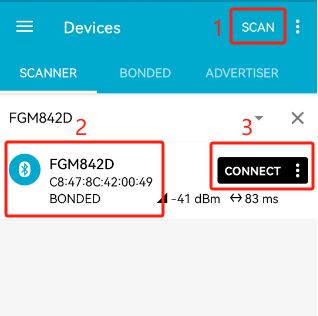
Open nRF Connect application on your phone. Click "SCAN" to scan for peripheral devices, select "FGM842D " in the scan results and then click "CONNECT".
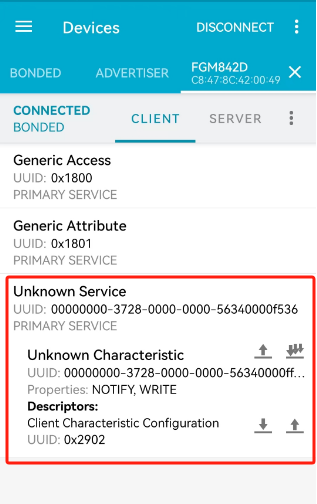
After the module is connected successfully, the following information is displayed in "CLIENT":
Send data to the module through nRF Connect application. The module receives the data and sends the data back to nRF Connect application.
i. Select an editable characteristic value, and click the up arrow.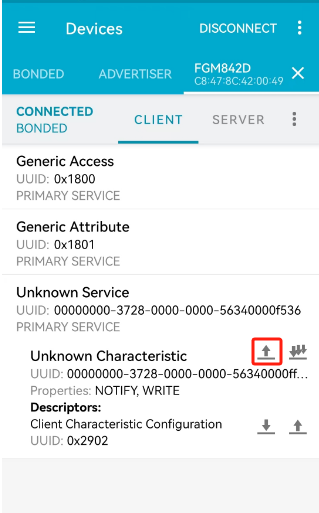
ii. Input the data to be sent in text format, and click "SEND".
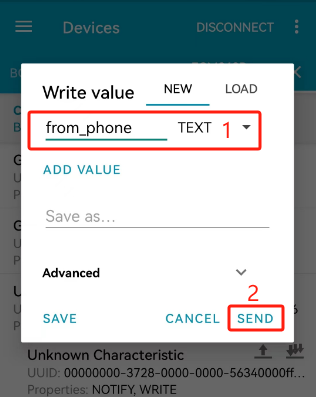
iii. The module receives the data and then sends the data back to nRF Connect, as shown in the figure below.
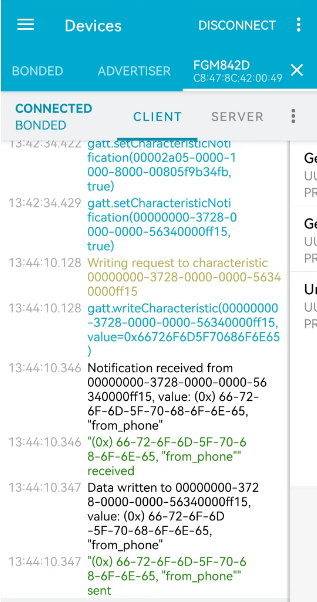
A code example of receiving and sending back data is as follows:
uint16_t ql_ble_demo_gatt_cb(ql_ble_gatt_msg_t *p_msg)
{
    os_printf("%s, msg_evt: [%d], conn_idx: [%d] rn", __func__, p_msg->msg_evt, p_msg->conn_idx);
    uint8_t idx = 0;

    switch (p_msg->msg_evt)
    {
        case QL_BLE_GATT_MSG_WRITE_REQ:
        {
            os_printf("conn_idx: [%d], svc_id: [%d], att_idx: [%d], handle: [%d], len: [%d], data: [%s] rn",
                    p_msg->conn_idx, p_msg->param.report.svc_id, p_msg->param.report.att_idx,
                    p_msg->param.report.char_handle, p_msg->param.report.data.len, p_msg->param.report.data.data);

            ql_ble_demo_msg ble_demo_msg = {0};
            ble_demo_msg.msg_id = QL_BLE_DEMO_PER_GATT_SEND_NTF;
            ble_demo_msg.msg_param.send_ntf.con_idx = p_msg->conn_idx;
            ble_demo_msg.msg_param.send_ntf.svc_id = p_msg->param.report.svc_id;
            ble_demo_msg.msg_param.send_ntf.att_idx = p_msg->param.report.att_idx;
            ble_demo_msg.msg_param.send_ntf.len = p_msg->param.report.data.len;
            ble_demo_msg.msg_param.send_ntf.data = malloc(p_msg->param.report.data.len);
            memset((void *)ble_demo_msg.msg_param.send_ntf.data, 0x00, p_msg->param.report.data.len);
            memcpy((void *)ble_demo_msg.msg_param.send_ntf.data, (const void *)p_msg->param.report.data.data,
                p_msg->param.report.data.len);
            ql_ble_demo_msg_send(&ble_demo_msg);
            break;
        }
    }
}

// ...

static void ql_ble_demo_msg_process(ql_ble_demo_msg *ble_msg)
{
    os_printf("msg_id: %d rn", ble_msg->msg_id);

    switch (ble_msg->msg_id)
    {
        case QL_BLE_DEMO_PER_GATT_SEND_NTF:
        {
            ql_ble_gatts_send_ntf_value(ble_msg->msg_param.send_ntf.con_idx,
                                        ble_msg->msg_param.send_ntf.svc_id,
                                        ble_msg->msg_param.send_ntf.att_idx,
                                        ble_msg->msg_param.send_ntf.data,
                                        ble_msg->msg_param.send_ntf.len);
            if (ble_msg->msg_param.send_ntf.data != NULL)
            {
                free(ble_msg->msg_param.send_ntf.data);
                ble_demo_msg.msg_param.send_ntf.data = NULL;
            }
            break;
        }
    }
}
Module as BLE Central Device
In this example, the nRF Connect application is used as the peripheral device for testing.
Initialize the BLE central device. The code example is as follows:
// ...

static void ql_ble_demo_entry(void *arg)
{
    ql_ble_demo_msg ble_demo_msg;
    uint8_t ble_mac[6] = {0};

    ql_ble_address_get(ble_mac);
    os_printf("ble_mac: [%02x:%02x:%02x:%02x:%02x:%02x] rn",
            ble_mac[0], ble_mac[1], ble_mac[2], ble_mac[3], ble_mac[4], ble_mac[5]);

    /* Set ble event callback */
    ql_ble_set_notice_cb(ql_ble_demo_gap_cb);
    ql_ble_gatt_init(ql_ble_demo_gatt_cb);

    while (1)
    {
        os_memset((void *)&ble_demo_msg, 0x00, sizeof(ql_ble_demo_msg));
        if (ql_rtos_queue_wait(ql_ble_demo_q, (uint8 *)&ble_demo_msg, sizeof(ble_demo_msg), QL_WAIT_FOREVER) == 0)
        {
            ql_ble_demo_msg_process(&ble_demo_msg);
        }
    }
}
Set the scan parameters and start scanning. The code example is as follows:
// ...

case QL_BLE_DEMO_START_SCAN:
{
    ql_ble_scan_param_t scan_param = {0};
    scan_param.scan_intv = 0x50;
    scan_param.scan_wd = 0x20;

    ret = ql_ble_start_scaning(scan_param);
    if (ret != QL_BLE_SUCCESS)
    {
        os_printf("ql_ble_start_scaning, ret: [%d] rn", ret);
        return;
    }
    break;
}
After scanning is started, QL_BLE_REPORT_ADV_EVENT event is generated for selecting the peripheral device to be connected.
// ...

case QL_BLE_REPORT_ADV_EVENT:
{
    ql_ble_recv_adv_t *recv_adv = (ql_ble_recv_adv_t *)param;
    os_printf("adv_type: [%d], adv_addr_type: [%d], adv_addr:[%02x:%02x:%02x:%02x:%02x:%02x], rssi: [%d] rn",
            recv_adv->adv_type, recv_adv->adv_addr_type, recv_adv->adv_addr[0], recv_adv->adv_addr[1],
            recv_adv->adv_addr[2], recv_adv->adv_addr[3], recv_adv->adv_addr[4], recv_adv->adv_addr[5],
            recv_adv->rssi);

#if CFG_ENABLE_QUECTEL_BLE_CENTRAL
    ql_ble_demo_report_adv_deal(recv_adv);
#endif
    break;
}

// ...

void ql_ble_demo_report_adv_deal(ql_ble_recv_adv_t *p_adv_report)
{
    uint8_t index = 0;

    while (index < p_adv_report->data_len)
    {
        gapAdStructure_t adElement;
        adElement.length = p_adv_report->data[index];
        adElement.adType = p_adv_report->data[index + 1];
        adElement.aData = (uint8_t *)&p_adv_report->data[index + 2];

        if ((adElement.adType = 0x08) || (adElement.adType = 0x09))
        {
            if (!memcmp(adElement.aData, "phone_server", strlen("phone_server"))) // check adv name
            {
                os_printf("Found Device NAME, RSSI:%ddBm, mac:", p_adv_report->rssi);
                for (uint8_t i = 0; i < 6; i++)
                {
                    os_printf("%02X ", p_adv_report->adv_addr[i]);
                }
                os_printf("rn");

                memcpy(&peer_addr.addr[0], p_adv_report->adv_addr, 6);
                peer_addr.addr_type = p_adv_report->adv_addr_type;

                ql_ble_demo_msg ble_demo_msg = {0};
                ble_demo_msg.msg_id = QL_BLE_DEMO_STOP_SCAN;
                ql_ble_demo_msg_send(&ble_demo_msg);
                return;
            }
        }

        /* Move on to the next AD element type */
        index += adElement.length + sizeof(uint8_t);
    }
}
After connecting to the peripheral device, QL_BLE_INIT_CONNECT_EVENT event is generated to discover the services of peripheral device.
// ...

case QL_BLE_DEMO_STOP_SCAN:
{
    ret = ql_ble_stop_scaning();
    if (ret != QL_BLE_SUCCESS)
    {
        os_printf("ql_ble_stop_scaning, ret: [%d] rn", ret);
        return;
    }

    if (ql_ble_demo_sem)
    {
        ql_rtos_semaphore_wait(ql_ble_demo_sem, QL_BLE_DEMO_TIMEOUT_MS);
    }

    ql_ble_set_connect_dev_addr(&peer_addr);
    ret = ql_ble_start_conn(0x30, 0x30, 0, 500);
    if (ret != QL_BLE_SUCCESS)
    {
        os_printf("ql_ble_start_conn, ret: [%d] rn", ret);
        return;
    }
    break;
}

// ...

case QL_BLE_INIT_CONNECT_EVENT:
{
    ql_ble_conn_ind_t *conn_ind = (ql_ble_conn_ind_t *)param;
    os_printf("conn_idx: [%d], addr_type: [%d], peer_addr: [%02x:%02x:%02x:%02x:%02x:%02x] rn",
            conn_ind->conn_idx, conn_ind->peer_addr_type, conn_ind->peer_addr[0], conn_ind->peer_addr[1],
            conn_ind->peer_addr[2], conn_ind->peer_addr[3], conn_ind->peer_addr[4], conn_ind->peer_addr[5]);

    conn_hdl = conn_ind->conn_idx;

#if CFG_ENABLE_QUECTEL_BLE_CENTRAL
    ql_ble_demo_msg ble_demo_msg = {0};
    ble_demo_msg.msg_id = QL_BLE_DEMO_CENTRAL_EXCHANGE_MTU;
    ql_ble_demo_msg_send(&ble_demo_msg);
#endif
    break;
}

// ...

case QL_BLE_MTU_CHANGE_EVENT:
{
    ql_ble_mtu_change_t *mtu_change = (ql_ble_mtu_change_t *)param;
    os_printf("conn_idx: [%d], mtu_size: [%d] rn", mtu_change->conn_idx, mtu_change->mtu);

#if CFG_ENABLE_QUECTEL_BLE_CENTRAL
    ql_ble_demo_msg ble_demo_msg = {0};
    ble_demo_msg.msg_id = QL_BLE_DEMO_CEN_GATT_DISV_ALL_SRV;
    ql_ble_demo_msg_send(&ble_demo_msg);
#endif
    break;
}

// ...

case QL_BLE_DEMO_CEN_GATT_DISV_ALL_SRV:
{
    ql_ble_gattc_all_service_discovery(conn_hdl);
    break;
}
After discovering the services of peripheral device, QL_BLE_GATT_MSG_CMP_EVT event is generated, with the operation item being QL_BLE_GATT_OP_PEER_SVC_DISC_END.
// ...
case QL_BLE_GATT_MSG_CMP_EVT:
{
    os_printf("QL_BLE_GATT_MSG_CMP_EVT, operation: [%d], status: [%d] rn",
            p_msg->param.op.operation, p_msg->param.op.status);

    if ((p_msg->param.op.operation == QL_BLE_GATT_OP_PEER_SVC_DISC_END) && (cen_chara_hdl != 0))
    {
#if CFG_ENABLE_QUECTEL_BLE_CENTRAL
        ql_ble_demo_msg ble_demo_msg = {0};
        ble_demo_msg.msg_id = QL_BLE_DEMO_CEN_GATT_NTFCFG;
        ql_ble_demo_msg_send(&ble_demo_msg);
#endif
    }
    break;
}
After the data is successfully written to the peripheral device, the peripheral device will send "123456" to the central device, and then QL_BLE_GATT_MSG_NTF_REQ event is generated.
// ...
case QL_BLE_GATT_MSG_NTF_REQ:
{
    os_printf("conn_idx: [%d], svc_id: [%d], att_idx: [%d], handle: [%d], len: [%d], data: [%s] rn",
            p_msg->conn_idx, p_msg->param.report.svc_id, p_msg->param.report.att_idx,
            p_msg->param.report.char_handle, p_msg->param.report.data.len, p_msg->param.report.data.data);

#if CFG_ENABLE_QUECTEL_BLE_CENTRAL
    ql_ble_demo_msg ble_demo_msg = {0};
    ble_demo_msg.msg_id = QL_BLE_DEMO_CEN_GATT_WRREQ;
    ql_ble_demo_msg_send(&ble_demo_msg);
#endif
    break;
}
Appendix References
Related documents:
| Document Name |
|---|
| [1]: Quectel_FCM242D&FGM842D_Series_QuecOpen(SDK)_Quick_Start_Guide |
Terms and Abbreviations
Terms and Abbreviations:
| Abbreviation | Description |
|---|---|
| API | Application Programming Interface |
| BLE | Bluetooth Low Energy |
| GATT | Generic Attribute Profile |
| ID | Identifier |
| IoT | Internet of Things |
| MAC | Medium Access Control |
| MTU | Maximum Transmission Unit |
| RSSI | Received Signal Strength Indicator |
| SDK | Software Development Kit |
| UUID | Universally Unique Identifier |