


 English
RTOS Development Guide
Introduction
Quectel FCM242D and FGM842D series modules support QuecOpen® solution. QuecOpen® is an embedded development platform based on RTOS system. It is intended to simplify the design and development of IoT applications.
For more information on QuecOpen®, see Quick_Start_Guide.
This document is applicable to QuecOpen® solution based on SDK build environment and explains how to develop RTOS on FCM242D and FGM842D series modules in QuecOpen® solution.
Brief Introduction to RTOS
RTOS Definition
Systems that require specific response times from computers are typically referred to as critical systems or applications. To meet the response time requirements of these critical systems or applications, real-time operating systems (RTOS) have been developed.
An RTOS is one in which all tasks are completed within a specified time frame, and task completion must meet timing predictability. Please note that the essence of an RTOS lies in its temporally predictable responses. As a result, real-time operating systems often respond very quickly.
RTOS kernel objects: task, semaphore, mutex, message queue, and timer.
Task
In daily life, when we manage a serious problem, we generally divide it into several parts to solve them one by one. Similarly, in complex program development, we usually divide a big task into multiple small tasks and process them on the computer step by step until the development of the complex program is finally completed. This solution makes the operating system run multiple tasks simultaneously to improve processor utilization.
Task and Its Memory Structure
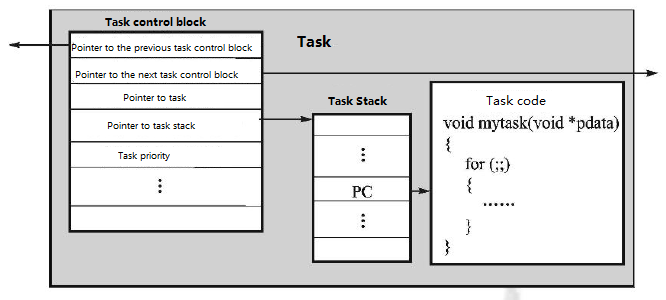
An RTOS task usually consists of three parts: task control block, task stack and task code. Among them, the task control block is associated with the task code, and records each task attribute. The task stack saves the task environment. The figure below is a schematic diagram of the RTOS task overview.
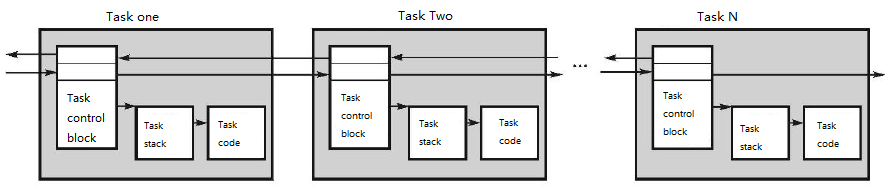
The control blocks of multiple tasks are generally organized in a linked list. The linked list is shown in the figure below:
Task State
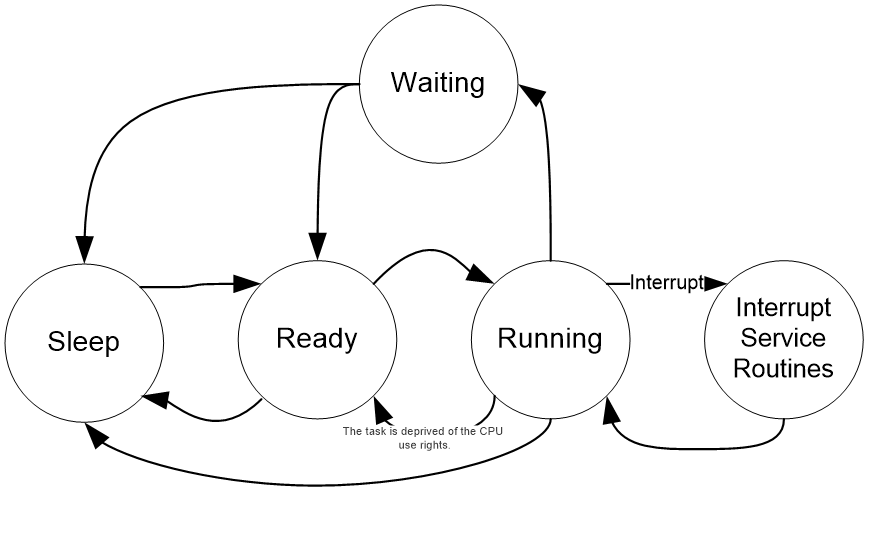
Task states are described below:
| State | Description |
|---|---|
| Sleep | The task resides in the program space (ROM or RAM) in the form of code and has not yet been delivered to the operating system for management. In short, if the task has not been assigned to a task control block or has been deprived of a task control block, the task is in the sleep state. |
| Ready | If the system assigns a task control block to the task and registers the task in the task ready table for its further running, the task is in the ready state. |
| Running | The scheduler determines the task in the ready state to obtain the right to use the CPU, then the task enters the running state. Only one task can be running at a time. Among the ready tasks, only when all tasks with a priority higher than this task are turned into the waiting state, can this task enter the running state. |
| Waiting | If a running task is waiting for an interval to pass or an event to occur before running, the task transfers the right to use the CPU to other tasks to enter the waiting state. |
| Interrupt Service | Once a running task responds to the interrupt request, it will suspend running and execute the interrupt service. At this time, the task is in the interrupt service state. |
A task can switch among 5 different states. The switching process is shown in the figure below:
Task Creation and Deletion
The RTOS APIs for task creation and deletion provided by the module are listed below. See ql_rtos_task_create and ql_rtos_task_delete for details.
Task Creation:
ql_rtos_status ql_rtos_task_create(
    ql_task_t *taskRef,
    uint32 stackSize,
    uint8 priority,
    char *taskName,
    void (*taskStart)(void*),
    void* argv
);
Task Deletion:
ql_rtos_status ql_rtos_task_delete(
    ql_task_t taskRef
);
The parameters that need to be passed for task creation are task handle pointer, task stack size, task priority, task name, task entry function and parameters passed to the task. Among them, the task stack size is determined by the task code.
Module task priority range: 0 to 9. 0 means the lowest task priority. The priority of the task in application layer should not be higher than 4.
Task code structure:
void user_task(void * argv)
{
    while(1)
    {
        //process your task
    }
    ql_rtos_task_delete(NULL);
}
NOTE
In a task, after exiting the
while(1)structure, the current task must be deleted to release the resources occupied by the task control block and task stack. PassingNULLtoql_rtos_task_delete(ql_task_t taskRef)can delete the current task.If the parameter passed into
ql_rtos_task_delete(ql_task_t taskRef)is notNULL, the task pointed to by the task handle is deleted.
Task Management API Overview:
| Function | Description |
|---|---|
ql_rtos_task_create() |
Creates a task. |
ql_rtos_task_delete() |
Deletes a task. |
ql_rtos_task_suspend() |
Suspends a task. |
ql_rtos_task_resume() |
Takes the task out of the suspended state. |
ql_rtos_task_get_current_ref() |
Gets the current task handle. |
ql_rtos_task_change_priority() |
Changes the priority of the target task. |
ql_rtos_task_yield() |
Switches tasks immediately. |
ql_rtos_task_sleep_ms() |
Sets task sleep time in milliseconds. |
ql_rtos_task_sleep_s() |
Sets task sleep time in seconds. |
ql_rtos_enter_critical() |
Enters the critical section protection. |
ql_rtos_exit_critical() |
Exits the critical section protection. |
Semaphore
When a complex task is divided into several small tasks, these small tasks should be arranged and processed in an orderly manner. For example, an application is divided into task A and task B. Task B should wait for task A to finish the corresponding operation for further execution of task B. At this time, task B is in the waiting state until task A completes its operation. Then, task A sends a signal to task B to notify task B that it can now be executed.
Semaphore is not only used for notification, but it can also measure the number of task executions. If task A continuously sends signals to task B several times, task B can be executed cyclically. Semaphore plays an important role in the multi-task synchronization mechanism.
Semaphore usage pseudocode:
sem_t sem;

void taskA(void * argv)
{
    while(1)
    {
        ...
        sem_post(&sem);
        sleep(1);
        ...
    }
}

void taskB(void * argv)
{
    int cnt = 0;
    while(1)
    {
        ...
        sem_wait(&sem);
        printf("got sem for %d time(s)\n", ++cnt);
        ...
    }
}
Semaphore API Overview:
| Function | Description |
|---|---|
ql_rtos_semaphore_create() |
Creates a semaphore. |
ql_rtos_semaphore_wait() |
Sets the waiting time for a semaphore. |
ql_rtos_semaphore_release() |
Releases a semaphore. |
ql_rtos_semaphore_get_cnt() |
Gets the semaphore value. |
ql_rtos_semaphore_delete() |
Deletes a semaphore. |
Mutex
Mutex, a binary semaphore, whose maximum value is 1, is used to protect shared resources from being accessed by multiple tasks at the same time, so as to avoid inconsistencies in the context of shared resources accessed by the same task before and after, resulting in some unexpected situations (that may be serious). Therefore, mutex plays an important role in protecting shared resources.
Mutex usage pseudocode:
bool bFlag = TRUE;

void taskA(void * argv)
{
    ...
    //lock();
    if(bFlag == TRUE)
    {
        //lableA:
        printf("bFlag value is: %d\n", bFlag);
        bFlag = FALSE;
    }
    //unlock();
    ...
}

void taskB(void * argv)
{
    ...
    //lock();
    if(bFlag == TRUE)
    {
        //lableB:
        printf("bFlag value is: %d\n", bFlag);
        bFlag = FALSE;
    }
    //unlock();
    ...
}
Mutex API Overview:
| Function | Description |
|---|---|
ql_rtos_mutex_create() |
Creates a mutex. |
ql_rtos_mutex_lock() |
Locks a mutex with waiting forever. |
ql_rtos_mutex_unlock() |
Unlocks a mutex. |
ql_rtos_mutex_delete() |
Deletes a mutex. |
Message Queue
In addition to sending semaphores for interaction, multiple tasks can also deliver messages through message queues. The message queue delivers messages from one task to another. Message delivery method: Based on the start address and size of the message to be delivered, one task copies the message into the message queue, and then sends a semaphore to another task that is waiting for the message. The thread waiting for the message copies the message in the message queue to the local buffer, and then removes the message in the queue.
Message queue usage pseudocode:
queue_t queue;

void taskA(void * argv)
{
    while(1)
    {
        ...
        queue_post(&queue, &msg, msg_size);
        sleep(1);
        ...
    }
}

void taskB(void * argv)
{
    int cnt = 0;
    while(1)
    {
        ...
        queue_wait(&queue, &msg, msg_size);
        printf("got msg for %d time(s): %s\n", ++cnt, msg);
        ...
    }
}
Message Queue API Overview:
| Function | Description |
|---|---|
ql_rtos_queue_create() |
Creates a message queue. |
ql_rtos_queue_wait() |
Waits for messages in the queue. |
ql_rtos_queue_release() |
Releases a message queue. |
ql_rtos_queue_delete() |
Deletes a message queue. |
Timer
A timer is used for timing. After the specified time arrives, the timer will inform the user about the expiration through the callback function. The timer of the module supports executing callback functions in system service and the specified task.
Timer API Overview:
| Function | Description |
|---|---|
ql_rtos_timer_create() |
Creates a timer. |
ql_rtos_timer_start() |
Starts a timer. The time precision is in milliseconds. After the timer expires, the system will be awakened from sleep mode. |
ql_rtos_timer_stop() |
Stops a timer. |
ql_rtos_timer_is_running() |
Determines whether the timer is running. |
ql_rtos_timer_delete() |
Deletes a timer. |
ql_rtos_timer_change_period() |
Changes the timing interval of a timer. |
ql_rtos_up_time_ms() |
Gets the duration from system startup to the current moment. |
Event Group
The event group is a way of inter-task communication, mainly used to achieve tasks synchronization. Event communication does not involve data transmission. Unlike semaphores, it can achieve one-to-many and many-to-many synchronization. That is, a task can wait for the occurrence of multiple events.
Event group usage pseudocode:
event_t event;

void taskA(void * argv)
{
    while(1)
    {
        ...
        event_set(event, val, in_isr);
        sleep(1);
        ...
    }
}

void taskB(void * argv)
{
    int cnt = 0;
    while(1)
    {
        ...
        event_wait(&event, val, clear_on_exit, wait_all_bits, wait_forever);
        printf("got event for %d time(s)\n", ++cnt);
        ...
    }
}
Event Group API Overview:
| Function | Description |
|---|---|
ql_rtos_event_group_create |
Creates an event group. |
ql_rtos_event_group_delete |
Deletes an event group. |
ql_rtos_event_group_get_bits |
Gets values of the current event group. |
ql_rtos_event_group_wait_bits |
Waits for an event group. |
ql_rtos_event_group_clear_bits |
Clears the specified bit of the event group. |
ql_rtos_event_group_set_bits |
Sets the specified bit for the event group. |
Task Notification
Task notification is a mechanism where tasks are initialized at creation, carrying resources within the task. It does not need to be created when used, occupying less RAM space and being faster compared to methods like using semaphores to unblock tasks.
Task notification usage pseudocode:
void taskA(void * argv)
{
    while(1)
    {
        ...
        task_flags_set(taskB_handle_, flags);
        sleep(1);
        ...
    }
}

void taskB(void * argv)
{
    int cnt = 0;
    while(1)
    {
        ...
        task_flags_wait(wait_forever);
        printf("got task flags for %d time(s)\n", ++cnt);
        ...
    }
}
Task Notification API Overview:
| Function | Description |
|---|---|
ql_rtos_task_flags_set() |
Sends a task notification. |
ql_rtos_task_flags_wait() |
Waits for a task notification. |
RTOS APIs
Data Type
ql_rtos_status
typedef int ql_rtos_status //Data type of RTOS API return value.
ql_task_t
typedef void * ql_task_t //Type of task handle.
ql_sem_t
typedef void * ql_sem_t //Type of semaphore handle.
ql_mutex_t
typedef void * ql_mutex_t //Type of mutex handle.
ql_queue_t
typedef void * ql_queue_t //Type of message queue handle.
ql_timer_t
typedef struct
{
    void * handle;
    timer_cb_t function;
    void * arg;
    volatile ql_timer_state_t state;
} ql_timer_t;
- Parameter
| Parameter | Description |
|---|---|
| handle | Timer handle. |
| function | The callback function for timer expiration. |
| arg | Parameters in the callback function. |
| state | Timer state. |
ql_timer_state_t
typedef enum
{
    QL_TIMER_INIT = 0,
    QL_TIMER_DELETING,
    QL_TIMER_DELETED,
} ql_timer_state_t;
- Member
| Member | Description |
|---|---|
| QL_TIMER_INIT | Initialization |
| QL_TIMER_DELETING | Deleting |
| QL_TIMER_DELETED | Deleted |
ql_wait_e
typedef enum
{
    QL_WAIT_FOREVER = 0xFFFFFFFFUL,
    QL_NO_WAIT = 0
} ql_wait_e;
- Member
| Member | Description |
|---|---|
| QL_WAIT_FOREVER | Wait forever |
| QL_NO_WAIT | No wait |
ql_event_group_t
typedef void * ql_event_group_t; //Type of event group handle.
Header File
ql_osi.h, the header file of RTOS API, is in the ql_components\api\ directory of the SDK. Unless otherwise specified, all header files mentioned in this document are in this directory.
API Description
ql_rtos_task_create
This function creates a task.
- Prototype
ql_rtos_status ql_rtos_task_create(
  ql_task_t *taskRef,
  uint32_t stackSize,
  uint8_t priority,
  char *taskName,
  void (*taskStart)(void*), void* argv
)
Parameter
taskRef: [Out] Task handle.stackSize: [In] Task stack size, determined by task code. Maximum value: 128 KB. Unit: byte.priority: [In] Task priority. Range: 0--9.taskName: [In] Task name. Maximum value: 16 bytes.taskStart: [In] The task entry function.argv: [In] The parameters passed to the task.
Return Value
0: Successful executionOther value: Failed execution
ql_rtos_task_delete
This function deletes a task.
- Prototype
ql_rtos_status ql_rtos_task_delete (ql_task_t taskRef)
Parameter
taskRef: [In] Task handle. If the parameter is NULL, delete the current task. Otherwise, delete the task pointed to by the task handle.
Return Value
0: Successful executionOther value: Failed execution
ql_rtos_task_suspend
This function suspends a task.
- Prototype
ql_rtos_status ql_rtos_task_suspend(ql_task_t taskRef)
Parameter
taskRef: [In] Task handle.
Return Value
0: Successful executionOther value: Failed execution
ql_rtos_task_resume
This function takes the task out of the suspended state.
- Prototype
ql_rtos_status ql_rtos_task_resume(ql_task_t taskRef)
Parameter
taskRef: [In] Task handle.
Return Value
0: Successful execution- Other value: Failed execution
ql_rtos_task_get_current_ref
This function gets the current task handle.
- Prototype
ql_rtos_status ql_rtos_task_get_current_ref(ql_task_t * taskRef)
Parameter
taskRef: [Out] Task handle.
Return Value
0: Successful execution- Other value: Failed execution
ql_rtos_task_change_priority
This function changes the priority of the target task.
- Prototype
ql_rtos_status ql_rtos_task_change_priority(ql_task_t taskRef, uint8 new_priority)
Parameter
taskRef: [In] Task handle.new_priority: [In] New priority of the task. Range: 0--9. 0 means the lowest task priority.
Return Value
0: Successful execution- Other value: Failed execution
ql_rtos_task_yield
The function switches tasks immediately.
- Prototype
void ql_rtos_task_yield()
Parameter
None
Return Value
None
ql_rtos_task_sleep_ms
This function sets task sleep time in milliseconds.
- Prototype
void ql_rtos_task_sleep_ms(uint32 ms)
Parameter
ms: [In] Task sleep time. Unit: millisecond.
Return Value
None
ql_rtos_task_sleep_s
This function sets task sleep time in seconds.
- Prototype
void ql_rtos_task_sleep_s(uint32 s)
Parameter
s: [In] Task sleep time. Unit: second.
Return Value
None
ql_rtos_enter_critical
This function enters the critical section protection.
- Prototype
ql_rtos_status ql_rtos_enter_critical(void)
Parameter
None
Return Value
None
ql_rtos_exit_critical
This function exits the critical section protection.
- Prototype
ql_rtos_status ql_rtos_exit_critical(void)
Parameter
None
Return Value
None
ql_rtos_semaphore_create
This function creates a semaphore.
- Prototype
ql_rtos_status ql_rtos_semaphore_create(ql_sem_t *semaRef, uint32 initialCount)
Parameter
semaRef: [Out] Semaphore handle.initialCount: [In] Initial semaphore value.
Return Value
0: Successful execution- Other value: Failed execution
ql_rtos_semaphore_wait
This function sets the waiting time for a semaphore.
- Prototype
ql_rtos_status ql_rtos_semaphore_wait(ql_sem_t semaRef, uint32 timeout)
Parameter
semaRef: [In] Semaphore handle.timeout: [In] The waiting time for the semaphore. Unit: millisecond. In addition to the following values, you can also set the waiting time according to your requirements.
QL_WAIT_FOREVER: Wait forever
QL_NO_WAIT: No wait
Return Value
0: Successful execution- Other value: Failed execution
ql_rtos_semaphore_release
This function releases a semaphore.
- Prototype
ql_rtos_status ql_rtos_semaphore_release(ql_sem_t semaRef)
Parameter
semaRef: [In] Semaphore handle.
Return Value
0: Successful execution- Other value: Failed execution
ql_rtos_semaphore_get_cnt
This function gets the semaphore value.
- Prototype
ql_rtos_status ql_rtos_semaphore_get_cnt(ql_sem_t semaRef, uint32* cnt_ptr)
Parameter
semaRef: [In] Semaphore handle.cnt_ptr: [Out] The output semaphore.
Return Value
0: Successful execution- Other value: Failed execution
ql_rtos_semaphore_delete
This function deletes a semaphore.
- Prototype
ql_rtos_status ql_rtos_semaphore_delete(ql_sem_t semaRef)
Parameter
semaRef: [In] Semaphore handle.
Return Value
0: Successful execution- Other value: Failed execution
ql_rtos_mutex_create
This function creates a mutex.
- Prototype
ql_rtos_status ql_rtos_mutex_create(ql_mutex_t *mutexRef)
Parameter
mutexRef: [Out] Mutex handle.
Return Value
0: Successful execution- Other value: Failed execution
ql_rtos_mutex_lock
This function locks a mutex with waiting forever.
- Prototype
ql_rtos_status ql_rtos_mutex_lock(ql_mutex_t mutexRef)
Parameter
mutexRef: [In] Mutex handle.
Return Value
0: Successful execution- Other value: Failed execution
ql_rtos_mutex_unlock
This function unlocks a mutex.
- Prototype
ql_rtos_status ql_rtos_mutex_unlock(ql_mutex_t mutexRef)
Parameter
mutexRef: [In] Mutex handle.
Return Value
0: Successful execution- Other value: Failed execution
ql_rtos_mutex_delete
This function deletes a mutex.
- Prototype
ql_rtos_status ql_rtos_mutex_delete(ql_mutex_t mutexRef)
Parameter
utexRef: [In] Mutex handle.
Return Value
0: Successful execution- Other value: Failed execution
ql_rtos_queue_create
This function creates a message queue.
- Prototype
ql_rtos_status ql_rtos_queue_create(ql_queue_t *msgQRef, uint32 maxSize, uint32 maxNumber)
Parameter
msgQRef: [In] Message queue handle.maxSize: [In] The maximum message size supported by the message queue. Unit: byte.maxNumber: [In] The maximum number of messages supported by the message queue.
Return Value
0: Successful execution- Other value: Failed execution
ql_rtos_queue_wait
This function waits for messages in the queue.
- Prototype
ql_rtos_status ql_rtos_queue_wait(ql_queue_t msgQRef, uint8 * recvMsg, uint32 size, uint32 timeout)
Parameter
msgQRef: [In] Message queue.size: [In] Invalid parameter which is only designed for compatibility with other Quectel modules. The value is equal tomaxSizewhen the queue is created.recvMsg: [In] The pointer to receive the message.timeout: [In] The waiting time of the message queue. Unit: millisecond.
Special values:QL_WAIT_FOREVER: Wait foreverQL_NO_WAIT: No wait
Return Value
0: Successful execution- Other value: Failed execution
ql_rtos_queue_release
This function releases a message queue.
- Prototype
ql_rtos_status ql_rtos_queue_release(ql_queue_t msgQRef, uint32 size, uint8 *msgPtr, uint32 timeout)
Parameter
msgQRef: [In] Message queue.size: [In] Message size. Unit: byte.msgPtr: [In] The starting address of the data to be sent.timeout: [In] The waiting time of the message queue. Unit: millisecond.
Special values:QL_WAIT_FOREVER: Wait foreverQL_NO_WAIT: No wait
Return Value
0: Successful execution- Other value: Failed execution
ql_rtos_queue_delete
This function deletes a message queue.
- Prototype
ql_rtos_status ql_rtos_queue_delete(ql_queue_t msgQRef)
Parameter
msgQRef: [In] Message queue.
Return Value
0: Successful execution- Other value: Failed execution
ql_rtos_timer_create
This function creates a timer.
- Prototype
ql_rtos_status ql_rtos_timer_create(ql_timer_t* timerRef, uint32_t time_ms, void (* callBackRoutine )(void *), void * timerArgc )
Parameter
timerRef: [In] Timer handle.time_ms: [In] Timing interval of a timer. Unit: ms.callBackRoutine: [In] Timer callback function.timerArgc: [In] The parameter of the timer callback function.
Return Value
0: Successful execution- Other value: Failed execution
ql_rtos_timer_start
This function starts a timer. The time precision is in milliseconds. After the timer expires, the system will be awakened from sleep mode.
- Prototype
ql_rtos_status ql_rtos_timer_start(ql_timer_t timerRef)
Parameter
timerRef: [In] Timer handle.
Return Value
0: Successful execution- Other value: Failed execution
ql_rtos_timer_stop
This function stops a timer.
- Prototype
ql_rtos_status ql_rtos_timer_stop(ql_timer_t timerRef)
Parameter
timerRef: [In] Timer handle.
Return Value
0: Successful execution- Other value: Failed execution
ql_rtos_timer_is_running
This function determines whether the timer is running.
- Prototype
ql_rtos_status ql_rtos_timer_is_running(ql_timer_t timerRef)
Parameter
timerRef: [In] Timer handle.
Return Value
1: The timer is running.0: The timer is not running.
ql_rtos_timer_delete
This function deletes a timer.
- Prototype
ql_rtos_status ql_rtos_timer_delete(ql_timer_t timerRef)
Parameter
timerRef: [In] Timer handle.
Return Value
0: Successful execution- Other value: Failed execution
ql_rtos_timer_change_period
This function changes the timing interval of a timer.
- Prototype
ql_rtos_status ql_rtos_timer_change_period(ql_timer_t timerRef, uint32_t time_ms)
Parameter
timerRef: [In] Timer handle.time_ms: [In] New timing interval of a timer. Unit: millisecond.
Return Value
0: Successful execution- Other value: Failed execution
ql_rtos_up_time_ms
This function obtains the duration from system startup to the current moment.
- Prototype
uint32_t ql_rtos_up_time_ms()
Parameter
NoneReturn Value
- The duration from system startup to the current moment. Unit: millisecond.
ql_rtos_event_group_create
This function creates an event group.
- Prototype
ql_rtos_status ql_rtos_event_group_create(ql_event_group_t *event_group)
Parameter
event_group: [In] Event group.
Return Value
0: Successful execution- Other value: Failed execution
ql_rtos_event_group_delete
This function deletes an event group.
- Prototype
void ql_rtos_event_group_delete(ql_event_group_t event_group)
Parameter
event_group: [In] Event group.
Return Value
None
ql_rtos_event_group_get_bits
This function gets event bit of the current event group.
- Prototype
uint32_t ql_rtos_event_group_get_bits(ql_event_group_t event_group)
Parameter
event_group: [In] Event group.
Return Value
- The event bit of the current event group.
ql_rtos_event_group_wait_bits
The function waits for an event group.
- Prototype
uint32_t ql_rtos_event_group_wait_bits(
    ql_event_group_t event_group,
    const uint32_t val,
    const bool clear_on_exit,
    const bool wait_all_bits,
    int timeout
)
Parameter
event_group: [In] Event group.val: [In] The event bit of the event group.clear_on_exit: [In] whether to clear the event group after the function exits.wait_all_bits: [In] whether to wait for all specified events.timeout: [In] The timeout for the wait. Unit: millisecond.
Special values:QL_WAIT_FOREVER: Wait foreverQL_NO_WAIT: No wait
Return Value
0: Successful execution- Other value: Failed execution
ql_rtos_event_group_clear_bits
This function clears the specified bit of the event group.
- Prototype
uint32_t ql_rtos_event_group_clear_bits(ql_event_group_t event_group, const uint32_t val, bool isr)
Parameter
event_group: [In] Event group.val: [In] The event bit of the event group.isr: [In] Whether currently in interrupt state.
Special values:1: In interrupt0: Not in interrupt
Return Value
0: Successful execution- Other value: Failed execution
ql_rtos_event_group_set_bits
This function sets the specified bit for the event group.
- Prototype
uint32_t ql_rtos_event_group_set_bits(ql_event_group_t event_group, const uint32_t val, bool isr)
Parameter
event_group: [In] Event group.val: [In] The event bit of the event group.isr: [In] Whether currently in interrupt state.
Special values:1: In interrupt0: Not in interrupt
Return Value
0: Successful execution- Other value: Failed execution
ql_rtos_task_flags_set
This function sends a task notification. After object tasks receive notifications, it will bitwise OR its own task notification value with flags.
- Prototype
ql_rtos_status ql_rtos_task_flags_set (ql_task_t taskRef, uint32_t flags)
Parameter
taskRef: [In] Task handle.flags: [In] The value of task notification to be sent.
Return Value
0: Successful execution- Other value: Failed execution
ql_rtos_task_flags_wait
This function waits for a task notification.
- Prototype
uint32_t ql_rtos_task_flags_wait (uint32_t timeout)
- Parameter
timeout: [In] Timeout to the wait.
Return Value
1: Successfully waited for the task notification.Other value: Timeout waiting for the task notification.
Example File
ql_osi_demo, the example file of RTOS API, is in the ql_applicationexampleosi_demo directory of the SDK. You can refer to this file to realize the related functionalities.
Appendix References
Related Document:
| Document Name |
|---|
| Quectel_FCM242D&FGM842D_Series_QuecOpen(SDK)_Quick_Start_Guide |
Terms and Abbreviations:
| Abbreviation | Description |
|---|---|
| API | Application Programming Interface |
| CPU | Central Processing Unit |
| IoT | Internet of Things |
| PC | Personal Computer |
| RAM | Random Access Memory |
| ROM | Read-Only Memory |
| RTOS | Real Time Operating System |
| SDK | Software Development Kit |