
40‑Pin扩展
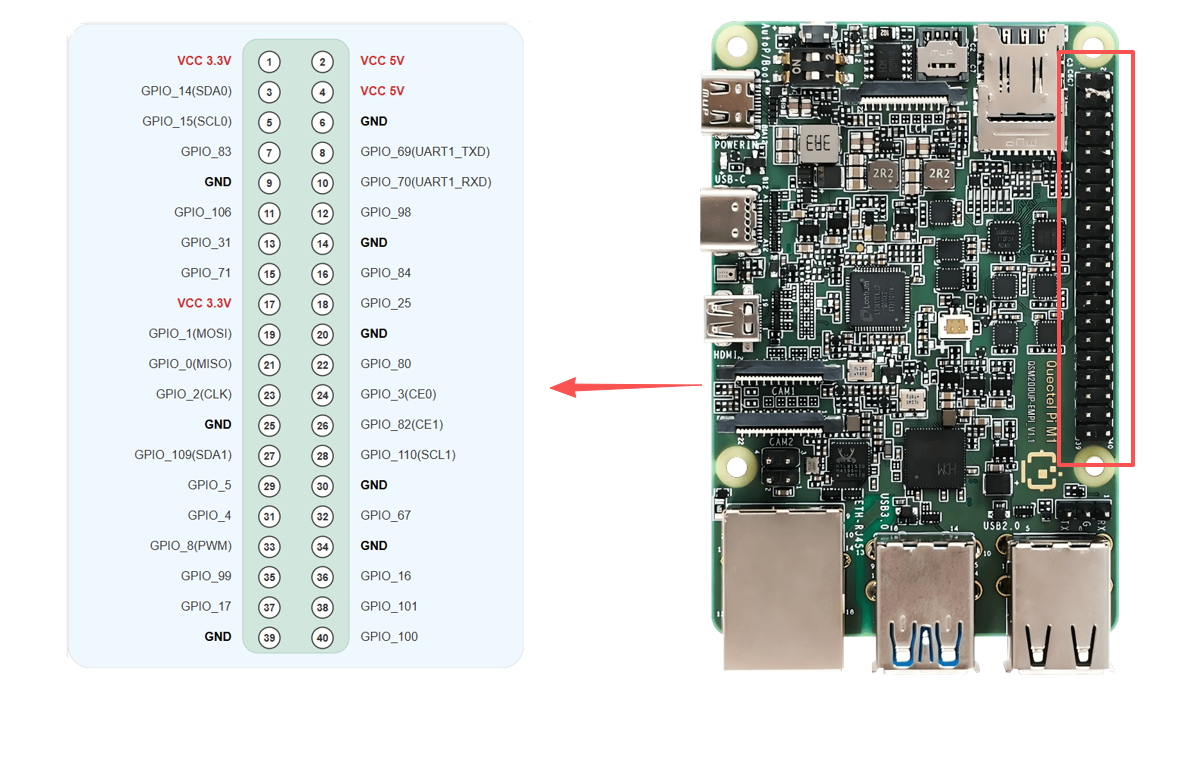
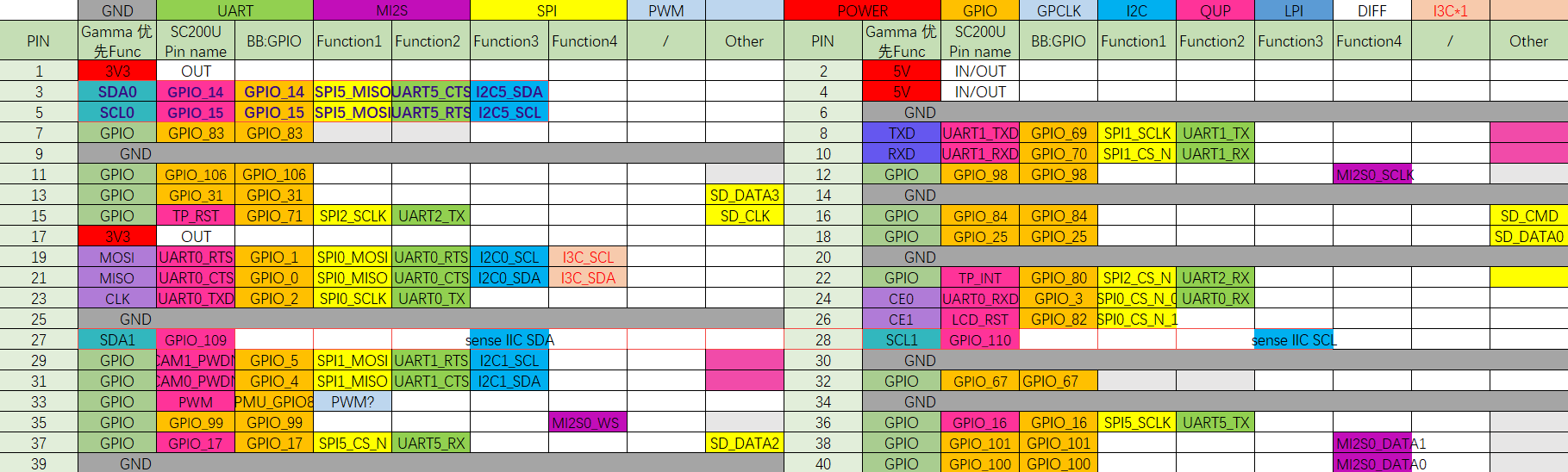
Quectel Pi M1智能主控板提供了标准的40‑pin GPIO扩展接口,支持GPIO、I2C、SPI、UART、PWM等多种外设接口。下面将介绍如何测试这些接口的功能。
引脚定义
GPIO测试
本节以测试40‑Pin的pin7引脚为例,演示如何使用GPIO功能。pin7对应的gpio_num为83。
硬件连接
连接方法一:万用表测量电压
将pin7(GPIO_83)引脚接万用表正极,pin6(GND)引脚接万用表负极。通过万用表可以测量引脚输出的电压值,验证GPIO功能是否正常。
连接方法二:使用GPIO扩展板指示灯
也可以通过接插树莓派4B/3B GPIO扩展板到40-Pin扩展接口来测试GPIO高低电平。该扩展板将各GPIO引脚引出并配有对应的指示灯,可将待测GPIO引脚配置为输出并将其接到扩展板上,当GPIO输出高电平时,小灯点亮,输出低电平时,小灯熄灭,从而直观观察GPIO电平变化是否符合预期。
关于该扩展板的更多信息,可参考配件章节中的GPIO terminal expansion board条目(参见:支持配件)。
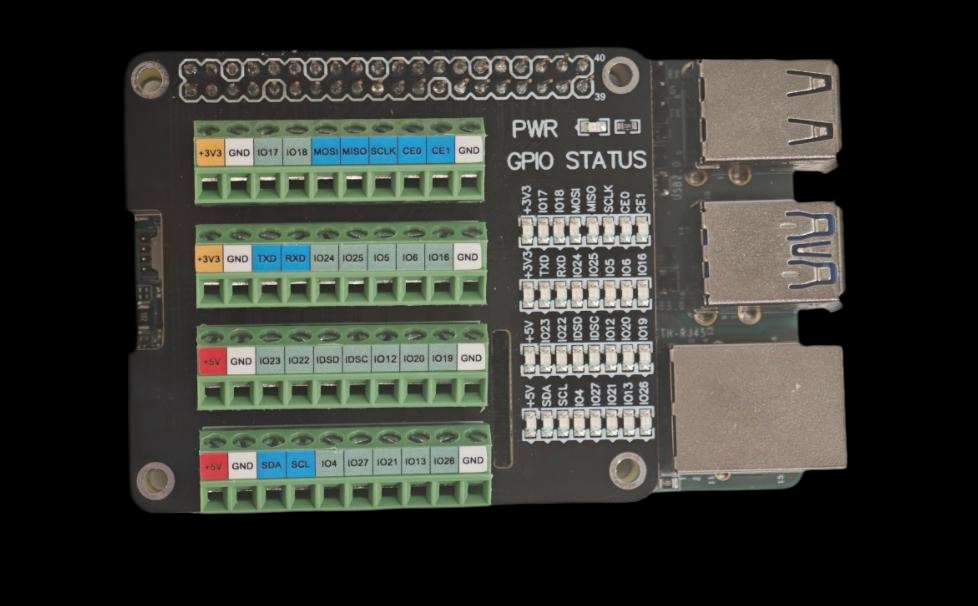
GPIO扩展板指示灯示例
测试方法
以下示例基于Android平台,直接使用预先通过NDK编译好的GPIO控制可执行文件pin_control_sysfs进行测试(无需自行编译)。
- 将可执行文件推送到开发板并赋权:
adb push <本地存放路径>/pin_control_sysfs /data/local/tmp/pin_control_sysfs
adb shell "chmod +x /data/local/tmp/pin_control_sysfs"
adb shell "ls -lh /data/local/tmp/pin_control_sysfs"
- 进入设备端shell并运行工具以查看用法:
adb shell
cd /data/local/tmp
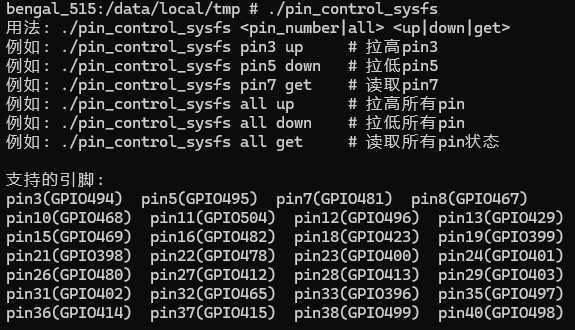
./pin_control_sysfs
运行后会打印可用命令和已支持的40‑pin引脚映射,示例输出如下:
- 常用操作示例:
- 拉高单个引脚:
./pin_control_sysfs pin7 up - 拉低单个引脚:
./pin_control_sysfs pin7 down - 读取单个引脚:
./pin_control_sysfs pin7 get - 操作全部引脚:
./pin_control_sysfs all up | all down | all get
- 拉高单个引脚:
提示:运行时确保目标引脚未被其它功能(如I2C/SPI/UART)占用,建议先通过扩展板指示灯或万用表确认电平变化是否符合预期。
点击展开/折叠:pin_control源码(可自行使用NDK编译)
#include <stdio.h>
#include <stdlib.h>
#include <unistd.h>
#include <fcntl.h>
#include <string.h>
#include <errno.h>

// GPIO引脚映射表 (SC200U Gamma Linux项目)
typedef struct {
    int pin;
    int gpio_num;  // Linux sysfs GPIO编号
} pin_map_t;

// 根据Bengal平台的GPIO映射 (与Android项目一致)
static const pin_map_t pin_mapping[] = {
    {3, 494}, {5, 495}, {7, 481}, {8, 467}, {10, 468}, {11, 504}, {12, 496}, {13, 429},
    {15, 469}, {16, 482}, {18, 423}, {19, 399}, {21, 398}, {22, 478}, {23, 400}, {24, 401},
    {26, 480}, {27, 412}, {28, 413}, {29, 403}, {31, 402}, {32, 465}, {33, 396}, {35, 497},
    {36, 414}, {37, 415}, {38, 499}, {40, 498}
};

#define PIN_COUNT (sizeof(pin_mapping) / sizeof(pin_map_t))

/**
 * 根据pin号获取GPIO映射信息
 */
const pin_map_t* get_pin_info(int pin) {
    for (int i = 0; i < PIN_COUNT; i++) {
        if (pin_mapping[i].pin == pin) {
            return &pin_mapping[i];
        }
    }
    return NULL;
}

/**
 * 导出GPIO到sysfs
 */
int export_gpio(int gpio_num) {
    char path[64];
    int fd;

    // 检查GPIO是否已导出
    snprintf(path, sizeof(path), "/sys/class/gpio/gpio%d", gpio_num);
    if (access(path, F_OK) == 0) {
        return 0;  // 已导出
    }

    // 导出GPIO
    fd = open("/sys/class/gpio/export", O_WRONLY);
    if (fd < 0) {
        printf("无法打开 /sys/class/gpio/export: %s\n", strerror(errno));
        return -1;
    }

    char gpio_str[8];
    snprintf(gpio_str, sizeof(gpio_str), "%d", gpio_num);
    if (write(fd, gpio_str, strlen(gpio_str)) < 0) {
        // 如果该GPIO已被导出,写入时会返回错误,忽略此非致命问题
        if (errno != EBUSY) {
            printf("无法export GPIO%d: %s\n", gpio_num, strerror(errno));
            close(fd);
            return -1;
        }
    }
    close(fd);

    usleep(100000);  // 延时100ms,等待sysfs节点创建完成
    return 0;
}

/**
 * 取消导出GPIO
 */
int unexport_gpio(int gpio_num) {
    int fd;

    fd = open("/sys/class/gpio/unexport", O_WRONLY);
    if (fd < 0) {
        return -1;
    }

    char gpio_str[8];
    snprintf(gpio_str, sizeof(gpio_str), "%d", gpio_num);
    write(fd, gpio_str, strlen(gpio_str));
    close(fd);

    return 0;
}

/**
 * 设置GPIO方向
 */
int set_gpio_direction(int gpio_num, const char *direction) {
    char path[64];
    int fd;

    snprintf(path, sizeof(path), "/sys/class/gpio/gpio%d/direction", gpio_num);
    fd = open(path, O_WRONLY);
    if (fd < 0) {
        printf("无法打开 %s: %s\n", path, strerror(errno));
        return -1;
    }

    if (write(fd, direction, strlen(direction)) < 0) {
        printf("设置GPIO%d方向失败: %s\n", gpio_num, strerror(errno));
        close(fd);
        return -1;
    }
    close(fd);

    return 0;
}

/**
 * 设置GPIO值
 */
int set_gpio_value(int gpio_num, int value) {
    char path[64];
    int fd;

    snprintf(path, sizeof(path), "/sys/class/gpio/gpio%d/value", gpio_num);
    fd = open(path, O_WRONLY);
    if (fd < 0) {
        printf("无法打开 %s: %s\n", path, strerror(errno));
        return -1;
    }

    char value_str[2];
    snprintf(value_str, sizeof(value_str), "%d", value);
    if (write(fd, value_str, 1) < 0) {
        printf("设置GPIO%d值失败: %s\n", gpio_num, strerror(errno));
        close(fd);
        return -1;
    }
    close(fd);

    return 0;
}

/**
 * 读取GPIO值
 */
int get_gpio_value(int gpio_num, int *value) {
    char path[64];
    int fd;
    char val[2];

    snprintf(path, sizeof(path), "/sys/class/gpio/gpio%d/value", gpio_num);
    fd = open(path, O_RDONLY);
    if (fd < 0) {
        printf("无法打开 %s: %s\n", path, strerror(errno));
        return -1;
    }

    if (read(fd, val, 1) < 0) {
        printf("读取GPIO%d失败: %s\n", gpio_num, strerror(errno));
        close(fd);
        return -1;
    }
    close(fd);

    *value = (val[0] == '1') ? 1 : 0;
    return 0;
}

/**
 * 使用sysfs控制GPIO
 * action: 0=拉低, 1=拉高, 2=读取
 */
int control_gpio_sysfs(int gpio_num, int action) {
    // 确保GPIO已导出
    if (export_gpio(gpio_num) < 0) {
        return -1;
    }

    if (action == 0 || action == 1) {
        // 设置方向为输出
        if (set_gpio_direction(gpio_num, "out") < 0) {
            return -1;
        }

        // 设置值
        if (set_gpio_value(gpio_num, action) < 0) {
            return -1;
        }

        printf("✓ GPIO%d已设置为%s电平\n", gpio_num, action ? "高" : "低");

        // 验证设置是否生效
        usleep(50000);
        int verify_value;
        if (get_gpio_value(gpio_num, &verify_value) == 0) {
            printf("  验证: GPIO%d实际状态: %s电平 (值: %d)\n",
                   gpio_num, verify_value ? "高" : "低", verify_value);
        }

    } else if (action == 2) {
        // 读取GPIO值
        int value;
        if (get_gpio_value(gpio_num, &value) == 0) {
            printf("✓ GPIO%d当前状态: %s电平 (值: %d)\n",
                   gpio_num, value ? "高" : "低", value);
        } else {
            return -1;
        }
    }

    return 0;
}

/**
 * 读取所有引脚状态
 */
int read_all_pins() {
    printf("========================================\n");
    printf("=== 读取所有引脚状态 ===\n");
    printf("========================================\n");
    int success_count = 0;

    for (int i = 0; i < PIN_COUNT; i++) {
        printf("pin%d (GPIO%d): ", pin_mapping[i].pin, pin_mapping[i].gpio_num);
        fflush(stdout);

        if (control_gpio_sysfs(pin_mapping[i].gpio_num, 2) == 0) {
            success_count++;
        } else {
            printf("✗ 读取失败\n");
        }
    }

    printf("========================================\n");
    printf("成功读取 %d/%lu 个引脚\n", success_count, PIN_COUNT);
    printf("========================================\n");
    return 0;
}

/**
 * 控制所有引脚
 */
int control_all_pins(int action) {
    printf("========================================\n");
    printf("开始控制所有引脚为%s电平...\n", action ? "高" : "低");
    printf("========================================\n");
    int success_count = 0;

    for (int i = 0; i < PIN_COUNT; i++) {
        printf("pin%d (GPIO%d): ", pin_mapping[i].pin, pin_mapping[i].gpio_num);
        fflush(stdout);

        if (control_gpio_sysfs(pin_mapping[i].gpio_num, action) == 0) {
            success_count++;
        } else {
            printf("✗ 控制失败\n");
        }
    }

    printf("========================================\n");
    printf("成功控制 %d/%lu 个引脚\n", success_count, PIN_COUNT);
    printf("========================================\n");

    return (success_count == PIN_COUNT) ? 0 : 1;
}

/**
 * 显示帮助信息
 */
void show_help(const char *prog_name) {
    printf("用法: %s <pin_number|all> <up|down|get>\n", prog_name);
    printf("例如: %s pin3 up     # 拉高pin3\n", prog_name);
    printf("例如: %s pin5 down   # 拉低pin5\n", prog_name);
    printf("例如: %s pin7 get    # 读取pin7\n", prog_name);
    printf("例如: %s all up      # 拉高所有pin\n", prog_name);
    printf("例如: %s all down    # 拉低所有pin\n", prog_name);
    printf("例如: %s all get     # 读取所有pin状态\n", prog_name);
    printf("\n支持的引脚:\n");

    for (int i = 0; i < PIN_COUNT; i++) {
        printf("pin%d(GPIO%d)  ", pin_mapping[i].pin, pin_mapping[i].gpio_num);
        if ((i + 1) % 4 == 0) printf("\n");
    }
    printf("\n");
}

/**
 * 主函数
 */
int main(int argc, char *argv[]) {
    if (argc < 3) {
        show_help(argv[0]);
        return 1;
    }

    char *pin_str = argv[1];
    char *action_str = argv[2];

    // 解析动作参数
    int action;
    if (strcmp(action_str, "up") == 0) {
        action = 1;
    } else if (strcmp(action_str, "down") == 0) {
        action = 0;
    } else if (strcmp(action_str, "get") == 0) {
        action = 2;
    } else {
        printf("错误: 动作必须是up, down或get\n");
        return 1;
    }

    // 处理all命令
    if (strcmp(pin_str, "all") == 0) {
        if (action == 2) {
            return read_all_pins();
        } else {
            return control_all_pins(action);
        }
    }

    // 解析引脚号
    int pin;
    if (sscanf(pin_str, "pin%d", &pin) != 1) {
        printf("错误: 无效的引脚格式,请使用pin3, pin5等\n");
        return 1;
    }

    const pin_map_t *pin_info = get_pin_info(pin);
    if (pin_info == NULL) {
        printf("错误: 不支持的引脚 pin%d\n", pin);
        return 1;
    }

    printf("控制 pin%d (GPIO%d)...\n", pin, pin_info->gpio_num);
    return control_gpio_sysfs(pin_info->gpio_num, action);
}
I2C测试
40‑pin接口的pin3和pin5默认为I2C的数据和时钟引脚。为了测试I2C接口,我们需要外接一个I2C设备。此处我们选用微雪环境传感器扩展板,将其接入40‑pin接口后,对应的设备节点为/dev/i2c2。
测试准备
本次测试使用微雪环境传感器扩展板(BME280),通过40‑pin接口进行连接。
硬件连接示意图:
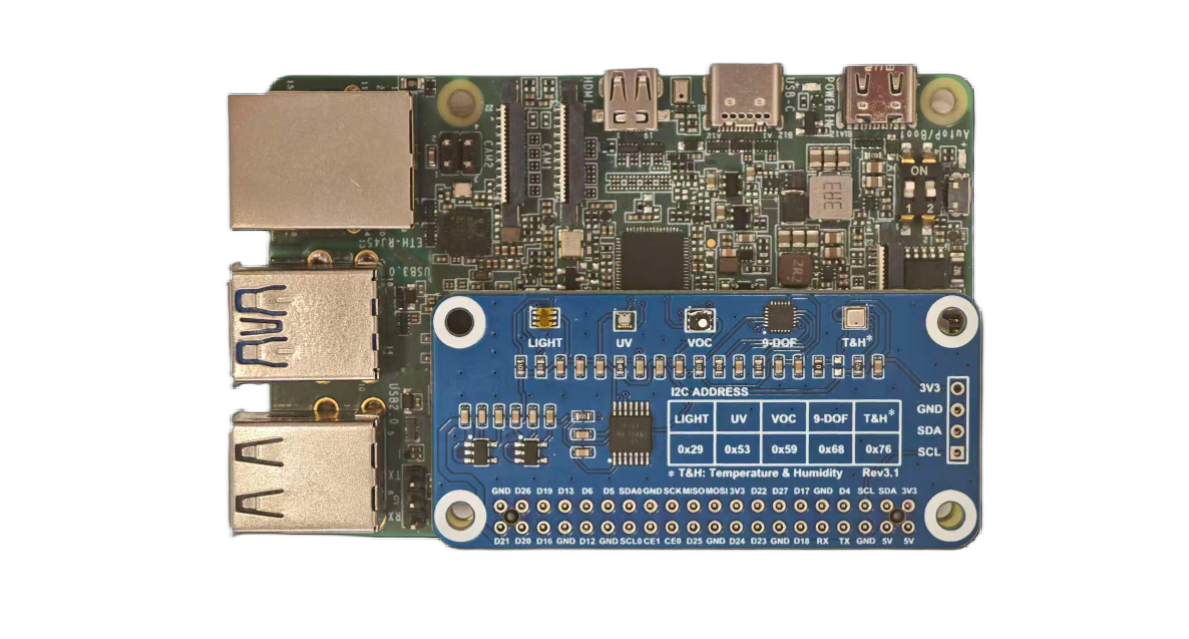
接入环境传感器扩展板的Quectel Pi M1
测试方法
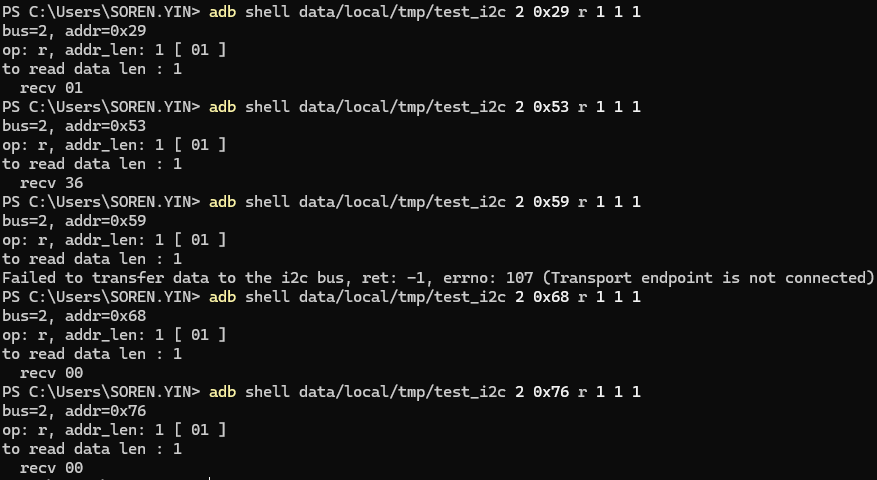
I2C测试示例输出
执行步骤1: 推送工具并授权
adb root
adb push <本地路径>/test_i2c /data/local/tmp/test_i2c
adb shell "chmod +x /data/local/tmp/test_i2c"
adb shell "ls -la /data/local/tmp/"
执行步骤2: 运行测试
示例:在i2c-2总线上,设备地址为0x29,读取1字节的寄存器地址,并读取1字节的数据:
adb shell "data/local/tmp/test_i2c 2 0x29 r 1 1 1"
执行步骤3: 辅助检查
adb shell "i2cdetect -y -r 1"
adb shell "ls -al /dev/i2c*"
日志字段说明示例
bus=1, addr=0x47:使用I2C总线1,设备地址0x47op: r, addr len: 1 [ 00 ]:读操作,寄存器地址长度1字节,寄存器地址0x00to read data len : 2:准备读取2字节数据recv 12/recv 34:实际读取到的数据为0x12、0x34
执行步骤1: 创建源文件
新建test_i2c.c文件,内容如下:
点击展开/折叠:test_i2c源码(可自行使用NDK或交叉编译)
#include <stdio.h>
#include <stdlib.h>
#include <string.h>
#include <stdint.h>
#include <fcntl.h>
#include <errno.h>
#include <unistd.h>
#include <sys/ioctl.h>
#include <linux/i2c.h>
#include <linux/i2c-dev.h>

struct i2c_client {
    int bus;
    int addr;
    int fd;
};

static int is_sgm7220(const struct i2c_client *client) {
    return client->bus == 1 && client->addr == 0x47;
}

static int test_i2c_transfer(struct i2c_client *client, struct i2c_msg *msgs, int num)
{
    struct i2c_rdwr_ioctl_data msgset;
    int ret;

    msgset.msgs = msgs;
    msgset.nmsgs = num;

    ret = ioctl(client->fd, I2C_RDWR, &msgset);
    if (ret < 0) {
        printf("Failed to transfer data to the i2c bus, ret: %d, errno: %d (%s)\n", ret, errno, strerror(errno));
    }
    return ret;
}

static int test_i2c_write(struct i2c_client *client, uint8_t *buf, int data_len)
{
    struct i2c_msg msg_set[1] = {
        {
            .addr = client->addr,
            .flags = 0,
            .len = 2,
            .buf = (uint8_t *)buf
        }
    };

    if (is_sgm7220(client)) {
        msg_set[0].flags |= I2C_M_IGNORE_NAK;
    }

    return test_i2c_transfer(client, msg_set, 1);
}

static int test_i2c_read(struct i2c_client *client, uint8_t *buf, int addr_len, int data_len)
{
    struct i2c_msg msg_set[2] = {
        {
            .addr = client->addr,
            .flags = 0,
            .len = addr_len,
            .buf = buf
        },
        {
            .addr = client->addr,
            .flags = I2C_M_RD,
            .len = data_len,
            .buf = buf
        }
    };

    if (is_sgm7220(client)) {
        msg_set[0].flags |= I2C_M_REV_DIR_ADDR;
        msg_set[1].flags |= I2C_M_NOSTART;
    }

    return test_i2c_transfer(client, msg_set, 2);
}

int main(int argc, char *argv[]) {
    char filename[20];
    int i;
    struct i2c_client client;

    if (argc < 6) {
        printf("%s bus slave_addr r addr_len addr_array data_len\n", argv[0]);
        printf("%s bus slave_addr w data_len data_array\n", argv[0]);
        return -1;
    }
    client.bus = strtol(argv[1], NULL, 10);
    client.addr = strtol(argv[2], NULL, 16);

    printf("bus=%d, addr=0x%x\n", client.bus, client.addr);
    snprintf(filename, 19, "/dev/i2c-%d", client.bus);
    client.fd = open(filename, O_RDWR);
    if (client.fd < 0) {
        printf("Failed to open the i2c bus, errno: %d (%s)\n", errno, strerror(errno));
        return -1;
    }

    if (ioctl(client.fd, I2C_SLAVE_FORCE, client.addr) < 0) {
        printf("Failed to acquire bus access and/or talk to slave, errno: %d (%s)\n", errno, strerror(errno));
        close(client.fd);
        return -1;
    }

    i = 3;
    while (i < argc) {
        const char *op = argv[i++];
        uint8_t buf[128];
        int j, addr_len, data_len = 0;

        printf("op: %s, ", op);

        if (i >= argc) {
            printf("error i=%d, argc=%d\n", i, argc);
            goto _out;
        }
        data_len = strtol(argv[i++], NULL, 10);
        if (data_len <= 0 || data_len > sizeof(buf)) {
            printf(" error i=%d, argc=%d, data_len=%d\n", i, argc, data_len);
            goto _out;
        }

        printf("%s: %d [", strcmp(op, "r") == 0 ? "addr_len" : "data_len", data_len);
        for (j = 0; j < data_len; j++) {
            if (i >= argc) {
                printf(" error i=%d, argc=%d, j=%d\n", i, argc, j);
                goto _out;
            }
            buf[j] = strtol(argv[i++], NULL, 16);
            printf(" %02x", buf[j]);
        }
        printf(" ]\n");

        if (strcmp(op, "r") == 0) {
            addr_len = data_len;
            if (i >= argc) {
                printf(" error i=%d, argc=%d\n", i, argc);
                goto _out;
            }
            data_len = strtol(argv[i++], NULL, 10);
            printf("to read data len : %d\n", data_len);

            if (test_i2c_read(&client, buf, addr_len, data_len) <= 0) {
                break;
            }
            for (j = 0; j < data_len; j++) {
                printf("  recv %02x\n", buf[j]);
            }
        }
        else if (strcmp(op, "w") == 0) {
            printf("to write data len : %d\n", data_len);
            if (test_i2c_write(&client, buf, data_len) < 0) {
                break;
            }
        }
        else {
            printf("Invalid command %s\n", argv[i]);
            break;
        }
    }
_out:

    close(client.fd);

    return 0;
}
SPI测试
40-pin接口中的SPI功能对应的设备片选节点为/dev/spidev0.0和/dev/spidev0.1。在adb中输入以下内容可查看这些节点:
adb shell "ls /dev/spidev*"
微雪OLED显示器测试(cs0和cs1)
请按照以下表格进行接线:
| OLED引脚 | 应该连接到 | SC200U物理引脚 | 备注 |
|---|---|---|---|
| VCC | 3.3V电源 | Pin1或Pin17 | 必须是3.3V |
| GND | 地线 | Pin6/9/14等任意GND | 共地 |
| DIN/MOSI | SPI数据 | Pin19 | SPI_MOSI |
| CLK/SCK | SPI时钟 | Pin23 | SPI_CLK |
| CS/CE | 片选 | Pin24/Pin26 | SPI_CE0/SPI_CE1 |
| D/C | 数据/命令 | Pin22 | GPIO80 |
| RES/RST | 复位 | Pin18 | GPIO25 |
硬件连接示意图:
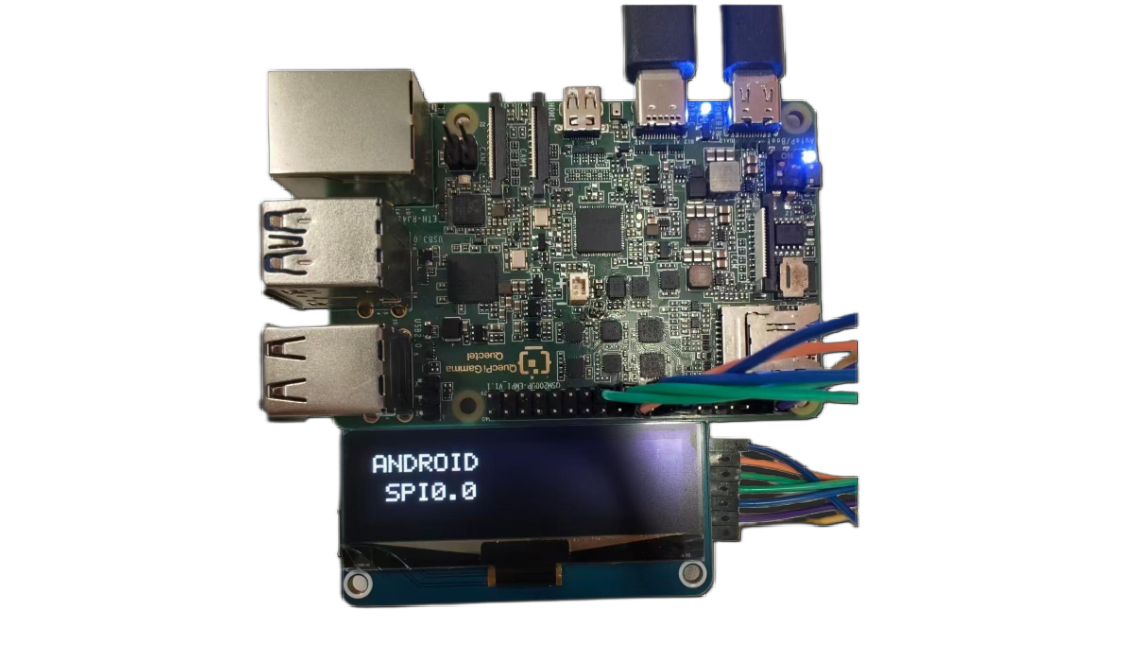
SPI0.0 (CE0, Pin24) 测试 - OLED显示 "ANDROID SPI0.0"
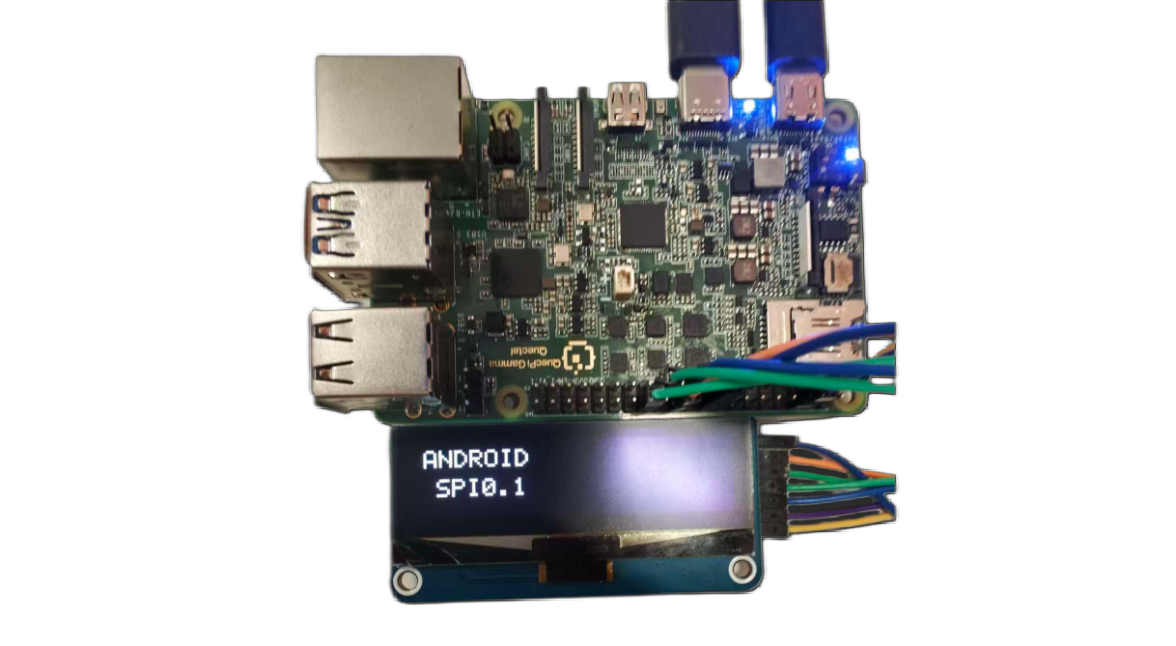
SPI0.1 (CE1, Pin26) 测试 - OLED显示 "ANDROID SPI0.1"
执行步骤:
adb root
adb push "D:\tools\40pin android\test_android_spi" /data/local/tmp/test_android_spi
adb shell "chmod +x /data/local/tmp/test_android_spi"
adb shell
cd /data/local/tmp/
./test_android_spi
程序运行后会提示选择SPI设备:
- 选择0:使用
/dev/spidev0.0(CE0, Pin24) - 选择1:使用
/dev/spidev0.1(CE1, Pin26)
请根据实际接线情况选择对应的设备(CS/CE引脚连接到pin24则选择0,连接到pin26则选择1)。
测试结果:
程序执行后会依次进行以下测试:
╔══════════════════════════════════════════════════════╗
║        Android SPI OLED 测试程序                     ║
║        适配Android设备                               ║
╚══════════════════════════════════════════════════════╝

选择SPI设备:
  [0] /dev/spidev0.0 (CE0, Pin24)
  [1] /dev/spidev0.1 (CE1, Pin26)
  [c] 自定义设备路径
选择: 1

使用设备: /dev/spidev0.1

初始化GPIO...
  ✓ GPIO初始化成功

打开SPI设备: /dev/spidev0.1
  ✓ SPI设备已打开并配置
    - 模式: 3
    - 速度: 2000000 Hz
    - 位宽: 8 bits

初始化OLED...
  复位OLED...
  发送初始化命令...
  ✓ OLED初始化完成

━━━━━━━━━━━━━━━━━━━━━━━━━━━━━━━━━━━━━━━━━━━━━━
  开始测试序列: SPI0.1
━━━━━━━━━━━━━━━━━━━━━━━━━━━━━━━━━━━━━━━━━━━━━━

[测试1] 显示设备信息...
  ✓ 屏幕应显示: ANDROID SPI0.1

[测试2] 全白屏测试...
  ✓ 屏幕应全白

[测试3] 闪烁测试 (5次)...
    闪烁 1/5
    闪烁 2/5
    闪烁 3/5
    闪烁 4/5
    闪烁 5/5
  ✓ 闪烁测试完成

[测试4] FPS性能测试...
  运行100帧更新...
  ✓ 性能: 40.3 FPS (耗时: 2.48秒)
  ✓ FPS结果已显示

[测试5] 图案测试...
  图案1: 横条纹
  图案2: 竖条纹
  图案3: 棋盘格
  ✓ 图案测试完成

[测试6] 测试总结...
  ✓ 总结已显示
测试说明:
- 测试1:验证OLED能够正常显示文本信息
- 测试2:验证OLED全屏显示功能
- 测试3:通过闪烁测试验证OLED刷新功能
- 测试4:测试SPI通信性能(FPS值)
- 测试5:测试不同图案显示功能
- 测试6:显示测试总结信息
若所有测试项均显示 √ 标记,则表明SPI通信与OLED功能一切正常。
执行步骤1: 创建源文件
新建test_spi.c文件,内容如下:
点击展开/折叠:test_spi源码(可自行使用NDK或交叉编译)
/*
 * Test both CE0 and CE1 - requires manual wire switching
 * This helps verify which CS pin your OLED is connected to
 * Enhanced with text display and FPS performance test
 */

#include <stdio.h>
#include <stdlib.h>
#include <stdint.h>
#include <string.h>
#include <unistd.h>
#include <fcntl.h>
#include <sys/ioctl.h>
#include <linux/spi/spidev.h>
#include <time.h>

#define GPIO_BASE   398
#define GPIO_RST    (GPIO_BASE + 25)
#define GPIO_DC     (GPIO_BASE + 80)
#define SPI_MODE    SPI_MODE_3
#define SPI_SPEED   8000000

#define OLED_WIDTH  128
#define OLED_HEIGHT 32
#define OLED_PAGES  4

// Complete 5x7 font
static const uint8_t font_5x7[][5] = {
    {0x00, 0x00, 0x00, 0x00, 0x00}, // Space
    {0x3E, 0x51, 0x49, 0x45, 0x3E}, // 0
    {0x00, 0x42, 0x7F, 0x40, 0x00}, // 1
    {0x42, 0x61, 0x51, 0x49, 0x46}, // 2
    {0x21, 0x41, 0x45, 0x4B, 0x31}, // 3
    {0x18, 0x14, 0x12, 0x7F, 0x10}, // 4
    {0x27, 0x45, 0x45, 0x45, 0x39}, // 5
    {0x3C, 0x4A, 0x49, 0x49, 0x30}, // 6
    {0x01, 0x71, 0x09, 0x05, 0x03}, // 7
    {0x36, 0x49, 0x49, 0x49, 0x36}, // 8
    {0x06, 0x49, 0x49, 0x29, 0x1E}, // 9
    {0x7E, 0x11, 0x11, 0x11, 0x7E}, // A
    {0x7F, 0x49, 0x49, 0x49, 0x36}, {0x3E, 0x41, 0x41, 0x41, 0x22}, // B C
    {0x7F, 0x41, 0x41, 0x22, 0x1C}, {0x7F, 0x49, 0x49, 0x49, 0x41}, // D E
    {0x7F, 0x09, 0x09, 0x09, 0x01}, {0x3E, 0x41, 0x49, 0x49, 0x7A}, // F G
    {0x7F, 0x08, 0x08, 0x08, 0x7F}, {0x00, 0x41, 0x7F, 0x41, 0x00}, // H I
    {0x20, 0x40, 0x41, 0x3F, 0x01}, {0x7F, 0x08, 0x14, 0x22, 0x41}, // J K
    {0x7F, 0x40, 0x40, 0x40, 0x40}, {0x7F, 0x02, 0x0C, 0x02, 0x7F}, // L M
    {0x7F, 0x04, 0x08, 0x10, 0x7F}, {0x3E, 0x41, 0x41, 0x41, 0x3E}, // N O
    {0x7F, 0x09, 0x09, 0x09, 0x06}, {0x3E, 0x41, 0x51, 0x21, 0x5E}, // P Q
    {0x7F, 0x09, 0x19, 0x29, 0x46}, {0x46, 0x49, 0x49, 0x49, 0x31}, // R S
    {0x01, 0x01, 0x7F, 0x01, 0x01}, {0x3F, 0x40, 0x40, 0x40, 0x3F}, // T U
    {0x1F, 0x20, 0x40, 0x20, 0x1F}, {0x3F, 0x40, 0x38, 0x40, 0x3F}, // V W
    {0x63, 0x14, 0x08, 0x14, 0x63}, {0x07, 0x08, 0x70, 0x08, 0x07}, // X Y
    {0x61, 0x51, 0x49, 0x45, 0x43}, // Z
    {0x08, 0x08, 0x08, 0x08, 0x08}, // -
    {0x00, 0x36, 0x36, 0x00, 0x00}, // :
    {0x00, 0x60, 0x60, 0x00, 0x00}, // .
};

static int char_to_index(char c) {
    if (c == ' ') return 0;
    if (c >= '0' && c <= '9') return 1 + (c - '0');
    if (c >= 'A' && c <= 'Z') return 11 + (c - 'A');
    if (c >= 'a' && c <= 'z') return 11 + (c - 'a');
    if (c == '-') return 37;
    if (c == ':') return 38;
    if (c == '.') return 39;
    return 0;
}

int gpio_write(int gpio, int value);
void oled_quick_test(const char *device, const char *name);

int main() {
    printf("\n╔════════════════════════════════════════════════════════╗\n");
    printf("║  Chip Select Pin Comparison Tool                      ║\n");
    printf("╚════════════════════════════════════════════════════════╝\n");

    printf("\nThis tool helps identify which CS pin is connected.\n");
    printf("\nInstruction:\n");
    printf("  1. Connect OLED CS to Pin24 first\n");
    printf("  2. Run test - should see display\n");
    printf("  3. Move OLED CS to Pin26\n");
    printf("  4. Run test again - should see display\n");
    printf("\n");

    char choice;
    printf("Which pin is your OLED CS currently connected to?\n");
    printf("  [0] Pin24 (CE0)\n");
    printf("  [1] Pin26 (CE1)\n");
    printf("Choice: ");
    scanf(" %c", &choice);

    if (choice == '0') {
        printf("\nTesting CE0 (Pin24)...\n");
        oled_quick_test("/dev/spidev0.0", "CE0-PIN24");
    } else if (choice == '1') {
        printf("\nTesting CE1 (Pin26)...\n");
        oled_quick_test("/dev/spidev0.1", "CE1-PIN26");
    } else {
        printf("Invalid choice\n");
        return 1;
    }

    return 0;
}

void oled_quick_test(const char *device, const char *name) {
    // Display buffer
    static uint8_t buffer[OLED_PAGES][OLED_WIDTH];

    // Simple GPIO functions
    int gpio_export(int gpio) {
        int fd = open("/sys/class/gpio/export", O_WRONLY);
        if (fd < 0) return -1;
        char buf[10];
        snprintf(buf, sizeof(buf), "%d", gpio);
        write(fd, buf, strlen(buf));
        close(fd);
        usleep(100000);
        return 0;
    }

    int gpio_set_dir(int gpio) {
        char path[50];
        snprintf(path, sizeof(path), "/sys/class/gpio/gpio%d/direction", gpio);
        int fd = open(path, O_WRONLY);
        if (fd < 0) return -1;
        write(fd, "out", 3);
        close(fd);
        return 0;
    }

    int gpio_write(int gpio, int value) {
        char path[50];
        snprintf(path, sizeof(path), "/sys/class/gpio/gpio%d/value", gpio);
        int fd = open(path, O_WRONLY);
        if (fd < 0) return -1;
        char buf[2] = {value ? '1' : '0', 0};
        write(fd, buf, 1);
        close(fd);
        return 0;
    }

    void send_cmd(int fd, uint8_t cmd) {
        gpio_write(GPIO_DC, 0);
        write(fd, &cmd, 1);
        usleep(1000);
    }

    void set_pixel(int x, int y, int color) {
        if (x >= 0 && x < OLED_WIDTH && y >= 0 && y < OLED_HEIGHT) {
            int page = y / 8;
            int bit = y % 8;
            if (color)
                buffer[page][x] |= (1 << bit);
            else
                buffer[page][x] &= ~(1 << bit);
        }
    }

    void draw_char(int x, int y, char c) {
        int idx = char_to_index(c);
        for (int col = 0; col < 5; col++) {
            uint8_t data = font_5x7[idx][col];
            for (int row = 0; row < 8; row++) {
                if (data & (1 << row)) {
                    set_pixel(x + col, y + row, 1);
                }
            }
        }
    }

    void draw_text(int x, int y, const char *text) {
        int cursor = x;
        while (*text) {
            draw_char(cursor, y, *text);
            cursor += 6;
            text++;
        }
    }

    void clear_buffer() {
        memset(buffer, 0, OLED_PAGES * OLED_WIDTH);
    }

    void display_buffer(int fd) {
        for (int page = 0; page < OLED_PAGES; page++) {
            send_cmd(fd, 0xB0 + page);
            send_cmd(fd, 0x04);
            send_cmd(fd, 0x10);
            gpio_write(GPIO_DC, 1);
            write(fd, buffer[page], OLED_WIDTH);
        }
    }

    // Initialize GPIO
    gpio_export(GPIO_RST);
    gpio_export(GPIO_DC);
    usleep(200000);
    gpio_set_dir(GPIO_RST);
    gpio_set_dir(GPIO_DC);

    // Open SPI
    printf("  Opening %s...\n", device);
    int spi_fd = open(device, O_RDWR);
    if (spi_fd < 0) {
        perror("  ERROR: Cannot open device");
        printf("  → %s is NOT working or OLED not connected\n", name);
        return;
    }
    printf("  ✓ Device opened\n");

    // Configure SPI
    uint8_t mode = SPI_MODE;
    uint32_t speed = SPI_SPEED;
    ioctl(spi_fd, SPI_IOC_WR_MODE, &mode);
    ioctl(spi_fd, SPI_IOC_WR_MAX_SPEED_HZ, &speed);

    // Reset OLED
    printf("  Resetting OLED...\n");
    gpio_write(GPIO_RST, 0);
    usleep(50000);
    gpio_write(GPIO_RST, 1);
    usleep(50000);

    // Initialize OLED
    printf("  Initializing OLED...\n");
    send_cmd(spi_fd, 0xAE);
    send_cmd(spi_fd, 0x04); send_cmd(spi_fd, 0x10); send_cmd(spi_fd, 0x40);
    send_cmd(spi_fd, 0x81); send_cmd(spi_fd, 0xFF);
    send_cmd(spi_fd, 0xA1); send_cmd(spi_fd, 0xA6);
    send_cmd(spi_fd, 0xA8); send_cmd(spi_fd, 0x1F);
    send_cmd(spi_fd, 0xC8);
    send_cmd(spi_fd, 0xD3); send_cmd(spi_fd, 0x00);
    send_cmd(spi_fd, 0xD5); send_cmd(spi_fd, 0xF0);
    send_cmd(spi_fd, 0xD8); send_cmd(spi_fd, 0x05);
    send_cmd(spi_fd, 0xD9); send_cmd(spi_fd, 0xC2);
    send_cmd(spi_fd, 0xDA); send_cmd(spi_fd, 0x12);
    send_cmd(spi_fd, 0xDB); send_cmd(spi_fd, 0x08);
    send_cmd(spi_fd, 0xAF);
    printf("  ✓ OLED initialized\n");

    // Test 1: Display "USING: CE0" or "USING: CE1"
    printf("\n  [Test 1] Displaying chip select info...\n");
    clear_buffer();
    draw_text(10, 4, "USING:");
    if (strstr(name, "CE0")) {
        draw_text(25, 16, "CE0");
    } else {
        draw_text(25, 16, "CE1");
    }
    display_buffer(spi_fd);
    printf("  ✓ Screen showing: USING %s\n", strstr(name, "CE0") ? "CE0" : "CE1");
    sleep(3);

    // Test 2: Fill white
    printf("\n  [Test 2] Filling screen WHITE...\n");
    memset(buffer, 0xFF, OLED_PAGES * OLED_WIDTH);
    display_buffer(spi_fd);
    printf("  ✓ Screen should be WHITE\n");
    sleep(2);

    // Test 3: Blink test
    printf("\n  [Test 3] Blink test (5 times)...\n");
    for (int i = 0; i < 5; i++) {
        // White
        memset(buffer, 0xFF, OLED_PAGES * OLED_WIDTH);
        display_buffer(spi_fd);
        usleep(200000);

        // Black
        memset(buffer, 0x00, OLED_PAGES * OLED_WIDTH);
        display_buffer(spi_fd);
        usleep(200000);

        printf("    Blink %d/5\n", i + 1);
    }
    printf("  ✓ Blink test complete\n");

    // Test 4: FPS Performance Test
    printf("\n  [Test 4] FPS Performance Test...\n");
    printf("  Running 100 frame updates...\n");

    struct timespec start, end;
    clock_gettime(CLOCK_MONOTONIC, &start);

    for (int frame = 0; frame < 100; frame++) {
        // Generate test pattern
        for (int page = 0; page < OLED_PAGES; page++) {
            for (int x = 0; x < OLED_WIDTH; x++) {
                buffer[page][x] = (x + frame) & 0xFF;
            }
        }
        display_buffer(spi_fd);
    }

    clock_gettime(CLOCK_MONOTONIC, &end);
    double elapsed = (end.tv_sec - start.tv_sec) +
                     (end.tv_nsec - start.tv_nsec) / 1000000000.0;
    double fps = 100.0 / elapsed;

    printf("  ✓ Performance: %.1f FPS\n", fps);

    // Display FPS result on screen
    clear_buffer();
    draw_text(10, 4, "FPS TEST");
    char fps_str[20];
    snprintf(fps_str, sizeof(fps_str), "%.1f FPS", fps);
    draw_text(20, 16, fps_str);
    display_buffer(spi_fd);
    printf("  ✓ FPS result displayed on screen\n");
    sleep(3);

    // Test 5: CS Pin Functionality Test
    printf("\n  [Test 5] CS Pin Functionality Test...\n");
    printf("  This test verifies CS pin actually controls the device\n");

    // Step 1: Display number 1
    printf("  Step 1: Displaying pattern 1...\n");
    clear_buffer();
    draw_text(15, 4, "PATTERN");
    draw_text(50, 16, "1");
    display_buffer(spi_fd);
    sleep(2);

    // Step 2: Try to update through the OTHER CS (should fail if CS works)
    printf("  Step 2: Trying to update via OTHER CS...\n");
    const char *other_device = strstr(name, "CE0") ? "/dev/spidev0.1" : "/dev/spidev0.0";
    const char *other_name = strstr(name, "CE0") ? "CE1" : "CE0";

    int other_fd = open(other_device, O_RDWR);
    if (other_fd >= 0) {
        uint8_t mode = SPI_MODE;
        uint32_t speed = SPI_SPEED;
        ioctl(other_fd, SPI_IOC_WR_MODE, &mode);
        ioctl(other_fd, SPI_IOC_WR_MAX_SPEED_HZ, &speed);

        // Try to display pattern 2 via other CS
        clear_buffer();
        draw_text(15, 4, "PATTERN");
        draw_text(50, 16, "2");

        for (int page = 0; page < OLED_PAGES; page++) {
            send_cmd(other_fd, 0xB0 + page);
            send_cmd(other_fd, 0x04);
            send_cmd(other_fd, 0x10);
            gpio_write(GPIO_DC, 1);
            write(other_fd, buffer[page], OLED_WIDTH);
        }

        close(other_fd);
        printf("  Sent update via %s (other CS)\n", other_name);
        sleep(2);

        printf("\n  ╔════════════════════════════════════════════════╗\n");
        printf("  ║ CHECK SCREEN: Still showing '1' or changed to '2'? ║\n");
        printf("  ╚════════════════════════════════════════════════╝\n");
        printf("\n  If still showing '1': CS pin is WORKING correctly ✓\n");
        printf("  If changed to '2': CS pin NOT working (both CS active) ✗\n\n");
        sleep(2);
    }

    // Step 3: Update back via correct CS
    printf("  Step 3: Updating via correct CS (%s)...\n", name);
    clear_buffer();
    draw_text(15, 4, "BACK TO");
    draw_text(50, 16, "1");
    display_buffer(spi_fd);
    printf("  ✓ Should see pattern 1 again\n");
    sleep(2);

    // Test 6: FPS result summary
    printf("\n  [Test 6] Final Summary...\n");
    clear_buffer();
    draw_text(30, 4, name);
    char summary_str[20];
    snprintf(summary_str, sizeof(summary_str), "%.1fFPS", fps);
    draw_text(20, 16, summary_str);
    display_buffer(spi_fd);
    printf("  ✓ Summary displayed\n");
    sleep(3);

    // Clear screen
    clear_buffer();
    display_buffer(spi_fd);

    close(spi_fd);

    printf("\n======================================================================\n");
    printf("  %s Test Complete!\n", name);
    printf("======================================================================\n");
    printf("  CS Pin Test Result:\n");
    printf("    If screen didn't change to '2' in Step 2:\n");
    printf("      → CS pin is working correctly ✓\n");
    printf("    If screen changed to '2':\n");
    printf("      → CS pin might not be controlling the device ✗\n");
    printf("      → Both CS pins may be active simultaneously\n");
    printf("\n  Performance: %.1f FPS\n", fps);
    printf("======================================================================\n");
}
UART测试
在40-pin接口中,pin8和pin10默认配置为UART功能,对应的设备节点为 /dev/ttyHS0。
可以使用以下命令查看系统中所有的串口设备:
ls /dev/tty*
UART回环测试
本测试通过将pin8和pin10短接,验证串口收发功能是否正常。
硬件连接: 将40‑pin的pin8(TX)和pin10(RX)短接。
执行步骤1: 创建源文件
新建uart_loopback.c文件,内容如下:
点击展开/折叠:uart_loopback源码(可自行使用NDK或交叉编译)
示例可执行程序文件:uart_loopback
#include <stdio.h>
#include <stdlib.h>
#include <string.h>
#include <unistd.h>
#include <fcntl.h>
#include <termios.h>
#include <errno.h>
#include <signal.h>

// 全局变量用于信号处理
static int serial_fd = -1;
static volatile int running = 1;

// 信号处理函数
void signal_handler(int sig) {
    printf("\n用户中断测试\n");
    running = 0;
    if (serial_fd >= 0) {
        close(serial_fd);
        printf("串口已关闭\n");
    }
    exit(0);
}

// 配置串口参数
int configure_serial(int fd, int baudrate) {
    struct termios tty;

    if (tcgetattr(fd, &tty) != 0) {
        printf("获取串口属性失败: %s\n", strerror(errno));
        return -1;
    }

    // 设置波特率
    speed_t speed;
    switch (baudrate) {
        case 9600:   speed = B9600;   break;
        case 19200:  speed = B19200;  break;
        case 38400:  speed = B38400;  break;
        case 57600:  speed = B57600;  break;
        case 115200: speed = B115200; break;
        case 230400: speed = B230400; break;
        default:     speed = B115200; break;
    }

    cfsetospeed(&tty, speed);
    cfsetispeed(&tty, speed);

    // 配置串口参数
    tty.c_cflag &= ~PARENB;        // 无奇偶校验
    tty.c_cflag &= ~CSTOPB;        // 1个停止位
    tty.c_cflag &= ~CSIZE;         // 清除数据位设置
    tty.c_cflag |= CS8;            // 8个数据位
    tty.c_cflag &= ~CRTSCTS;       // 禁用硬件流控制
    tty.c_cflag |= CREAD | CLOCAL; // 启用接收和本地连接

    // 配置输入模式
    tty.c_iflag &= ~(IXON | IXOFF | IXANY); // 禁用软件流控制
    tty.c_iflag &= ~(ICANON | ECHO | ECHOE | ISIG); // 原始模式

    // 配置输出模式
    tty.c_oflag &= ~OPOST; // 原始输出

    // 配置本地模式
    tty.c_lflag &= ~(ICANON | ECHO | ECHOE | ISIG); // 原始模式

    // 设置超时
    tty.c_cc[VTIME] = 10; // 1秒超时
    tty.c_cc[VMIN] = 0;   // 非阻塞读取

    if (tcsetattr(fd, TCSANOW, &tty) != 0) {
        printf("设置串口属性失败: %s\n", strerror(errno));
        return -1;
    }

    return 0;
}

// UART回环测试函数
int serial_loopback_test(const char* port, int baudrate) {
    char test_data[] = "Hello, Serial Loopback!";
    char received_data[256];
    ssize_t bytes_written, bytes_read;

    // 打开串口设备
    serial_fd = open(port, O_RDWR | O_NOCTTY | O_SYNC);
    if (serial_fd < 0) {
        printf("无法打开串口 %s: %s\n", port, strerror(errno));
        return -1;
    }

    // 配置串口
    if (configure_serial(serial_fd, baudrate) != 0) {
        close(serial_fd);
        return -1;
    }

    printf("串口 %s 已打开,开始回环测试(按Ctrl+C退出)...\n", port);

    while (running) {
        // 清空接收缓冲区
        tcflush(serial_fd, TCIOFLUSH);

        // 发送数据
        bytes_written = write(serial_fd, test_data, strlen(test_data));
        if (bytes_written < 0) {
            printf("发送数据失败: %s\n", strerror(errno));
            break;
        }
        printf("发送: %s\n", test_data);

        // 等待数据接收
        usleep(100000); // 100ms

        // 读取回环数据
        bytes_read = read(serial_fd, received_data, sizeof(received_data) - 1);
        if (bytes_read < 0) {
            printf("读取数据失败: %s\n", strerror(errno));
            break;
        }

        received_data[bytes_read] = '\0'; // 添加字符串结束符

        // 验证结果
        if (bytes_read == strlen(test_data) &&
            strncmp(received_data, test_data, strlen(test_data)) == 0) {
            printf("接收: %s → 测试通过\n\n", received_data);
        } else {
            printf("接收异常: 发送[%zu] vs 接收[%zd] → 测试失败\n",
                   strlen(test_data), bytes_read);
            if (bytes_read > 0) {
                printf("接收内容: %s\n\n", received_data);
            } else {
                printf("未接收到数据\n\n");
            }
        }

        sleep(1); // 间隔1秒重复测试
    }

    close(serial_fd);
    printf("串口 %s 已关闭\n", port);
    return 0;
}

int main(int argc, char* argv[]) {
    const char* port = "/dev/ttyHS0";  // 默认串口
    int baudrate = 115200;            // 默认波特率

    // 解析命令行参数
    if (argc >= 2) {
        port = argv[1];
    }
    if (argc >= 3) {
        baudrate = atoi(argv[2]);
    }

    // 设置信号处理
    signal(SIGINT, signal_handler);
    signal(SIGTERM, signal_handler);

    printf("UART回环测试程序\n");
    printf("使用串口: %s\n", port);
    printf("波特率: %d\n", baudrate);
    printf("=====================================\n");

    // 执行回环测试
    int result = serial_loopback_test(port, baudrate);

    return result;
}
执行步骤:
adb root
adb push <本地路径>/uart_loopback_test /data/local/tmp/uart_loopback
adb shell chmod +x /data/local/tmp/uart_loopback
adb shell ls -la /data/local/tmp/
adb shell
cd /data/local/tmp/
./uart_loopback
测试结果:
当pin8和pin10正确短接时,程序会持续发送数据并验证接收的数据是否一致:
UART回环测试程序
使用串口: /dev/ttyHS0
波特率: 115200
=====================================
串口 /dev/ttyHS0 已打开,开始回环测试(按Ctrl+C退出)...
发送: Hello, Serial Loopback!
接收: Hello, Serial Loopback! → 测试通过

发送: Hello, Serial Loopback!
接收: Hello, Serial Loopback! → 测试通过

发送: Hello, Serial Loopback!
接收: Hello, Serial Loopback! → 测试通过
按Ctrl+C可退出测试程序。程序会自动关闭串口并退出。