


 English
HCM111Z QuecOpen(SDK) General API Development Guide
Introduction
Quectel HCM111Z module supports QuecOpen® solution. QuecOpen® is an embedded development platform, which is intended to simplify the design and development of IoT applications.
This document is applicable to QuecOpen® solution based on SDK build environment. It provides an overview of the flash API, watchdog API, timer API and RTC API provided in the SDK of Quectel HCM111Z module, and their development procedures, as well as other general APIs.
Flash
Flash API
Header File
ql_flash.h, the header file of flash API, is in the components/quectel_api/ql_include directory. Unless otherwise specified, all header files mentioned in this document are in this directory.
API Overview
| Function | Description |
|---|---|
ql_flash_set_security() |
Sets the protection type of flash. |
ql_flash_write() |
Writes data to flash. |
ql_flash_read() |
Reads data from flash. |
ql_flash_erase() |
Erases data from flash. |
API Description
ql_flash_set_security
This function sets the protection type of flash. You need to disable protection on the flash before writing data to it or erasing the data in it.
Prototype:
ql_errcode_flash_e ql_flash_set_security(ql_flash_protect_type_e type)
Parameters:
type: [In] Protection type. For details, see ql_flash_protect_type_e.
Return Value:
Function execution result code. See ql_errcode_flash_e.
ql_flash_protect_type_e
The enumeration of flash protection types:
typedef enum {
  QL_FLASH_PROTECT_NONE = 0,
  QL_FLASH_PROTECT_ALL,
} ql_flash_protect_type_e;
| Member | Description |
|---|---|
| QL_FLASH_PROTECT_NONE | No protection |
| QL_FLASH_PROTECT_ALL | Protect the whole flash |
ql_errcode_flash_e
The enumeration of result codes:
typedef enum {
  QL_FLASH_SUCCESS = 0,
  QL_FLASH_EXECUTE_ERR,
  QL_FLASH_PARAM_ERR,
} ql_errcode_flash_e;
| Member | Description |
|---|---|
| QL_FLASH_SUCCESS | Successful execution |
| QL_FLASH_EXECUTE_ERR | Failed execution |
| QL_FLASH_PARAM_ERR | Invalid parameter |
ql_flash_write
This function writes data to flash.
Prototype:
ql_errcode_flash_e ql_flash_write(uint8_t *data, uint32_t addr, uint32_t len)
Parameters:
data: [In] Data to be written to flash.addr: [In] Address in flash where the data is to be written.len: [In] Length of data to be written to flash. Unit: byte.
Return Value:
Function execution result code. See ql_errcode_flash_e.
ql_flash_read
This function reads data from flash.
Prototype:
ql_errcode_flash_e ql_flash_read(uint8_t *data, uint32_t addr, uint32_t len)
Parameters:
data: [Out] Data read from flash.addr: [In] Address where the read data is stored.len: [In] Length ofdata. Unit: byte.
Return Value:
Function execution result code. See ql_errcode_flash_e.
ql_flash_erase
This function erases data from flash. At least one sector (4 KB in size) of data is erased at a time. The size of data erased each time is an integer multiple of the sector size.
Prototype:
ql_errcode_flash_e ql_flash_erase(uint32_t addr, uint32_t len)
Parameters:
addr: [In] Address where the data to be erased is located.len: [In] Length of data to be erased. Unit: byte.
Return Value:
Function execution result code. See ql_errcode_flash_e.
Development Procedure
This chapter describes how to use the above flash API in an application and perform simplified feature debugging.
Operation Procedure
The code example of operating flash is provided in the module SDK. The demo is in ql_flash_demo.c under the quectel_demo/ql_flash_demo/code directory. The related functions are described as follows:
demo_flash(): Task execution function, which writes data to flash, reads data from flash and erases data in flash.
void demo_flash(void)
{
    uint32_t id;
    ql_debug("flash demo\r\n");

    ql_flash_set_security(QL_FLASH_PROTECT_NONE);
    ql_flash_erase(USER_FLASH_BASE_ADDR, FLASH_PAGE_SIZE);
    uint32_t idx = 0;
    for(idx=0; idx<FLASH_PAGE_SIZE; idx++)
        buf[idx] = idx;
    ql_flash_write(buf,USER_FLASH_BASE_ADDR, FLASH_PAGE_SIZE );
    for(idx=0; idx<FLASH_PAGE_SIZE; idx++)
        buf[idx] = 0xff;
    ql_flash_read(buf,USER_FLASH_BASE_ADDR, FLASH_PAGE_SIZE);
    ql_debug("read reg:\r\n");
    show_reg(buf,5,1);
    show_reg(buf+4091,5,1);

    flash_erase(USER_FLASH_BASE_ADDR, FLASH_PAGE_SIZE);
    for(idx=0; idx<FLASH_PAGE_SIZE; idx++)
        buf[idx] = idx+1;
    flash_write(USER_FLASH_BASE_ADDR, FLASH_PAGE_SIZE, buf);
    for(idx=0; idx<FLASH_PAGE_SIZE; idx++)
        buf[idx] = 0xfe;
    flash_read(USER_FLASH_BASE_ADDR, FLASH_PAGE_SIZE, buf);
    ql_debug("read reg:\r\n");
    show_reg(buf,5,1);
    show_reg(buf+4091,5,1);

    ql_flash_erase(USER_FLASH_MAX_PAGE_ADDR, FLASH_PAGE_SIZE);
    for(idx=0; idx<FLASH_PAGE_SIZE; idx++)
        buf[idx] = idx+2;
    ql_flash_write(buf,USER_FLASH_MAX_PAGE_ADDR, FLASH_PAGE_SIZE);
    for(idx=0; idx<FLASH_PAGE_SIZE; idx++)
        buf[idx] = 0xfd;
    ql_flash_read(buf,USER_FLASH_MAX_PAGE_ADDR, FLASH_PAGE_SIZE );
    ql_debug("read reg:\r\n");
    show_reg(buf,5,1);
    show_reg(buf+4091,5,1);

    ql_flash_erase(USER_FLASH_MAX_PAGE_ADDR, FLASH_PAGE_SIZE);
    for(idx=0; idx<FLASH_PAGE_SIZE; idx++)
        buf[idx] = idx+3;
    ql_flash_write(buf,USER_FLASH_MAX_PAGE_ADDR, FLASH_PAGE_SIZE);
    for(idx=0; idx<FLASH_PAGE_SIZE; idx++)
        buf[idx] = 0xfc;
    ql_flash_read(buf,USER_FLASH_MAX_PAGE_ADDR, FLASH_PAGE_SIZE);
    ql_debug("read reg:\r\n");
    show_reg(buf,5,1);
    show_reg(buf+4091,5,1);

    ql_flash_erase(USER_FLASH_MAX_PAGE_ADDR, FLASH_PAGE_SIZE);
    	  for(idx=0; idx<FLASH_PAGE_SIZE; idx++)
        buf[idx] = 0x00;
    	ql_flash_read(buf,USER_FLASH_MAX_PAGE_ADDR, FLASH_PAGE_SIZE);
    ql_debug("read reg:\r\n");
    show_reg(buf,5,1);
    show_reg(buf+4091,5,1);
Function Debugging
To debug the flash function, use the EVB (e.g., HCM111Z TE-B) installed with the module and follow these steps:
- Run the flash demo described in Operation Procedure.
- Recompile the firmware version.
- Download the new firmware version to the module.
- Restart the module.
- Open UART 1 port to get log information.
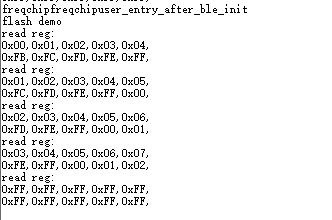
The log data in the figure above shows that writing data to flash, reading data from flash and erasing data in flash are all successful.
Watchdog
Watchdog API
Header File
ql_watchdog.h, the header file of watchdog API, is in the components/quectel_api/ql_include directory. Unless otherwise specified, all header files mentioned in this document are in this directory.
API Overview
| Function | Description |
|---|---|
ql_wdg_init() |
Initializes the watchdog. |
ql_wdg_reload() |
Feeds the watchdog. |
ql_wdg_finalize() |
Closes the watchdog. |
API Description
ql_wdg_init
This function initializes the watchdog.
Prototype:
ql_wdg_errcode_e ql_wdg_init(uint32_t timeout)
Parameters:
timeout: [In] Watchdog timeout. Unit: Second.
Return Value:
Function execution result code. See ql_wdg_errcode_e.
ql_wdg_errcode_e
The enumeration of result codes:
typedef enum {
  QL_WDG_SUCCESS = 0,
  QL_WDG_EXECUTE_ERR,
  QL_WDG_INVALID_PARAM_ERR,
} ql_wdg_errcode_e;
| Member | Description |
|---|---|
| QL_WDG_SUCCESS | Successful execution |
| QL_WDG_EXECUTE_ERR | Failed execution |
| QL_WDG_INVALID_PARAM_ERR | Invalid parameter |
ql_wdg_reload
This function feeds the watchdog.
Prototype:
ql_wdg_errcode_e ql_wdg_reload(void)
Parameters:
None
Return Value:
Function execution result code. See ql_wdg_errcode_e.
ql_wdg_finalize
This function closes the watchdog.
Prototype:
ql_wdg_errcode_e ql_wdg_finalize(void)
Parameters:
None
Return Value:
Function execution result code. See ql_wdg_errcode_e.
Development Procedure
This chapter describes how to use the above watchdog API in an application.
Operation Procedure
The code example of operating watchdog API is provided in the module SDK. The demo is in ql_wdt_demo.c under the quectel_demo/ql_wdt_demo/code directory. The related functions are described as follows:
demo_wdt(): This function creates watchdog tasks. It should be called when operating the demo.
void demo_wdt(void)
{
  ql_debug("watchdog demo\r\n");
  ql_wdg_init(4);
  while(1)
  {
    #if 0 //Exceeding the maximum time set by the watchdog
      co_delay_100us(50000);
    #else
      co_delay_100us(30000);
      ql_debug("wdg reload\r\n");
      ql_wdg_reload();
    #endif
  }
}
When running normally, the demo automatically executes ql_wdg_reload() every 3 seconds without triggering the watchdog reset. To test the watchdog reset, change #if 0 to #if 1 in above code, compile the firmware, and re-flash the new firmware version into the module. If the demo does not automatically execute ql_wdg_reload() for more than 4 seconds, the watchdog reset will be triggered.
Timer
Timer API
Header File
ql_timer.h, the header file of timer API, is in the components/quectel_api/ql_include directory. Unless otherwise specified, all header files mentioned in this document are in this directory.
API Overview
| Function | Description |
|---|---|
ql_timer_init() |
Initializes the timer. |
ql_timer_start() |
Starts the timer. |
ql_timer_stop() |
Stops the timer. |
ql_timer_get_cnt() |
Gets the current timer count value. |
API Description
ql_timer_init
This function initializes the timer.
Prototype:
ql_timer_errcode_e ql_timer_init(ql_timer_number_e timer_id, uint32_t timer_us, ql_timer_mode_e mode, ql_timer_callback timer_cb)
Parameters:
timer_id: [In] Timer ID. For details, see ql_timer_number_e.timer_us: [In] Timing duration. Unit: microsecond. Range: 1~349000.mode: [In] Timer working mode. For details, see ql_timer_mode_e.timer_cb: [In] Callback function for timer interruption. For details, see ql_timer_callback.
Return Value:
Function execution result code. See ql_timer_errcode_e.
ql_timer_number_e
The enumeration of timer IDs:
typedef enum {
  QL_TIMER_0 = 0,
  QL_TIMER_1,
} ql_timer_number_e;
| Member | Description |
|---|---|
| QL_TIMER_0 | Timer 0 |
| QL_TIMER_1 | Timer 1 |
ql_timer_mode_e
The enumeration of timer working modes:
typedef enum {
  QL_TIMER_SINGLE = 0,
  QL_TIMER_PERIODIC,
} ql_timer_mode_e;
| Member | Description |
|---|---|
| QL_TIMER_SINGLE | Single (reserved, and is not supported currently). |
| QL_TIMER_PERIODIC | Periodic |
ql_timer_callback
This is the callback function for interrupting the timer.
typedef void (*ql_timer_callback)(uint8_t arg)
arg: [In] Reserved.
ql_timer_errcode_e
The enumeration of result codes:
typedef enum {
  QL_TIMER_SUCCESS = 0,
  QL_TIMER_EXECUTE_ERR,
  QL_TIMER_INVALID_PARAM_ERR,
  QL_TIMER_NOT_OPEN_ERR,
} ql_timer_errcode_e;
| Member | Description |
|---|---|
| QL_TIMER_SUCCESS | Successful execution |
| QL_TIMER_EXECUTE_ERR | Failed execution |
| QL_TIMER_INVALID_PARAM_ERR | Invalid parameter |
| QL_TIMER_NOT_OPEN_ERR | Timer is not enabled |
ql_timer_start
This function starts the timer.
Prototype:
ql_timer_errcode_e ql_timer_start(ql_timer_number_e timer_id)
Parameters:
timer_id: [In] Timer ID. For details, see ql_timer_number_e.
Return Value:
Function execution result code. See ql_timer_errcode_e.
ql_timer_stop
This function stops the timer.
Prototype:
ql_timer_errcode_e ql_timer_stop(ql_timer_number_e timer_id)
Parameters:
timer_id: [In] Timer ID. For details, see ql_timer_number_e.
Return Value:
Function execution result code. See ql_timer_errcode_e.
ql_timer_get_cnt
This function gets the current timer count value.
Prototype:
ql_timer_errcode_e ql_timer_get_cnt(ql_timer_number_e timer_id, uint32_t *count)
Parameters:
timer_id: [In] Timer ID. For details, see ql_timer_number_e.count: [In] Pointer to the count value.
Return Value:
Function execution result code. See ql_timer_errcode_e.
Development Procedure
This chapter describes how to use the above timer API in an application and perform simplified feature debugging.
Operation Procedure
The code example of operating timer is provided in the module SDK. The demo is in ql_timer_demo.c under the quectel_demo/ql_timer_demo/code directory. The related functions are described as follows:
demo_timer(): This function initializes and starts the timer.ql_timer0_cb_test(): Callback function for timer 0 interruption.ql_timer1_cb_test(): Callback function for timer 1 interruption.
void demo_timer(void)
{
  uint8_t ret;
  ql_debug("hardware timer demo\r\n");
  ret = ql_timer_init(QL_TIMER_0,500,QL_TIMER_PERIODIC,ql_timer0_cb_test);
  if(ret != QL_TIMER_SUCCRSS)
  {
    ql_debug("timer0 init fail\r\n");
  }
  ql_timer_start(QL_TIMER_0);
  ret = ql_timer_init(QL_TIMER_1,20000,QL_TIMER_PERIODIC,ql_timer1_cb_test);
  if(ret != QL_TIMER_SUCCRSS)
  {
    ql_debug("timer1 init fail\r\n");
  }
  ql_timer_start(QL_TIMER_1);
}

void ql_timer0_cb_test(uint8_t arg)
{
  static uint32_t cnt = 0;
  uint32_t num = 0;
  cnt++;
  if(cnt >= 2000){ //1s
    ql_timer_stop(QL_TIMER_0);
    ql_timer_get_cnt(QL_TIMER_0,&num);
    ql_debug("timer0 num = %d\r\n",num);
  }
}

void ql_timer1_cb_test(uint8_t arg)
{
  static uint32_t cnt = 0;
  uint32_t num = 0;
  cnt++;
  if(cnt >= 100){ //2s
    cnt = 0;
    ql_timer_get_cnt(QL_TIMER_1,&num);
    ql_debug("timer1 num = %d\r\n",num);
  }
}
Function Debugging
To debug the timer function, use the EVB (e.g., HCM111Z TE-B) installed with the module and follow these steps:
- Run the timer demo described in Operation Procedure.
- Recompile the firmware version.
- Download the new firmware version to the module.
- Restart the module.
- Open UART 1 port to get log information.
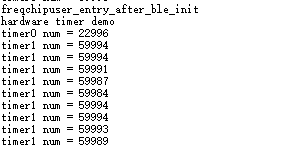
The log data in the figure above shows that the timer has been started and the timer interrupt callback function has been successfully called.
RTC
RTC API
Header File
ql_rtc.h, the header file of RTC API, is in the components/quectel_api/ql_include directory. Unless otherwise specified, all header files mentioned in this document are in this directory.
API Overview
| Function | Description |
|---|---|
ql_rtc_init() |
Initializes the RTC. |
ql_rtc_start() |
Starts the RTC. |
API Description
ql_rtc_init
This function initializes the RTC.
Prototype:
ql_rtc_errcode_e ql_rtc_init(ql_rtc_port_e port, ql_rtc_callback callback)
Parameters:
port: [In] RTC ID. For details, see ql_rtc_port_e.callback: [In] Callback function for RTC interruption. For details, see ql_rtc_callback.
Return Value:
Function execution result code. See ql_rtc_errcode_e.
ql_rtc_port_e
The enumeration of RTC IDs:
typedef enum {
  QL_RTC_PORT0 = 0,
  QL_RTC_PORT1,
} ql_rtc_port_e;
| Member | Description |
|---|---|
| QL_RTC_PORT0 | RTC 0 |
| QL_RTC_PORT1 | RTC 1 |
ql_rtc_callback
This is the callback function for interrupting the RTC.
typedef void (*ql_rtc_callback)(void)
No parameters and return value.
ql_rtc_errcode_e
The enumeration of result codes:
typedef enum {
  QL_RTC_SUCCESS = 0,
  QL_RTC_EXECUTE_ERR,
  QL_RTC_INVAILD_PARAM_ERR,
} ql_rtc_errcode_e;
| Member | Description |
|---|---|
| QL_RTC_SUCCESS | Successful execution |
| QL_RTC_EXECUTE_ERR | Failed execution |
| QL_RTC_INVAILD_PARAM_ERR | Invalid parameter |
ql_rtc_start
This function starts the RTC.
Prototype:
ql_rtc_errcode_e ql_rtc_start(ql_rtc_port_e port, uint32_t ms)
Parameters:
port: [In] RTC ID. For details, see ql_rtc_port_e.ms: [In] Timer duration. Unit: millisecond.
Return Value:
Function execution result code. See ql_rtc_errcode_e.
Development Procedure
This chapter describes how to use the above RTC API in an application and perform simplified feature debugging.
Operation Procedure
The code example of operating RTC API is provided in the module SDK. The demo is in ql_rtc_demo.c under the quectel_demo/ql_rtc_demo/code directory. The related functions are described as follows:
demo_rtc(): This function initializes the RTC and compiles the callback function for RTC interruption.ql_rtc0_cb_test(): Callback function for RTC 0 interruption.ql_rtc1_cb_test(): Callback function for RTC 1 interruption.
void demo_rtc(void)
{
  ql_debug("rtc demo\r\n");
  ql_rtc_init(QL_RTC_PORT0,ql_rtc0_cb_test);
  ql_rtc_init(QL_RTC_PORT1,ql_rtc1_cb_test);
  ql_rtc_start(QL_RTC_PORT0,10);
  ql_rtc_start(QL_RTC_PORT1,1000);
  ql_sys_sleep_enable();
}

void ql_rtc0_cb_test(void)
{
  ql_debug("rtc0 %d\r\n",ql_sys_get_run_time());
}

void ql_rtc1_cb_test(void)
{
  ql_debug("rtc1 %d\r\n",ql_sys_get_run_time());
  ql_rtc_start(QL_RTC_PORT1,1000);
}
Function Debugging
To debug the RTC function, use the EVB (e.g., HCM111Z TE-B) installed with the module and follow these steps:
- Run the RTC demo described in Operation Procedure.
- Recompile the firmware version.
- Download the new firmware version to the module.
- Restart the module.
- Open UART 1 port to get log information.
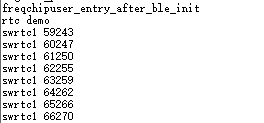
The log data in the figure above shows that the RTC has been successfully initialized and started.
Other General APIs
General System API
Header File
ql_sys.h, the header file of other general APIs, is in the components/quectel_api/ql_include directory. Unless otherwise specified, all header files mentioned in this document are in this directory.
API Overview
| Function | Description |
|---|---|
ql_sys_sleep_enable() |
Enables the sleep mode functionality on the module. |
ql_sys_sleep_disable() |
Disables the sleep mode functionality on the module. |
ql_sys_reset() |
Resets the module. |
ql_sys_delay_100us() |
Increases the delay time in the program. |
ql_sys_set_pclk() |
Sets the system main frequency. |
ql_sys_set_tx_power() |
Sets the RF transmitting power. |
ql_sys_get_run_time() |
Gets the runtime of the program. |
ql_sys_irq_enable() |
Interrupts the system. |
API Description
ql_sys_sleep_enable
This function enables the sleep mode functionality on the module.
Prototype:
ql_sys_errcode_e ql_sys_sleep_enable(void)
Parameters:
None
Return Value:
Function execution result code. See ql_sys_errcode_e.
ql_sys_errcode_e
The enumeration of result codes:
typedef enum {
  QL_SYS_SUCCESS = 0,
  QL_SYS_EXECUTE_ERR,
  QL_SYS_INVALID_PARAM_ERR,
} ql_sys_errcode_e;
| Member | Description |
|---|---|
| QL_SYS_SUCCESS | Successful execution |
| QL_SYS_EXECUTE_ERR | Failed execution |
| QL_SYS_INVALID_PARAM_ERR | Invalid parameter |
ql_sys_sleep_disable
This function disables the sleep mode functionality on the module.
Prototype:
ql_sys_errcode_e ql_sys_sleep_disable(void)
Parameters:
None
Return Value:
Function execution result code. See ql_sys_errcode_e.
ql_sys_reset
This function resets the module.
Prototype:
ql_sys_errcode_e ql_sys_reset(void)
Parameters:
None
Return Value:
Function execution result code. See ql_sys_errcode_e.
ql_sys_delay_100us
This function increases the delay time in the program.
Prototype:
ql_sys_errcode_e ql_sys_delay_100us(uint32_t num)
Parameters:
num: [In] Delay time. Unit: 100 microseconds.
Return Value:
Function execution result code. See ql_sys_errcode_e.
ql_sys_set_pclk
This function sets the system main frequency.
Prototype:
ql_sys_errcode_e ql_sys_set_pclk(ql_sys_clk_e clk)
Parameters:
clk: [In] System main frequency. For details, see ql_sys_clk_e.
Return Value:
Function execution result code. See ql_sys_errcode_e.
ql_sys_clk_e
The enumeration of settings of the system main frequency:
typedef enum {
  QL_SYS_CLK_6M,
  QL_SYS_CLK_12M,
  QL_SYS_CLK_24M,
  QL_SYS_CLK_48M,
} ql_sys_clk_e;
| Member | Description |
|---|---|
| QL_SYS_CLK_6M | Set the system main frequency to 6 MHz |
| QL_SYS_CLK_12M | Set the system main frequency to 12 MHz |
| QL_SYS_CLK_24M | Set the system main frequency to 24 MHz |
| QL_SYS_CLK_48M | Set the system main frequency to 48 MHz |
ql_sys_set_tx_power
This function sets the RF transmitting power.
Prototype:
ql_sys_errcode_e ql_sys_set_tx_power(ql_sys_tx_power_e power)
Parameters:
power: [In] RF transmitting power. For details, see ql_sys_tx_power_e.
Return Value:
Function execution result code. See ql_sys_errcode_e.
ql_sys_tx_power_e
The enumeration of settings of RF transmitting power:
typedef enum {
  QL_TX_POWER_NEG_16dBm,
  QL_TX_POWER_NEG_10dBm,
  QL_TX_POWER_NEG_7dBm,
  QL_TX_POWER_NEG_5dBm,
  QL_TX_POWER_NEG_3dBm,
  QL_TX_POWER_NEG_2dBm,
  QL_TX_POWER_NEG_1dBm,
  QL_TX_POWER_0dBm,
  QL_TX_POWER_POS_1dBm,
  QL_TX_POWER_POS_2dBm,
  QL_TX_POWER_POS_3dBm,
  QL_TX_POWER_POS_4dBm,
  QL_TX_POWER_POS_5dBm,
  QL_TX_POWER_POS_6dBm,
  QL_TX_POWER_POS_7dBm,
  QL_TX_POWER_POS_8dBm,
  QL_TX_POWER_POS_9dBm,
  QL_TX_POWER_POS_10dBm,
} ql_sys_tx_power_e;
| Member | Description |
|---|---|
| QL_TX_POWER_NEG_16dBm | Set the transmitting power to -16 dBm |
| QL_TX_POWER_NEG_10dBm | Set the transmitting power to -10 dBm |
| QL_TX_POWER_NEG_7dBm | Set the transmitting power to -7 dBm |
| QL_TX_POWER_NEG_5dBm | Set the transmitting power to -5 dBm |
| QL_TX_POWER_NEG_3dBm | Set the transmitting power to -3 dBm |
| QL_TX_POWER_NEG_2dBm | Set the transmitting power to -2 dBm |
| QL_TX_POWER_NEG_1dBm | Set the transmitting power to -1 dBm |
| QL_TX_POWER_0dBm | Set the transmitting power to 0 dBm |
| QL_TX_POWER_POS_1dBm | Set the transmitting power to 1 dBm |
| QL_TX_POWER_POS_2dBm | Set the transmitting power to 2 dBm |
| QL_TX_POWER_POS_3dBm | Set the transmitting power to 3 dBm |
| QL_TX_POWER_POS_4dBm | Set the transmitting power to 4 dBm |
| QL_TX_POWER_POS_5dBm | Set the transmitting power to 5 dBm |
| QL_TX_POWER_POS_6dBm | Set the transmitting power to 6 dBm |
| QL_TX_POWER_POS_7dBm | Set the transmitting power to 7 dBm |
| QL_TX_POWER_POS_8dBm | Set the transmitting power to 8 dBm |
| QL_TX_POWER_POS_9dBm | Set the transmitting power to 9 dBm |
| QL_TX_POWER_POS_10dBm | Set the transmitting power to 10 dBm |
ql_sys_get_run_time
This function gets the runtime of the program. When the runtime reaches 83886079 milliseconds (0x4FFFFFF), it will reclock.
Prototype:
uint32_t ql_sys_get_run_time(void)
Parameters:
None
Return Value:
Runtime of the program. Unit: millisecond.
ql_sys_irq_enable
This function interrupts the system.
Prototype:
ql_sys_errcode_e ql_sys_irq_enable(void)
Parameters:
None
Return Value:
Function execution result code. See ql_sys_errcode_e.
Terms and Abbreviations
| Abbreviation | Description | |
|---|---|---|
| API | Application Programming Interface | |
| EVB | Evaluation Board | |
| ID | Identifier | |
| IoT | Internet of Things | |
| RTC | Real-Time Clock | |
| SDK | Software Development Kit | # HCM111Z QuecOpen(SDK) General API Development Guide |
Introduction
Quectel HCM111Z module supports QuecOpen® solution. QuecOpen® is an embedded development platform, which is intended to simplify the design and development of IoT applications.
This document is applicable to QuecOpen® solution based on SDK build environment. It provides an overview of the flash API, watchdog API, timer API and RTC API provided in the SDK of Quectel HCM111Z module, and their development procedures, as well as other general APIs.
Flash
Flash API
Header File
ql_flash.h, the header file of flash API, is in the components/quectel_api/ql_include directory. Unless otherwise specified, all header files mentioned in this document are in this directory.
API Overview
| Function | Description |
|---|---|
ql_flash_set_security() |
Sets the protection type of flash. |
ql_flash_write() |
Writes data to flash. |
ql_flash_read() |
Reads data from flash. |
ql_flash_erase() |
Erases data from flash. |
API Description
ql_flash_set_security
This function sets the protection type of flash. You need to disable protection on the flash before writing data to it or erasing the data in it.
Prototype:
ql_errcode_flash_e ql_flash_set_security(ql_flash_protect_type_e type)
Parameters:
type: [In] Protection type. For details, see ql_flash_protect_type_e.
Return Value:
Function execution result code. See ql_errcode_flash_e.
ql_flash_protect_type_e
The enumeration of flash protection types:
typedef enum {
  QL_FLASH_PROTECT_NONE = 0,
  QL_FLASH_PROTECT_ALL,
} ql_flash_protect_type_e;
| Member | Description |
|---|---|
| QL_FLASH_PROTECT_NONE | No protection |
| QL_FLASH_PROTECT_ALL | Protect the whole flash |
ql_errcode_flash_e
The enumeration of result codes:
typedef enum {
  QL_FLASH_SUCCESS = 0,
  QL_FLASH_EXECUTE_ERR,
  QL_FLASH_PARAM_ERR,
} ql_errcode_flash_e;
| Member | Description |
|---|---|
| QL_FLASH_SUCCESS | Successful execution |
| QL_FLASH_EXECUTE_ERR | Failed execution |
| QL_FLASH_PARAM_ERR | Invalid parameter |
ql_flash_write
This function writes data to flash.
Prototype:
ql_errcode_flash_e ql_flash_write(uint8_t *data, uint32_t addr, uint32_t len)
Parameters:
data: [In] Data to be written to flash.addr: [In] Address in flash where the data is to be written.len: [In] Length of data to be written to flash. Unit: byte.
Return Value:
Function execution result code. See ql_errcode_flash_e.
ql_flash_read
This function reads data from flash.
Prototype:
ql_errcode_flash_e ql_flash_read(uint8_t *data, uint32_t addr, uint32_t len)
Parameters:
data: [Out] Data read from flash.addr: [In] Address where the read data is stored.len: [In] Length ofdata. Unit: byte.
Return Value:
Function execution result code. See ql_errcode_flash_e.
ql_flash_erase
This function erases data from flash. At least one sector (4 KB in size) of data is erased at a time. The size of data erased each time is an integer multiple of the sector size.
Prototype:
ql_errcode_flash_e ql_flash_erase(uint32_t addr, uint32_t len)
Parameters:
addr: [In] Address where the data to be erased is located.len: [In] Length of data to be erased. Unit: byte.
Return Value:
Function execution result code. See ql_errcode_flash_e.
Development Procedure
This chapter describes how to use the above flash API in an application and perform simplified feature debugging.
Operation Procedure
The code example of operating flash is provided in the module SDK. The demo is in ql_flash_demo.c under the quectel_demo/ql_flash_demo/code directory. The related functions are described as follows:
demo_flash(): Task execution function, which writes data to flash, reads data from flash and erases data in flash.
void demo_flash(void)
{
    uint32_t id;
    ql_debug("flash demo\r\n");

    ql_flash_set_security(QL_FLASH_PROTECT_NONE);
    ql_flash_erase(USER_FLASH_BASE_ADDR, FLASH_PAGE_SIZE);
    uint32_t idx = 0;
    for(idx=0; idx<FLASH_PAGE_SIZE; idx++)
        buf[idx] = idx;
    ql_flash_write(buf,USER_FLASH_BASE_ADDR, FLASH_PAGE_SIZE );
    for(idx=0; idx<FLASH_PAGE_SIZE; idx++)
        buf[idx] = 0xff;
    ql_flash_read(buf,USER_FLASH_BASE_ADDR, FLASH_PAGE_SIZE);
    ql_debug("read reg:\r\n");
    show_reg(buf,5,1);
    show_reg(buf+4091,5,1);

    flash_erase(USER_FLASH_BASE_ADDR, FLASH_PAGE_SIZE);
    for(idx=0; idx<FLASH_PAGE_SIZE; idx++)
        buf[idx] = idx+1;
    flash_write(USER_FLASH_BASE_ADDR, FLASH_PAGE_SIZE, buf);
    for(idx=0; idx<FLASH_PAGE_SIZE; idx++)
        buf[idx] = 0xfe;
    flash_read(USER_FLASH_BASE_ADDR, FLASH_PAGE_SIZE, buf);
    ql_debug("read reg:\r\n");
    show_reg(buf,5,1);
    show_reg(buf+4091,5,1);

    ql_flash_erase(USER_FLASH_MAX_PAGE_ADDR, FLASH_PAGE_SIZE);
    for(idx=0; idx<FLASH_PAGE_SIZE; idx++)
        buf[idx] = idx+2;
    ql_flash_write(buf,USER_FLASH_MAX_PAGE_ADDR, FLASH_PAGE_SIZE);
    for(idx=0; idx<FLASH_PAGE_SIZE; idx++)
        buf[idx] = 0xfd;
    ql_flash_read(buf,USER_FLASH_MAX_PAGE_ADDR, FLASH_PAGE_SIZE );
    ql_debug("read reg:\r\n");
    show_reg(buf,5,1);
    show_reg(buf+4091,5,1);

    ql_flash_erase(USER_FLASH_MAX_PAGE_ADDR, FLASH_PAGE_SIZE);
    for(idx=0; idx<FLASH_PAGE_SIZE; idx++)
        buf[idx] = idx+3;
    ql_flash_write(buf,USER_FLASH_MAX_PAGE_ADDR, FLASH_PAGE_SIZE);
    for(idx=0; idx<FLASH_PAGE_SIZE; idx++)
        buf[idx] = 0xfc;
    ql_flash_read(buf,USER_FLASH_MAX_PAGE_ADDR, FLASH_PAGE_SIZE);
    ql_debug("read reg:\r\n");
    show_reg(buf,5,1);
    show_reg(buf+4091,5,1);

    ql_flash_erase(USER_FLASH_MAX_PAGE_ADDR, FLASH_PAGE_SIZE);
    	  for(idx=0; idx<FLASH_PAGE_SIZE; idx++)
        buf[idx] = 0x00;
    	ql_flash_read(buf,USER_FLASH_MAX_PAGE_ADDR, FLASH_PAGE_SIZE);
    ql_debug("read reg:\r\n");
    show_reg(buf,5,1);
    show_reg(buf+4091,5,1);
Function Debugging
To debug the flash function, use the EVB (e.g., HCM111Z TE-B) installed with the module and follow these steps:
- Run the flash demo described in Operation Procedure.
- Recompile the firmware version.
- Download the new firmware version to the module.
- Restart the module.
- Open UART 1 port to get log information.

The log data in the figure above shows that writing data to flash, reading data from flash and erasing data in flash are all successful.
Watchdog
Watchdog API
Header File
ql_watchdog.h, the header file of watchdog API, is in the components/quectel_api/ql_include directory. Unless otherwise specified, all header files mentioned in this document are in this directory.
API Overview
| Function | Description |
|---|---|
ql_wdg_init() |
Initializes the watchdog. |
ql_wdg_reload() |
Feeds the watchdog. |
ql_wdg_finalize() |
Closes the watchdog. |
API Description
ql_wdg_init
This function initializes the watchdog.
Prototype:
ql_wdg_errcode_e ql_wdg_init(uint32_t timeout)
Parameters:
timeout: [In] Watchdog timeout. Unit: Second.
Return Value:
Function execution result code. See ql_wdg_errcode_e.
ql_wdg_errcode_e
The enumeration of result codes:
typedef enum {
  QL_WDG_SUCCESS = 0,
  QL_WDG_EXECUTE_ERR,
  QL_WDG_INVALID_PARAM_ERR,
} ql_wdg_errcode_e;
| Member | Description |
|---|---|
| QL_WDG_SUCCESS | Successful execution |
| QL_WDG_EXECUTE_ERR | Failed execution |
| QL_WDG_INVALID_PARAM_ERR | Invalid parameter |
ql_wdg_reload
This function feeds the watchdog.
Prototype:
ql_wdg_errcode_e ql_wdg_reload(void)
Parameters:
None
Return Value:
Function execution result code. See ql_wdg_errcode_e.
ql_wdg_finalize
This function closes the watchdog.
Prototype:
ql_wdg_errcode_e ql_wdg_finalize(void)
Parameters:
None
Return Value:
Function execution result code. See ql_wdg_errcode_e.
Development Procedure
This chapter describes how to use the above watchdog API in an application.
Operation Procedure
The code example of operating watchdog API is provided in the module SDK. The demo is in ql_wdt_demo.c under the quectel_demo/ql_wdt_demo/code directory. The related functions are described as follows:
demo_wdt(): This function creates watchdog tasks. It should be called when operating the demo.
void demo_wdt(void)
{
  ql_debug("watchdog demo\r\n");
  ql_wdg_init(4);
  while(1)
  {
    #if 0 //Exceeding the maximum time set by the watchdog
      co_delay_100us(50000);
    #else
      co_delay_100us(30000);
      ql_debug("wdg reload\r\n");
      ql_wdg_reload();
    #endif
  }
}
When running normally, the demo automatically executes ql_wdg_reload() every 3 seconds without triggering the watchdog reset. To test the watchdog reset, change #if 0 to #if 1 in above code, compile the firmware, and re-flash the new firmware version into the module. If the demo does not automatically execute ql_wdg_reload() for more than 4 seconds, the watchdog reset will be triggered.
Timer
Timer API
Header File
ql_timer.h, the header file of timer API, is in the components/quectel_api/ql_include directory. Unless otherwise specified, all header files mentioned in this document are in this directory.
API Overview
| Function | Description |
|---|---|
ql_timer_init() |
Initializes the timer. |
ql_timer_start() |
Starts the timer. |
ql_timer_stop() |
Stops the timer. |
ql_timer_get_cnt() |
Gets the current timer count value. |
API Description
ql_timer_init
This function initializes the timer.
Prototype:
ql_timer_errcode_e ql_timer_init(ql_timer_number_e timer_id, uint32_t timer_us, ql_timer_mode_e mode, ql_timer_callback timer_cb)
Parameters:
timer_id: [In] Timer ID. For details, see ql_timer_number_e.timer_us: [In] Timing duration. Unit: microsecond. Range: 1~349000.mode: [In] Timer working mode. For details, see ql_timer_mode_e.timer_cb: [In] Callback function for timer interruption. For details, see ql_timer_callback.
Return Value:
Function execution result code. See ql_timer_errcode_e.
ql_timer_number_e
The enumeration of timer IDs:
typedef enum {
  QL_TIMER_0 = 0,
  QL_TIMER_1,
} ql_timer_number_e;
| Member | Description |
|---|---|
| QL_TIMER_0 | Timer 0 |
| QL_TIMER_1 | Timer 1 |
ql_timer_mode_e
The enumeration of timer working modes:
typedef enum {
  QL_TIMER_SINGLE = 0,
  QL_TIMER_PERIODIC,
} ql_timer_mode_e;
| Member | Description |
|---|---|
| QL_TIMER_SINGLE | Single (reserved, and is not supported currently). |
| QL_TIMER_PERIODIC | Periodic |
ql_timer_callback
This is the callback function for interrupting the timer.
typedef void (*ql_timer_callback)(uint8_t arg)
arg: [In] Reserved.
ql_timer_errcode_e
The enumeration of result codes:
typedef enum {
  QL_TIMER_SUCCESS = 0,
  QL_TIMER_EXECUTE_ERR,
  QL_TIMER_INVALID_PARAM_ERR,
  QL_TIMER_NOT_OPEN_ERR,
} ql_timer_errcode_e;
| Member | Description |
|---|---|
| QL_TIMER_SUCCESS | Successful execution |
| QL_TIMER_EXECUTE_ERR | Failed execution |
| QL_TIMER_INVALID_PARAM_ERR | Invalid parameter |
| QL_TIMER_NOT_OPEN_ERR | Timer is not enabled |
ql_timer_start
This function starts the timer.
Prototype:
ql_timer_errcode_e ql_timer_start(ql_timer_number_e timer_id)
Parameters:
timer_id: [In] Timer ID. For details, see ql_timer_number_e.
Return Value:
Function execution result code. See ql_timer_errcode_e.
ql_timer_stop
This function stops the timer.
Prototype:
ql_timer_errcode_e ql_timer_stop(ql_timer_number_e timer_id)
Parameters:
timer_id: [In] Timer ID. For details, see ql_timer_number_e.
Return Value:
Function execution result code. See ql_timer_errcode_e.
ql_timer_get_cnt
This function gets the current timer count value.
Prototype:
ql_timer_errcode_e ql_timer_get_cnt(ql_timer_number_e timer_id, uint32_t *count)
Parameters:
timer_id: [In] Timer ID. For details, see ql_timer_number_e.count: [In] Pointer to the count value.
Return Value:
Function execution result code. See ql_timer_errcode_e.
Development Procedure
This chapter describes how to use the above timer API in an application and perform simplified feature debugging.
Operation Procedure
The code example of operating timer is provided in the module SDK. The demo is in ql_timer_demo.c under the quectel_demo/ql_timer_demo/code directory. The related functions are described as follows:
demo_timer(): This function initializes and starts the timer.ql_timer0_cb_test(): Callback function for timer 0 interruption.ql_timer1_cb_test(): Callback function for timer 1 interruption.
void demo_timer(void)
{
  uint8_t ret;
  ql_debug("hardware timer demo\r\n");
  ret = ql_timer_init(QL_TIMER_0,500,QL_TIMER_PERIODIC,ql_timer0_cb_test);
  if(ret != QL_TIMER_SUCCRSS)
  {
    ql_debug("timer0 init fail\r\n");
  }
  ql_timer_start(QL_TIMER_0);
  ret = ql_timer_init(QL_TIMER_1,20000,QL_TIMER_PERIODIC,ql_timer1_cb_test);
  if(ret != QL_TIMER_SUCCRSS)
  {
    ql_debug("timer1 init fail\r\n");
  }
  ql_timer_start(QL_TIMER_1);
}

void ql_timer0_cb_test(uint8_t arg)
{
  static uint32_t cnt = 0;
  uint32_t num = 0;
  cnt++;
  if(cnt >= 2000){ //1s
    ql_timer_stop(QL_TIMER_0);
    ql_timer_get_cnt(QL_TIMER_0,&num);
    ql_debug("timer0 num = %d\r\n",num);
  }
}

void ql_timer1_cb_test(uint8_t arg)
{
  static uint32_t cnt = 0;
  uint32_t num = 0;
  cnt++;
  if(cnt >= 100){ //2s
    cnt = 0;
    ql_timer_get_cnt(QL_TIMER_1,&num);
    ql_debug("timer1 num = %d\r\n",num);
  }
}
Function Debugging
To debug the timer function, use the EVB (e.g., HCM111Z TE-B) installed with the module and follow these steps:
- Run the timer demo described in Operation Procedure.
- Recompile the firmware version.
- Download the new firmware version to the module.
- Restart the module.
- Open UART 1 port to get log information.

The log data in the figure above shows that the timer has been started and the timer interrupt callback function has been successfully called.
RTC
RTC API
Header File
ql_rtc.h, the header file of RTC API, is in the components/quectel_api/ql_include directory. Unless otherwise specified, all header files mentioned in this document are in this directory.
API Overview
| Function | Description |
|---|---|
ql_rtc_init() |
Initializes the RTC. |
ql_rtc_start() |
Starts the RTC. |
API Description
ql_rtc_init
This function initializes the RTC.
Prototype:
ql_rtc_errcode_e ql_rtc_init(ql_rtc_port_e port, ql_rtc_callback callback)
Parameters:
port: [In] RTC ID. For details, see ql_rtc_port_e.callback: [In] Callback function for RTC interruption. For details, see ql_rtc_callback.
Return Value:
Function execution result code. See ql_rtc_errcode_e.
ql_rtc_port_e
The enumeration of RTC IDs:
typedef enum {
  QL_RTC_PORT0 = 0,
  QL_RTC_PORT1,
} ql_rtc_port_e;
| Member | Description |
|---|---|
| QL_RTC_PORT0 | RTC 0 |
| QL_RTC_PORT1 | RTC 1 |
ql_rtc_callback
This is the callback function for interrupting the RTC.
typedef void (*ql_rtc_callback)(void)
No parameters and return value.
ql_rtc_errcode_e
The enumeration of result codes:
typedef enum {
  QL_RTC_SUCCESS = 0,
  QL_RTC_EXECUTE_ERR,
  QL_RTC_INVAILD_PARAM_ERR,
} ql_rtc_errcode_e;
| Member | Description |
|---|---|
| QL_RTC_SUCCESS | Successful execution |
| QL_RTC_EXECUTE_ERR | Failed execution |
| QL_RTC_INVAILD_PARAM_ERR | Invalid parameter |
ql_rtc_start
This function starts the RTC.
Prototype:
ql_rtc_errcode_e ql_rtc_start(ql_rtc_port_e port, uint32_t ms)
Parameters:
port: [In] RTC ID. For details, see ql_rtc_port_e.ms: [In] Timer duration. Unit: millisecond.
Return Value:
Function execution result code. See ql_rtc_errcode_e.
Development Procedure
This chapter describes how to use the above RTC API in an application and perform simplified feature debugging.
Operation Procedure
The code example of operating RTC API is provided in the module SDK. The demo is in ql_rtc_demo.c under the quectel_demo/ql_rtc_demo/code directory. The related functions are described as follows:
demo_rtc(): This function initializes the RTC and compiles the callback function for RTC interruption.ql_rtc0_cb_test(): Callback function for RTC 0 interruption.ql_rtc1_cb_test(): Callback function for RTC 1 interruption.
void demo_rtc(void)
{
  ql_debug("rtc demo\r\n");
  ql_rtc_init(QL_RTC_PORT0,ql_rtc0_cb_test);
  ql_rtc_init(QL_RTC_PORT1,ql_rtc1_cb_test);
  ql_rtc_start(QL_RTC_PORT0,10);
  ql_rtc_start(QL_RTC_PORT1,1000);
  ql_sys_sleep_enable();
}

void ql_rtc0_cb_test(void)
{
  ql_debug("rtc0 %d\r\n",ql_sys_get_run_time());
}

void ql_rtc1_cb_test(void)
{
  ql_debug("rtc1 %d\r\n",ql_sys_get_run_time());
  ql_rtc_start(QL_RTC_PORT1,1000);
}
Function Debugging
To debug the RTC function, use the EVB (e.g., HCM111Z TE-B) installed with the module and follow these steps:
- Run the RTC demo described in Operation Procedure.
- Recompile the firmware version.
- Download the new firmware version to the module.
- Restart the module.
- Open UART 1 port to get log information.

The log data in the figure above shows that the RTC has been successfully initialized and started.
Other General APIs
General System API
Header File
ql_sys.h, the header file of other general APIs, is in the components/quectel_api/ql_include directory. Unless otherwise specified, all header files mentioned in this document are in this directory.
API Overview
| Function | Description |
|---|---|
ql_sys_sleep_enable() |
Enables the sleep mode functionality on the module. |
ql_sys_sleep_disable() |
Disables the sleep mode functionality on the module. |
ql_sys_reset() |
Resets the module. |
ql_sys_delay_100us() |
Increases the delay time in the program. |
ql_sys_set_pclk() |
Sets the system main frequency. |
ql_sys_set_tx_power() |
Sets the RF transmitting power. |
ql_sys_get_run_time() |
Gets the runtime of the program. |
ql_sys_irq_enable() |
Interrupts the system. |
API Description
ql_sys_sleep_enable
This function enables the sleep mode functionality on the module.
Prototype:
ql_sys_errcode_e ql_sys_sleep_enable(void)
Parameters:
None
Return Value:
Function execution result code. See ql_sys_errcode_e.
ql_sys_errcode_e
The enumeration of result codes:
typedef enum {
  QL_SYS_SUCCESS = 0,
  QL_SYS_EXECUTE_ERR,
  QL_SYS_INVALID_PARAM_ERR,
} ql_sys_errcode_e;
| Member | Description |
|---|---|
| QL_SYS_SUCCESS | Successful execution |
| QL_SYS_EXECUTE_ERR | Failed execution |
| QL_SYS_INVALID_PARAM_ERR | Invalid parameter |
ql_sys_sleep_disable
This function disables the sleep mode functionality on the module.
Prototype:
ql_sys_errcode_e ql_sys_sleep_disable(void)
Parameters:
None
Return Value:
Function execution result code. See ql_sys_errcode_e.
ql_sys_reset
This function resets the module.
Prototype:
ql_sys_errcode_e ql_sys_reset(void)
Parameters:
None
Return Value:
Function execution result code. See ql_sys_errcode_e.
ql_sys_delay_100us
This function increases the delay time in the program.
Prototype:
ql_sys_errcode_e ql_sys_delay_100us(uint32_t num)
Parameters:
num: [In] Delay time. Unit: 100 microseconds.
Return Value:
Function execution result code. See ql_sys_errcode_e.
ql_sys_set_pclk
This function sets the system main frequency.
Prototype:
ql_sys_errcode_e ql_sys_set_pclk(ql_sys_clk_e clk)
Parameters:
clk: [In] System main frequency. For details, see ql_sys_clk_e.
Return Value:
Function execution result code. See ql_sys_errcode_e.
ql_sys_clk_e
The enumeration of settings of the system main frequency:
typedef enum {
  QL_SYS_CLK_6M,
  QL_SYS_CLK_12M,
  QL_SYS_CLK_24M,
  QL_SYS_CLK_48M,
} ql_sys_clk_e;
| Member | Description |
|---|---|
| QL_SYS_CLK_6M | Set the system main frequency to 6 MHz |
| QL_SYS_CLK_12M | Set the system main frequency to 12 MHz |
| QL_SYS_CLK_24M | Set the system main frequency to 24 MHz |
| QL_SYS_CLK_48M | Set the system main frequency to 48 MHz |
ql_sys_set_tx_power
This function sets the RF transmitting power.
Prototype:
ql_sys_errcode_e ql_sys_set_tx_power(ql_sys_tx_power_e power)
Parameters:
power: [In] RF transmitting power. For details, see ql_sys_tx_power_e.
Return Value:
Function execution result code. See ql_sys_errcode_e.
ql_sys_tx_power_e
The enumeration of settings of RF transmitting power:
typedef enum {
  QL_TX_POWER_NEG_16dBm,
  QL_TX_POWER_NEG_10dBm,
  QL_TX_POWER_NEG_7dBm,
  QL_TX_POWER_NEG_5dBm,
  QL_TX_POWER_NEG_3dBm,
  QL_TX_POWER_NEG_2dBm,
  QL_TX_POWER_NEG_1dBm,
  QL_TX_POWER_0dBm,
  QL_TX_POWER_POS_1dBm,
  QL_TX_POWER_POS_2dBm,
  QL_TX_POWER_POS_3dBm,
  QL_TX_POWER_POS_4dBm,
  QL_TX_POWER_POS_5dBm,
  QL_TX_POWER_POS_6dBm,
  QL_TX_POWER_POS_7dBm,
  QL_TX_POWER_POS_8dBm,
  QL_TX_POWER_POS_9dBm,
  QL_TX_POWER_POS_10dBm,
} ql_sys_tx_power_e;
| Member | Description |
|---|---|
| QL_TX_POWER_NEG_16dBm | Set the transmitting power to -16 dBm |
| QL_TX_POWER_NEG_10dBm | Set the transmitting power to -10 dBm |
| QL_TX_POWER_NEG_7dBm | Set the transmitting power to -7 dBm |
| QL_TX_POWER_NEG_5dBm | Set the transmitting power to -5 dBm |
| QL_TX_POWER_NEG_3dBm | Set the transmitting power to -3 dBm |
| QL_TX_POWER_NEG_2dBm | Set the transmitting power to -2 dBm |
| QL_TX_POWER_NEG_1dBm | Set the transmitting power to -1 dBm |
| QL_TX_POWER_0dBm | Set the transmitting power to 0 dBm |
| QL_TX_POWER_POS_1dBm | Set the transmitting power to 1 dBm |
| QL_TX_POWER_POS_2dBm | Set the transmitting power to 2 dBm |
| QL_TX_POWER_POS_3dBm | Set the transmitting power to 3 dBm |
| QL_TX_POWER_POS_4dBm | Set the transmitting power to 4 dBm |
| QL_TX_POWER_POS_5dBm | Set the transmitting power to 5 dBm |
| QL_TX_POWER_POS_6dBm | Set the transmitting power to 6 dBm |
| QL_TX_POWER_POS_7dBm | Set the transmitting power to 7 dBm |
| QL_TX_POWER_POS_8dBm | Set the transmitting power to 8 dBm |
| QL_TX_POWER_POS_9dBm | Set the transmitting power to 9 dBm |
| QL_TX_POWER_POS_10dBm | Set the transmitting power to 10 dBm |
ql_sys_get_run_time
This function gets the runtime of the program. When the runtime reaches 83886079 milliseconds (0x4FFFFFF), it will reclock.
Prototype:
uint32_t ql_sys_get_run_time(void)
Parameters:
None
Return Value:
Runtime of the program. Unit: millisecond.
ql_sys_irq_enable
This function interrupts the system.
Prototype:
ql_sys_errcode_e ql_sys_irq_enable(void)
Parameters:
None
Return Value:
Function execution result code. See ql_sys_errcode_e.
Terms and Abbreviations
| Abbreviation | Description |
|---|---|
| API | Application Programming Interface |
| EVB | Evaluation Board |
| ID | Identifier |
| IoT | Internet of Things |
| RTC | Real-Time Clock |
| SDK | Software Development Kit |