


 English
HCM111Z QuecOpen(SDK) BLE Development Guide
Introduction
Quectel HCM111Z module supports QuecOpen® solution. QuecOpen® is an embedded development platform that simplifies the software design and development process of IoT applications.
This document applies to the QuecOpen® solution based on the SDK build environment, mainly introducing the Bluetooth Low Energy (BLE) API and related examples for the HCM111Z module under the QuecOpen® solution.
Bluetooth Low Energy API
Header File
The header file for the BLE API is ql_ble.h, located in the components/quectel_api/ql_include directory of the SDK package. Unless otherwise specified, all header files mentioned in this document are in this directory.
Function Overview
| Function | Description |
|---|---|
ql_ble_create_db() |
Initializes BLE and customizes BLE services |
ql_ble_set_notice_cb() |
Registers the BLE event callback function |
ql_ble_set_dev_name() |
Sets the local name |
ql_ble_address_get() |
Gets the BLE MAC address |
ql_ble_set_adv_param() |
Sets advertising parameters |
ql_ble_set_adv_data() |
Sets advertising data |
ql_ble_set_scan_rsp_data() |
Sets scan response data |
ql_ble_start_advertising() |
Starts BLE advertising |
ql_ble_stop_advertising() |
Stops BLE advertising |
ql_ble_start_scaning() |
Starts BLE scanning |
ql_ble_stop_scaning() |
Stops BLE scanning |
ql_ble_update_param() |
Updates connection parameters |
ql_ble_set_connect_dev_addr() |
Sets the address of the BLE device to be connected |
ql_ble_start_conn() |
Initiates a connection |
ql_ble_disconnect() |
Actively disconnects |
ql_ble_get_connect_num() |
Gets the number of connected links |
ql_ble_link_rssi_report() |
Enables/Disables getting RSSI of the connected link |
ql_ble_gatt_init() |
Initializes GATT parameters |
ql_ble_gatt_mtu_changes() |
Updates the MTU value |
ql_ble_gattc_all_service_discovery() |
Central device discovers all services of the peripheral |
ql_ble_gattc_ntf_ind_enable() |
Central device enables notification or indication of the peripheral |
ql_ble_gattc_write_data_req() |
Central device writes data to the peripheral by request |
ql_ble_gattc_write_data_with_handle() |
Central device writes data to the specified characteristic value handle of the peripheral by request |
ql_ble_gattc_write_data_cmd() |
Central device writes data to the peripheral by command |
ql_ble_gatts_send_ntf_value() |
Peripheral sends data to the central via notification |
ql_ble_gatts_send_ind_value() |
Peripheral sends data to the central via indication |
ql_ble_security_param_init() |
Sets security characteristic parameters |
ql_ble_bond_num_max() |
Sets the maximum number of bonded devices |
ql_ble_bond_delete_all() |
Deletes information of all bonded devices |
ql_ble_get_bond_status() |
Gets the bonding status of the currently connected device |
ql_ble_pairing_req() |
Sends a pairing request |
ql_ble_security_req() |
Sends a security connection request |
ql_ble_enc_req() |
Sends an encryption request |
Function Details
ql_ble_create_db
This function initializes BLE and customizes BLE services.
Function Prototype
ql_errcode_bt_e ql_ble_create_db(ql_ble_gatt_service_t *service, uint8_t *svc_id)
Parameters
service:
[In] BLE service list. See ql_ble_gatt_service_t.
svc_id:
[Out] BLE service ID.
Return Value
Result code. See ql_errcode_bt_e.
ql_errcode_bt_e
The enumeration of result codes is defined as follows:
typedef enum {
  QL_BT_SUCCESS = 0,
  QL_BT_ERR_PROFILE,
  QL_BT_ERR_CREATE_DB,
  QL_BT_ERR_CMD_NOT_SUPPORT,
  QL_BT_ERR_UNKNOW_IDX,
  QL_BT_ERR_BLE_STATUS,
  QL_BT_ERR_BLE_PARAM,
  QL_BT_ERR_ADV_DATA,
  QL_BT_ERR_CMD_RUN,
  QL_BT_ERR_NO_MEM,
  QL_BT_ERR_INIT_CREATE,
  QL_BT_ERR_INIT_STATE,
  QL_BT_ERR_ATTC_WRITE,
  QL_BT_ERR_ATTC_WRITE_UNREGISTER,
} ql_errcode_bt_e
Members
| Member | Description |
|---|---|
QL_BT_SUCCESS |
Function executed successfully |
QL_BT_ERR_PROFILE |
Profile error |
QL_BT_ERR_CREATE_DB |
Failed to add BLE service |
QL_BT_ERR_CMD_NOT_SUPPORT |
Command not supported |
QL_BT_ERR_UNKNOW_IDX |
Unknown BLE activity index |
QL_BT_ERR_BLE_STATUS |
Status error |
QL_BT_ERR_BLE_PARAM |
Invalid parameter |
QL_BT_ERR_ADV_DATA |
Advertising data format error |
QL_BT_ERR_CMD_RUN |
Command execution failed |
QL_BT_ERR_NO_MEM |
Insufficient memory |
QL_BT_ERR_INIT_CREATE |
Failed to create connection task |
QL_BT_ERR_INIT_STATE |
Connection status error |
QL_BT_ERR_ATTC_WRITE |
Write data error |
QL_BT_ERR_ATTC_WRITE_UNREGISTER |
BLE service for writing data not registered |
ql_ble_gatt_service_t
The BLE service list structure is defined as follows:
typedef struct {
  const ql_ble_gatt_attribute_t *p_att_tb;
  uint8_t att_nb;
  ql_ble_gatt_msg_handler_t gatt_msg_handler;
} ql_ble_gatt_service_t
Parameters
| Type | Parameter | Description |
|---|---|---|
| ql_ble_gatt_attribute_t | p_att_tb |
BLE service attribute list. See ql_ble_gatt_attribute_t. |
| uint8_t | att_nb |
Number of attribute lists. |
| ql_ble_gatt_msg_handler_t | gatt_msg_handler |
Callback function. See ql_ble_gatt_msg_handler_t. |
ql_ble_gatt_attribute_t
The BLE service attribute list structure is defined as follows:
typedef struct {
  ql_ble_gatt_uuid_t uuid;
  uint16_t prop;
  uint16_t max_size;
  uint8_t *p_data;
} ql_ble_gatt_attribute_t
Parameters
| Type | Parameter | Description |
|---|---|---|
| ql_ble_gatt_uuid_t | uuid |
UUID. See ql_ble_gatt_uuid_t. |
| uint16_t | prop |
Permission settings |
| uint16_t | max_size |
Maximum number of bytes for the attribute |
| uint8_t | *p_data |
Attribute data pointer |
ql_ble_gatt_uuid_t
The UUID structure is defined as follows:
typedef struct {
  uint8_t size;
  uint8_t p_uuid[16];
} ql_ble_gatt_uuid_t
Parameters
| Type | Parameter | Description |
|---|---|---|
| uint8_t | size |
UUID length, can be 2 bytes or 16 bytes. |
| uint8_t | p_uuid |
UUID value; array of 2 bytes or 16 bytes. |
ql_ble_gatt_msg_handler_t
This function is the BLE service callback function.
Function Prototype
typedef uint16_t (*ql_ble_gatt_msg_handler_t)(void *p_msg)
Parameters
p_msg:
[In] BLE GATT message. See ql_ble_gatt_msg_t.
ql_ble_gatt_msg_t
The BLE GATT message structure is defined as follows:
typedef struct {
  ql_ble_gatt_msg_evt_t msg_evt;
  uint8_t conn_idx;
  uint8_t svc_id;
  uint16_t att_idx;
  uint16_t handle;
  union {
    ql_ble_gatt_msg_hdl_t msg;
    ql_ble_gatt_op_cmp_t op;
  } param;
} ql_ble_gatt_msg_t
Parameters
| Type | Parameter | Description |
|---|---|---|
| ql_ble_gatt_msg_evt_t | msg_evt |
BLE GATT message event. See ql_ble_gatt_msg_evt_t. |
| uint8_t | conn_idx |
Connection index. |
| uint8_t | svc_id |
BLE service ID. |
| uint16_t | att_idx |
Attribute index in the service table. |
| uint16_t | handle |
Attribute handle number in the peripheral service. |
| ql_ble_gatt_msg_hdl_t | msg |
GATT message length and data pointer. See ql_ble_gatt_msg_hdl_t. |
| ql_ble_gatt_op_cmp_t | op |
GATT operation type, including read, write, notification, and indication. See ql_ble_gatt_op_cmp_t. |
ql_ble_gatt_msg_evt_t
The BLE GATT message event enumeration is defined as follows:
typedef enum {
  QL_BLE_GATTC_MSG_READ_REQ,
  QL_BLE_GATTC_MSG_WRITE_REQ,
  QL_BLE_GATTC_MSG_ATT_INFO_REQ,
  QL_BLE_GATTC_MSG_NTF_REQ,
  QL_BLE_GATTC_MSG_IND_REQ,
  QL_BLE_GATTC_MSG_READ_IND,
  QL_BLE_GATTC_MSG_CMP_EVT,
  QL_BLE_GATTC_MSG_LINK_CREATE,
  QL_BLE_GATTC_MSG_LINK_LOST,
  QL_BLE_GATTC_MSG_SVC_REPORT,
  QL_BLE_GATTC_MSG_HANDLE_ERROR = 0x80,
} ql_ble_gatt_msg_evt_t
Members
| Member | Description |
|---|---|
QL_BLE_GATTC_MSG_READ_REQ |
Read data request |
QL_BLE_GATTC_MSG_WRITE_REQ |
Write data request |
QL_BLE_GATTC_MSG_ATT_INFO_REQ |
Attribute information request |
QL_BLE_GATTC_MSG_NTF_REQ |
Notification data received from GATT client |
QL_BLE_GATTC_MSG_IND_REQ |
Indication data received from GATT client |
QL_BLE_GATTC_MSG_READ_IND |
Read data request response |
QL_BLE_GATTC_MSG_CMP_EVT |
Message completion event |
QL_BLE_GATTC_MSG_LINK_CREATE |
Link established |
QL_BLE_GATTC_MSG_LINK_LOST |
Link lost |
QL_BLE_GATTC_MSG_SVC_REPORT |
Report of receiving peripheral BLE service information |
QL_BLE_GATTC_MSG_HANDLE_ERROR |
Application cannot handle message correctly |
ql_ble_gatt_msg_hdl_t
The BLE GATT message structure is defined as follows:
typedef struct {
  uint16_t msg_len;
  uint8_t *p_msg_data;
} ql_ble_gatt_msg_hdl_t
Parameters
| Type | Parameter | Description |
|---|---|---|
| uint16_t | msg_len |
Length of message |
| uint8_t | *p_msg_data |
Message data |
ql_ble_gatt_op_cmp_t
The GATT operation type structure is defined as follows:
typedef struct {
  uint8_t operation;
  uint8_t status;
  void * arg;
} ql_ble_gatt_op_cmp_t
Parameters
| Type | Parameter | Description |
|---|---|---|
| uint8_t | operation |
Request type |
| uint8_t | status |
Request status |
| void | * arg |
Parameter pointer |
ql_ble_set_notice_cb
This function registers the BLE event callback function.
Function Prototype
ql_errcode_bt_e ql_ble_set_notice_cb(ql_ble_notice_cb callback)
Parameters
callback:
[In] BLE event callback function. See ble_notice_cb_t.
Return Value
Result code. See ql_errcode_bt_e.
ble_notice_cb_t
This function is the BLE event callback function.
Function Prototype
typedef void (*ql_ble_notice_cb)(ql_ble_notify_e notice, void *param)
Parameters
notice:
[In] BLE event type. See ble_notice_t.
param:
[In] BLE event parameter.
ble_notice_t
The BLE event enumeration is defined as follows:
typedef enum {
  QL_BLE_STACK_OK = 0,
  QL_BLE_REPORT_ADV_EVENT,
  QL_BLE_MTU_CHANGE_EVENT,
  QL_BLE_CONNECT_EVENT,
  QL_BLE_DISCONNECT_EVENT,
  QL_BLE_INIT_CONNECT_EVENT,
  QL_BLE_ADV_STOP_EVENT,
  QL_BLE_SCAN_STOP_EVENT,
  QL_BLE_CONN_PARAM_UPDATE_EVENT,
  QL_BLE_LINK_RSSI_EVENT,
  QL_BLE_SEC_MASTER_AUTH_REQ,
  QL_BLE_SEC_MASTER_ENCRYPT,
  QL_BLE_SEC_SLAVE_ENCRYPT,
} ql_ble_notify_e
Members
| Member | Description |
|---|---|
QL_BLE_STACK_OK |
BLE protocol stack ready |
QL_BLE_REPORT_ADV_EVENT |
Scan result return event |
QL_BLE_MTU_CHANGE_EVENT |
MTU change event |
QL_BLE_CONNECT_EVENT |
Module establishes connection with central as peripheral |
QL_BLE_DISCONNECT_EVENT |
Connection disconnect event |
QL_BLE_INIT_CONNECT_EVENT |
Module establishes connection with peripheral as central |
QL_BLE_ADV_STOP_EVENT |
Advertising stop event |
QL_BLE_SCAN_STOP_EVENT |
Scanning stop event |
QL_BLE_CONN_PARAM_UPDATE_EVENT |
Connection parameter update event |
QL_BLE_LINK_RSSI_EVENT |
Get RSSI value of connection link |
QL_BLE_SEC_MASTER_AUTH_REQ |
Central gets authentication request from peripheral |
QL_BLE_SEC_MASTER_ENCRYPT |
Central link encryption |
QL_BLE_SEC_SLAVE_ENCRYPT |
Peripheral link encryption |
ql_ble_set_dev_name
This function sets the local name.
Function Prototype
ql_errcode_bt_e ql_ble_set_dev_name(uint8_t *name, uint8_t name_len)
Parameters
name:
[In] Device name.
name_len:
[In] Device name length. Maximum: 26 bytes.
Return Value
Result code. See ql_errcode_bt_e.
ql_ble_address_get
This function gets the BLE MAC address.
Function Prototype
ql_errcode_bt_e ql_ble_address_get(uint8_t *mac_addr)
Parameters
mac_addr:
[Out] BLE MAC address.
Return Value
Result code. See ql_errcode_bt_e.
ql_ble_set_adv_param
This function sets advertising parameters.
Function Prototype
ql_errcode_bt_e ql_ble_set_adv_param(ql_ble_adv_param_t *adv_param)
Parameters
adv_param:
[In] Advertising parameters. See ql_ble_adv_param_t.
Return Value
Result code. See ql_errcode_bt_e.
ql_ble_adv_param_t
The advertising parameter structure is defined as follows:
typedef struct {
  ql_ble_adv_mode_e mode;
  ql_ble_addr_type_e addr_type;
  ql_ble_adv_mac_addr_t peer_addr;
  ql_ble_phy_e phy;
  uint16_t adv_intv_min;
  uint16_t adv_intv_max;
  ql_ble_adv_channel_e channel;
  ql_ble_adv_filter_e filter;
  uint8_t adv_sid;
  uint16_t per_adv_intv_min;
  uint16_t per_adv_intv_max;
  ql_ble_adv_disc_mode_e disc_mode;
} ql_ble_adv_param_t
Parameters
| Type | Parameter | Description |
|---|---|---|
| ql_ble_adv_mode_e | mode |
Advertising mode. See ql_ble_adv_mode_e. |
| ql_ble_addr_type_e | addr_type |
Advertising address type. See ql_ble_addr_type_e. |
| ql_ble_adv_mac_addr_t | peer_addr |
Peripheral address. See ql_ble_adv_mac_addr_t. |
| ql_ble_phy_e | phy |
Physical layer type for advertising. See ql_ble_phy_e. |
| uint16_t | adv_intv_min |
Minimum advertising interval. Range: 32~16384. Unit: 0.625 ms. Time range: 20 ms~10.24 s. |
| uint16_t | adv_intv_max |
Maximum advertising interval. Range: 32~16384. Unit: 0.625 ms. Time range: 20 ms~10.24 s. |
| ql_ble_adv_channel_e | channel |
Advertising channel. See ql_ble_adv_channel_e. |
| ql_ble_adv_filter_e | filter |
Advertising filter type. See ql_ble_adv_filter_e. |
| uint8_t | adv_sid |
Advertising index, only applicable to extended advertising and periodic advertising. Range: 0~0xF. |
| uint16_t | per_adv_intv_min |
Minimum peripheral advertising interval. Range: 32~16384. Unit: 0.625 ms. Time range: 20 ms~10.24 s. |
| uint16_t | per_adv_intv_max |
Maximum peripheral advertising interval. Range: 32~16384. Unit: 0.625 ms. Time range: 20 ms~10.24 s. |
| ql_ble_adv_disc_mode_e | disc_mode |
Advertising discoverable type. See ql_ble_adv_disc_mode_e. |
ql_ble_adv_mode_e
The enumeration of advertising mode:
typedef enum {
  QL_BLE_ADV_MODE_UNDIRECT = 0x01,
  QL_BLE_ADV_MODE_DIRECT = 0x02,
  QL_BLE_ADV_MODE_NON_CONN_NON_SCAN = 0x03,
  QL_BLE_ADV_MODE_NON_CONN_SCAN = 0x04,
  QL_BLE_ADV_MODE_HDC_DIRECT = 0x05,
  QL_BLE_ADV_MODE_BEACON = 0x06,
  QL_BLE_ADV_MODE_CUSTOM = 0x07,
  QL_BLE_ADV_MODE_EXTEND_CONN_UNDIRECT = 0x11,
  QL_BLE_ADV_MODE_EXTEND_CONN_DIRECT = 0x12,
  QL_BLE_ADV_MODE_EXTEND_NON_CONN_SCAN = 0x13,
  QL_BLE_ADV_MODE_EXTEND_NON_CONN_SCAN_DIRECT = 0x14,
  QL_BLE_ADV_MODE_EXTEND_NON_CONN_NON_SCAN = 0x15,
  QL_BLE_ADV_MODE_EXTEND_NON_CONN_NON_SCAN_DIRECT = 0x16,
  QL_BLE_ADV_MODE_PER_ADV_UNDIRECT = 0x21,
  QL_BLE_ADV_MODE_PER_ADV_DIRECT = 0x22,
} ql_ble_adv_mode_e
Members
| Member | Description |
|---|---|
QL_BLE_ADV_MODE_UNDIRECT |
Connectable and scannable advertising |
QL_BLE_ADV_MODE_DIRECT |
Direct advertising |
QL_BLE_ADV_MODE_NON_CONN_NON_SCAN |
Non-connectable and non-scannable advertising |
QL_BLE_ADV_MODE_NON_CONN_SCAN |
Non-connectable and scannable advertising |
QL_BLE_ADV_MODE_HDC_DIRECT |
Connectable and non-scannable advertising |
QL_BLE_ADV_MODE_BEACON |
Beacon advertising |
QL_BLE_ADV_MODE_CUSTOM |
Custom type |
QL_BLE_ADV_MODE_EXTEND_CONN_UNDIRECT |
Extended advertising mode, connectable and scannable advertising |
QL_BLE_ADV_MODE_EXTEND_CONN_DIRECT |
Extended advertising mode, direct advertising |
QL_BLE_ADV_MODE_EXTEND_NON_CONN_SCAN |
Extended advertising mode, non-connectable and scannable advertising |
QL_BLE_ADV_MODE_EXTEND_NON_CONN_SCAN_DIRECT |
Extended advertising mode, non-connectable and scannable direct advertising |
QL_BLE_ADV_MODE_EXTEND_NON_CONN_NON_SCAN |
Extended advertising mode, non-connectable and non-scannable advertising |
QL_BLE_ADV_MODE_EXTEND_NON_CONN_NON_SCAN_DIRECT |
Extended advertising mode, non-connectable and non-scannable direct advertising |
QL_BLE_ADV_MODE_PER_ADV_UNDIRECT |
Synchronous advertising mode, undirect advertising |
QL_BLE_ADV_MODE_PER_ADV_DIRECT |
Synchronous advertising mode, direct advertising |
ql_ble_addr_type_e
The advertising address type enumeration is defined as follows:
typedef enum {
  QL_BLE_ADDR_TYPE_PUBLIC = 0,
  QL_BLE_ADDR_TYPE_PRIVATE,
  QL_BLE_ADDR_TYPE_RANDOM_RESOVABLE,
  QL_BLE_ADDR_TYPE_RANDOM_NONE_RESOVABLE,
} ql_ble_addr_type_e
Members
| Member | Description |
|---|---|
QL_BLE_ADDR_TYPE_PUBLIC |
Public address |
QL_BLE_ADDR_TYPE_PRIVATE |
Private address |
QL_BLE_ADDR_TYPE_RANDOM_RESOVABLE |
Resolvable random address |
QL_BLE_ADDR_TYPE_RANDOM_NONE_RESOVABLE |
Non-resolvable random address |
ql_ble_adv_mac_addr_t
The peripheral address type structure is defined as follows:
typedef struct {
  uint8_t addr[6];
  uint8_t addr_type;
} ql_ble_adv_mac_addr_t
Parameters
| Type | Parameter | Description |
|---|---|---|
| uint8_t | addr |
Address. 6-byte array. |
| uint8_t | addr_type |
Address type. 0=public/1=private random. |
ql_ble_phy_e
The advertising physical layer type enumeration is defined as follows:
typedef enum {
  QL_BLE_PHY_ANY = 0,
  QL_BLE_PHY_1MBPS = 1,
  QL_BLE_PHY_2MBPS = 2,
  QL_BLE_PHY_CODED = 3,
} ql_ble_phy_e
Members
| Member | Description |
|---|---|
QL_BLE_PHY_ANY |
No preferred type |
QL_BLE_PHY_1MBPS |
1 Mbps |
QL_BLE_PHY_2MBPS |
2 Mbps |
QL_BLE_PHY_CODED |
CODED type |
ql_ble_adv_channel_e
The advertising channel enumeration is defined as follows:
typedef enum {
  QL_BLE_ADV_CHAN_37 = 0x01,
  QL_BLE_ADV_CHAN_38 = 0x02,
  QL_BLE_ADV_CHAN_39 = 0x04,
  QL_BLE_ADV_CHAN_ALL = 0X07,
} ql_ble_adv_channel_e
Members
| Member | Description |
|---|---|
QL_BLE_ADV_CHAN_37 |
Advertising channel 37 |
QL_BLE_ADV_CHAN_38 |
Advertising channel 38 |
QL_BLE_ADV_CHAN_39 |
Advertising channel 39 |
QL_BLE_ADV_CHAN_ALL |
All channels |
ql_ble_adv_filter_e
The advertising filter type enumeration is defined as follows:
typedef enum {
  QL_BLE_ADV_ALLOW_SCAN_ANY_CON_ANY = 0x00,
  QL_BLE_ADV_ALLOW_SCAN_WLST_CON_ANY = 0x01,
  QL_BLE_ADV_ALLOW_SCAN_ANY_CON_WLST = 0x02,
  QL_BLE_ADV_ALLOW_SCAN_WLST_CON_WLST = 0x03,
} ql_ble_adv_filter_e
Members
| Member | Description |
|---|---|
QL_BLE_ADV_ALLOW_SCAN_ANY_CON_ANY |
Any device can scan and connect |
QL_BLE_ADV_ALLOW_SCAN_WLST_CON_ANY |
Any device can connect, only white list devices can scan |
QL_BLE_ADV_ALLOW_SCAN_ANY_CON_WLST |
Any device can scan, only white list devices can connect |
QL_BLE_ADV_ALLOW_SCAN_WLST_CON_WLST |
Only white list devices can scan and connect |
ql_ble_adv_disc_mode_e
The advertising discoverable type enumeration is defined as follows:
typedef enum {
  QL_BLE_ADV_DISC_MODE_GEN_DISC = 0,
  QL_BLE_ADV_DISC_MODE_LIM_DISC = 1,
  QL_BLE_ADV_DISC_MODE_NON_DISC = 2,
  QL_BLE_ADV_DISC_MODE_MAX = 3,
} ql_ble_adv_disc_mode_e
Members
| Member | Description |
|---|---|
QL_BLE_ADV_DISC_MODE_GEN_DISC |
General discoverable mode |
QL_BLE_ADV_DISC_MODE_LIM_DISC |
Limited discoverable mode |
QL_BLE_ADV_DISC_MODE_NON_DISC |
Non-discoverable mode |
QL_BLE_ADV_DISC_MODE_MAX |
Maximum value of discoverable mode |
ql_ble_set_adv_data
This function sets advertising data.
Function Prototype
ql_errcode_bt_e ql_ble_set_adv_data(uint8_t *adv_buff, uint16_t adv_len)
Parameters
adv_buff:
[In] Advertising data, should be written according to BLE advertising data rules.
adv_len:
[In] Advertising data length. Unit: byte.
Return Value
Result code. See ql_errcode_bt_e.
ql_ble_set_scan_rsp_data
This function sets scan response data.
Function Prototype
ql_errcode_bt_e ql_ble_set_scan_rsp_data(uint8_t *scan_rsp, uint16_t scan_rsp_len)
Parameters
scan_rsp:
[In] Scan response data. Should be written according to BLE advertising data rules.
scan_rsp_len:
[In] Scan response data length. Unit: byte.
Return Value
Result code. See ql_errcode_bt_e.
ql_ble_start_advertising
This function starts BLE advertising.
Function Prototype
ql_errcode_bt_e ql_ble_start_advertising(uint16_t duration)
Parameters
duration:
[In] Advertising duration. Unit: 10 ms. 0 means not actively stop advertising.
Return Value
Result code. See ql_errcode_bt_e.
ql_ble_stop_advertising
This function stops BLE advertising.
Function Prototype
ql_errcode_bt_e ql_ble_stop_advertising(void)
Parameters
None
Return Value
Result code. See ql_errcode_bt_e.
ql_ble_start_scaning
This function starts BLE scanning.
Function Prototype
ql_errcode_bt_e ql_ble_start_scaning(uint16_t scan_intv, uint16_t scan_wd, uint8_t dup_filt, ql_ble_phy_e phy)
Parameters
scan_intv:
[In] Scan interval. Range: 18~4096. Unit: 0.625 ms. Time range: 11.25 ms~2560 ms.
scan_wd:
[In] Scan window. Range: 17~4096. Unit: 0.625 ms. Time range: 10.625 ms~2560 ms.
dup_filt:
[In] Whether to enable duplicate advertising packet filtering. 0: Disable, 1: Enable.
phy:
[In] Advertising physical layer type. See ql_ble_phy_e.
Return Value
Result code. See ql_errcode_bt_e.
ql_ble_stop_scaning
This function stops BLE scanning.
Function Prototype
ql_errcode_bt_e ql_ble_stop_scaning(void)
Parameters
None
Return Value
Result code. See ql_errcode_bt_e.
ql_ble_update_param
This function updates connection parameters.
Function Prototype
ql_errcode_bt_e ql_ble_update_param(uint8_t conn_idx, uint16_t intv_min, uint16_t intv_max, uint16_t latency, uint16_t sup_to)
Parameters
conn_idx:
[In] Connection index.
intv_min:
[In] Minimum connection interval. Range: 6~3200. Unit: 1.25 ms. Time range: 7.5 ms~4 s.
intv_max:
[In] Maximum connection interval. Range: 6~3200. Unit: 1.25 ms. Time range: 7.5 ms~4 s.
latency:
[In] Number of connection intervals that the peripheral can ignore. Must satisfy: (1 + latency)* intv_max * 2 * 1.25 < sup_to * 10.
sup_to:
[In] Connection timeout. Range: 10~3200. Unit: 10 ms. Time range: 100 ms~32 s.
Return Value
Result code. See ql_errcode_bt_e.
ql_ble_set_connect_dev_addr
This function sets the address of the BLE device to be connected.
Function Prototype
ql_errcode_bt_e ql_ble_set_connect_dev_addr(ql_ble_adv_mac_addr_t *addr)
Parameters
addr:
[In] MAC address of the peripheral to be connected. See ql_ble_adv_mac_addr_t.
Return Value
Result code. See ql_errcode_bt_e.
ql_ble_start_conn
This function initiates a connection.
Function Prototype
ql_errcode_bt_e ql_ble_start_conn(uint16_t intv_min, uint16_t intv_max, uint16_t latency, uint16_t sup_to)
Parameters
intv_min:
[In] Minimum connection interval. Range: 6~3200. Unit: 1.25 ms. Time range: 7.5 ms~4 s.
intv_max:
[In] Maximum connection interval. Range: 6~3200. Unit: 1.25 ms. Time range: 7.5 ms~4 s.
latency:
[In] Number of connection intervals that the peripheral can ignore. Must satisfy: (1 + latency) * intv_max * 2 * 1.25 < sup_to * 10.
sup_to:
[In] Connection timeout. Range: 10~3200. Unit: 10 ms. Time range: 100 ms~32 s.
Return Value
Result code. See ql_errcode_bt_e.
ql_ble_disconnect
This function actively disconnects.
Function Prototype
ql_errcode_bt_e ql_ble_disconnect(uint8_t conidx)
Parameters
conidx:
[In] Connection index.
Return Value
Result code. See ql_errcode_bt_e.
ql_ble_get_connect_num
This function gets the number of connected links.
Function Prototype
int ql_ble_get_connect_num(void)
Parameters
None
Return Value
Number of links.
ql_ble_link_rssi_report
This function enables/disables getting RSSI of the connected link.
Function Prototype
ql_errcode_bt_e ql_ble_link_rssi_report(bool enable)
Parameters
enable:
[In] Enable/Disable getting RSSI of the connected link. After enabling, the obtained RSSI will be notified to the application layer through the QL_BLE_LINK_RSSI_EVENT event.
Return Value
Result code. See ql_errcode_bt_e.
ql_ble_gatt_init
This function initializes GATT parameters.
Function Prototype
ql_errcode_bt_e ql_ble_gatt_init(ql_gatt_client_t *p_client)
Parameters
p_client:
[In] GATT parameters. See ql_gatt_client_t.
Return Value
Result code. See ql_errcode_bt_e.
ql_gatt_client_t
The GATT parameter structure is defined as follows:
typedef struct {
  const ql_ble_gatt_uuid_t *p_att_tb;
  uint8_t att_nb;
  uint8_t att_tb_initialized;
  ql_ble_gatt_msg_handler_t gatt_msg_handler;
} ql_gatt_client_t
Parameters
| Type | Parameter | Description |
|---|---|---|
| ql_ble_gatt_uuid_t | p_att_tb |
UUID. See ql_ble_gatt_uuid_t. |
| uint8_t | att_nb |
Number of attribute values. |
| uint8_t | att_tb_initialized |
Attribute initialization flag |
| ql_ble_gatt_msg_handler_t | gatt_msg_handler |
Callback function. See ql_ble_gatt_msg_handler_t. |
ql_ble_gatt_mtu_changes
This function updates the MTU value.
Function Prototype
ql_errcode_bt_e ql_ble_gatt_mtu_changes(uint8_t conn_idx, uint16_t mtu_size)
Parameters
conn_idx:
[In] Connection index.
mtu_size:
[In] MTU value. Maximum: 247.
Return Value
Result code. See ql_errcode_bt_e.
ql_ble_gattc_all_service_discovery
This function is used when the module works as a central device to discover all services of the peripheral. The discovery result is returned through the QL_BLE_GATTC_MSG_ATT_INFO_REQ event.
Function Prototype
ql_errcode_bt_e ql_ble_gattc_all_service_discovery(uint8_t conidx)
Parameters
conidx:
[In] Connection index.
Return Value
Result code. See ql_errcode_bt_e.
ql_ble_gattc_ntf_ind_enable
This function is used when the module works as a central device to enable notification or indication of the peripheral.
Function Prototype
ql_errcode_bt_e ql_ble_gattc_ntf_ind_enable(uint8_t conidx, uint8_t att_idx, bool ntf, bool ind)
Parameters
conidx:
[In] Connection index.
att_idx:
[In] Attribute index in the service list.
ntf:
[In] Whether to enable notification.
ind:
[In] Whether to enable indication.
Return Value
Result code. See ql_errcode_bt_e.
ql_ble_gattc_write_data_req
This function is used when the module works as a central device to write data to the peripheral by request.
Function Prototype
ql_errcode_bt_e ql_ble_gattc_write_data_req(uint8_t conidx, uint8_t att_idx, uint8_t *data, uint16_t data_len)
Parameters
conidx:
[In] Connection index.
att_idx:
[In] Attribute index in the service list.
data:
[In] Data.
data_len:
[In] Data length. Unit: byte.
Return Value
Result code. See ql_errcode_bt_e.
ql_ble_gattc_write_data_req_with_handle
This function is used when the module works as a central device to write data to the specified characteristic value handle of the peripheral by request.
Function Prototype
ql_errcode_bt_e ql_ble_gattc_write_data_req_with_handle(uint8_t conidx, uint16_t handle, uint8_t *data, uint16_t data_len)
Parameters
conidx:
[In] Connection index.
handle:
[In] Service handle of the peripheral.
data:
[In] Data.
data_len:
[In] Data length. Unit: byte.
Return Value
Result code. See ql_errcode_bt_e.
ql_ble_gattc_write_data_cmd
This function is used when the module works as a central device to write data to the peripheral by command.
Function Prototype
ql_errcode_bt_e ql_ble_gattc_write_data_cmd(uint8_t conidx, uint8_t att_idx, uint8_t *data, uint16_t data_len)
Parameters
conidx:
[In] Connection index.
att_idx:
[In] Attribute index in the service list.
data:
[In] Data.
data_len:
[In] Data length. Unit: byte.
Return Value
Result code. See ql_errcode_bt_e.
ql_ble_gattc_write_data_with_handle
This function is used when the module works as a central device to write data to the specified handle of the peripheral by command.
Function Prototype
ql_errcode_bt_e ql_ble_gattc_write_data_with_handle(uint8_t conidx, uint16_t handle, uint8_t *data, uint16_t data_len)
Parameters
conidx:
[In] Connection index.
handle:
[In] Service handle of the peripheral.
data:
[In] Data.
data_len:
[In] Data length. Unit: byte.
Return Value
Result code. See ql_errcode_bt_e.
ql_ble_gatts_send_ntf_value
This function is used when the module works as a peripheral to send data to the central via notification.
Function Prototype
ql_errcode_bt_e ql_ble_gatts_send_ntf_value(uint8_t con_idx, uint8_t svc_id, uint8_t att_idx, uint8_t *data, uint16_t len)
Parameters
con_idx:
[In] Connection index.
svc_id:
[In] BLE service ID.
att_idx:
[In] Attribute index in the service list.
data:
[In] Data.
len:
[In] Data length. Unit: byte.
Return Value
Result code. See ql_errcode_bt_e.
ql_ble_gatts_send_ind_value
This function is used when the module works as a peripheral to send data to the central via indication.
Function Prototype
ql_errcode_bt_e ql_ble_gatts_send_ind_value(uint8_t con_idx, uint8_t svc_id, uint8_t att_idx, uint8_t *data, uint16_t len)
Parameters
con_idx:
[In] Connection index.
svc_id:
[In] BLE service ID.
att_idx:
[In] Attribute index in the service list.
data:
[In] Data.
len:
[In] Data length. Unit: byte.
Return Value
Result code. See ql_errcode_bt_e.
ql_ble_security_param_init
This function sets security characteristic parameters.
Function Prototype
ql_errcode_bt_e ql_ble_security_param_init(ql_ble_security_param_t *param)
Parameters
param:
[In] Security characteristic parameters. See ql_ble_security_param_t.
Return Value
Result code. See ql_errcode_bt_e.
ql_ble_security_param_t
The security characteristic parameter structure is defined as follows:
typedef struct {
  bool mitm;
  bool ble_secure_conn;
  ql_ble_io_cap_e io_cap;
  ql_ble_pair_mode_e pair_init_mode;
  bool bond_auth;
  uint32_t password;
} ql_ble_security_param_t
Parameters
| Type | Parameter | Description |
|---|---|---|
| bool | mitm |
Enable/Disable Anti-Man-in-the-Middle Attack mode. |
| bool | ble_secure_conn |
Enable/Disable security connection mode. |
| ql_ble_io_cap_e | io_cap |
Input and output capability type. See ql_ble_io_cap_e. |
| ql_ble_pair_mode_e | pair_init_mode |
Pairing mode type. See ql_ble_pair_mode_e. |
| bool | bond_auth |
Enable/Disable bond authentication. |
| uint32_t | password |
Pairing password. Range: 0~999999. |
ql_ble_io_cap_e
The input and output capability type enumeration is defined as follows:
typedef enum {
  QL_BLE_IO_CAP_DISPLAY_ONLY = 0x00,
  QL_BLE_IO_CAP_DISPLAY_YES_NO = 0x01,
  QL_BLE_IO_CAP_KEYBOARD_ONLY = 0x02,
  QL_BLE_IO_CAP_NO_INPUT_NO_OUTPUT = 0x03,
  QL_BLE_IO_CAP_KEYBOARD_DISPLAY = 0x04,
} ql_ble_io_cap_e
Members
| Member | Description |
|---|---|
QL_BLE_IO_CAP_DISPLAY_ONLY |
Only display capability. |
QL_BLE_IO_CAP_DISPLAY_YES_NO |
Can display "Yes/No" options and select "Yes/No". |
QL_BLE_IO_CAP_KEYBOARD_ONLY |
Only keyboard input capability. |
QL_BLE_IO_CAP_NO_INPUT_NO_OUTPUT |
No keyboard input capability and display capability, Justwork mode. |
QL_BLE_IO_CAP_KEYBOARD_DISPLAY |
Has keyboard input capability and display capability. |
ql_ble_pair_mode_e
The pairing mode type enumeration is defined as follows:
typedef enum {
  QL_BLE_PAIRING_MODE_NO_PAIRING = 0x00,
  QL_BLE_PAIRING_MODE_WAIT_FOR_REQ = 0x01,
  QL_BLE_PAIRING_MODE_INITIATE = 0x02,
} ql_ble_pair_mode_e
Members
| Member | Description |
|---|---|
QL_BLE_PAIRING_MODE_NO_PAIRING |
Pairing not allowed |
QL_BLE_PAIRING_MODE_WAIT_FOR_REQ |
Wait for pairing request |
QL_BLE_PAIRING_MODE_INITIATE |
Initiate pairing request |
ql_ble_bond_num_max
This function sets the maximum number of bonded devices.
Function Prototype
ql_errcode_bt_e ql_ble_bond_num_max(uint8_t max_dev_num)
Parameters
max_dev_num:
[In] Maximum number of bonds. Range: 0~20.
Return Value
Result code. See ql_errcode_bt_e.
ql_ble_bond_delete_all
This function deletes information of all bonded devices.
Function Prototype
ql_errcode_bt_e ql_ble_bond_delete_all(void)
Parameters
None
Return Value
Result code. See ql_errcode_bt_e.
ql_ble_get_bond_status
This function gets the bonding status of the currently connected device.
Function Prototype
bool ql_ble_get_bond_status(void)
Parameters
None
Return Value
Bonding status.
False Not bonded
True Bonded
ql_ble_pairing_req
This function sends a pairing request.
Function Prototype
ql_errcode_bt_e ql_ble_pairing_req(uint8_t conidx)
Parameters
conidx:
[In] Connection index.
Return Value
Result code. See ql_errcode_bt_e.
ql_ble_security_req
This function sends a security connection request.
Function Prototype
ql_errcode_bt_e ql_ble_security_req(uint8_t conidx)
Parameters
conidx:
[In] Connection index.
Return Value
Result code. See ql_errcode_bt_e.
ql_ble_enc_req
This function sends an encryption request.
Function Prototype
ql_errcode_bt_e ql_ble_enc_req(uint8_t conidx)
Parameters
conidx:
[In] Connection index.
Return Value
Result code. See ql_errcode_bt_e.
Examples
This chapter mainly introduces how to use the above BLE API in applications and perform simple debugging of BLE data transmission and reception.
The BLE API project examples are as follows. You can view the complete examples yourself.
- The project example for BLE peripheral functionality is located in the
quectel_demo/ql_ble_peripheral_demopath. - The project example for BLE central device functionality is located in the
quectel_demo/ql_ble_central_demopath. - The project example for BLE HID device functionality is located in the
quectel_demo/ql_ble_hid_demopath. - The project example for BLE multi-connection device functionality is located in the
quectel_demo/ql_ble_multi_demopath.
BLE Peripheral Feature
- Initialize BLE peripheral. The example code is as follows.
void simple_peripheral_init(void)
{
// Set local Bluetooth name
uint8_t local_name[] = "Simple Peripheral";
ql_ble_set_dev_name(local_name, sizeof(local_name));
#if 0 // Whether security connection is needed
ql_ble_security_param_t param = {
.mitm = false,
.ble_secure_conn = false,
.io_cap = QL_BLE_IO_CAP_NO_INPUT_NO_OUTPUT,
.pair_init_mode = QL_BLE_PAIRING_MODE_WAIT_FOR_REQ,
.bond_auth = true,
.password = 0,
};
ql_ble_security_param_init(¶m);
ql_ble_bond_num_max(8);
#endif
ql_ble_set_notice_cb(ql_ble_demo_notice);
// Get Bluetooth MAC address
uint8_t mac_addr[6] = {0};
ql_ble_address_get(mac_addr);
ql_debug("Local BDADDR: 0x%2X%2X%2X%2X%2X%2X\\r\\n",
mac_addr[0], mac_addr[1], mac_addr[2],
mac_addr[3], mac_addr[4], mac_addr[5]);
// Add Bluetooth service
sp_gatt_add_service();
}
- Add BLE service. The example code is as follows.
void sp_gatt_add_service(void)
{
    // simple_profile_att_table is the definition table of Bluetooth service, users can adjust it themselves
    simple_profile_svc.p_att_tb = simple_profile_att_table;
    simple_profile_svc.att_nb = SP_IDX_NB;

    // sp_gatt_msg_handler is the data communication callback function for this service
    simple_profile_svc.gatt_msg_handler = (void *)sp_gatt_msg_handler;

    // Add this service
    ql_ble_create_db(&simple_profile_svc, &sp_svc_id);
}
- After the BLE service is added, the
QL_BLE_STACK_OKevent is generated, then set the advertising parameters and start advertising. The example code is as follows.
...
case QL_BLE_STACK_OK:
{
    sp_start_adv();
} break;
...
- Set advertising parameters and advertising data, then start advertising. The example code is as follows.
static void sp_start_adv(void)
{
// Set advertising parameters
ql_ble_adv_param_t param;
param.mode = QL_BLE_ADV_MODE_UNDIRECT;
param.addr_type = QL_BLE_ADDR_TYPE_PUBLIC;
param.channel = QL_BLE_ADV_CHAN_ALL;
param.filter = QL_BLE_ADV_ALLOW_SCAN_ANY_CON_ANY;
param.adv_intv_min = 400;
param.adv_intv_max = 400;
ql_ble_set_adv_param(¶m);
// Set advertising data and advertising response data
ql_ble_set_adv_data(adv_data, sizeof(adv_data));
ql_ble_set_scan_rsp_data(scan_rsp_data, sizeof(scan_rsp_data));
// Start advertising
ql_debug("Start advertising...\\r\\n");
ql_ble_start_advertising(0);
}
- Open nRF_connect, start scanning, the result is as follows.
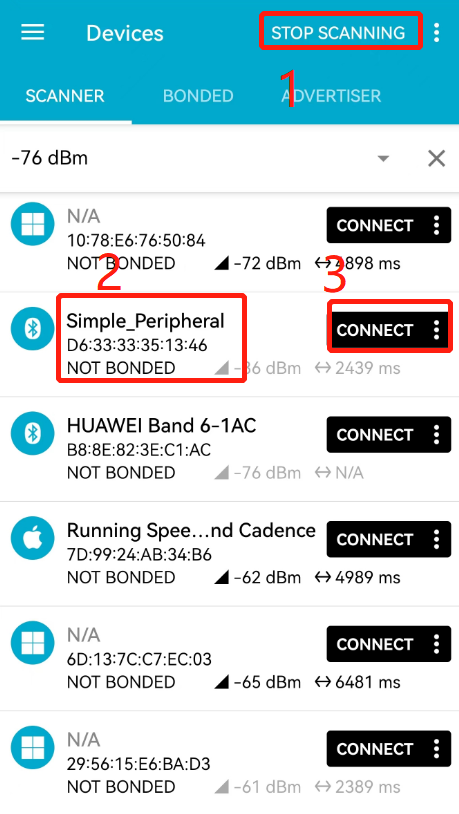
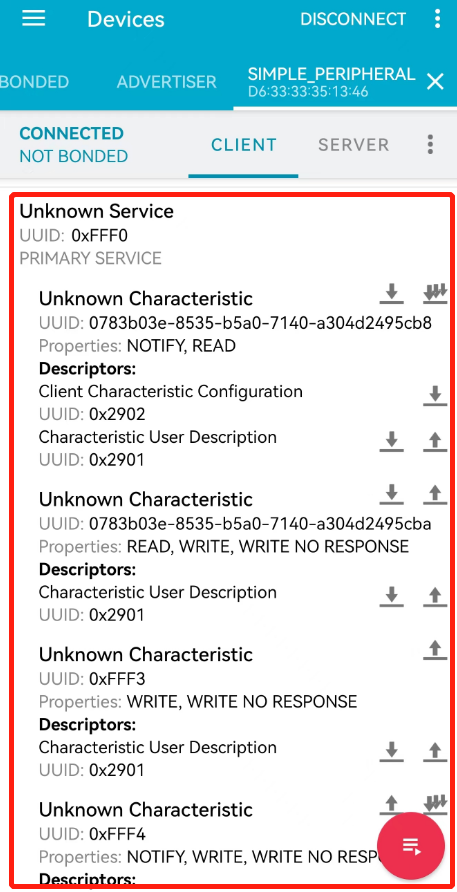
- The central device sends data to the peripheral device, and the peripheral device returns data to the central device after receiving the data, as shown in the figure below.
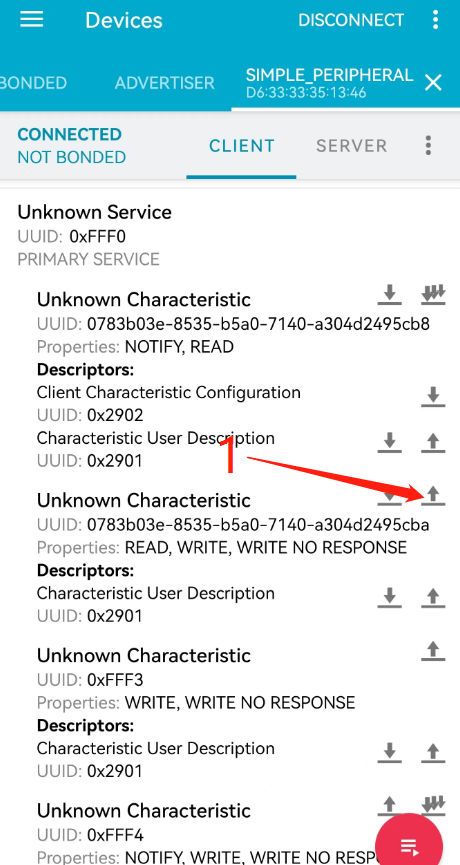
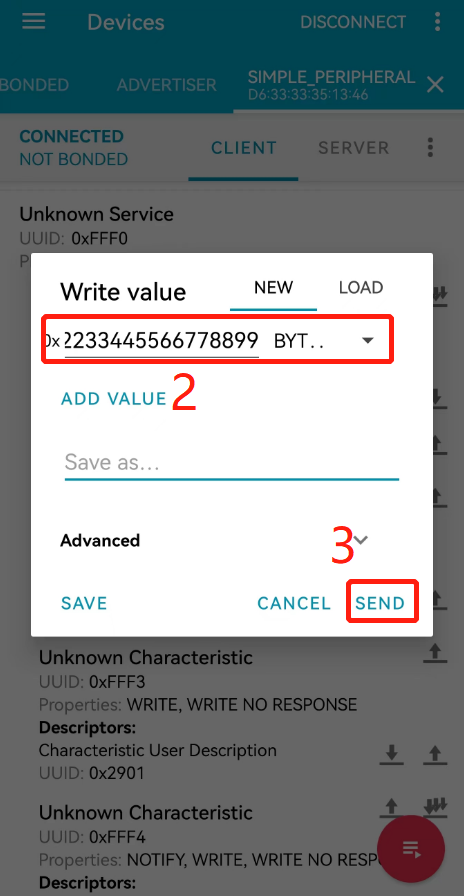
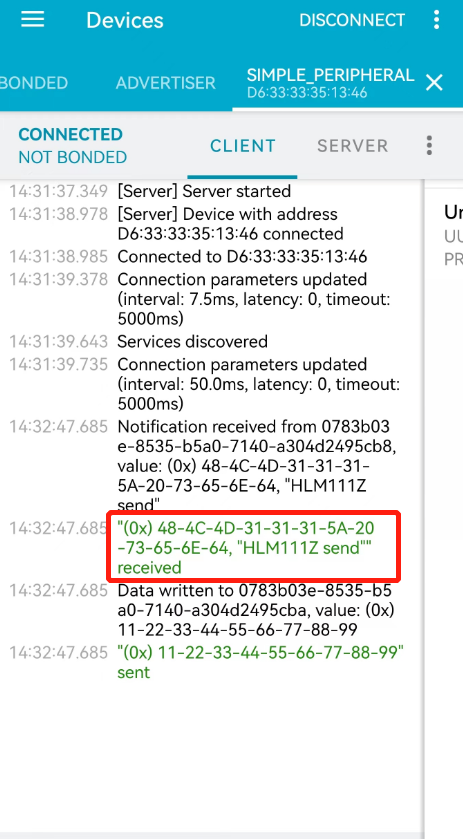
- The example code for data reception and reply is as follows:
else if (p_msg->att_idx == SP_IDX_CHAR2_VALUE)
{
    // Print received data
    ql_debug("char2_recv:");
    ql_debug_hex(p_msg->param.msg.p_msg_data, p_msg->param.msg.msg_len);

    // Send "HCM111Z send" to the central device
    ql_ble_gatts_send_ntf_value(p_msg->conn_idx, sp_svc_id, SP_IDX_CHAR1_VALUE,
                               (uint8_t *)"HLM111Z send", strlen("HLM111Z send"));
}
BLE Central Device Feature
In this example, the peripheral from *BLE Peripheral Feature* needs to be used as the test device.
- Initialize BLE GATT client. The example code is as follows.
void simple_central_init(void)
{
// Set local name
uint8_t local_name[] = "Simple Central";
ql_ble_set_dev_name(local_name, sizeof(local_name));
// Set event callback
ql_ble_set_notice_cb(ql_ble_demo_notice);
// Get device MAC address
uint8_t mac_addr[6] = {0};
ql_ble_address_get(mac_addr);
ql_debug("Local BDADDR: 0x%2X%2X%2X%2X%2X%2X\\r\\n",
mac_addr[0], mac_addr[1], mac_addr[2],
mac_addr[3], mac_addr[4], mac_addr[5]);
#if 0
ql_ble_security_param_t param = {
.mitm = false, // dont use PIN code during bonding
.ble_secure_conn = false, //not enable security encryption
.io_cap = QL_BLE_IO_CAP_NO_INPUT_NO_OUTPUT, //ble device has neither output nor input ability,
.pair_init_mode = QL_BLE_PAIRING_MODE_WAIT_FOR_REQ, //need bond
.bond_auth = true, //need bond auth
.password = 0,
};
ql_ble_security_param_init(¶m);
//enable bond manage module, which will record bond key and peer service info into flash.
ql_ble_bond_num_max(8);
#endif
// Initialize GATT client parameters
ql_gatt_client_t client;
#if 1
client.p_att_tb = client_att_tb;
client.att_nb = 2;
#else
client.p_att_tb = NULL;
client.att_nb = 0;
#endif
client.gatt_msg_handler = (void *)simple_central_msg_handler;
ql_ble_gatt_init(&client);
}
- After initializing the BLE GATT client, the
QL_BLE_STACK_OKevent is generated, then set the scan parameters and start Bluetooth scanning. The example code is as follows.
...
case QL_BLE_STACK_OK:
{
    ql_debug("[ql]QL_BLE_STACK_OK\\r\\n");
    simple_central_start_scan();
} break;
...
- Set scan parameters and start scanning. The example code is as follows.
static void simple_central_start_scan(void)
{
    // Start Scanning
    ql_ble_start_scaning(32, 20, 0, QL_BLE_PHY_1MBPS);
}
- After starting scanning, the
QL_BLE_REPORT_ADV_EVENTevent is generated, through which the device to be connected is selected.
...
case QL_BLE_REPORT_ADV_EVENT:
{
    ql_ble_recv_adv_t *adv_report = (ql_ble_recv_adv_t *)param;

    // Print complete advertising data
    ql_debug("adv_type:%02x, rssi:%d, addr_type:%d\\r\\n",
             adv_report->adv_type, adv_report->rssi, adv_report->adv_addr_type);
    ql_debug("content:");
    ql_debug_hex(adv_report->data, adv_report->data_len);

    char scan_name[] = "Simple_Peripheral";

    // Filter devices with advertising name "Simple_Peripheral"
    if (strstr((char *)adv_report->data, scan_name) != NULL)
    {
        // Stop scanning
        ql_ble_stop_scaning();
        ql_debug("content:");
        ql_debug_hex(adv_report->data, adv_report->data_len);

        // Record MAC address information from scan results
        ql_ble_adv_mac_addr_t addr;
        memcpy(addr.addr, adv_report->adv_addr, 6);
        addr.addr_type = adv_report->adv_addr_type;

        // Set connection parameters and initiate connection
        ql_ble_set_connect_dev_addr(&addr);
        ql_ble_start_conn(12, 12, 0, 300);
    }
} break;
...
- After the device is connected, the
QL_BLE_INIT_CONNECT_EVENTevent is generated, then initiate the discovery of peripheral services.
...
case QL_BLE_INIT_CONNECT_EVENT:
{
    ql_ble_conn_ind_t *conn_ind = (ql_ble_conn_ind_t *)param;

    // Discover peripheral services
    ql_ble_gattc_all_service_discovery(conn_ind->conn_idx);
} break;
...
- After the peripheral service discovery is completed, the
QL_BLE_GATTC_MSG_CMP_EVTevent is generated, with the operation item being GATT_OP_PEER_SVC_DISC_END.
...
case QL_BLE_GATTC_MSG_CMP_EVT:
{
    ql_debug("[ql]GATT Operation : %d\\r\\n", p_msg->param.op.operation);

    if(p_msg->param.op.operation == GATT_OP_PEER_SVC_DISC_END)
    {
        // Service discovery completed
        ql_debug("peer svc discovery done\\r\\n");
        #if 0
        ql_ble_gattc_add_uuid(p_msg->conn_idx, client_att_tb, 2, handles)
        #endif
    }
    else if(p_msg->param.op.operation == GATT_OP_PEER_SVC_REGISTERED)
    {
        uint16_t att_handles[2];
        memcpy(att_handles, p_msg->param.op.arg, 4);
        ql_debug_hex((uint8_t *)att_handles, 4);

        #if 0
        handles[0] = att_handles[0];
        handles[1] = att_handles[1];
        #endif

        // Enable notification for the peripheral
        ql_debug("ql_ble_gattc_ntf_ind_enable\\r\\n");
        ql_ble_gattc_ntf_ind_enable(p_msg->conn_idx, 0, 1, 0);

        // Write data to the peripheral
        ql_debug("ql_ble_gattc_write_data_cmd\\r\\n");
        uint8_t send_data[10] = {0x09,0x08,0x07,0x06,0x05,0x04,0x03,0x02,0x01,0x00};
        ql_ble_gattc_write_data_cmd(p_msg->conn_idx, 1, send_data, 10);
    }
} break;
...
- After successfully writing data to the peripheral, the peripheral will send "HCM111Z send" data to the central, then the
QL_BLE_GATTC_MSG_NTF_REQevent is generated.
case QL_BLE_GATTC_MSG_NTF_REQ: //receive notification data from peer device
{
    ql_debug_hex(p_msg->param.msg.p_msg_data, p_msg->param.msg.msg_len); //printf received ntf data
}
break;
BLE HID Device Feature
BLE HID device refers to a peripheral with HID service. Due to the integrated HID service, BLE HID devices can automatically reconnect with mobile phones. This example also adds device information service, battery service, and OTA upgrade service.
- Initialize BLE HID device. The example code is as follows.
void hid_device_init(void)
{
// Set local device name
uint8_t local_name[] = "BLE HID KBD MICE";
ql_ble_set_dev_name(local_name, sizeof(local_name));
// Set security characteristic parameters
ql_ble_security_param_t param = {
.mitm = true,
.ble_secure_conn = false,
.io_cap = QL_BLE_IO_CAP_NO_INPUT_NO_OUTPUT,
.pair_init_mode = QL_BLE_PAIRING_MODE_WAIT_FOR_REQ,
.bond_auth = true,
.password = 123456,
};
ql_ble_security_param_init(¶m);
// Set the maximum number of devices saving pairing information to 8
ql_ble_bond_num_max(8);
// Set event callback
ql_ble_set_notice_cb(ql_ble_demo_notice);
// Get Bluetooth MAC address
uint8_t mac_addr[6] = {0};
ql_ble_address_get(mac_addr);
ql_debug("Local BDADDR: 0x%2X%2X%2X%2X%2X%2X\\r\\n",
mac_addr[0], mac_addr[1], mac_addr[2],
mac_addr[3], mac_addr[4], mac_addr[5]);
// Add device information service
dis_gatt_add_service();
// Add battery service
batt_gatt_add_service();
// Add HID service
hid_gatt_add_service();
// Add OTA service
ota_gatt_add_service();
}
- After BLE HID device initialization is completed, the
QL_BLE_STACK_OKevent is generated, then set advertising parameters and start Bluetooth advertising. The example code is as follows.
...
case QL_BLE_STACK_OK:
{
    hid_start_adv();
} break;
...
- Set advertising parameters and start advertising. The example code is as follows.
void hid_start_adv(void)
{
// Set advertising parameters
ql_ble_adv_param_t param;
param.mode = QL_BLE_ADV_MODE_UNDIRECT;
param.addr_type = QL_BLE_ADDR_TYPE_PUBLIC;
param.channel = QL_BLE_ADV_CHAN_ALL;
param.filter = QL_BLE_ADV_ALLOW_SCAN_ANY_CON_ANY;
param.adv_intv_min = 80;
param.adv_intv_max = 80;
ql_ble_set_adv_param(¶m);
// Set advertising data and scan response data
ql_ble_set_adv_data(adv_data, sizeof(adv_data));
ql_ble_set_scan_rsp_data(scan_rsp_data, sizeof(scan_rsp_data));
// Start advertising
ql_ble_start_advertising(0);
}
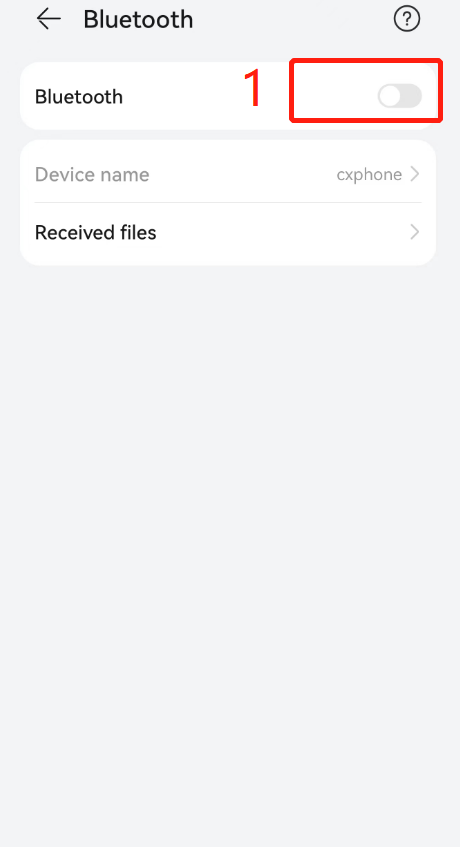
- Open mobile phone Bluetooth, click on the HID device name to connect, as shown in the figure below.
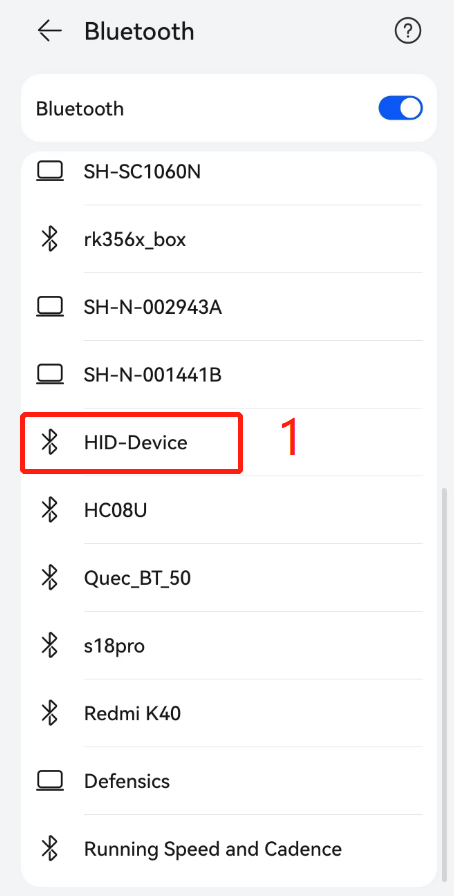
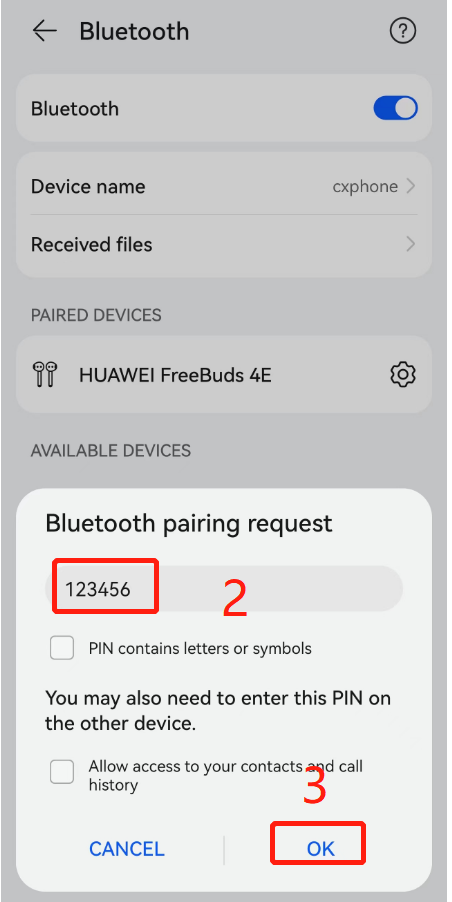
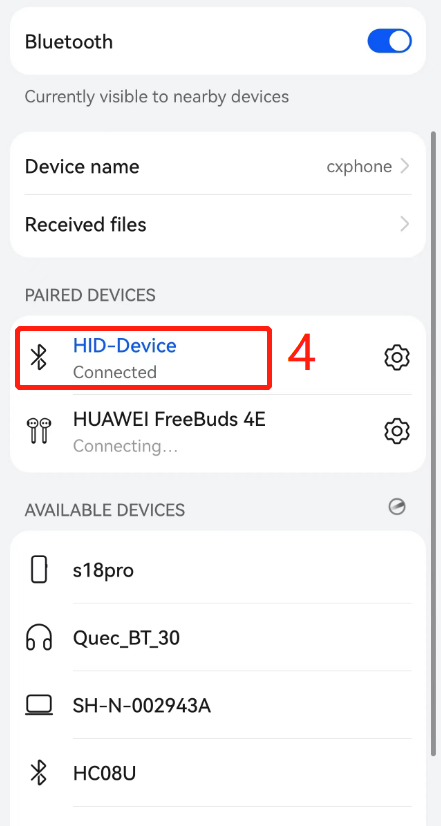
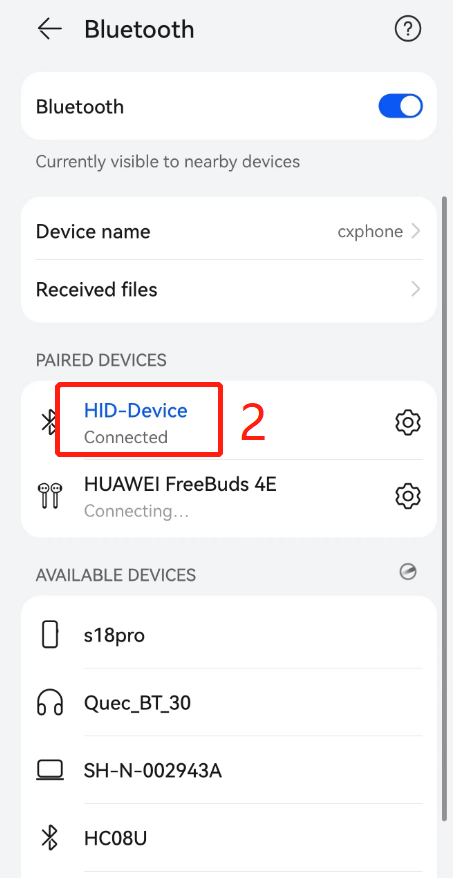
- Turn off mobile phone Bluetooth and then turn it back on, the HID device will automatically reconnect, as shown in the figure below.
Terminolosgy Abbreviations
| Abbreviation | Full Name | Description | |
|---|---|---|---|
| API | Application Programming Interface | Application Programming Interface | |
| BLE | Bluetooth Low Energy | Bluetooth Low Energy | |
| GATT | Generic Attribute Profile | Generic Attribute Profile | |
| HID | Human Interface Device | Human Interface Device | |
| ID | Identifier | Identifier | |
| IoT | Internet of Things | Internet of Things | |
| MAC | Medium Access Control | Medium Access Control | |
| MTU | Maximum Transmission Unit | Maximum Transmission Unit | |
| OTA | Over-the-air programming | Over-the-air programming | |
| SDK | Software Development Kit | Software Development Kit | |
| UUID | Universally Unique Identifier | Universally Unique Identifier | # HCM111Z QuecOpen(SDK) BLE Development Guide |
Introduction
Quectel HCM111Z module supports QuecOpen® solution. QuecOpen® is an embedded development platform that simplifies the software design and development process of IoT applications.
This document applies to the QuecOpen® solution based on the SDK build environment, mainly introducing the Bluetooth Low Energy (BLE) API and related examples for the HCM111Z module under the QuecOpen® solution.
Bluetooth Low Energy API
Header File
The header file for the BLE API is ql_ble.h, located in the components/quectel_api/ql_include directory of the SDK package. Unless otherwise specified, all header files mentioned in this document are in this directory.
Function Overview
| Function | Description |
|---|---|
ql_ble_create_db() |
Initializes BLE and customizes BLE services |
ql_ble_set_notice_cb() |
Registers the BLE event callback function |
ql_ble_set_dev_name() |
Sets the local name |
ql_ble_address_get() |
Gets the BLE MAC address |
ql_ble_set_adv_param() |
Sets advertising parameters |
ql_ble_set_adv_data() |
Sets advertising data |
ql_ble_set_scan_rsp_data() |
Sets scan response data |
ql_ble_start_advertising() |
Starts BLE advertising |
ql_ble_stop_advertising() |
Stops BLE advertising |
ql_ble_start_scaning() |
Starts BLE scanning |
ql_ble_stop_scaning() |
Stops BLE scanning |
ql_ble_update_param() |
Updates connection parameters |
ql_ble_set_connect_dev_addr() |
Sets the address of the BLE device to be connected |
ql_ble_start_conn() |
Initiates a connection |
ql_ble_disconnect() |
Actively disconnects |
ql_ble_get_connect_num() |
Gets the number of connected links |
ql_ble_link_rssi_report() |
Enables/Disables getting RSSI of the connected link |
ql_ble_gatt_init() |
Initializes GATT parameters |
ql_ble_gatt_mtu_changes() |
Updates the MTU value |
ql_ble_gattc_all_service_discovery() |
Central device discovers all services of the peripheral |
ql_ble_gattc_ntf_ind_enable() |
Central device enables notification or indication of the peripheral |
ql_ble_gattc_write_data_req() |
Central device writes data to the peripheral by request |
ql_ble_gattc_write_data_with_handle() |
Central device writes data to the specified characteristic value handle of the peripheral by request |
ql_ble_gattc_write_data_cmd() |
Central device writes data to the peripheral by command |
ql_ble_gatts_send_ntf_value() |
Peripheral sends data to the central via notification |
ql_ble_gatts_send_ind_value() |
Peripheral sends data to the central via indication |
ql_ble_security_param_init() |
Sets security characteristic parameters |
ql_ble_bond_num_max() |
Sets the maximum number of bonded devices |
ql_ble_bond_delete_all() |
Deletes information of all bonded devices |
ql_ble_get_bond_status() |
Gets the bonding status of the currently connected device |
ql_ble_pairing_req() |
Sends a pairing request |
ql_ble_security_req() |
Sends a security connection request |
ql_ble_enc_req() |
Sends an encryption request |
Function Details
ql_ble_create_db
This function initializes BLE and customizes BLE services.
Function Prototype
ql_errcode_bt_e ql_ble_create_db(ql_ble_gatt_service_t *service, uint8_t *svc_id)
Parameters
service:
[In] BLE service list. See ql_ble_gatt_service_t.
svc_id:
[Out] BLE service ID.
Return Value
Result code. See ql_errcode_bt_e.
ql_errcode_bt_e
The enumeration of result codes is defined as follows:
typedef enum {
  QL_BT_SUCCESS = 0,
  QL_BT_ERR_PROFILE,
  QL_BT_ERR_CREATE_DB,
  QL_BT_ERR_CMD_NOT_SUPPORT,
  QL_BT_ERR_UNKNOW_IDX,
  QL_BT_ERR_BLE_STATUS,
  QL_BT_ERR_BLE_PARAM,
  QL_BT_ERR_ADV_DATA,
  QL_BT_ERR_CMD_RUN,
  QL_BT_ERR_NO_MEM,
  QL_BT_ERR_INIT_CREATE,
  QL_BT_ERR_INIT_STATE,
  QL_BT_ERR_ATTC_WRITE,
  QL_BT_ERR_ATTC_WRITE_UNREGISTER,
} ql_errcode_bt_e
Members
| Member | Description |
|---|---|
QL_BT_SUCCESS |
Function executed successfully |
QL_BT_ERR_PROFILE |
Profile error |
QL_BT_ERR_CREATE_DB |
Failed to add BLE service |
QL_BT_ERR_CMD_NOT_SUPPORT |
Command not supported |
QL_BT_ERR_UNKNOW_IDX |
Unknown BLE activity index |
QL_BT_ERR_BLE_STATUS |
Status error |
QL_BT_ERR_BLE_PARAM |
Invalid parameter |
QL_BT_ERR_ADV_DATA |
Advertising data format error |
QL_BT_ERR_CMD_RUN |
Command execution failed |
QL_BT_ERR_NO_MEM |
Insufficient memory |
QL_BT_ERR_INIT_CREATE |
Failed to create connection task |
QL_BT_ERR_INIT_STATE |
Connection status error |
QL_BT_ERR_ATTC_WRITE |
Write data error |
QL_BT_ERR_ATTC_WRITE_UNREGISTER |
BLE service for writing data not registered |
ql_ble_gatt_service_t
The BLE service list structure is defined as follows:
typedef struct {
  const ql_ble_gatt_attribute_t *p_att_tb;
  uint8_t att_nb;
  ql_ble_gatt_msg_handler_t gatt_msg_handler;
} ql_ble_gatt_service_t
Parameters
| Type | Parameter | Description |
|---|---|---|
| ql_ble_gatt_attribute_t | p_att_tb |
BLE service attribute list. See ql_ble_gatt_attribute_t. |
| uint8_t | att_nb |
Number of attribute lists. |
| ql_ble_gatt_msg_handler_t | gatt_msg_handler |
Callback function. See ql_ble_gatt_msg_handler_t. |
ql_ble_gatt_attribute_t
The BLE service attribute list structure is defined as follows:
typedef struct {
  ql_ble_gatt_uuid_t uuid;
  uint16_t prop;
  uint16_t max_size;
  uint8_t *p_data;
} ql_ble_gatt_attribute_t
Parameters
| Type | Parameter | Description |
|---|---|---|
| ql_ble_gatt_uuid_t | uuid |
UUID. See ql_ble_gatt_uuid_t. |
| uint16_t | prop |
Permission settings |
| uint16_t | max_size |
Maximum number of bytes for the attribute |
| uint8_t | *p_data |
Attribute data pointer |
ql_ble_gatt_uuid_t
The UUID structure is defined as follows:
typedef struct {
  uint8_t size;
  uint8_t p_uuid[16];
} ql_ble_gatt_uuid_t
Parameters
| Type | Parameter | Description |
|---|---|---|
| uint8_t | size |
UUID length, can be 2 bytes or 16 bytes. |
| uint8_t | p_uuid |
UUID value; array of 2 bytes or 16 bytes. |
ql_ble_gatt_msg_handler_t
This function is the BLE service callback function.
Function Prototype
typedef uint16_t (*ql_ble_gatt_msg_handler_t)(void *p_msg)
Parameters
p_msg:
[In] BLE GATT message. See ql_ble_gatt_msg_t.
ql_ble_gatt_msg_t
The BLE GATT message structure is defined as follows:
typedef struct {
  ql_ble_gatt_msg_evt_t msg_evt;
  uint8_t conn_idx;
  uint8_t svc_id;
  uint16_t att_idx;
  uint16_t handle;
  union {
    ql_ble_gatt_msg_hdl_t msg;
    ql_ble_gatt_op_cmp_t op;
  } param;
} ql_ble_gatt_msg_t
Parameters
| Type | Parameter | Description |
|---|---|---|
| ql_ble_gatt_msg_evt_t | msg_evt |
BLE GATT message event. See ql_ble_gatt_msg_evt_t. |
| uint8_t | conn_idx |
Connection index. |
| uint8_t | svc_id |
BLE service ID. |
| uint16_t | att_idx |
Attribute index in the service table. |
| uint16_t | handle |
Attribute handle number in the peripheral service. |
| ql_ble_gatt_msg_hdl_t | msg |
GATT message length and data pointer. See ql_ble_gatt_msg_hdl_t. |
| ql_ble_gatt_op_cmp_t | op |
GATT operation type, including read, write, notification, and indication. See ql_ble_gatt_op_cmp_t. |
ql_ble_gatt_msg_evt_t
The BLE GATT message event enumeration is defined as follows:
typedef enum {
  QL_BLE_GATTC_MSG_READ_REQ,
  QL_BLE_GATTC_MSG_WRITE_REQ,
  QL_BLE_GATTC_MSG_ATT_INFO_REQ,
  QL_BLE_GATTC_MSG_NTF_REQ,
  QL_BLE_GATTC_MSG_IND_REQ,
  QL_BLE_GATTC_MSG_READ_IND,
  QL_BLE_GATTC_MSG_CMP_EVT,
  QL_BLE_GATTC_MSG_LINK_CREATE,
  QL_BLE_GATTC_MSG_LINK_LOST,
  QL_BLE_GATTC_MSG_SVC_REPORT,
  QL_BLE_GATTC_MSG_HANDLE_ERROR = 0x80,
} ql_ble_gatt_msg_evt_t
Members
| Member | Description |
|---|---|
QL_BLE_GATTC_MSG_READ_REQ |
Read data request |
QL_BLE_GATTC_MSG_WRITE_REQ |
Write data request |
QL_BLE_GATTC_MSG_ATT_INFO_REQ |
Attribute information request |
QL_BLE_GATTC_MSG_NTF_REQ |
Notification data received from GATT client |
QL_BLE_GATTC_MSG_IND_REQ |
Indication data received from GATT client |
QL_BLE_GATTC_MSG_READ_IND |
Read data request response |
QL_BLE_GATTC_MSG_CMP_EVT |
Message completion event |
QL_BLE_GATTC_MSG_LINK_CREATE |
Link established |
QL_BLE_GATTC_MSG_LINK_LOST |
Link lost |
QL_BLE_GATTC_MSG_SVC_REPORT |
Report of receiving peripheral BLE service information |
QL_BLE_GATTC_MSG_HANDLE_ERROR |
Application cannot handle message correctly |
ql_ble_gatt_msg_hdl_t
The BLE GATT message structure is defined as follows:
typedef struct {
  uint16_t msg_len;
  uint8_t *p_msg_data;
} ql_ble_gatt_msg_hdl_t
Parameters
| Type | Parameter | Description |
|---|---|---|
| uint16_t | msg_len |
Length of message |
| uint8_t | *p_msg_data |
Message data |
ql_ble_gatt_op_cmp_t
The GATT operation type structure is defined as follows:
typedef struct {
  uint8_t operation;
  uint8_t status;
  void * arg;
} ql_ble_gatt_op_cmp_t
Parameters
| Type | Parameter | Description |
|---|---|---|
| uint8_t | operation |
Request type |
| uint8_t | status |
Request status |
| void | * arg |
Parameter pointer |
ql_ble_set_notice_cb
This function registers the BLE event callback function.
Function Prototype
ql_errcode_bt_e ql_ble_set_notice_cb(ql_ble_notice_cb callback)
Parameters
callback:
[In] BLE event callback function. See ble_notice_cb_t.
Return Value
Result code. See ql_errcode_bt_e.
ble_notice_cb_t
This function is the BLE event callback function.
Function Prototype
typedef void (*ql_ble_notice_cb)(ql_ble_notify_e notice, void *param)
Parameters
notice:
[In] BLE event type. See ble_notice_t.
param:
[In] BLE event parameter.
ble_notice_t
The BLE event enumeration is defined as follows:
typedef enum {
  QL_BLE_STACK_OK = 0,
  QL_BLE_REPORT_ADV_EVENT,
  QL_BLE_MTU_CHANGE_EVENT,
  QL_BLE_CONNECT_EVENT,
  QL_BLE_DISCONNECT_EVENT,
  QL_BLE_INIT_CONNECT_EVENT,
  QL_BLE_ADV_STOP_EVENT,
  QL_BLE_SCAN_STOP_EVENT,
  QL_BLE_CONN_PARAM_UPDATE_EVENT,
  QL_BLE_LINK_RSSI_EVENT,
  QL_BLE_SEC_MASTER_AUTH_REQ,
  QL_BLE_SEC_MASTER_ENCRYPT,
  QL_BLE_SEC_SLAVE_ENCRYPT,
} ql_ble_notify_e
Members
| Member | Description |
|---|---|
QL_BLE_STACK_OK |
BLE protocol stack ready |
QL_BLE_REPORT_ADV_EVENT |
Scan result return event |
QL_BLE_MTU_CHANGE_EVENT |
MTU change event |
QL_BLE_CONNECT_EVENT |
Module establishes connection with central as peripheral |
QL_BLE_DISCONNECT_EVENT |
Connection disconnect event |
QL_BLE_INIT_CONNECT_EVENT |
Module establishes connection with peripheral as central |
QL_BLE_ADV_STOP_EVENT |
Advertising stop event |
QL_BLE_SCAN_STOP_EVENT |
Scanning stop event |
QL_BLE_CONN_PARAM_UPDATE_EVENT |
Connection parameter update event |
QL_BLE_LINK_RSSI_EVENT |
Get RSSI value of connection link |
QL_BLE_SEC_MASTER_AUTH_REQ |
Central gets authentication request from peripheral |
QL_BLE_SEC_MASTER_ENCRYPT |
Central link encryption |
QL_BLE_SEC_SLAVE_ENCRYPT |
Peripheral link encryption |
ql_ble_set_dev_name
This function sets the local name.
Function Prototype
ql_errcode_bt_e ql_ble_set_dev_name(uint8_t *name, uint8_t name_len)
Parameters
name:
[In] Device name.
name_len:
[In] Device name length. Maximum: 26 bytes.
Return Value
Result code. See ql_errcode_bt_e.
ql_ble_address_get
This function gets the BLE MAC address.
Function Prototype
ql_errcode_bt_e ql_ble_address_get(uint8_t *mac_addr)
Parameters
mac_addr:
[Out] BLE MAC address.
Return Value
Result code. See ql_errcode_bt_e.
ql_ble_set_adv_param
This function sets advertising parameters.
Function Prototype
ql_errcode_bt_e ql_ble_set_adv_param(ql_ble_adv_param_t *adv_param)
Parameters
adv_param:
[In] Advertising parameters. See ql_ble_adv_param_t.
Return Value
Result code. See ql_errcode_bt_e.
ql_ble_adv_param_t
The advertising parameter structure is defined as follows:
typedef struct {
  ql_ble_adv_mode_e mode;
  ql_ble_addr_type_e addr_type;
  ql_ble_adv_mac_addr_t peer_addr;
  ql_ble_phy_e phy;
  uint16_t adv_intv_min;
  uint16_t adv_intv_max;
  ql_ble_adv_channel_e channel;
  ql_ble_adv_filter_e filter;
  uint8_t adv_sid;
  uint16_t per_adv_intv_min;
  uint16_t per_adv_intv_max;
  ql_ble_adv_disc_mode_e disc_mode;
} ql_ble_adv_param_t
Parameters
| Type | Parameter | Description |
|---|---|---|
| ql_ble_adv_mode_e | mode |
Advertising mode. See ql_ble_adv_mode_e. |
| ql_ble_addr_type_e | addr_type |
Advertising address type. See ql_ble_addr_type_e. |
| ql_ble_adv_mac_addr_t | peer_addr |
Peripheral address. See ql_ble_adv_mac_addr_t. |
| ql_ble_phy_e | phy |
Physical layer type for advertising. See ql_ble_phy_e. |
| uint16_t | adv_intv_min |
Minimum advertising interval. Range: 32~16384. Unit: 0.625 ms. Time range: 20 ms~10.24 s. |
| uint16_t | adv_intv_max |
Maximum advertising interval. Range: 32~16384. Unit: 0.625 ms. Time range: 20 ms~10.24 s. |
| ql_ble_adv_channel_e | channel |
Advertising channel. See ql_ble_adv_channel_e. |
| ql_ble_adv_filter_e | filter |
Advertising filter type. See ql_ble_adv_filter_e. |
| uint8_t | adv_sid |
Advertising index, only applicable to extended advertising and periodic advertising. Range: 0~0xF. |
| uint16_t | per_adv_intv_min |
Minimum peripheral advertising interval. Range: 32~16384. Unit: 0.625 ms. Time range: 20 ms~10.24 s. |
| uint16_t | per_adv_intv_max |
Maximum peripheral advertising interval. Range: 32~16384. Unit: 0.625 ms. Time range: 20 ms~10.24 s. |
| ql_ble_adv_disc_mode_e | disc_mode |
Advertising discoverable type. See ql_ble_adv_disc_mode_e. |
ql_ble_adv_mode_e
The enumeration of advertising mode:
typedef enum {
  QL_BLE_ADV_MODE_UNDIRECT = 0x01,
  QL_BLE_ADV_MODE_DIRECT = 0x02,
  QL_BLE_ADV_MODE_NON_CONN_NON_SCAN = 0x03,
  QL_BLE_ADV_MODE_NON_CONN_SCAN = 0x04,
  QL_BLE_ADV_MODE_HDC_DIRECT = 0x05,
  QL_BLE_ADV_MODE_BEACON = 0x06,
  QL_BLE_ADV_MODE_CUSTOM = 0x07,
  QL_BLE_ADV_MODE_EXTEND_CONN_UNDIRECT = 0x11,
  QL_BLE_ADV_MODE_EXTEND_CONN_DIRECT = 0x12,
  QL_BLE_ADV_MODE_EXTEND_NON_CONN_SCAN = 0x13,
  QL_BLE_ADV_MODE_EXTEND_NON_CONN_SCAN_DIRECT = 0x14,
  QL_BLE_ADV_MODE_EXTEND_NON_CONN_NON_SCAN = 0x15,
  QL_BLE_ADV_MODE_EXTEND_NON_CONN_NON_SCAN_DIRECT = 0x16,
  QL_BLE_ADV_MODE_PER_ADV_UNDIRECT = 0x21,
  QL_BLE_ADV_MODE_PER_ADV_DIRECT = 0x22,
} ql_ble_adv_mode_e
Members
| Member | Description |
|---|---|
QL_BLE_ADV_MODE_UNDIRECT |
Connectable and scannable advertising |
QL_BLE_ADV_MODE_DIRECT |
Direct advertising |
QL_BLE_ADV_MODE_NON_CONN_NON_SCAN |
Non-connectable and non-scannable advertising |
QL_BLE_ADV_MODE_NON_CONN_SCAN |
Non-connectable and scannable advertising |
QL_BLE_ADV_MODE_HDC_DIRECT |
Connectable and non-scannable advertising |
QL_BLE_ADV_MODE_BEACON |
Beacon advertising |
QL_BLE_ADV_MODE_CUSTOM |
Custom type |
QL_BLE_ADV_MODE_EXTEND_CONN_UNDIRECT |
Extended advertising mode, connectable and scannable advertising |
QL_BLE_ADV_MODE_EXTEND_CONN_DIRECT |
Extended advertising mode, direct advertising |
QL_BLE_ADV_MODE_EXTEND_NON_CONN_SCAN |
Extended advertising mode, non-connectable and scannable advertising |
QL_BLE_ADV_MODE_EXTEND_NON_CONN_SCAN_DIRECT |
Extended advertising mode, non-connectable and scannable direct advertising |
QL_BLE_ADV_MODE_EXTEND_NON_CONN_NON_SCAN |
Extended advertising mode, non-connectable and non-scannable advertising |
QL_BLE_ADV_MODE_EXTEND_NON_CONN_NON_SCAN_DIRECT |
Extended advertising mode, non-connectable and non-scannable direct advertising |
QL_BLE_ADV_MODE_PER_ADV_UNDIRECT |
Synchronous advertising mode, undirect advertising |
QL_BLE_ADV_MODE_PER_ADV_DIRECT |
Synchronous advertising mode, direct advertising |
ql_ble_addr_type_e
The advertising address type enumeration is defined as follows:
typedef enum {
  QL_BLE_ADDR_TYPE_PUBLIC = 0,
  QL_BLE_ADDR_TYPE_PRIVATE,
  QL_BLE_ADDR_TYPE_RANDOM_RESOVABLE,
  QL_BLE_ADDR_TYPE_RANDOM_NONE_RESOVABLE,
} ql_ble_addr_type_e
Members
| Member | Description |
|---|---|
QL_BLE_ADDR_TYPE_PUBLIC |
Public address |
QL_BLE_ADDR_TYPE_PRIVATE |
Private address |
QL_BLE_ADDR_TYPE_RANDOM_RESOVABLE |
Resolvable random address |
QL_BLE_ADDR_TYPE_RANDOM_NONE_RESOVABLE |
Non-resolvable random address |
ql_ble_adv_mac_addr_t
The peripheral address type structure is defined as follows:
typedef struct {
  uint8_t addr[6];
  uint8_t addr_type;
} ql_ble_adv_mac_addr_t
Parameters
| Type | Parameter | Description |
|---|---|---|
| uint8_t | addr |
Address. 6-byte array. |
| uint8_t | addr_type |
Address type. 0=public/1=private random. |
ql_ble_phy_e
The advertising physical layer type enumeration is defined as follows:
typedef enum {
  QL_BLE_PHY_ANY = 0,
  QL_BLE_PHY_1MBPS = 1,
  QL_BLE_PHY_2MBPS = 2,
  QL_BLE_PHY_CODED = 3,
} ql_ble_phy_e
Members
| Member | Description |
|---|---|
QL_BLE_PHY_ANY |
No preferred type |
QL_BLE_PHY_1MBPS |
1 Mbps |
QL_BLE_PHY_2MBPS |
2 Mbps |
QL_BLE_PHY_CODED |
CODED type |
ql_ble_adv_channel_e
The advertising channel enumeration is defined as follows:
typedef enum {
  QL_BLE_ADV_CHAN_37 = 0x01,
  QL_BLE_ADV_CHAN_38 = 0x02,
  QL_BLE_ADV_CHAN_39 = 0x04,
  QL_BLE_ADV_CHAN_ALL = 0X07,
} ql_ble_adv_channel_e
Members
| Member | Description |
|---|---|
QL_BLE_ADV_CHAN_37 |
Advertising channel 37 |
QL_BLE_ADV_CHAN_38 |
Advertising channel 38 |
QL_BLE_ADV_CHAN_39 |
Advertising channel 39 |
QL_BLE_ADV_CHAN_ALL |
All channels |
ql_ble_adv_filter_e
The advertising filter type enumeration is defined as follows:
typedef enum {
  QL_BLE_ADV_ALLOW_SCAN_ANY_CON_ANY = 0x00,
  QL_BLE_ADV_ALLOW_SCAN_WLST_CON_ANY = 0x01,
  QL_BLE_ADV_ALLOW_SCAN_ANY_CON_WLST = 0x02,
  QL_BLE_ADV_ALLOW_SCAN_WLST_CON_WLST = 0x03,
} ql_ble_adv_filter_e
Members
| Member | Description |
|---|---|
QL_BLE_ADV_ALLOW_SCAN_ANY_CON_ANY |
Any device can scan and connect |
QL_BLE_ADV_ALLOW_SCAN_WLST_CON_ANY |
Any device can connect, only white list devices can scan |
QL_BLE_ADV_ALLOW_SCAN_ANY_CON_WLST |
Any device can scan, only white list devices can connect |
QL_BLE_ADV_ALLOW_SCAN_WLST_CON_WLST |
Only white list devices can scan and connect |
ql_ble_adv_disc_mode_e
The advertising discoverable type enumeration is defined as follows:
typedef enum {
  QL_BLE_ADV_DISC_MODE_GEN_DISC = 0,
  QL_BLE_ADV_DISC_MODE_LIM_DISC = 1,
  QL_BLE_ADV_DISC_MODE_NON_DISC = 2,
  QL_BLE_ADV_DISC_MODE_MAX = 3,
} ql_ble_adv_disc_mode_e
Members
| Member | Description |
|---|---|
QL_BLE_ADV_DISC_MODE_GEN_DISC |
General discoverable mode |
QL_BLE_ADV_DISC_MODE_LIM_DISC |
Limited discoverable mode |
QL_BLE_ADV_DISC_MODE_NON_DISC |
Non-discoverable mode |
QL_BLE_ADV_DISC_MODE_MAX |
Maximum value of discoverable mode |
ql_ble_set_adv_data
This function sets advertising data.
Function Prototype
ql_errcode_bt_e ql_ble_set_adv_data(uint8_t *adv_buff, uint16_t adv_len)
Parameters
adv_buff:
[In] Advertising data, should be written according to BLE advertising data rules.
adv_len:
[In] Advertising data length. Unit: byte.
Return Value
Result code. See ql_errcode_bt_e.
ql_ble_set_scan_rsp_data
This function sets scan response data.
Function Prototype
ql_errcode_bt_e ql_ble_set_scan_rsp_data(uint8_t *scan_rsp, uint16_t scan_rsp_len)
Parameters
scan_rsp:
[In] Scan response data. Should be written according to BLE advertising data rules.
scan_rsp_len:
[In] Scan response data length. Unit: byte.
Return Value
Result code. See ql_errcode_bt_e.
ql_ble_start_advertising
This function starts BLE advertising.
Function Prototype
ql_errcode_bt_e ql_ble_start_advertising(uint16_t duration)
Parameters
duration:
[In] Advertising duration. Unit: 10 ms. 0 means not actively stop advertising.
Return Value
Result code. See ql_errcode_bt_e.
ql_ble_stop_advertising
This function stops BLE advertising.
Function Prototype
ql_errcode_bt_e ql_ble_stop_advertising(void)
Parameters
None
Return Value
Result code. See ql_errcode_bt_e.
ql_ble_start_scaning
This function starts BLE scanning.
Function Prototype
ql_errcode_bt_e ql_ble_start_scaning(uint16_t scan_intv, uint16_t scan_wd, uint8_t dup_filt, ql_ble_phy_e phy)
Parameters
scan_intv:
[In] Scan interval. Range: 18~4096. Unit: 0.625 ms. Time range: 11.25 ms~2560 ms.
scan_wd:
[In] Scan window. Range: 17~4096. Unit: 0.625 ms. Time range: 10.625 ms~2560 ms.
dup_filt:
[In] Whether to enable duplicate advertising packet filtering. 0: Disable, 1: Enable.
phy:
[In] Advertising physical layer type. See ql_ble_phy_e.
Return Value
Result code. See ql_errcode_bt_e.
ql_ble_stop_scaning
This function stops BLE scanning.
Function Prototype
ql_errcode_bt_e ql_ble_stop_scaning(void)
Parameters
None
Return Value
Result code. See ql_errcode_bt_e.
ql_ble_update_param
This function updates connection parameters.
Function Prototype
ql_errcode_bt_e ql_ble_update_param(uint8_t conn_idx, uint16_t intv_min, uint16_t intv_max, uint16_t latency, uint16_t sup_to)
Parameters
conn_idx:
[In] Connection index.
intv_min:
[In] Minimum connection interval. Range: 6~3200. Unit: 1.25 ms. Time range: 7.5 ms~4 s.
intv_max:
[In] Maximum connection interval. Range: 6~3200. Unit: 1.25 ms. Time range: 7.5 ms~4 s.
latency:
[In] Number of connection intervals that the peripheral can ignore. Must satisfy: (1 + latency)* intv_max * 2 * 1.25 < sup_to * 10.
sup_to:
[In] Connection timeout. Range: 10~3200. Unit: 10 ms. Time range: 100 ms~32 s.
Return Value
Result code. See ql_errcode_bt_e.
ql_ble_set_connect_dev_addr
This function sets the address of the BLE device to be connected.
Function Prototype
ql_errcode_bt_e ql_ble_set_connect_dev_addr(ql_ble_adv_mac_addr_t *addr)
Parameters
addr:
[In] MAC address of the peripheral to be connected. See ql_ble_adv_mac_addr_t.
Return Value
Result code. See ql_errcode_bt_e.
ql_ble_start_conn
This function initiates a connection.
Function Prototype
ql_errcode_bt_e ql_ble_start_conn(uint16_t intv_min, uint16_t intv_max, uint16_t latency, uint16_t sup_to)
Parameters
intv_min:
[In] Minimum connection interval. Range: 6~3200. Unit: 1.25 ms. Time range: 7.5 ms~4 s.
intv_max:
[In] Maximum connection interval. Range: 6~3200. Unit: 1.25 ms. Time range: 7.5 ms~4 s.
latency:
[In] Number of connection intervals that the peripheral can ignore. Must satisfy: (1 + latency) * intv_max * 2 * 1.25 < sup_to * 10.
sup_to:
[In] Connection timeout. Range: 10~3200. Unit: 10 ms. Time range: 100 ms~32 s.
Return Value
Result code. See ql_errcode_bt_e.
ql_ble_disconnect
This function actively disconnects.
Function Prototype
ql_errcode_bt_e ql_ble_disconnect(uint8_t conidx)
Parameters
conidx:
[In] Connection index.
Return Value
Result code. See ql_errcode_bt_e.
ql_ble_get_connect_num
This function gets the number of connected links.
Function Prototype
int ql_ble_get_connect_num(void)
Parameters
None
Return Value
Number of links.
ql_ble_link_rssi_report
This function enables/disables getting RSSI of the connected link.
Function Prototype
ql_errcode_bt_e ql_ble_link_rssi_report(bool enable)
Parameters
enable:
[In] Enable/Disable getting RSSI of the connected link. After enabling, the obtained RSSI will be notified to the application layer through the QL_BLE_LINK_RSSI_EVENT event.
Return Value
Result code. See ql_errcode_bt_e.
ql_ble_gatt_init
This function initializes GATT parameters.
Function Prototype
ql_errcode_bt_e ql_ble_gatt_init(ql_gatt_client_t *p_client)
Parameters
p_client:
[In] GATT parameters. See ql_gatt_client_t.
Return Value
Result code. See ql_errcode_bt_e.
ql_gatt_client_t
The GATT parameter structure is defined as follows:
typedef struct {
  const ql_ble_gatt_uuid_t *p_att_tb;
  uint8_t att_nb;
  uint8_t att_tb_initialized;
  ql_ble_gatt_msg_handler_t gatt_msg_handler;
} ql_gatt_client_t
Parameters
| Type | Parameter | Description |
|---|---|---|
| ql_ble_gatt_uuid_t | p_att_tb |
UUID. See ql_ble_gatt_uuid_t. |
| uint8_t | att_nb |
Number of attribute values. |
| uint8_t | att_tb_initialized |
Attribute initialization flag |
| ql_ble_gatt_msg_handler_t | gatt_msg_handler |
Callback function. See ql_ble_gatt_msg_handler_t. |
ql_ble_gatt_mtu_changes
This function updates the MTU value.
Function Prototype
ql_errcode_bt_e ql_ble_gatt_mtu_changes(uint8_t conn_idx, uint16_t mtu_size)
Parameters
conn_idx:
[In] Connection index.
mtu_size:
[In] MTU value. Maximum: 247.
Return Value
Result code. See ql_errcode_bt_e.
ql_ble_gattc_all_service_discovery
This function is used when the module works as a central device to discover all services of the peripheral. The discovery result is returned through the QL_BLE_GATTC_MSG_ATT_INFO_REQ event.
Function Prototype
ql_errcode_bt_e ql_ble_gattc_all_service_discovery(uint8_t conidx)
Parameters
conidx:
[In] Connection index.
Return Value
Result code. See ql_errcode_bt_e.
ql_ble_gattc_ntf_ind_enable
This function is used when the module works as a central device to enable notification or indication of the peripheral.
Function Prototype
ql_errcode_bt_e ql_ble_gattc_ntf_ind_enable(uint8_t conidx, uint8_t att_idx, bool ntf, bool ind)
Parameters
conidx:
[In] Connection index.
att_idx:
[In] Attribute index in the service list.
ntf:
[In] Whether to enable notification.
ind:
[In] Whether to enable indication.
Return Value
Result code. See ql_errcode_bt_e.
ql_ble_gattc_write_data_req
This function is used when the module works as a central device to write data to the peripheral by request.
Function Prototype
ql_errcode_bt_e ql_ble_gattc_write_data_req(uint8_t conidx, uint8_t att_idx, uint8_t *data, uint16_t data_len)
Parameters
conidx:
[In] Connection index.
att_idx:
[In] Attribute index in the service list.
data:
[In] Data.
data_len:
[In] Data length. Unit: byte.
Return Value
Result code. See ql_errcode_bt_e.
ql_ble_gattc_write_data_req_with_handle
This function is used when the module works as a central device to write data to the specified characteristic value handle of the peripheral by request.
Function Prototype
ql_errcode_bt_e ql_ble_gattc_write_data_req_with_handle(uint8_t conidx, uint16_t handle, uint8_t *data, uint16_t data_len)
Parameters
conidx:
[In] Connection index.
handle:
[In] Service handle of the peripheral.
data:
[In] Data.
data_len:
[In] Data length. Unit: byte.
Return Value
Result code. See ql_errcode_bt_e.
ql_ble_gattc_write_data_cmd
This function is used when the module works as a central device to write data to the peripheral by command.
Function Prototype
ql_errcode_bt_e ql_ble_gattc_write_data_cmd(uint8_t conidx, uint8_t att_idx, uint8_t *data, uint16_t data_len)
Parameters
conidx:
[In] Connection index.
att_idx:
[In] Attribute index in the service list.
data:
[In] Data.
data_len:
[In] Data length. Unit: byte.
Return Value
Result code. See ql_errcode_bt_e.
ql_ble_gattc_write_data_with_handle
This function is used when the module works as a central device to write data to the specified handle of the peripheral by command.
Function Prototype
ql_errcode_bt_e ql_ble_gattc_write_data_with_handle(uint8_t conidx, uint16_t handle, uint8_t *data, uint16_t data_len)
Parameters
conidx:
[In] Connection index.
handle:
[In] Service handle of the peripheral.
data:
[In] Data.
data_len:
[In] Data length. Unit: byte.
Return Value
Result code. See ql_errcode_bt_e.
ql_ble_gatts_send_ntf_value
This function is used when the module works as a peripheral to send data to the central via notification.
Function Prototype
ql_errcode_bt_e ql_ble_gatts_send_ntf_value(uint8_t con_idx, uint8_t svc_id, uint8_t att_idx, uint8_t *data, uint16_t len)
Parameters
con_idx:
[In] Connection index.
svc_id:
[In] BLE service ID.
att_idx:
[In] Attribute index in the service list.
data:
[In] Data.
len:
[In] Data length. Unit: byte.
Return Value
Result code. See ql_errcode_bt_e.
ql_ble_gatts_send_ind_value
This function is used when the module works as a peripheral to send data to the central via indication.
Function Prototype
ql_errcode_bt_e ql_ble_gatts_send_ind_value(uint8_t con_idx, uint8_t svc_id, uint8_t att_idx, uint8_t *data, uint16_t len)
Parameters
con_idx:
[In] Connection index.
svc_id:
[In] BLE service ID.
att_idx:
[In] Attribute index in the service list.
data:
[In] Data.
len:
[In] Data length. Unit: byte.
Return Value
Result code. See ql_errcode_bt_e.
ql_ble_security_param_init
This function sets security characteristic parameters.
Function Prototype
ql_errcode_bt_e ql_ble_security_param_init(ql_ble_security_param_t *param)
Parameters
param:
[In] Security characteristic parameters. See ql_ble_security_param_t.
Return Value
Result code. See ql_errcode_bt_e.
ql_ble_security_param_t
The security characteristic parameter structure is defined as follows:
typedef struct {
  bool mitm;
  bool ble_secure_conn;
  ql_ble_io_cap_e io_cap;
  ql_ble_pair_mode_e pair_init_mode;
  bool bond_auth;
  uint32_t password;
} ql_ble_security_param_t
Parameters
| Type | Parameter | Description |
|---|---|---|
| bool | mitm |
Enable/Disable Anti-Man-in-the-Middle Attack mode. |
| bool | ble_secure_conn |
Enable/Disable security connection mode. |
| ql_ble_io_cap_e | io_cap |
Input and output capability type. See ql_ble_io_cap_e. |
| ql_ble_pair_mode_e | pair_init_mode |
Pairing mode type. See ql_ble_pair_mode_e. |
| bool | bond_auth |
Enable/Disable bond authentication. |
| uint32_t | password |
Pairing password. Range: 0~999999. |
ql_ble_io_cap_e
The input and output capability type enumeration is defined as follows:
typedef enum {
  QL_BLE_IO_CAP_DISPLAY_ONLY = 0x00,
  QL_BLE_IO_CAP_DISPLAY_YES_NO = 0x01,
  QL_BLE_IO_CAP_KEYBOARD_ONLY = 0x02,
  QL_BLE_IO_CAP_NO_INPUT_NO_OUTPUT = 0x03,
  QL_BLE_IO_CAP_KEYBOARD_DISPLAY = 0x04,
} ql_ble_io_cap_e
Members
| Member | Description |
|---|---|
QL_BLE_IO_CAP_DISPLAY_ONLY |
Only display capability. |
QL_BLE_IO_CAP_DISPLAY_YES_NO |
Can display "Yes/No" options and select "Yes/No". |
QL_BLE_IO_CAP_KEYBOARD_ONLY |
Only keyboard input capability. |
QL_BLE_IO_CAP_NO_INPUT_NO_OUTPUT |
No keyboard input capability and display capability, Justwork mode. |
QL_BLE_IO_CAP_KEYBOARD_DISPLAY |
Has keyboard input capability and display capability. |
ql_ble_pair_mode_e
The pairing mode type enumeration is defined as follows:
typedef enum {
  QL_BLE_PAIRING_MODE_NO_PAIRING = 0x00,
  QL_BLE_PAIRING_MODE_WAIT_FOR_REQ = 0x01,
  QL_BLE_PAIRING_MODE_INITIATE = 0x02,
} ql_ble_pair_mode_e
Members
| Member | Description |
|---|---|
QL_BLE_PAIRING_MODE_NO_PAIRING |
Pairing not allowed |
QL_BLE_PAIRING_MODE_WAIT_FOR_REQ |
Wait for pairing request |
QL_BLE_PAIRING_MODE_INITIATE |
Initiate pairing request |
ql_ble_bond_num_max
This function sets the maximum number of bonded devices.
Function Prototype
ql_errcode_bt_e ql_ble_bond_num_max(uint8_t max_dev_num)
Parameters
max_dev_num:
[In] Maximum number of bonds. Range: 0~20.
Return Value
Result code. See ql_errcode_bt_e.
ql_ble_bond_delete_all
This function deletes information of all bonded devices.
Function Prototype
ql_errcode_bt_e ql_ble_bond_delete_all(void)
Parameters
None
Return Value
Result code. See ql_errcode_bt_e.
ql_ble_get_bond_status
This function gets the bonding status of the currently connected device.
Function Prototype
bool ql_ble_get_bond_status(void)
Parameters
None
Return Value
Bonding status.
False Not bonded
True Bonded
ql_ble_pairing_req
This function sends a pairing request.
Function Prototype
ql_errcode_bt_e ql_ble_pairing_req(uint8_t conidx)
Parameters
conidx:
[In] Connection index.
Return Value
Result code. See ql_errcode_bt_e.
ql_ble_security_req
This function sends a security connection request.
Function Prototype
ql_errcode_bt_e ql_ble_security_req(uint8_t conidx)
Parameters
conidx:
[In] Connection index.
Return Value
Result code. See ql_errcode_bt_e.
ql_ble_enc_req
This function sends an encryption request.
Function Prototype
ql_errcode_bt_e ql_ble_enc_req(uint8_t conidx)
Parameters
conidx:
[In] Connection index.
Return Value
Result code. See ql_errcode_bt_e.
Examples
This chapter mainly introduces how to use the above BLE API in applications and perform simple debugging of BLE data transmission and reception.
The BLE API project examples are as follows. You can view the complete examples yourself.
- The project example for BLE peripheral functionality is located in the
quectel_demo/ql_ble_peripheral_demopath. - The project example for BLE central device functionality is located in the
quectel_demo/ql_ble_central_demopath. - The project example for BLE HID device functionality is located in the
quectel_demo/ql_ble_hid_demopath. - The project example for BLE multi-connection device functionality is located in the
quectel_demo/ql_ble_multi_demopath.
BLE Peripheral Feature
- Initialize BLE peripheral. The example code is as follows.
void simple_peripheral_init(void)
{
// Set local Bluetooth name
uint8_t local_name[] = "Simple Peripheral";
ql_ble_set_dev_name(local_name, sizeof(local_name));
#if 0 // Whether security connection is needed
ql_ble_security_param_t param = {
.mitm = false,
.ble_secure_conn = false,
.io_cap = QL_BLE_IO_CAP_NO_INPUT_NO_OUTPUT,
.pair_init_mode = QL_BLE_PAIRING_MODE_WAIT_FOR_REQ,
.bond_auth = true,
.password = 0,
};
ql_ble_security_param_init(¶m);
ql_ble_bond_num_max(8);
#endif
ql_ble_set_notice_cb(ql_ble_demo_notice);
// Get Bluetooth MAC address
uint8_t mac_addr[6] = {0};
ql_ble_address_get(mac_addr);
ql_debug("Local BDADDR: 0x%2X%2X%2X%2X%2X%2X\\r\\n",
mac_addr[0], mac_addr[1], mac_addr[2],
mac_addr[3], mac_addr[4], mac_addr[5]);
// Add Bluetooth service
sp_gatt_add_service();
}
- Add BLE service. The example code is as follows.
void sp_gatt_add_service(void)
{
    // simple_profile_att_table is the definition table of Bluetooth service, users can adjust it themselves
    simple_profile_svc.p_att_tb = simple_profile_att_table;
    simple_profile_svc.att_nb = SP_IDX_NB;

    // sp_gatt_msg_handler is the data communication callback function for this service
    simple_profile_svc.gatt_msg_handler = (void *)sp_gatt_msg_handler;

    // Add this service
    ql_ble_create_db(&simple_profile_svc, &sp_svc_id);
}
- After the BLE service is added, the
QL_BLE_STACK_OKevent is generated, then set the advertising parameters and start advertising. The example code is as follows.
...
case QL_BLE_STACK_OK:
{
    sp_start_adv();
} break;
...
- Set advertising parameters and advertising data, then start advertising. The example code is as follows.
static void sp_start_adv(void)
{
// Set advertising parameters
ql_ble_adv_param_t param;
param.mode = QL_BLE_ADV_MODE_UNDIRECT;
param.addr_type = QL_BLE_ADDR_TYPE_PUBLIC;
param.channel = QL_BLE_ADV_CHAN_ALL;
param.filter = QL_BLE_ADV_ALLOW_SCAN_ANY_CON_ANY;
param.adv_intv_min = 400;
param.adv_intv_max = 400;
ql_ble_set_adv_param(¶m);
// Set advertising data and advertising response data
ql_ble_set_adv_data(adv_data, sizeof(adv_data));
ql_ble_set_scan_rsp_data(scan_rsp_data, sizeof(scan_rsp_data));
// Start advertising
ql_debug("Start advertising...\\r\\n");
ql_ble_start_advertising(0);
}
- Open nRF_connect, start scanning, the result is as follows.


- The central device sends data to the peripheral device, and the peripheral device returns data to the central device after receiving the data, as shown in the figure below.


- The example code for data reception and reply is as follows:
else if (p_msg->att_idx == SP_IDX_CHAR2_VALUE)
{
    // Print received data
    ql_debug("char2_recv:");
    ql_debug_hex(p_msg->param.msg.p_msg_data, p_msg->param.msg.msg_len);

    // Send "HCM111Z send" to the central device
    ql_ble_gatts_send_ntf_value(p_msg->conn_idx, sp_svc_id, SP_IDX_CHAR1_VALUE,
                               (uint8_t *)"HLM111Z send", strlen("HLM111Z send"));
}
BLE Central Device Feature
In this example, the peripheral from *BLE Peripheral Feature* needs to be used as the test device.
- Initialize BLE GATT client. The example code is as follows.
void simple_central_init(void)
{
// Set local name
uint8_t local_name[] = "Simple Central";
ql_ble_set_dev_name(local_name, sizeof(local_name));
// Set event callback
ql_ble_set_notice_cb(ql_ble_demo_notice);
// Get device MAC address
uint8_t mac_addr[6] = {0};
ql_ble_address_get(mac_addr);
ql_debug("Local BDADDR: 0x%2X%2X%2X%2X%2X%2X\\r\\n",
mac_addr[0], mac_addr[1], mac_addr[2],
mac_addr[3], mac_addr[4], mac_addr[5]);
#if 0
ql_ble_security_param_t param = {
.mitm = false, // dont use PIN code during bonding
.ble_secure_conn = false, //not enable security encryption
.io_cap = QL_BLE_IO_CAP_NO_INPUT_NO_OUTPUT, //ble device has neither output nor input ability,
.pair_init_mode = QL_BLE_PAIRING_MODE_WAIT_FOR_REQ, //need bond
.bond_auth = true, //need bond auth
.password = 0,
};
ql_ble_security_param_init(¶m);
//enable bond manage module, which will record bond key and peer service info into flash.
ql_ble_bond_num_max(8);
#endif
// Initialize GATT client parameters
ql_gatt_client_t client;
#if 1
client.p_att_tb = client_att_tb;
client.att_nb = 2;
#else
client.p_att_tb = NULL;
client.att_nb = 0;
#endif
client.gatt_msg_handler = (void *)simple_central_msg_handler;
ql_ble_gatt_init(&client);
}
- After initializing the BLE GATT client, the
QL_BLE_STACK_OKevent is generated, then set the scan parameters and start Bluetooth scanning. The example code is as follows.
...
case QL_BLE_STACK_OK:
{
    ql_debug("[ql]QL_BLE_STACK_OK\\r\\n");
    simple_central_start_scan();
} break;
...
- Set scan parameters and start scanning. The example code is as follows.
static void simple_central_start_scan(void)
{
    // Start Scanning
    ql_ble_start_scaning(32, 20, 0, QL_BLE_PHY_1MBPS);
}
- After starting scanning, the
QL_BLE_REPORT_ADV_EVENTevent is generated, through which the device to be connected is selected.
...
case QL_BLE_REPORT_ADV_EVENT:
{
    ql_ble_recv_adv_t *adv_report = (ql_ble_recv_adv_t *)param;

    // Print complete advertising data
    ql_debug("adv_type:%02x, rssi:%d, addr_type:%d\\r\\n",
             adv_report->adv_type, adv_report->rssi, adv_report->adv_addr_type);
    ql_debug("content:");
    ql_debug_hex(adv_report->data, adv_report->data_len);

    char scan_name[] = "Simple_Peripheral";

    // Filter devices with advertising name "Simple_Peripheral"
    if (strstr((char *)adv_report->data, scan_name) != NULL)
    {
        // Stop scanning
        ql_ble_stop_scaning();
        ql_debug("content:");
        ql_debug_hex(adv_report->data, adv_report->data_len);

        // Record MAC address information from scan results
        ql_ble_adv_mac_addr_t addr;
        memcpy(addr.addr, adv_report->adv_addr, 6);
        addr.addr_type = adv_report->adv_addr_type;

        // Set connection parameters and initiate connection
        ql_ble_set_connect_dev_addr(&addr);
        ql_ble_start_conn(12, 12, 0, 300);
    }
} break;
...
- After the device is connected, the
QL_BLE_INIT_CONNECT_EVENTevent is generated, then initiate the discovery of peripheral services.
...
case QL_BLE_INIT_CONNECT_EVENT:
{
    ql_ble_conn_ind_t *conn_ind = (ql_ble_conn_ind_t *)param;

    // Discover peripheral services
    ql_ble_gattc_all_service_discovery(conn_ind->conn_idx);
} break;
...
- After the peripheral service discovery is completed, the
QL_BLE_GATTC_MSG_CMP_EVTevent is generated, with the operation item being GATT_OP_PEER_SVC_DISC_END.
...
case QL_BLE_GATTC_MSG_CMP_EVT:
{
    ql_debug("[ql]GATT Operation : %d\\r\\n", p_msg->param.op.operation);

    if(p_msg->param.op.operation == GATT_OP_PEER_SVC_DISC_END)
    {
        // Service discovery completed
        ql_debug("peer svc discovery done\\r\\n");
        #if 0
        ql_ble_gattc_add_uuid(p_msg->conn_idx, client_att_tb, 2, handles)
        #endif
    }
    else if(p_msg->param.op.operation == GATT_OP_PEER_SVC_REGISTERED)
    {
        uint16_t att_handles[2];
        memcpy(att_handles, p_msg->param.op.arg, 4);
        ql_debug_hex((uint8_t *)att_handles, 4);

        #if 0
        handles[0] = att_handles[0];
        handles[1] = att_handles[1];
        #endif

        // Enable notification for the peripheral
        ql_debug("ql_ble_gattc_ntf_ind_enable\\r\\n");
        ql_ble_gattc_ntf_ind_enable(p_msg->conn_idx, 0, 1, 0);

        // Write data to the peripheral
        ql_debug("ql_ble_gattc_write_data_cmd\\r\\n");
        uint8_t send_data[10] = {0x09,0x08,0x07,0x06,0x05,0x04,0x03,0x02,0x01,0x00};
        ql_ble_gattc_write_data_cmd(p_msg->conn_idx, 1, send_data, 10);
    }
} break;
...
- After successfully writing data to the peripheral, the peripheral will send "HCM111Z send" data to the central, then the
QL_BLE_GATTC_MSG_NTF_REQevent is generated.
case QL_BLE_GATTC_MSG_NTF_REQ: //receive notification data from peer device
{
    ql_debug_hex(p_msg->param.msg.p_msg_data, p_msg->param.msg.msg_len); //printf received ntf data
}
break;
BLE HID Device Feature
BLE HID device refers to a peripheral with HID service. Due to the integrated HID service, BLE HID devices can automatically reconnect with mobile phones. This example also adds device information service, battery service, and OTA upgrade service.
- Initialize BLE HID device. The example code is as follows.
void hid_device_init(void)
{
// Set local device name
uint8_t local_name[] = "BLE HID KBD MICE";
ql_ble_set_dev_name(local_name, sizeof(local_name));
// Set security characteristic parameters
ql_ble_security_param_t param = {
.mitm = true,
.ble_secure_conn = false,
.io_cap = QL_BLE_IO_CAP_NO_INPUT_NO_OUTPUT,
.pair_init_mode = QL_BLE_PAIRING_MODE_WAIT_FOR_REQ,
.bond_auth = true,
.password = 123456,
};
ql_ble_security_param_init(¶m);
// Set the maximum number of devices saving pairing information to 8
ql_ble_bond_num_max(8);
// Set event callback
ql_ble_set_notice_cb(ql_ble_demo_notice);
// Get Bluetooth MAC address
uint8_t mac_addr[6] = {0};
ql_ble_address_get(mac_addr);
ql_debug("Local BDADDR: 0x%2X%2X%2X%2X%2X%2X\\r\\n",
mac_addr[0], mac_addr[1], mac_addr[2],
mac_addr[3], mac_addr[4], mac_addr[5]);
// Add device information service
dis_gatt_add_service();
// Add battery service
batt_gatt_add_service();
// Add HID service
hid_gatt_add_service();
// Add OTA service
ota_gatt_add_service();
}
- After BLE HID device initialization is completed, the
QL_BLE_STACK_OKevent is generated, then set advertising parameters and start Bluetooth advertising. The example code is as follows.
...
case QL_BLE_STACK_OK:
{
    hid_start_adv();
} break;
...
- Set advertising parameters and start advertising. The example code is as follows.
void hid_start_adv(void)
{
// Set advertising parameters
ql_ble_adv_param_t param;
param.mode = QL_BLE_ADV_MODE_UNDIRECT;
param.addr_type = QL_BLE_ADDR_TYPE_PUBLIC;
param.channel = QL_BLE_ADV_CHAN_ALL;
param.filter = QL_BLE_ADV_ALLOW_SCAN_ANY_CON_ANY;
param.adv_intv_min = 80;
param.adv_intv_max = 80;
ql_ble_set_adv_param(¶m);
// Set advertising data and scan response data
ql_ble_set_adv_data(adv_data, sizeof(adv_data));
ql_ble_set_scan_rsp_data(scan_rsp_data, sizeof(scan_rsp_data));
// Start advertising
ql_ble_start_advertising(0);
}
- Open mobile phone Bluetooth, click on the HID device name to connect, as shown in the figure below.


- Turn off mobile phone Bluetooth and then turn it back on, the HID device will automatically reconnect, as shown in the figure below.


Terminolosgy Abbreviations
| Abbreviation | Full Name | Description |
|---|---|---|
| API | Application Programming Interface | Application Programming Interface |
| BLE | Bluetooth Low Energy | Bluetooth Low Energy |
| GATT | Generic Attribute Profile | Generic Attribute Profile |
| HID | Human Interface Device | Human Interface Device |
| ID | Identifier | Identifier |
| IoT | Internet of Things | Internet of Things |
| MAC | Medium Access Control | Medium Access Control |
| MTU | Maximum Transmission Unit | Maximum Transmission Unit |
| OTA | Over-the-air programming | Over-the-air programming |
| SDK | Software Development Kit | Software Development Kit |
| UUID | Universally Unique Identifier | Universally Unique Identifier |